
Introduction
This manual provides detailed instructions for the installation, operation, and maintenance of your VORGUT 8MP 4K Wireless Security Camera System. Please read this manual thoroughly before using the product to ensure proper setup and functionality. Keep this manual for future reference.

Figure 1: Overview of the VORGUT 4K Wireless Security Camera System.
Package Contents
Verify that all items listed below are included in your package. If any items are missing or damaged, please contact customer support.
- 4x 4K Security Cameras
- 1x 12-inch Monitor
- 1x 1TB Internal Hard Disk Drive (HDD)
- 1x 12V 1A Power Adapter (for monitor)
- 4x 12V 2A Power Adapters (for cameras)
- 1x Instruction Manual
- 1x 1-meter Network Cable
- 4x Warning Stickers
- 4x Screw Sets for installation

Figure 2: Included components in the VORGUT Security Camera System package.
Setup
1. Initial Connection and Auto-Pairing
- Connect the provided 12V 1A power adapter to the monitor and plug it into a power outlet.
- Connect each camera to its respective 12V 2A power adapter and plug them into power outlets.
- The cameras and monitor will automatically pair within seconds. The camera feeds should appear on the monitor.

Figure 3: Automatic pairing process for cameras and monitor.
2. Network Connection (Optional for Remote Access)
To enable remote viewing and notifications, connect the monitor to your network.
- Connect one end of the provided network cable to the LAN port on the monitor.
- Connect the other end of the network cable to an available LAN port on your router.
- The system supports both 2.4GHz and 5GHz Wi-Fi for stable communication.
3. Mobile App Setup
Download the VORGUT mobile application from your device's app store. Follow the in-app instructions to add your device for remote viewing and control.
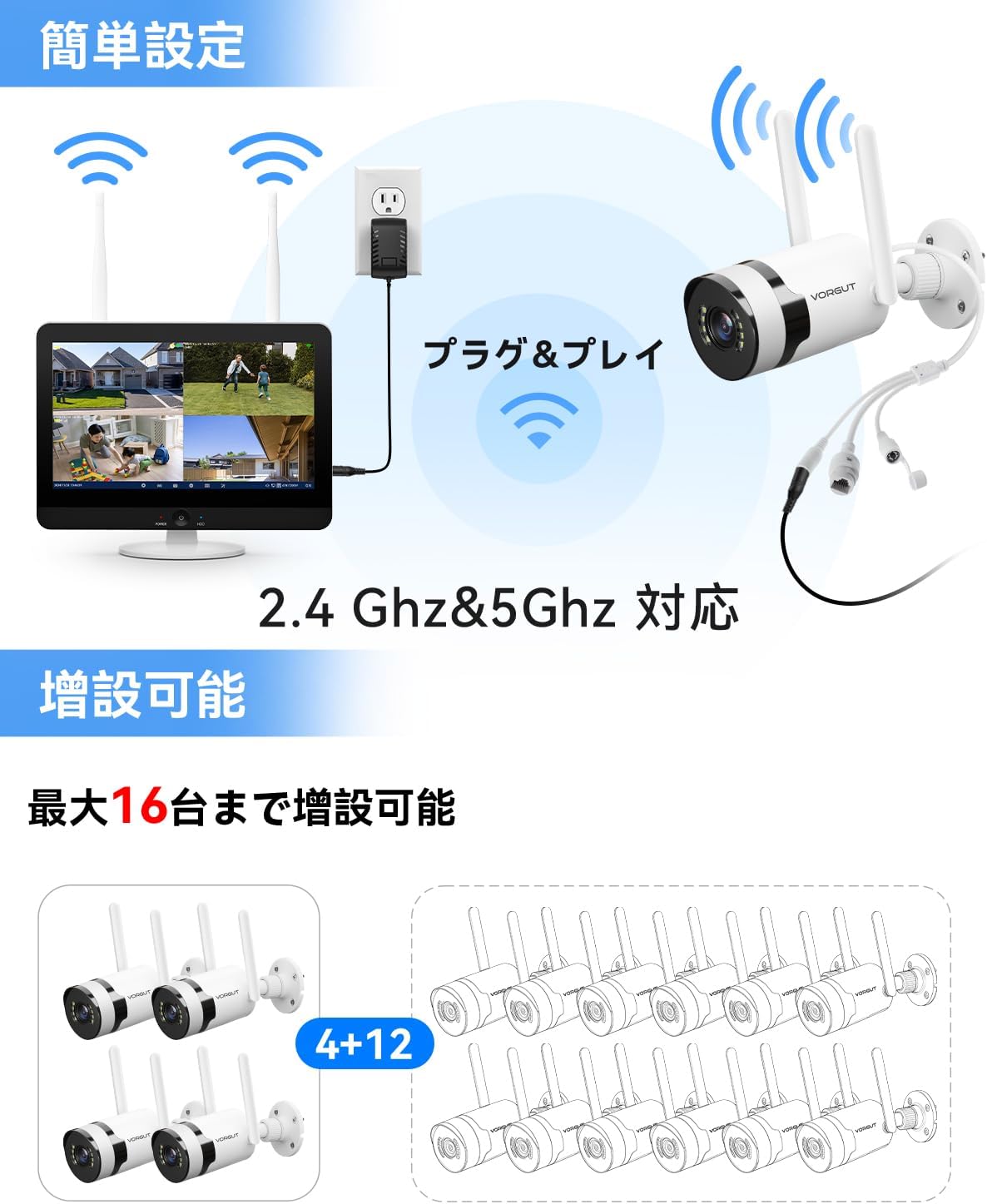
Figure 4: Easy setup and system expandability.
4. Camera Installation
Mount the cameras in desired outdoor locations using the provided screw sets. Ensure the cameras are within range of a power outlet and have a clear line of sight to the areas you wish to monitor. The cameras are IP66 waterproof, suitable for outdoor use in various weather conditions.
Operating Instructions
1. Live View and Playback
- On Monitor: The 12-inch monitor displays live feeds from all connected cameras. Use the monitor's controls (or a connected mouse) to navigate between views, access recordings, and adjust settings.
- Via Mobile App: Open the VORGUT app on your smartphone or tablet to view live feeds, play back recorded footage, and manage camera settings remotely.

Figure 5: Remote viewing and sharing capabilities.
2. Two-Way Audio Communication
The cameras feature two-way audio, allowing you to communicate with individuals near the camera through the mobile app.
- Open the live view of the desired camera in the app.
- Tap the microphone icon to speak and the speaker icon to listen.

Figure 6: Two-way audio communication feature.
3. Recording Modes
The system supports various recording options to suit your needs:
- 24-Hour Continuous Recording: Records continuously to the 1TB HDD, automatically overwriting the oldest footage when full.
- Motion Detection Recording: Records only when motion is detected, saving storage space.
- Scheduled Recording: Set specific times for recording to occur.

Figure 7: Available recording modes.
4. Alert Functions
The system provides multiple alert methods upon detecting suspicious activity:
- Light Warning: The camera's bright LED lights activate to deter intruders.
- Sound Alarm: An audible alarm sounds from the camera or NVR.
- App Notifications: Receive instant push notifications on your smartphone with screenshots.
- Email Notifications: Receive email alerts with event details.

Figure 8: Multiple alert methods for enhanced security.
Advanced Features
1. 8MP 4K Ultra HD Resolution
Equipped with an 8-megapixel (4K) high-performance image sensor, the system records clear and detailed footage, capturing fine details for effective surveillance and evidence.
2. Dual-Band Wi-Fi (2.4GHz & 5GHz)
Supports both 2.4GHz and 5GHz Wi-Fi bands, ensuring stable and high-speed data transmission for smooth video streaming regardless of your network environment.
3. AI Motion Detection
Advanced AI human shape detection reduces false alarms by accurately identifying human movement. You can define specific motion detection zones to focus on critical areas.

Figure 9: AI Smart Detection and customizable motion detection areas.
4. Wide Dynamic Range (WDR)
WDR technology automatically corrects images in environments with strong backlighting or shadows, providing clear and balanced video footage.
5. Enhanced Night Vision
The cameras provide clear vision both day and night. With powerful white LEDs, they can illuminate the area at night for color night vision and strong visual deterrence.

Figure 10: Day and Night Vision capabilities.
6. H.265+ Video Compression
Utilizes H.265+ high-efficiency video compression technology, which saves approximately twice the storage space compared to traditional H.264, allowing for longer recording times on the 1TB HDD while maintaining video quality.

Figure 11: H.265+ video compression efficiency.
7. Expandability
The system supports connecting up to 16 cameras simultaneously, allowing you to expand your surveillance coverage as needed for homes, shops, or warehouses.
Maintenance
- Regular Cleaning: Periodically clean the camera lenses with a soft, dry cloth to ensure clear image quality. Avoid abrasive cleaners.
- Check Connections: Ensure all power and network cables are securely connected and free from damage.
- Software Updates: Check the VORGUT app or website for any available firmware updates for your system to ensure optimal performance and security.
- HDD Health: While the 1TB HDD is designed for continuous operation, consider backing up critical footage periodically.
Troubleshooting
| Problem | Possible Cause | Solution |
|---|---|---|
| No image on monitor | Power not connected; Camera not paired; Faulty cable. | Check power connections for monitor and cameras. Ensure auto-pairing is complete. Inspect cables for damage. |
| Poor image quality | Dirty lens; Insufficient lighting; Network interference. | Clean camera lens. Ensure adequate lighting for night vision. Check Wi-Fi signal strength. |
| No remote access | Monitor not connected to network; App not configured correctly; Internet issue. | Verify network cable connection to router. Reconfigure app settings. Check internet connection. |
| False motion alarms | Sensitivity too high; Objects like trees or animals triggering detection. | Adjust motion detection sensitivity in settings. Define specific motion detection zones to exclude irrelevant areas. |
Specifications
| Feature | Detail |
|---|---|
| Model Number | K8016-IPG5831-W6-D19-4-1T |
| Video Resolution | 8MP (4K) |
| Monitor Size | 12 inches |
| Internal Storage | 1TB HDD (expandable up to 8TB via external storage) |
| Connectivity | Wireless (2.4GHz & 5GHz Wi-Fi) |
| Max Cameras Supported | 16 |
| Weather Resistance | IP66 Waterproof |
| Video Compression | H.265+ |
| Special Features | AI Motion Detection, Two-Way Audio, WDR, Light & Sound Alarms, App Notifications |
| Product Dimensions | 20 x 10 x 25 cm |
| Product Weight | 3 kg |
Warranty and Support
Your VORGUT Security Camera System comes with a 5-year long-term warranty, ensuring peace of mind. The product is TELEC certified, meeting safety standards.
For any inquiries, technical assistance, or warranty claims, VORGUT offers 365-day Japanese customer support. In case of initial defects or malfunctions, new product exchanges or refunds are available with shipping costs covered by the company.
Please refer to the contact information provided in your product packaging or on the official VORGUT website for support.

Figure 12: VORGUT commitment to quality and support.