
1. Introduction
Thank you for choosing the DICTAC Corner Twin Bed Frame. This manual provides detailed instructions for the assembly, operation, and maintenance of your new bed frame. Please read this manual thoroughly before assembly and retain it for future reference.
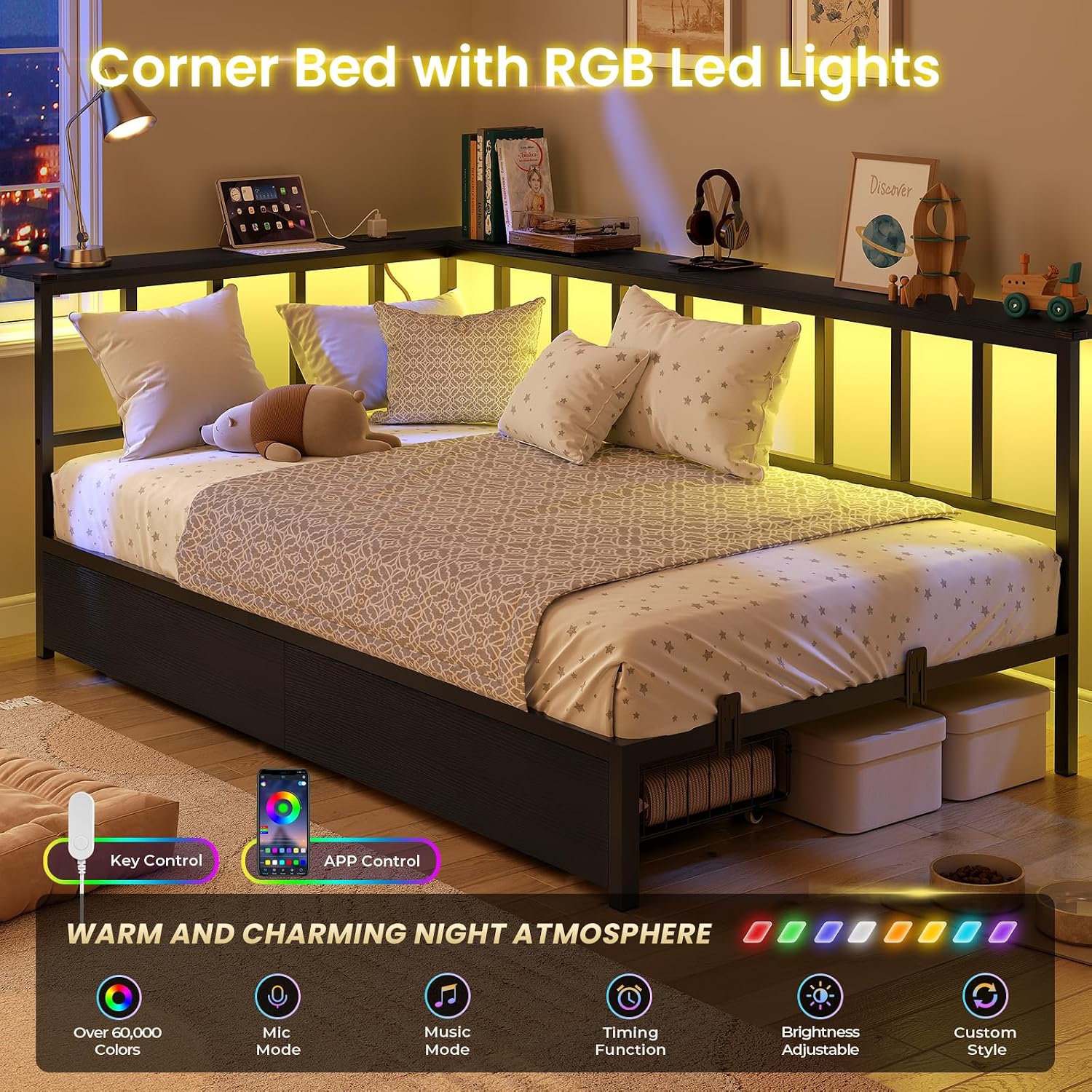
This bed frame features an L-shaped design with integrated storage shelves, two pull-out drawers, a built-in charging station, and smart RGB LED lighting. It is designed for twin-size mattresses.

2. Safety Information
- Weight Capacity: Do not exceed the maximum weight capacity of 450 lbs (204 kg).
- Assembly: Follow all assembly instructions carefully. Incorrect assembly can lead to instability or collapse.
- Sharp Edges: Exercise caution around sharp edges and corners during assembly and use. The product includes plastic corner protectors for enhanced safety.
- Children: Keep small parts and packaging materials away from children during assembly to prevent choking hazards.
- Electrical Components: Ensure the charging station and LED lights are connected to a suitable power source according to local electrical codes. Do not overload the outlets.
- Mattress: A mattress thickness of 6-10 inches is recommended for optimal fit and safety.
3. Package Contents
Before beginning assembly, verify that all parts listed below are present and undamaged. If any parts are missing or damaged, contact customer support immediately.
- Metal Bed Frame Components
- Storage Shelves
- 2 Storage Drawers with Wheels
- Built-in Charging Station (2 AC Outlets, 2 USB Ports)
- RGB LED Light Strip and Controller
- Mattress Slide Stoppers (2 units)
- Plastic Corner Protectors (4 units)
- Assembly Hardware (screws, bolts, nuts, etc.)
- Simple Assembly Tools
- Assembly Instructions Manual

4. Setup and Assembly
Assembly is required for this bed frame. It is recommended that two adults assemble the unit. Please follow the step-by-step instructions provided in the included assembly manual. Ensure all connections are secure before use.
- Preparation: Clear an adequate space for assembly. Lay out all components and hardware.
- Frame Assembly: Assemble the main metal frame structure according to the diagrams. Ensure all bolts are tightened securely.
- Slat Installation: Install the embedded metal slats into the frame. These slats are designed to support the mattress without a box spring.
- Storage Shelves: Attach the L-shaped storage shelves to the headboard and side rail as indicated.
- Drawers: Assemble the two storage drawers and insert them into the designated slots under the bed frame. Ensure the wheels glide smoothly.
- Charging Station: Install the built-in charging station into the pre-cut opening on the storage shelf. Connect the power cord.
- LED Lights: Apply the RGB LED light strip to the designated areas on the bed frame. Connect the light strip to its controller and power source.
- Safety Accessories: Attach the mattress slide stoppers to prevent mattress movement. Apply the plastic corner protectors to the corners of the storage shelves for safety.


5. Operating Instructions
5.1. Charging Station
The built-in charging station provides convenient access to power for your electronic devices.
- AC Outlets: Two 120V/12A AC outlets are available for standard electrical devices.
- USB Ports: Two 5V/2A USB ports are provided for charging smartphones, tablets, and other USB-powered devices.
- Power Cord: The charging station is equipped with a 5.2-foot power cord. Plug this cord into a wall outlet to activate the charging station.

5.2. RGB LED Lights
The integrated RGB LED lights can be controlled via a physical key control or a smartphone application.
- Key Control: Use the physical button to cycle through basic colors and turn the lights on/off. Long press the button to turn off the RGB light.
- APP Control: Download the designated smartphone application (refer to the separate LED light manual or packaging for app details). The app allows for advanced control over:
- Over 60,000 colors
- Brightness adjustment
- Various flashing modes
- Music sync mode (lights react to sound)
- Timing function (schedule on/off times)
- Custom style creation
5.3. Storage Drawers
The two pull-out storage drawers are designed for easy access and organization.
- Access: Gently pull the drawers out from under the bed frame. They are equipped with smooth-gliding casters for quiet operation.
- Capacity: Use the drawers for storing bed sheets, off-season clothing, toys, or other items.
- Drawer Bottom: The drawers feature a non-woven bottom to prevent items from falling through.

6. Maintenance
- Cleaning: Wipe the metal frame and wooden shelves with a soft, damp cloth. Avoid harsh chemicals or abrasive cleaners.
- Hardware Check: Periodically check all bolts and screws to ensure they remain tight. Re-tighten if necessary to maintain stability.
- LED Lights: If LED lights malfunction, check the power connection and controller. Do not attempt to repair the LED strip yourself; contact customer support.
- Charging Station: Ensure the charging station is free from dust and debris. Do not spill liquids on the outlets or USB ports.
7. Troubleshooting
| Problem | Possible Cause | Solution |
|---|---|---|
| Bed frame is wobbly or squeaks. | Loose hardware. | Check and tighten all bolts and screws. Ensure all connections are secure. |
| LED lights are not working. | Power connection issue, faulty controller, or damaged strip. | Verify the LED strip is properly connected to the controller and power adapter. Ensure the power adapter is plugged into a working outlet. If issues persist, contact customer support. |
| Charging station is not providing power. | Power cord unplugged, wall outlet not working, or internal fault. | Ensure the charging station's power cord is fully plugged into a functional wall outlet. Test the wall outlet with another device. If still no power, contact customer support. |
| Drawers do not slide smoothly. | Obstruction, damaged wheels, or uneven floor. | Check for any objects obstructing the drawer path. Inspect the wheels for damage. Ensure the bed frame is on a level surface. |
8. Specifications
| Brand | DICTAC |
| Model Number | CBF-03G |
| Size | Twin |
| Product Dimensions | 81.1"L x 45.7"W x 30.3"H |
| Color | Black |
| Material | Metal Frame, Wood Shelves |
| Finish Type | Powder Coated |
| Weight Capacity | 450 lbs |
| Recommended Mattress Thickness | 6-10 inches |
| Charging Station | 2 AC Outlets (120V/12A), 2 USB Ports (5V/2A), 5.2-foot Power Cord |
| LED Lights | RGB, APP & Key Control, Music Sync, Timing Function |
| Assembly Required | Yes |
| Item Weight | 60.7 pounds |
9. Warranty and Support
DICTAC provides customer support for its products. If your bed frame arrives damaged, scratched, or with missing parts, or if you encounter any other issues, please contact our customer service team for assistance.
For warranty information and support, please refer to the contact details provided with your purchase documentation or visit the official DICTAC website.
Contact Information:
- Email: [Refer to purchase documentation]
- Phone: [Refer to purchase documentation]
- Website: DICTAC Official Store on Amazon