
Introduction
Welcome to the realme 14 Pro 5G Smartphone user manual. This guide provides essential information to help you set up, operate, and maintain your device. Please read this manual thoroughly to ensure optimal performance and longevity of your smartphone.

What's in the Box
Verify that your package contains the following items:
- realme 14 Pro 5G Smartphone
- 45W Charger
- USB Data Cable
Setup
1. Insert SIM Card
Locate the SIM card tray on the side of your device. Use the provided SIM ejector tool to open the tray. Insert your Nano-SIM card(s) and optionally a microSD card into the designated slots. Ensure the tray is fully reinserted into the phone.
2. Charge the Battery
Before first use, fully charge your realme 14 Pro 5G Smartphone using the included 45W charger and USB data cable. Connect the USB cable to the phone's charging port and the charger to a power outlet. The charging indicator will appear on the screen.

3. Power On and Initial Configuration
Press and hold the Power button (located on the right side of the device) until the realme logo appears. Follow the on-screen instructions to select your language, connect to Wi-Fi, sign in to your Google account, and set up security features like fingerprint unlock.
Operating Your Device
Display
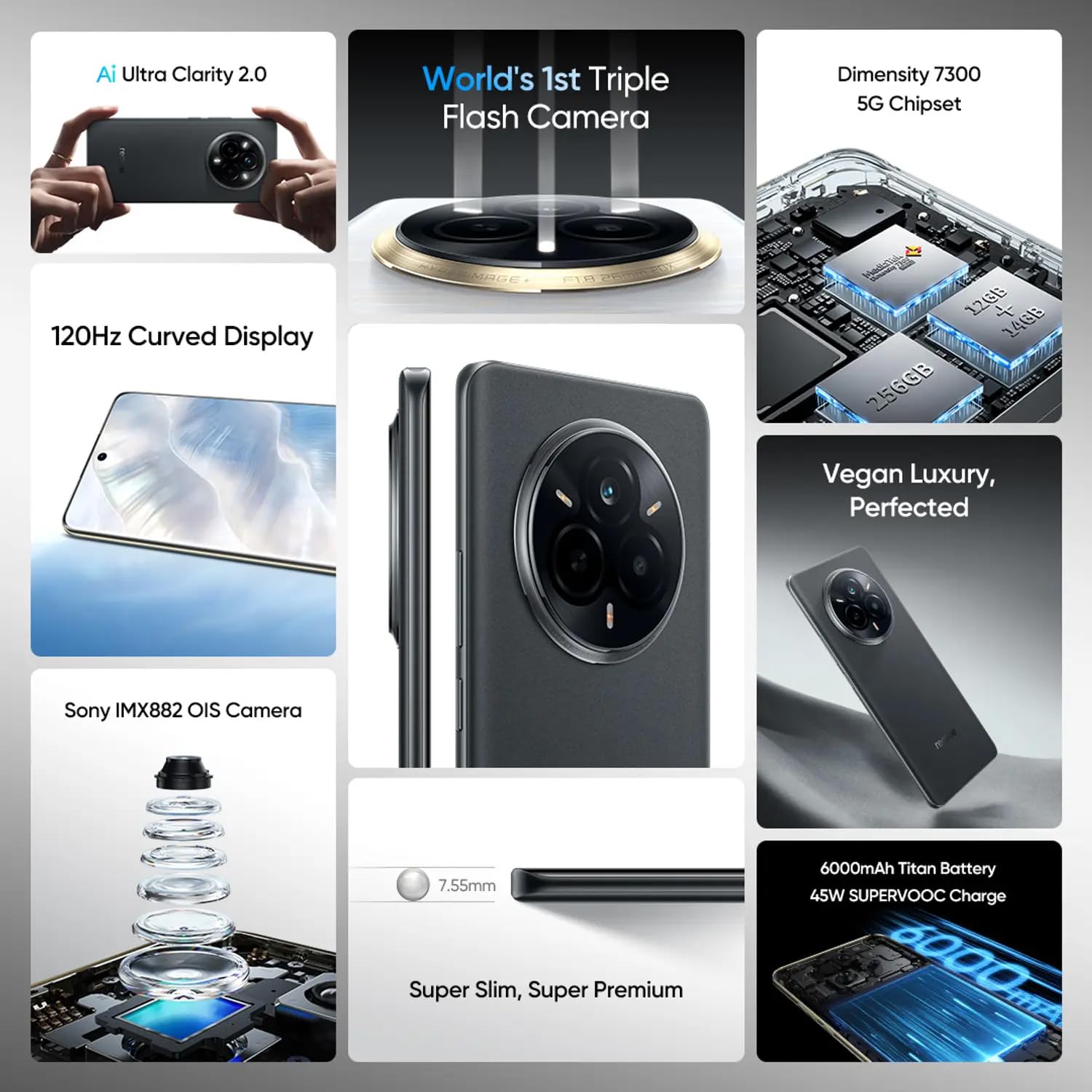
The realme 14 Pro features a 6.77-inch FHD+ curved display with a 120Hz refresh rate, providing a smooth and immersive visual experience. Adjust brightness and display settings in the 'Settings' menu.

Performance
Powered by the MediaTek Dimensity 7300 4nm processor, the device offers efficient performance for multitasking and gaming. It comes with 8GB RAM and 256GB internal storage, expandable up to 1TB with a microSD card for all your apps and media.

Camera System
The realme 14 Pro is equipped with a Sony IMX882 OIS Camera system, featuring a 50MP main sensor for high-resolution photos and a 16MP ultra-clear selfie camera. Explore various camera modes and settings for creative photography.

Battery and Charging
A 6000mAh battery provides extended usage throughout the day, supported by 45W SUPERVOOC fast charging for quick power-ups. Use only the official charger and cable for optimal charging speed and safety.
Software
The phone runs on realme UI 6.0, based on Android 15, offering an optimized and user-friendly experience with enhanced features and security.
Water and Dust Resistance
The device has an IP69 rating for dust and water resistance, providing protection against immersion in water up to 2 meters deep for 48 hours. This feature enhances durability in various environments.
Maintenance
Proper care ensures the longevity and optimal performance of your realme 14 Pro 5G Smartphone:
- Cleaning: Keep your device clean using a soft, dry cloth. Avoid abrasive materials or harsh chemicals.
- Temperature: Avoid exposing the phone to extreme temperatures (very hot or very cold) as this can affect battery life and internal components.
- Protection: Protect the screen with a screen protector and use a protective case to guard against drops and scratches.
- Battery Care: For optimal battery life, avoid fully discharging the battery frequently. Charge your phone before it completely runs out of power.
- Water Resistance: While the device is water-resistant, avoid intentional submersion, especially in saltwater, and ensure all ports are dry before charging.
Troubleshooting
Here are solutions to common issues you might encounter:
Device Not Powering On
Ensure the battery is sufficiently charged. Connect the charger and wait a few minutes before attempting to power on again. If the issue persists, perform a forced restart by holding the Power button for approximately 10-15 seconds.
Apps Crashing or Freezing
Close the problematic app and reopen it. Clear the app's cache and data from the device settings (Settings > Apps > [App Name] > Storage > Clear Cache/Clear Data). If the issue continues, consider uninstalling and reinstalling the app.
Poor Network Connectivity
Check if your SIM card is properly inserted. Toggle Airplane Mode on and off. Restart your device. Verify your network settings and contact your service provider if necessary.
Specifications
Detailed technical specifications for the realme 14 Pro 5G Smartphone:
| Feature | Specification |
|---|---|
| Operating System | Android 15 (realme UI 6.0) |
| Product Dimensions | 16.28 x 7.49 x 0.76 cm |
| Item Weight | 197 g |
| Model Number | Realme 14 Pro |
| Display | 6.77-inch FHD+ (1920 x 1080) 120Hz Curved Display |
| Processor | MediaTek Dimensity 7300 (4nm) |
| RAM | 8GB |
| Internal Storage | 256GB (Expandable up to 1TB with microSD) |
| Battery Capacity | 6000mAh |
| Charging | 45W SUPERVOOC Fast Charge |
| Rear Camera | 50MP Sony IMX882 OIS Camera |
| Front Camera | 16MP Ultra-clear Selfie Camera |
| Connectivity | 5G, Dual SIM (nano + nano + microSD), NFC, GPS, WiFi |
| Water/Dust Resistance | IP69 |
| Color | Grey |
| What's in the box | Realme 14 Pro 5G Smartphone, 45W Charger, USB data cable |
Warranty and Support
For detailed warranty information, please refer to the warranty card included with your product or visit the official realme website. The warranty covers manufacturing defects under normal use conditions.
For technical support, service inquiries, or to find authorized service centers, please contact realme customer service through their official channels. You can find contact information and support resources on the realme website: