
Introduction
This manual provides essential information for the safe and efficient operation, assembly, and maintenance of your CIRCOOTER Landturbo Pro Electric Scooter. Please read this manual thoroughly before your first ride and keep it for future reference.
Key Features
- Powerful Performance: Equipped with a 1500W peak (1000W rated) high-torque rear-drive motor, capable of conquering 20-25° slopes. Achieves a top speed of 52 km/h and supports a maximum load of 150 kg.
- Extended Range Battery: Features a high-capacity 48V 15.6Ah battery, providing up to 75 km of range on a full charge (7-8 hours charging time).
- Advanced Suspension System: Unique front and rear swing arm suspension with high-density springs absorbs up to 90% of road vibrations, paired with 10-inch pneumatic tires for a smooth ride on various terrains.
- Enhanced Visibility: Integrated ultra-bright LED headlights, brake lights, turn signals, and a 4-color customizable logo accent light ensure safety and visibility.
- Smart Connectivity & Safety: Connects with the Circooter Smart App for complete control. Includes safety-optimized dual disc brakes with E-ABS and 2-level adjustable handlebars.
Setup Guide
Follow these steps to unbox and prepare your scooter for its first use. Refer to the "Installation Operation" video for visual guidance.
Unboxing and Initial Assembly
- Carefully open the packaging and remove the scooter and all accessories.
- Unfold the scooter by releasing the folding mechanism. Ensure the stem is securely locked into the upright position.
- Attach the handlebars to the stem. Secure them using the provided screws and Allen wrench.
- Connect the display unit to the handlebar. Ensure all cables are properly connected and secured.
Video: Installation and Operation Guide. This video demonstrates unboxing, assembly, speed mode switching, app connection, folding, and light operations.

Image: Unboxed CIRCOOTER Landturbo Pro Electric Scooter with all components and tools.

Image: Unfolding the scooter stem into the upright position.

Image: Securing the handlebars to the scooter stem.

Image: Connecting the display unit and securing cables.
Operating Instructions
Power On/Off
To power on the scooter, press and hold the power button on the display unit. To power off, press and hold the power button again until the display turns off.
Speed Mode Selection
Your Landturbo Pro scooter features multiple speed modes. Use the mode button on the handlebar to cycle through available speed settings (e.g., ECO, RACE, SPORT). The current mode will be displayed on the screen. (Refer to the "Installation Operation" video from 1:35 for demonstration).
Using the Circooter Smart App
Enhance your riding experience by connecting your scooter to the Circooter Smart App. Scan the QR code in your manual or search for "Circooter" in your app store. Once installed, pair your scooter via Bluetooth to access additional controls and settings. (Refer to the "Installation Operation" video from 2:00 for app connection and control demonstration).
Folding and Storage
To fold your scooter for transport or storage, ensure the scooter is powered off. Locate the folding mechanism on the stem, release the latch, and carefully fold the stem downwards until it locks into place with the rear fender. (Refer to the "Installation Operation" video from 2:55 for folding demonstration).

Image: The scooter in its folded configuration, ready for transport or compact storage.
Lighting System
The scooter is equipped with a comprehensive lighting system for safety. Use the dedicated button on the handlebar to activate the LED headlights, brake lights, and turn signals. The customizable logo accent light on the deck also enhances visibility. (Refer to the "Installation Operation" video from 3:13 for light operations).

Image: Front view of the scooter with its bright LED headlight on.

Image: Rear view of the scooter showing activated brake lights and turn signals.
Maintenance
Regular maintenance ensures the longevity and safe operation of your electric scooter.
Battery Care
Charge the battery fully before first use. Always use the original charger provided. Avoid completely draining the battery and store the scooter with a partial charge if not used for extended periods. (Refer to the "Installation Operation" video from 3:31 for charging demonstration).

Image: Connecting the charger to the scooter's charging port.
Tire Care
Regularly check tire pressure and inflate to the recommended PSI. Inspect tires for any signs of wear, punctures, or damage before each ride. Replace worn tires promptly to maintain optimal performance and safety.
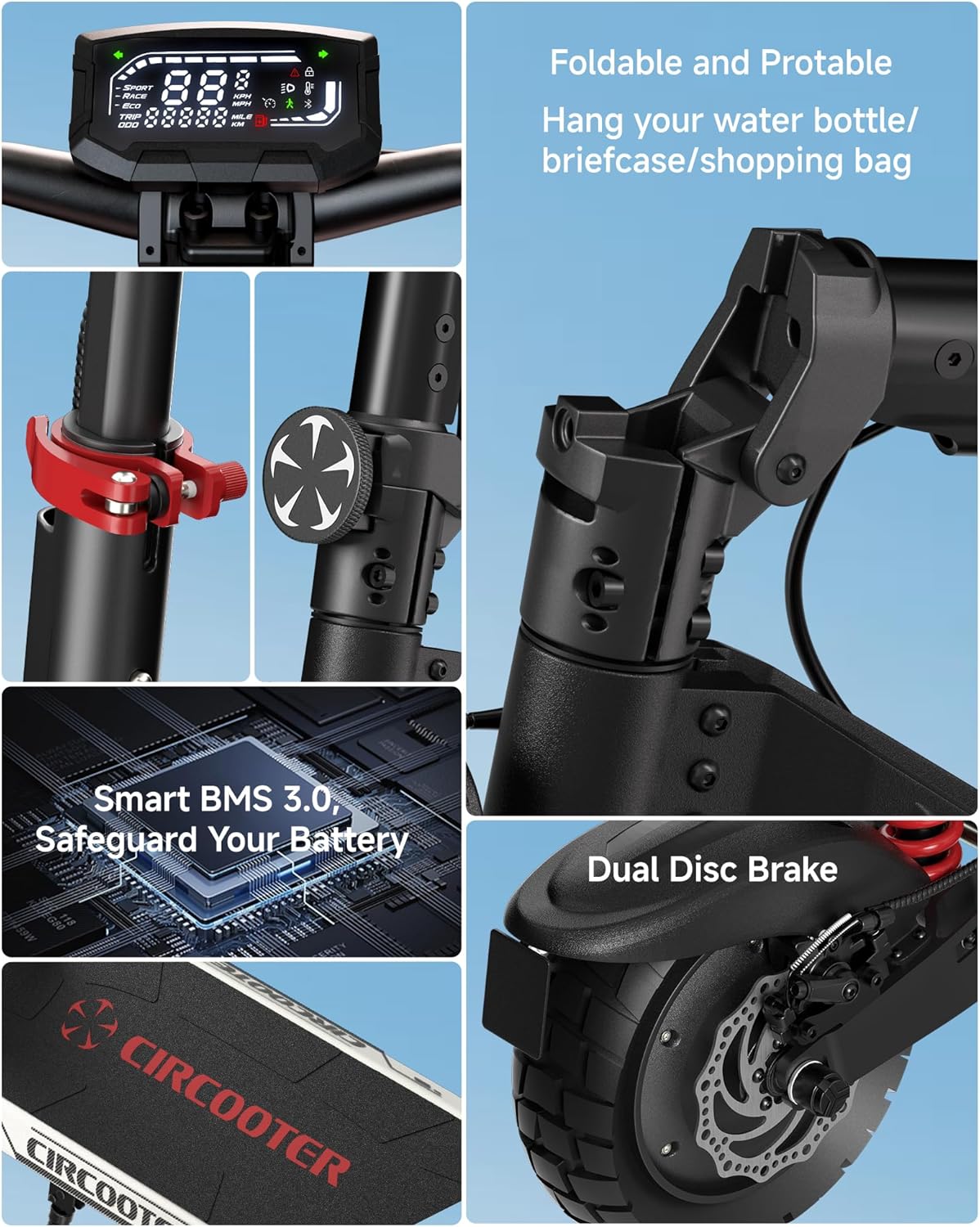
Image: Detailed view of the scooter's robust pneumatic tire.
Brake System Check
Before each ride, test both front and rear brakes to ensure they are functioning correctly. Check brake levers for proper tension and inspect brake pads and discs for wear. Adjust or replace components as needed.

Image: Detail of the scooter's dual disc brake system.
General Cleaning
Clean your scooter regularly with a damp cloth. Avoid using high-pressure water jets directly on electrical components. Ensure all moving parts are free from dirt and debris.
Troubleshooting
This section addresses common issues you might encounter with your electric scooter.
- Scooter does not power on:
- Ensure the battery is charged.
- Check all cable connections for looseness.
- If the issue persists, contact customer support.
- Motor not engaging:
- Verify the scooter is powered on and not in a locked mode via the app.
- Check if the throttle is properly connected and functioning.
- Ensure the brake levers are not engaged, as this can prevent motor activation.
- Brakes feel loose or ineffective:
- Inspect brake cables for damage or stretching.
- Check brake pads for wear and replace if necessary.
- Adjust brake lever tension as required.
- Unusual noises during operation:
- Inspect wheels and suspension for loose components or debris.
- Check for any rubbing parts, especially around the fenders or brake calipers.
For issues not covered here, or if troubleshooting steps do not resolve the problem, please contact CIRCOOTER customer support.
Technical Specifications
| Feature | Specification |
|---|---|
| Model Name | Landturbo Pro |
| Product Dimensions (L x W x H) | 124.5L x 64.5W x 128.5H Centimetres |
| Item Weight | 27 Kilograms |
| Weight Capacity Maximum | 150 Kilograms |
| Motor Power | 1500W Peak (1000W Rated) |
| Battery | 48V 15.6Ah |
| Maximum Distance Range | 75 Kilometers |
| Battery Charge Time | 7.5 Hours |
| Wheel Size | 10 Inches |
| Wheel Type | Pneumatic |
| Suspension Type | Dual Suspension (Front and Rear Swing Arm) |
| Brake Style | Front Braking, Rear Braking (Dual Disc Brakes + E-ABS) |
| Handlebar Type | Adjustable |
| Frame Material | Aluminum |
| Manufacturer | Shenzhen Xincheng Times Technology Co.,Ltd |
Warranty and Support
Warranty Information
The CIRCOOTER Landturbo Pro Electric Scooter comes with a limited warranty. The electric scooter provides 12 months and 365 days for different accessories warranty (such as rear fender, throttle, etc.) and 180 days for motor & battery limited warranty. Please refer to the full warranty terms for detailed coverage.
Customer Support
For any questions, technical assistance, or warranty claims, please contact CIRCOOTER customer support:
- Email: hello@circooter.com
- Manufacturer: Shenzhen Xincheng Times Technology Co.,Ltd

