
Introduction
This manual provides essential information for the safe and effective operation, setup, maintenance, and troubleshooting of your TOOLIOM 200A AC/DC TIG Welder with Pulse+ and Foot Pedal. Please read this manual thoroughly before operating the equipment and retain it for future reference. Proper understanding and adherence to these instructions will ensure optimal performance and extend the lifespan of your welder.
Safety Information
WARNING: Welding can be dangerous. Protect yourself and others from serious injury or death. Read and understand all safety information before operating this equipment.
- Electric Shock Can Kill: Do not touch live electrical parts. Wear dry insulating gloves and protective clothing. Insulate yourself from work and ground.
- Fumes and Gases Can Be Dangerous: Keep your head out of the fumes. Use ventilation or exhaust to remove fumes from the breathing zone.
- Arc Rays Can Burn Eyes and Skin: Wear a welding helmet with a proper shade filter. Wear protective clothing to protect skin.
- Fire and Explosion Hazard: Remove all flammables from the welding area. Have a fire extinguisher nearby.
- Hot Parts Can Cause Severe Burns: Allow cooling period before touching welded parts.
- Magnetic Fields: Pacemaker wearers should consult their doctor before operating.
Product Overview
The TOOLIOM TL-200TP is a versatile 200A AC/DC TIG Welder designed for a wide range of welding applications. It features Pulse+ functionality and is compatible with a TIG welding foot pedal for enhanced control. The large digital display provides clear real-time data for precise adjustments.
Key Features:
- 6-in-1 Welding Modes: AC TIG, DC TIG, AC Pulsed TIG, DC Pulsed TIG, Stick, and TIG Spot Welding.
- Foot Pedal Compatibility: Allows remote arc start/stop and current adjustment (foot pedal not included).
- Large Digital Display: Clearly shows mode, voltage, and current for easy monitoring.
- Versatile Material Capability: Capable of welding Aluminum, Alloy Steel, Copper, Stainless Steel, Carbon Steel, and Iron.
Main Components:
The welder unit typically includes the main power source, TIG torch, ground clamp, and gas hose. A foot pedal is an optional accessory.
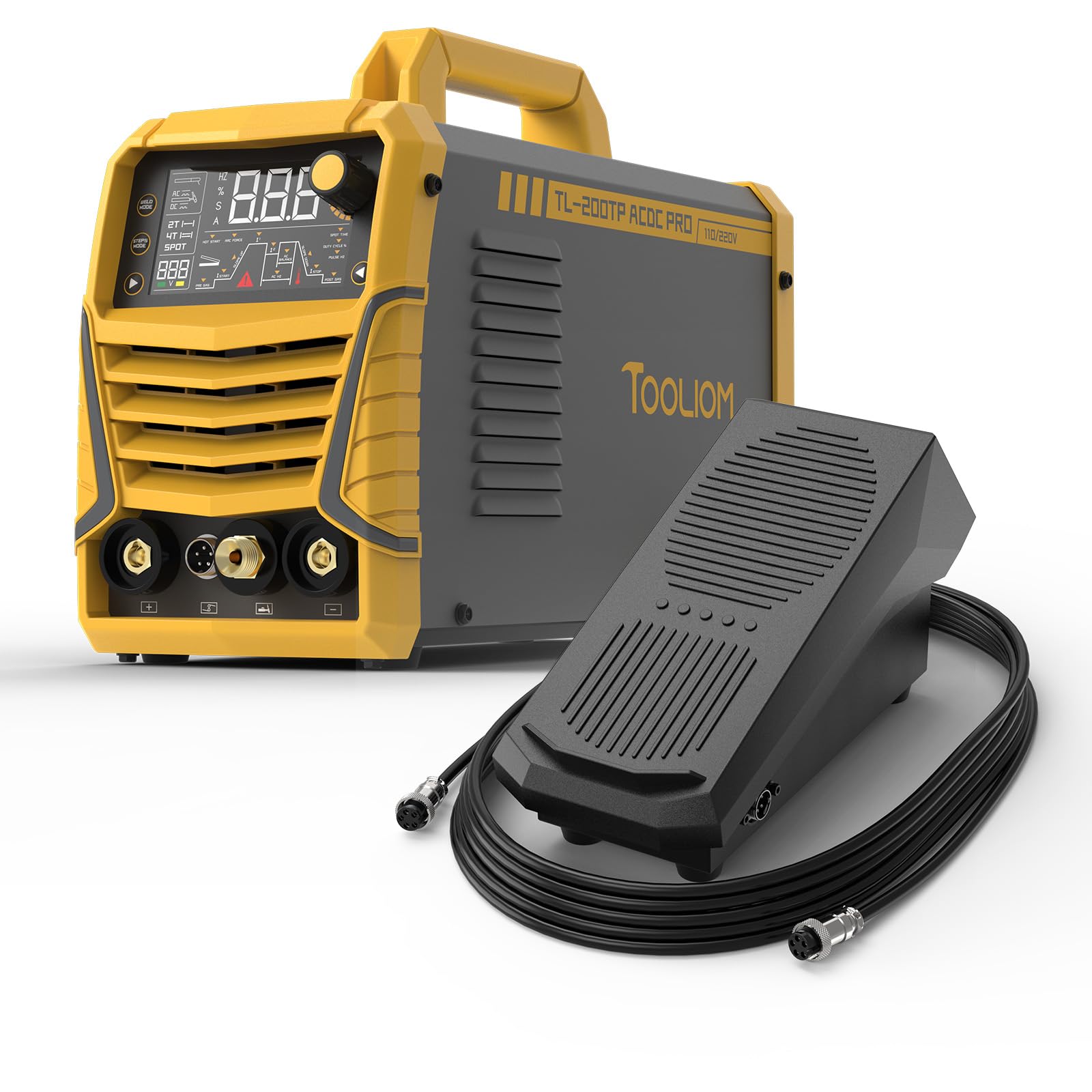
Figure 1: Front view of the TOOLIOM 200A AC/DC TIG Welder, showing the control panel, output terminals, and gas inlet.
Setup
- Unpacking and Inspection: Carefully remove the welder and all accessories from the packaging. Inspect for any shipping damage. Report any damage to your supplier immediately.
- Power Supply Connection:
- Ensure the welder is connected to a suitable power supply (110V or 220V) as indicated on the machine's rating plate.
- Use an appropriate power cord and plug. Ensure the power outlet is properly grounded.
- Gas Connection (Argon):
- Connect the gas hose from the welder to a regulator on a pure argon gas cylinder.
- Ensure all connections are tight to prevent gas leaks.
- Set the gas flow rate according to your welding application (typically 10-20 CFH for TIG).
- TIG Torch and Ground Clamp Connection:
- Connect the TIG torch cable to the appropriate terminal on the welder (usually the negative terminal for DC TIG, or either for AC TIG).
- Connect the ground clamp cable to the work piece terminal (usually the positive terminal for DC TIG, or either for AC TIG).
- Securely attach the ground clamp to the workpiece or welding table, ensuring good electrical contact.
- Foot Pedal Connection (Optional):
- If using an optional foot pedal, connect it to the designated foot pedal port on the welder.
- Refer to the foot pedal's specific instructions for proper connection and calibration.
Operating Instructions
Control Panel Overview:
The front panel features a large digital display and various control knobs/buttons for selecting welding modes and adjusting parameters. Familiarize yourself with the layout before operation.
Figure 2: Detailed view of the welder's control panel, highlighting the digital display for current, voltage, and mode selection, along with adjustment knobs for various welding parameters.
Welding Mode Selection:
The TL-200TP offers six welding modes. Use the mode selection button or knob to cycle through and select the desired mode:
- AC TIG: For welding aluminum and magnesium alloys.
- DC TIG: For welding stainless steel, carbon steel, copper, and other non-ferrous metals (except aluminum).
- AC Pulsed TIG: Provides enhanced control and reduced heat input for AC TIG applications.
- DC Pulsed TIG: Offers better control over heat input and penetration for DC TIG applications, especially on thin materials.
- Stick (MMA): For shielded metal arc welding with coated electrodes.
- TIG Spot Welding: For quick, consistent spot welds in TIG mode.
Parameter Adjustment:
After selecting a mode, use the corresponding knobs to adjust parameters. The large digital display will show real-time values.
- Welding Current: Adjust the amperage based on material thickness and type.
- Pulse Frequency/Duty Cycle (Pulsed TIG): Fine-tune for desired bead appearance and heat control.
- AC Balance (AC TIG): Controls the cleaning action and penetration for aluminum welding.
- Gas Pre/Post Flow: Set the duration for gas flow before and after the arc to protect the weld puddle and tungsten.
Foot Pedal Operation (if connected):
When the foot pedal is connected and enabled, it overrides the panel current control. Pressing the pedal initiates the arc, and varying the pedal position adjusts the welding current. Releasing the pedal terminates the arc.
General Welding Procedure:
- Ensure proper personal protective equipment (PPE) is worn.
- Prepare the workpiece: clean thoroughly to remove oil, rust, and contaminants.
- Select the appropriate welding mode and set initial parameters.
- Open the gas cylinder valve.
- Initiate the arc (either via torch switch or foot pedal).
- Maintain a consistent arc length and travel speed.
- Terminate the arc and allow post-flow gas to protect the cooling weld.
- Close the gas cylinder valve after welding is complete.
Maintenance
Regular maintenance ensures the longevity and safe operation of your welder.
- Daily: Check all cables and connections for damage. Clean the TIG torch nozzle and collet.
- Weekly: Clean the exterior of the welder with a dry, soft cloth. Check gas hose for leaks.
- Monthly: Inspect the internal components for dust buildup. Use compressed air to clean the cooling fins and fan if necessary (ensure power is disconnected).
- Tungsten Electrode Care: Sharpen tungsten electrodes as needed. Replace if contaminated or damaged.
- Storage: Store the welder in a clean, dry environment, protected from dust and moisture.
Troubleshooting
Refer to the table below for common issues and their potential solutions.
| Problem | Possible Cause | Solution |
|---|---|---|
| No arc initiation | No power, poor ground connection, gas off, torch switch fault. | Check power supply, ensure ground clamp is secure, open gas valve, inspect torch switch. |
| Poor weld quality (porosity, contamination) | Insufficient gas flow, gas leaks, dirty workpiece, contaminated tungsten. | Increase gas flow, check for leaks, clean workpiece, replace/sharpen tungsten. |
| Welder overheats and shuts down | Exceeded duty cycle, blocked ventilation, high ambient temperature. | Allow welder to cool, ensure proper ventilation, reduce welding time. |
| Inconsistent current with foot pedal | Foot pedal connection issue, faulty foot pedal. | Check foot pedal cable, test with another foot pedal if available, or operate without pedal. |
If problems persist after attempting these solutions, please contact customer support.
Specifications
| Parameter | Value |
|---|---|
| Model | TL-200TP |
| Welding Modes | AC TIG, DC TIG, AC Pulsed TIG, DC Pulsed TIG, Stick, TIG Spot |
| Input Voltage | 110V/220V (Dual Voltage) |
| Max Welding Current | 200A |
| Max Aluminum Thickness (110V) | 1/8" (3mm) |
| Max Aluminum Thickness (220V) | 3/16" (5mm) |
| Foot Pedal Compatibility | Yes (foot pedal not included) |
Warranty and Support
TOOLIOM products are manufactured to high-quality standards and are warranted against defects in materials and workmanship. Please refer to the warranty card included with your product for specific terms and conditions, including the warranty period.
For technical support, troubleshooting assistance, or warranty claims, please contact TOOLIOM customer service. Have your model number (TL-200TP) and purchase date available when contacting support.
Contact information (e.g., website, email, phone number) can typically be found on the manufacturer's official website or on the product packaging.
Official Product Videos
No official product videos from the seller were found to be relevant for embedding in this instruction manual.
