
1. Introduction
This manual provides detailed instructions for the installation, operation, and maintenance of your XTRONS IDP9053B Android 14 Car Stereo. Please read this manual thoroughly before installation and use to ensure proper functionality and to maximize your user experience.
1.1 Vehicle Compatibility
This car stereo is designed for specific BMW X5 E53 models manufactured between 1999 and 2006. Ensure your vehicle falls within this range for proper fitment and functionality.

Image 1.1: This image shows a comparison of the BMW X5 E53 dashboard before and after the installation of the XTRONS IDP9053B car stereo, demonstrating the integrated fit. It also includes an important note about removing the car's original frame for proper installation.
2. Key Features
The XTRONS IDP9053B offers a range of advanced features designed to enhance your in-car entertainment and navigation experience:
- 9-inch High-Definition IPS Screen: 1280x720 resolution with 178° wide viewing angles for clear visuals.
- Android 14 Operating System: Provides a fast and smooth user experience.
- Octa Core Processor with 4GB RAM & 64GB ROM: Ensures efficient multitasking and ample storage.
- Wireless Apple CarPlay & Android Auto: Seamless smartphone integration for navigation, communication, and media.
- Bluetooth 5.0: For stable hands-free calling and audio streaming.
- Built-in Digital Sound Processor (DSP): Offers advanced audio customization with a 15-band graphic equalizer.
- Optimized CANbus Decoding: Retains original vehicle functions like steering wheel controls, air conditioning display, and door status.
- Picture-in-Picture Functionality: Allows simultaneous use of multiple applications.
- Dual-band Wi-Fi Module: Supports both 2.4GHz and 5GHz bands for reliable internet connectivity.
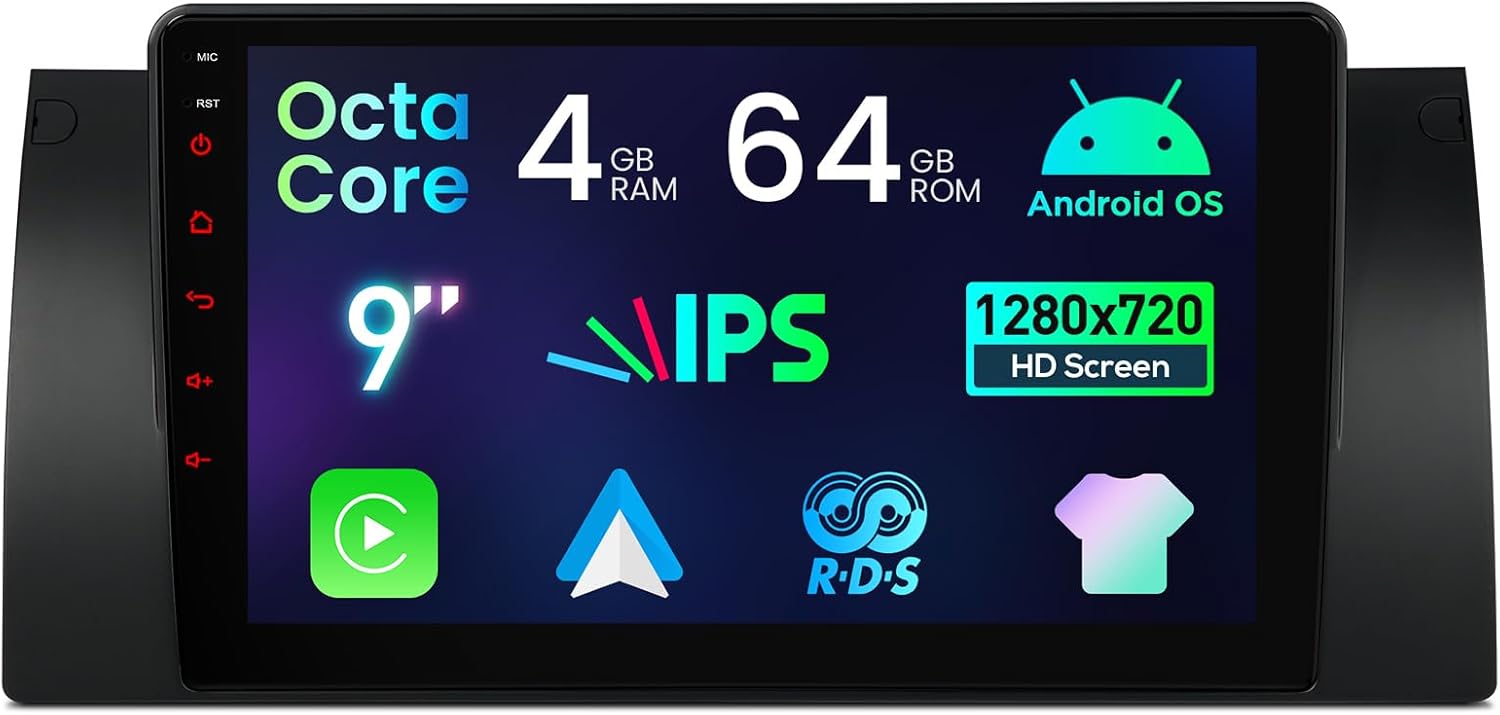
Image 2.1: This image displays the XTRONS IDP9053B car stereo unit, highlighting its 9-inch IPS HD screen, Octa Core processor, 4GB RAM, 64GB ROM, and Android operating system.

Image 2.2: This image illustrates the high-definition display capabilities of the stereo, featuring 1280x720 pixel resolution, support for 1080P video, and advanced IPS technology for wide 178-degree viewing angles and accurate color reproduction.
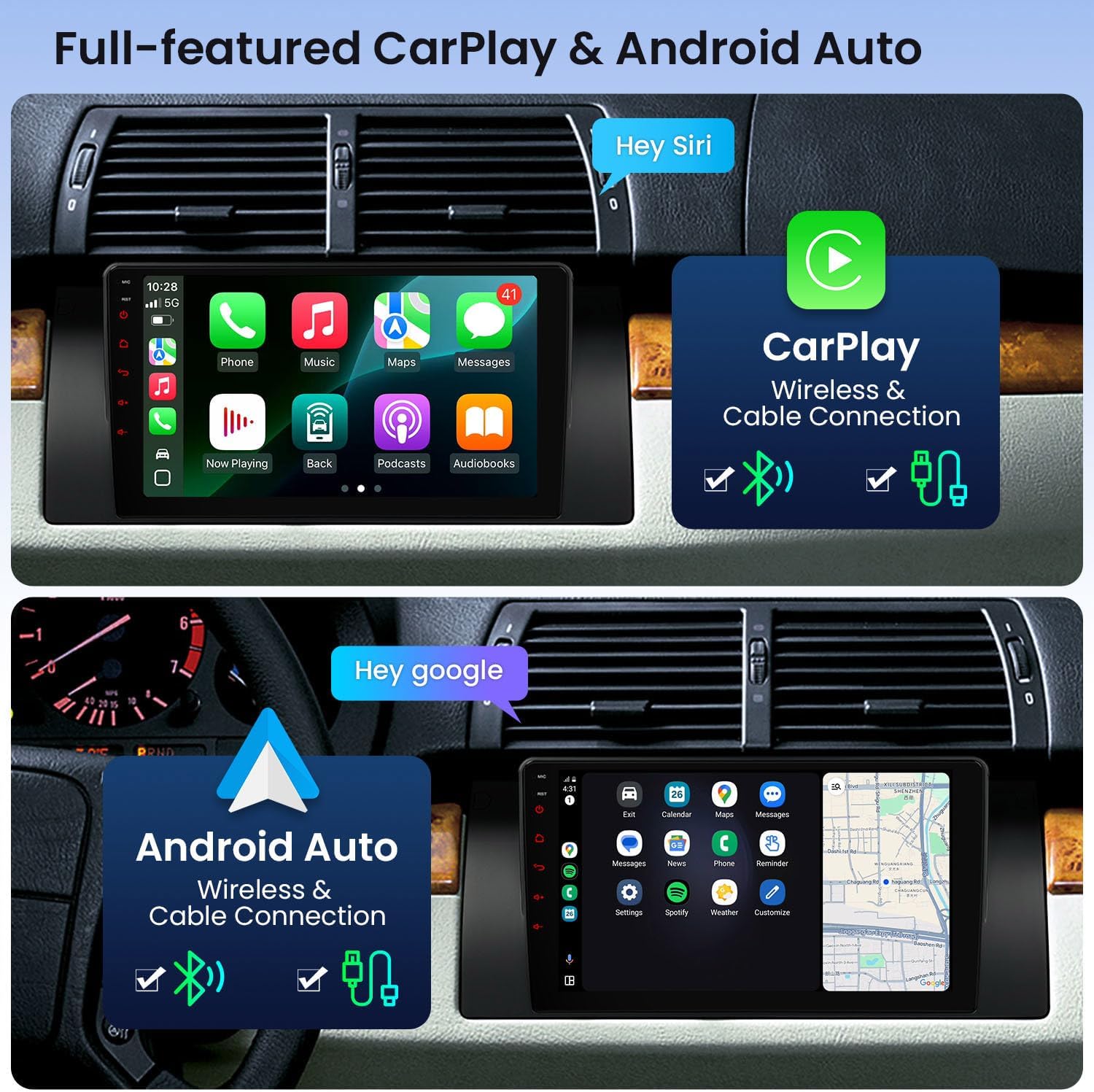
Image 2.3: This image demonstrates the wireless and wired Apple CarPlay and Android Auto functionalities, showing their respective user interfaces on the stereo screen.
3. Package Contents
Please verify that all items listed below are included in your package:
- 1 x Radio Antenna Cable
- 1 x Camera Cable
- 2 x USB Cable
- 1 x CANbus Cable
- 1 x SIM Card Slot Cable
- 1 x ISO Wiring Harness
- 1 x 4G Antenna
- 1 x GPS Antenna
- 1 x CANbus Box
- 2 x Installation Holder
- 1 x User Manual

Image 3.1: This image provides the physical dimensions of the head unit and a detailed diagram of all included accessories, such as the radio antenna cable, camera cable, USB cables, CANbus cable, SIM card slot cable, ISO wiring harness, 4G antenna, GPS antenna, CANbus box, and installation holders.
4. Installation
Professional installation is recommended. Ensure the vehicle's battery is disconnected before beginning installation. Refer to your vehicle's service manual for specific dashboard disassembly instructions.
4.1 Pre-Installation Notes
- Frame Removal: If your car's center console has a frame as shown in Image 1.1, it must be removed before installing the new head unit.
- Cable Requirements: Depending on your vehicle's original configuration, additional cables may be required.
4.2 Optional Cables for Specific Configurations
Review the following scenarios to determine if additional cables are necessary for your vehicle:
- Radio Antenna Port: If your car's radio antenna port is located in the trunk, you may need two extension cables (XTRONS ISOZF and FZMF).
- Original Radio Screen Size: For cars with an original 4.3" or 7" screen with a 12-pin plug, or if the navigation drive is in the rear, an extra 6m extension cable (XTRONS EXL007) may be needed.
- Blue 12-pin Dash Plug: If your car has a blue 12-pin plug in the dash, you may need a specific cable (XTRONS ICE/ACS/BMWDSP01).
- Logic7 System or Factory Amplifier: For cars with a Logic7 system or a factory car radio without fiber optic input (8 speaker wires), an extra decoder (XTRONS FOBB05) is required to retain the factory amplifier and prevent audio issues.
- Digital Sound System (e.g., Harman Kardon): An extension cable (XTRONS EXL007) may be needed for installation.
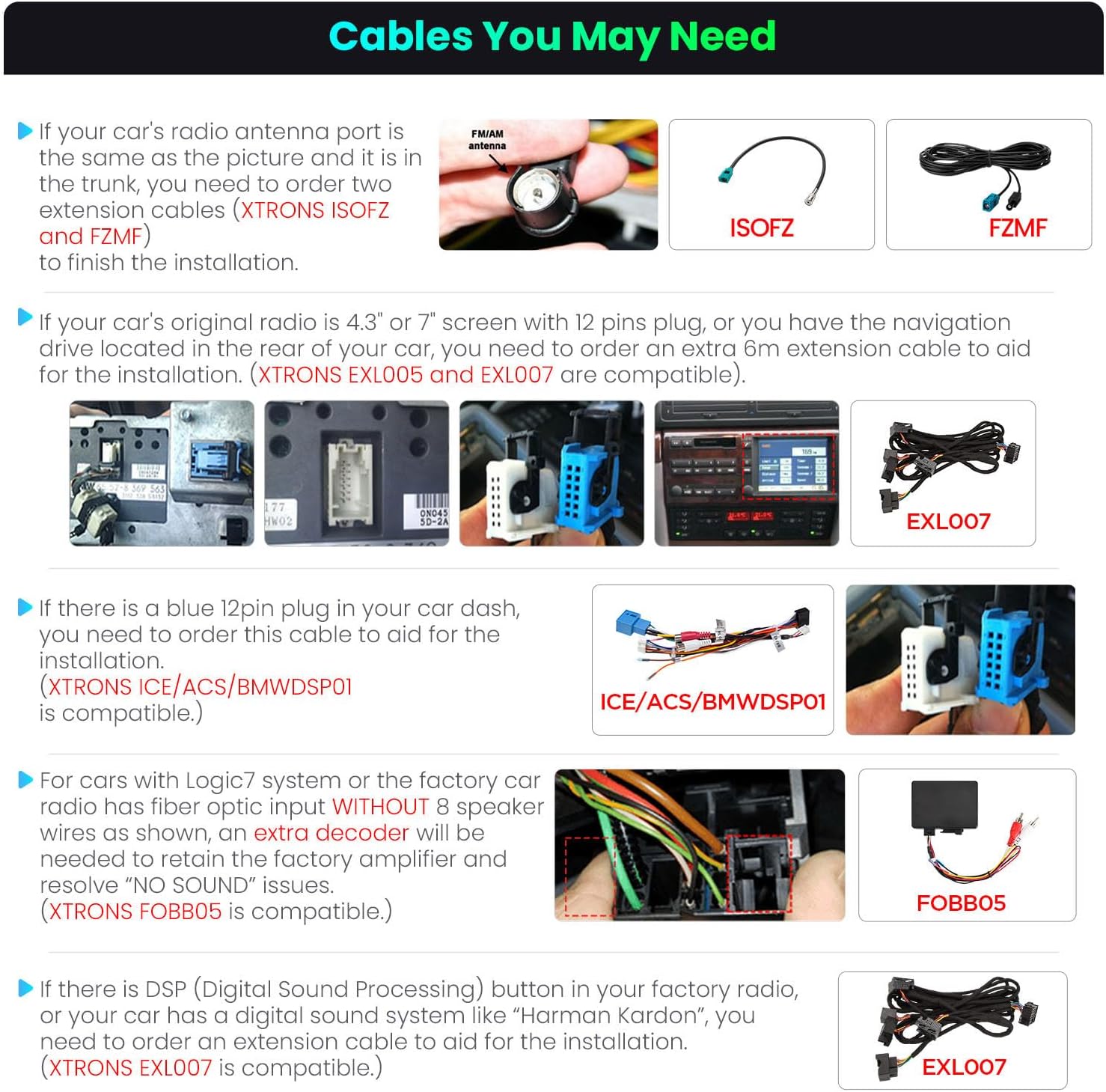
Image 4.1: This diagram details various optional cables that may be required for specific vehicle configurations, such as radio antenna extensions (XTRONS ISOZF and FZMF), 6m extension cable for rear-located radios (XTRONS EXL007), blue 12-pin dash cable (XTRONS ICE/ACS/BMWDSP01), fiber optic decoder for Logic7/factory amplifier (XTRONS FOBB05), and an extension cable for DSP/Harman Kardon systems (XTRONS EXL007).
5. Initial Setup
After successful installation, follow these steps for initial setup:
- Power On: Turn on your vehicle's ignition. The stereo should power on automatically.
- Language and Time Settings: Navigate to 'Settings' to configure your preferred language, time zone, and date.
- Wi-Fi Connection: Go to 'Settings' > 'Network & Internet' > 'Wi-Fi' to connect to an available Wi-Fi network for internet access and app downloads.
- Bluetooth Pairing: Access 'Settings' > 'Connected devices' > 'Bluetooth' to pair your smartphone for hands-free calls and audio streaming.
- CarPlay/Android Auto Setup: Connect your smartphone via USB or wirelessly (if supported by your phone) to initiate Apple CarPlay or Android Auto. Follow the on-screen prompts to complete the setup.
- CANbus Settings: If steering wheel controls or other original vehicle functions are not working, access the CANbus settings (often found in 'Factory Settings' or 'Car Settings') and select the correct vehicle model (e.g., E46 for BMW E53 models, as noted by some users). The factory settings code is typically 8888.
6. Operating Instructions
6.1 User Interface Navigation
The XTRONS IDP9053B features an intuitive Android interface. Swipe left or right on the home screen to access different pages. Use the app drawer to find all installed applications. The Quick Display Window allows for simultaneous viewing of car speed, navigation, or video.

Image 6.1: This image highlights the smart UI design, showcasing customizable themes, quick access shortcuts for music, a favorite apps bar, and examples of the Quick Display Window for car speed, navigation, and video playback.
6.2 Audio Customization (DSP)
Access the built-in DSP settings to fine-tune your audio experience. Adjust the 15-band graphic equalizer, select from 8 preset EQ modes, and utilize Smart Field Sound Positioning to optimize sound output.

Image 6.2: This image illustrates the advanced audio customization options, including a built-in DSP, a 15-band graphic equalizer, 8 preset EQ modes, and Smart Field Sound Positioning for an optimized audio experience.
6.3 Steering Wheel Controls
The unit supports your vehicle's original steering wheel controls for convenient operation of media playback, volume, and calls. Ensure correct CANbus settings are applied during setup for full functionality.

Image 6.3: This image demonstrates the integration with original steering wheel controls for media playback and lists supported vehicle functions such as ACC control, light control, reversing control, handbrake control, door status, outdoor temperature, speed, and mileage display.
7. Specifications
| Feature | Specification |
|---|---|
| Model | IDP9053B |
| Operating System | Android 14 |
| Processor | Octa Core |
| RAM | 4GB |
| ROM | 64GB |
| Screen Size | 9 Inches |
| Display Resolution | 1280x720 HD |
| Display Type | IPS Touch Screen |
| Connectivity | Bluetooth 5.0, Wi-Fi (2.4GHz & 5GHz), USB |
| Special Features | Built-in DSP, Wireless CarPlay, Android Auto, GPS Navigation |
8. Troubleshooting
If you encounter issues with your XTRONS IDP9053B, please refer to the following common solutions:
- No Power: Check all power connections and fuses. Ensure the ISO wiring harness is correctly connected.
- No Sound: Verify speaker connections. If your vehicle has a factory amplifier or Logic7 system, ensure the correct fiber optic decoder (XTRONS FOBB05) or extension cable (XTRONS EXL007) is installed and configured. Check DSP settings.
- Steering Wheel Controls Not Working: Access 'Factory Settings' (code 8888) and verify the CANbus settings are correctly configured for your BMW E53 model. Some users have found setting it to 'E46' resolves issues.
- GPS Signal Issues: Ensure the GPS antenna is properly connected and placed in a location with a clear view of the sky.
- Bluetooth Connection Problems: Ensure Bluetooth is enabled on both the stereo and your smartphone. Delete previous pairings and re-pair the devices.
- Wi-Fi Connectivity Issues: Check Wi-Fi signal strength. Ensure the correct password is entered. Try restarting the unit and your Wi-Fi hotspot.
- 4G Network Issues (if applicable): Ensure the SIM card is correctly inserted and activated. Verify network settings. If persistent, contact your network provider.
- Unit Freezing/Unresponsive: Perform a soft reset by pressing the RST button (if available) or by turning off the vehicle ignition and restarting.
9. Warranty and Support
For warranty information, technical support, or service inquiries, please refer to the warranty card included with your product or visit the official XTRONS website. You may also contact your point of purchase for assistance.


