
1. Introduction
The MangoKit SR40 is a versatile digital radio offering a wide range of listening options, including Internet Radio, DAB/DAB+, and FM. It features Bluetooth connectivity for streaming from your devices, a built-in podcast player, and 2.0 stereo speakers for rich sound. Designed for portability, it includes a long-lasting integrated battery and a durable wooden housing with an aluminum handle. This manual provides instructions for setup, operation, and maintenance of your SR40 radio.
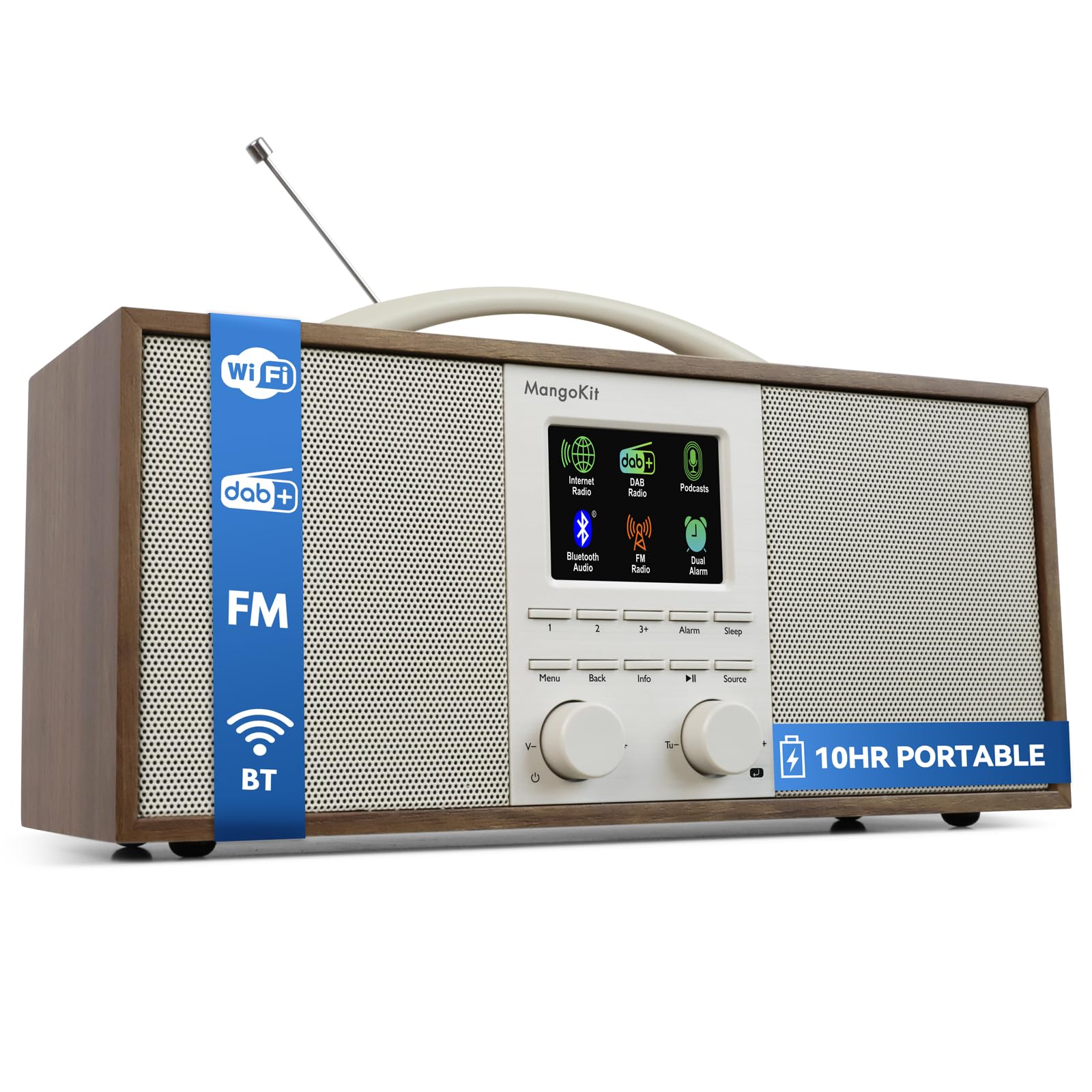
Image 1.1: The MangoKit SR40 Internet Radio, showcasing its elegant walnut finish and compact design.
2. Package Contents
Please check the box for the following items:
- 1x MangoKit SR40 Radio
- 1x Power Adapter
- 1x USB Type-C Cable
- 1x User Manual (this document)
3. Setup
3.1 Initial Charging
Before first use, fully charge the integrated lithium battery. Connect the supplied USB Type-C cable to the radio's USB-C port and the power adapter. Plug the adapter into a wall outlet. The charging indicator will show the charging status. A full charge provides over 10 hours of playback.

Image 3.1: The SR40 radio in an outdoor setting, demonstrating its portability and long battery life.
3.2 Power On and Initial Configuration
- Press and hold the Power button to turn on the radio.
- The device will boot into the setup wizard. Follow the on-screen prompts to select your preferred language.
- Wi-Fi Connection: The SR40 supports 2.4GHz Wi-Fi networks.
- You can connect using the WPS (Wi-Fi Protected Setup) function for quick pairing with compatible routers.
- Alternatively, manually select your Wi-Fi network from the list and enter the password using the radio's controls.
- Time and Date: The radio will automatically set the time and date via the internet or DAB signal once connected.

Image 3.2: Detailed view of the SR40's user-friendly controls and digital display.
4. Operating Instructions
4.1 Mode Selection
Press the Source button to cycle through available modes: Internet Radio, DAB/DAB+, FM, Bluetooth, and AUX input.
4.2 Internet Radio & Podcasts
- Once connected to Wi-Fi, select "Internet Radio" mode.
- Use the navigation controls to browse stations by country, genre, or popularity.
- For podcasts, select the "Podcast" option and use the search function to find desired content.
- To save a favorite station or podcast, press and hold one of the preset buttons (e.g., 1/2/3+) for approximately 2 seconds. The display will confirm the save.
- The SR40 can store up to 150 favorite stations across all modes. To access favorites, tap the 3+ button to open the favorites menu, then use the tuning knob to select.
4.3 DAB/DAB+ and FM Radio
- Extend the telescopic antenna for optimal reception.
- In DAB or FM mode, perform a station scan to find available broadcasts.
- Use the tuning knob to navigate through stations.
- Save favorite stations using the preset buttons as described for Internet Radio.
4.4 Bluetooth Streaming
Select "Bluetooth" mode. The radio will enter pairing mode. On your smartphone or tablet, search for "MangoKit SR40" in the Bluetooth settings and connect. You can now stream audio wirelessly to the radio.

Image 4.1: The SR40 radio connected via Bluetooth to a smartphone, demonstrating wireless audio streaming.
4.5 AUX Input
Connect an external audio device (e.g., MP3 player) to the AUX-in port on the back of the radio using a 3.5mm audio cable. Select "AUX" mode to play audio from the connected device.
4.6 Alarm, Snooze, and Sleep Timer
- Alarm: Access the alarm settings through the menu to set up one or more alarms. You can choose the alarm source (buzzer, FM, DAB, Internet Radio).
- Snooze: When an alarm sounds, press the Snooze button to temporarily silence it.
- Sleep Timer: Set a sleep timer to automatically turn off the radio after a specified duration.
4.7 Equalizer Settings
The SR40 features an equalizer to adjust the sound profile. You can select from predefined sound presets or manually adjust bass and treble levels to customize the audio output to your preference.
5. Maintenance
5.1 Cleaning
Wipe the radio with a soft, dry cloth. Do not use abrasive cleaners or solvents, as these may damage the wooden housing or display. Avoid exposing the device to excessive moisture.
5.2 Battery Care
To prolong battery life, avoid completely discharging the battery frequently. Recharge the device when the battery level is low. If storing the radio for an extended period, charge it to approximately 50% and recharge every few months.
6. Troubleshooting
| Problem | Possible Cause | Solution |
|---|---|---|
| No power / Does not turn on | Battery is completely discharged; Power adapter not connected or faulty. | Connect the radio to the power adapter and allow it to charge for a few hours before attempting to power on. Ensure the power adapter is working correctly. |
| Internet Radio connection drops frequently | Weak Wi-Fi signal; Router incompatibility (e.g., 5GHz network only); Network interference. | Ensure the radio is within range of your 2.4GHz Wi-Fi router. Check router settings to confirm 2.4GHz band is active. Try moving the radio closer to the router or reducing other network traffic. |
| Poor DAB/DAB+ or FM reception | Antenna not fully extended; Weak signal in current location; Interference from other electronics. | Fully extend the telescopic antenna. Try repositioning the radio or the antenna. Perform a new station scan in a different location. |
| Complicated menu navigation / Difficulty saving presets | Unfamiliarity with the control logic. | Refer to the "Operating Instructions" section (Section 4) of this manual for detailed steps on menu navigation and saving presets. Practice using the controls. |
| No sound or distorted sound | Volume too low or muted; Incorrect audio source selected; Equalizer settings misconfigured. | Increase the volume. Ensure the correct input source (Internet Radio, DAB, FM, Bluetooth, AUX) is selected. Check and adjust the equalizer settings. |
7. Specifications
- Brand: MangoKit
- Model: SR40
- Color: Walnut (Stereo Walnuss)
- Dimensions (L x W x H): 26 cm x 9 cm x 12 cm
- Connectivity: Bluetooth, USB (for charging)
- Tuner Technology: DAB/DAB+, FM
- Supported Radio Bands: FM/DAB+
- Power Source: Mains or battery operated
- Battery Voltage: 5 Volts (via USB-C)
- Audio Output Format: Stereo
- Display Type: LCD
- Housing Material: Wood
- Special Features: Portable WLAN Internet Radio, Podcast Player, 150 Presets, Sleep Timer, Alarm Clock
- Included Components: 1x Radio, 1x Power Adapter, 1x USB Type-C Cable, 1x User Manual
8. Warranty Information
The MangoKit SR40 comes with a limited warranty. Please refer to the warranty card included in your package or contact MangoKit customer support for specific terms and conditions regarding your product's warranty coverage.
9. Customer Support
If you encounter any issues not covered in this manual or require further assistance, please contact MangoKit customer support. You can find contact information on the official MangoKit website or through your purchase platform.
For more information, visit the MangoKit Store on Amazon.


