
1. Introduction
The NEEWER LL38 Video Camera Tripod is a robust and versatile support system designed for DSLR cameras, camcorders, and other photography equipment. Featuring a fluid head for smooth pan and tilt movements, a quick-release plate, and adjustable height, this tripod provides stability and flexibility for various shooting scenarios.
2. Package Contents
Please verify that all items listed below are included in your package:
- 1 x NEEWER LL38 Video Tripod
- 1 x Quick Release Plate
- 1 x Carrying Bag
- 1 x Cleaning Cloth

Image: Contents of the NEEWER LL38 Video Tripod package, including the tripod, quick release plate, carrying bag, and cleaning cloth, along with a summary of specifications.
3. Specifications
| Feature | Detail |
|---|---|
| Model Name | LL38 |
| Material | Aluminum Alloy |
| Maximum Height | 78.7 inches (200 cm) |
| Minimum Height | 34.6 inches (88 cm) |
| Folded Size | 35.8 inches (91 cm) |
| Weight Limit | 17.6 lbs (8 kg) |
| Tripod Head Type | Pan Heads (Fluid Head) |
| Mounting Points | 1/4" and 3/8" screws |
| Compatible Devices | DSLR cameras, camcorders, mirrorless cameras, telescopes, sliders, phone holders |
4. Setup
- Unpack the Tripod: Carefully remove the tripod and all accessories from the carrying bag.
- Extend the Legs: Release the flip locks on each leg section. Extend the legs to the desired height. Ensure all flip locks are securely fastened after adjustment to prevent collapse.
- Level the Tripod: The fluid head features a 70mm bottom bowl base that allows for quick leveling on uneven terrain. Use the built-in bubble level on the fluid head to ensure the tripod is perfectly horizontal before mounting your camera.
- Attach the Quick Release Plate: If not already attached, screw the quick release plate onto the bottom of your camera using the appropriate 1/4" or 3/8" screw. Ensure it is tightened securely.
- Mount Your Camera: Align the quick release plate with the receiver on the fluid head. Press the side release button on the fluid head and slide the plate into place until it clicks and locks securely. Verify the camera is firmly attached by gently attempting to lift it.
5. Operating Instructions
5.1. Height Adjustment
The NEEWER LL38 tripod features a one-step height adjustment mechanism. To adjust the height:
- Locate the flip locks on each leg section.
- Flip open the locks to extend or retract the leg sections.
- Once the desired height is achieved, firmly close the flip locks to secure the legs in position.

Image: The NEEWER LL38 tripod shown at various heights: folded (35.8"/91cm), minimum (34.6"/88cm), medium (57"/145cm), and maximum (78.7"/200cm).
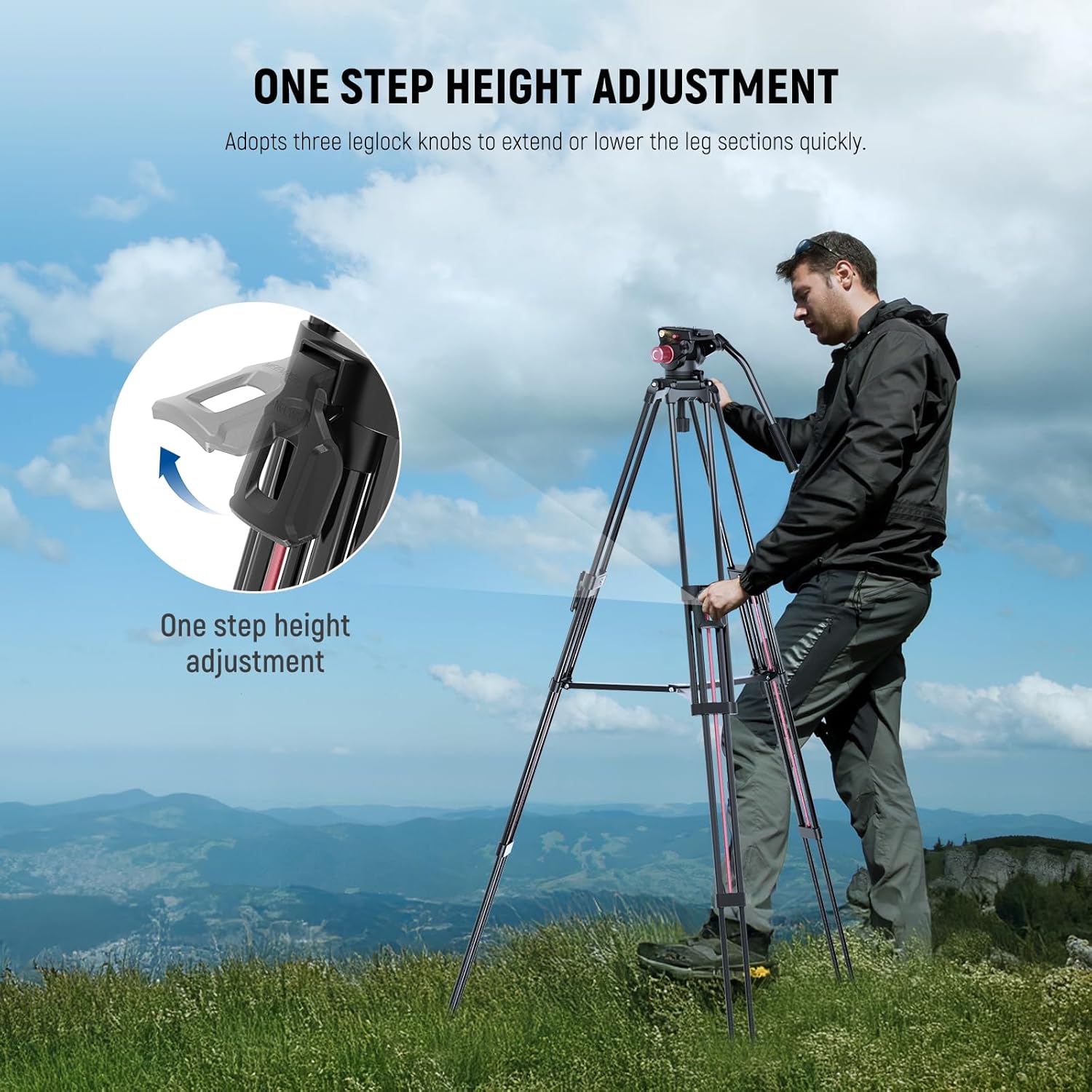
Image: A user demonstrating the one-step height adjustment using the leg lock knobs on the tripod.
5.2. Fluid Head Operation
The integrated fluid head allows for smooth and precise camera movements.
- Panning: Loosen the pan locking knob to rotate the camera 360° horizontally. Tighten the knob to lock the position.
- Tilting: Loosen the tilt locking knob to adjust the camera's vertical angle from -70° to +90°. Tighten the knob to secure the tilt.

Image: Diagram illustrating the 360° panning and -70° to +90° tilting capabilities of the fluid head, with labels for pan and tilt locking knobs.
5.3. Quick Release Plate
To quickly attach or detach your camera:
- Attaching: Ensure the quick release plate is securely fastened to your camera. Press the side release button on the fluid head and slide the plate with the camera into the head until it locks.
- Detaching: Press the side release button and slide the camera with the quick release plate out of the fluid head.

Image: Detailed view of the quick release plate, quick release plate locking knob, non-slip pad, and the quick release plate release button on the fluid head.
5.4. Removable Handle
The handle can be installed on either side of the video head for both right-handed and left-handed users. Simply unscrew the handle, reposition it to the desired side, and screw it back in securely.

Image: Demonstrates the removable handle being used in both right-handed and left-handed configurations on the fluid head.
6. Compatibility
The NEEWER LL38 tripod is designed for wide compatibility with various camera types and accessories:
- Cameras: Compatible with Sony, Canon, Nikon, and other DSLR cameras, mirrorless cameras, and camcorders.
- Accessories: Features 1/4" and 3/8" screws for attaching equipment like telescopes, sliders, and phone holders. An extra 3/8" side screw hole allows for mounting accessories such as magic arms, monitors, LED video lights, and microphones.
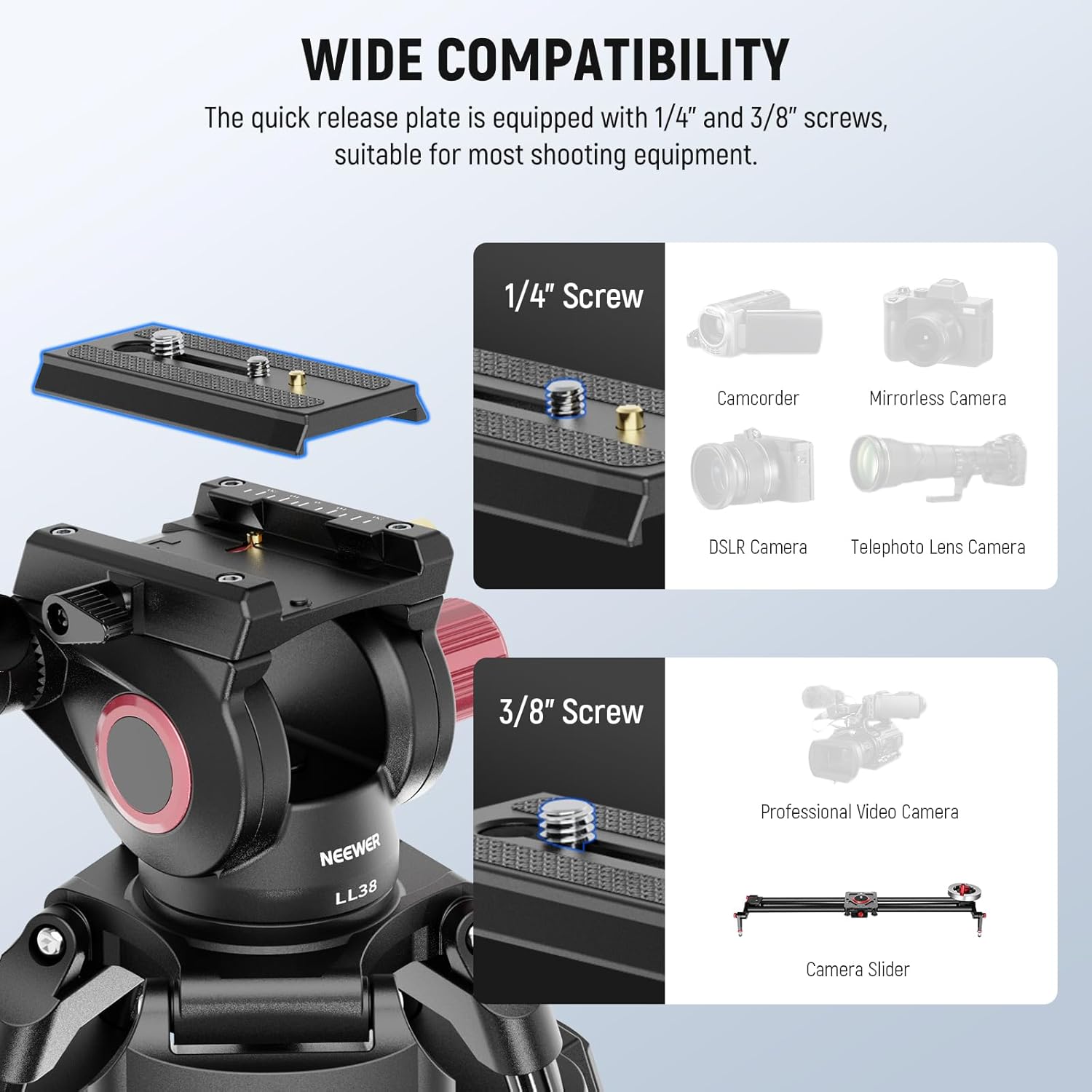
Image: Visual representation of the tripod's compatibility with various devices including camcorders, mirrorless cameras, DSLR cameras, telephoto lens cameras, professional video cameras, and camera sliders, highlighting the 1/4" and 3/8" screws.
7. Applications
The NEEWER LL38 tripod is suitable for a variety of professional and creative applications:
- Event Filming
- Interviewing
- Live Recording
- Video Podcasting
- Sports Photography
- Weddings
- Landscapes
- Product Photography
- Vlogging
- Selfies
- Live Streaming

Image: Examples of the tripod in use for various applications such as event filming, interviewing, live recording, and video podcasting.
8. Maintenance
- Cleaning: Use the provided cleaning cloth to wipe down the tripod after each use, especially if used outdoors. Avoid abrasive cleaners or solvents.
- Storage: Store the tripod in its carrying bag in a dry, cool place to protect it from dust and moisture.
- Lubrication: The fluid head is designed for smooth operation and generally does not require user lubrication. If movements become stiff, contact customer support.
- Inspection: Periodically check all screws, knobs, and leg locks to ensure they are tight and functioning correctly.
9. Troubleshooting
| Problem | Possible Cause | Solution |
|---|---|---|
| Legs collapse slowly or do not hold height. | Flip locks are not fully engaged or are worn. | Ensure all flip locks are firmly closed after extending the legs. If the issue persists, inspect the locks for damage or contact support. |
| Fluid head movements are not smooth or feel stiff. | Pan/tilt locking knobs are too tight, or internal mechanism requires inspection. | Ensure pan and tilt locking knobs are sufficiently loosened for movement. If stiffness persists, contact customer support. |
| Handle does not stay in its socket. | Handle not securely tightened. | Ensure the handle is fully screwed into its socket. Check for any debris preventing a secure fit. |
| Camera not securely attached to the fluid head. | Quick release plate not fully engaged or locking mechanism is faulty. | Ensure the quick release plate is correctly aligned and fully slides into the receiver until it clicks. Verify the side release button is not stuck. |
10. Warranty and Support
The NEEWER LL38 Video Camera Tripod comes with a 1-Year Manufacturer Warranty from the date of purchase. This warranty covers defects in materials and workmanship under normal use.
For warranty claims, technical support, or any inquiries regarding your product, please contact NEEWER customer service through their official website or the retailer where the product was purchased. Please have your proof of purchase and product model number (LL38) ready when contacting support.


