
VIPCOO iE-S1
VIPCOO S1 Electric Scooter User Manual
Model: iE-S1
1. Introduction
Welcome to the VIPCOO S1 Electric Scooter user manual. This guide provides essential information for the safe and efficient operation, maintenance, and troubleshooting of your new electric scooter. Please read this manual thoroughly before your first ride to ensure optimal performance and safety.
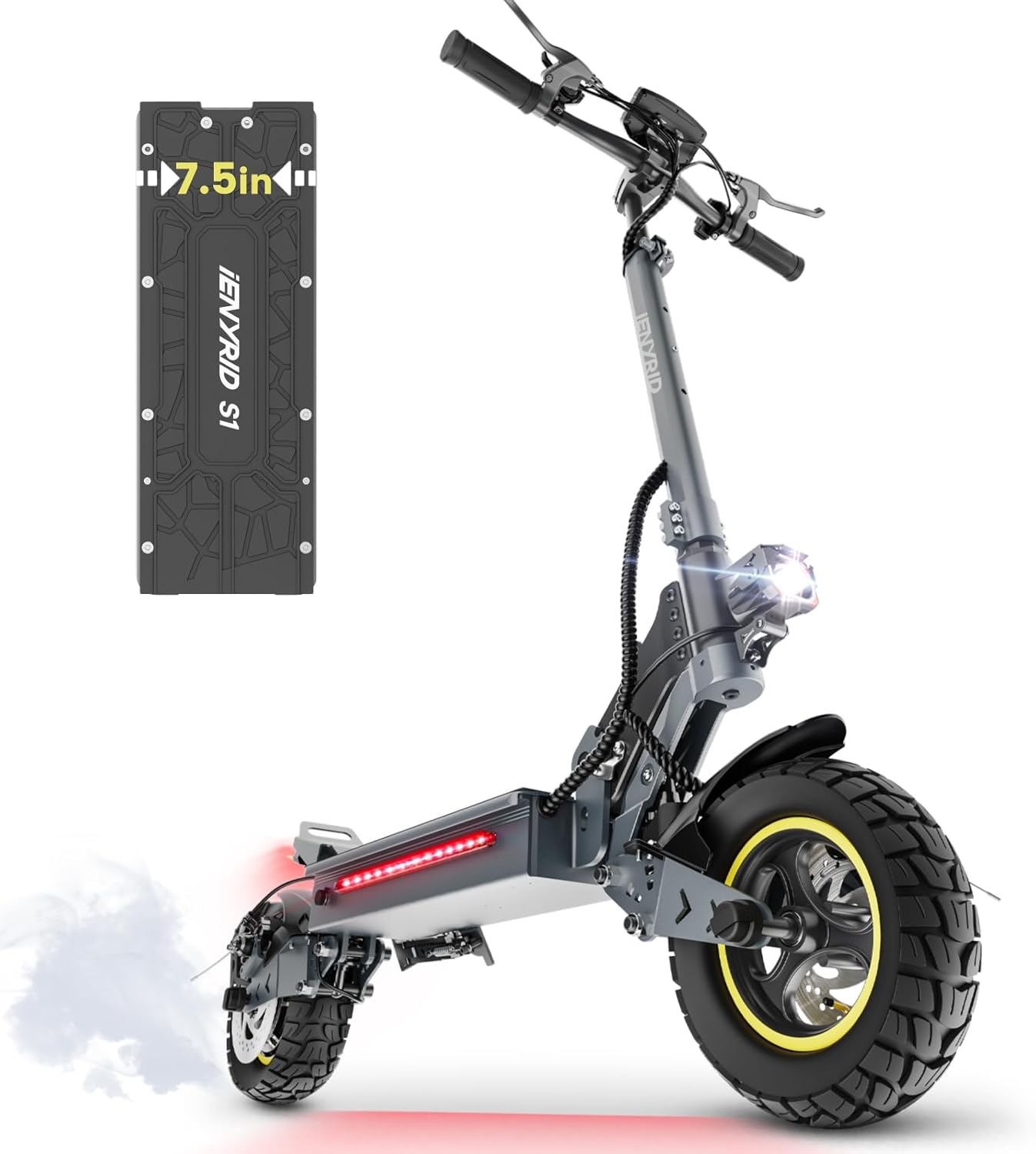
Figure 1: VIPCOO S1 Electric Scooter main view. This image shows the overall design of the S1 electric scooter, highlighting its robust frame and off-road tires.
2. Safety Guidelines
Your safety is paramount. Always adhere to the following guidelines:
- Always wear a helmet and appropriate safety gear (knee pads, elbow pads, wrist guards) when riding.
- Familiarize yourself with local laws and regulations regarding electric scooter usage.
- Do not ride under the influence of alcohol or drugs.
- Avoid riding in heavy rain, snow, or on icy surfaces.
- Maintain a safe distance from other vehicles and pedestrians.
- Regularly inspect your scooter for any signs of damage or wear before each ride.
- Ensure all bolts and fasteners are tightened securely.
- The maximum weight limit for this scooter is 265 pounds (120 kg). Do not exceed this limit.
3. Setup and Assembly
The VIPCOO S1 Electric Scooter comes partially assembled. Follow these steps to complete the setup:
- Unboxing: Carefully remove all components from the packaging. Check against the included components list (Charger, Manual, S1 Electric Scooter, Toolkit).
- Handlebar Installation: Lift the handlebar stem and secure it in the upright position using the quick-release clamp. Ensure it clicks into place firmly.
- Handlebar Adjustment: Adjust the handlebar height to a comfortable position using the adjustable handlebar mechanism. Secure it tightly.
- Initial Charge: Before first use, fully charge the scooter's battery. The charging time is approximately 6 hours. Connect the charger to the charging port and then to a power outlet. The LED indicator on the charger will change color when fully charged.
- Tire Pressure Check: Ensure the 10-inch pneumatic tires are inflated to the recommended pressure. Proper tire pressure is crucial for ride quality and range.

Figure 2: Initial setup of the VIPCOO S1 Electric Scooter. This image illustrates a user performing initial checks and adjustments, highlighting the large battery capacity and off-road tires.
4. Operating Instructions
Learn how to operate your VIPCOO S1 Electric Scooter safely and effectively.
4.1 Powering On/Off
- To power on, press and hold the power button on the display.
- To power off, press and hold the power button again until the display turns off.
4.2 Display Functions
The large LED display provides real-time information:
- Battery Life: Indicates the current battery charge level.
- Speed Mode/Driving Gears: Shows the current speed setting (e.g., Eco, Standard, Sport).
- Current Speed: Displays your real-time speed.
- Accumulated Mileage: Tracks the total distance traveled.
- Light Indicator: Shows if the lights are on or off.
- Coded Lock: Indicates security status.

Figure 3: Smart LCD Display. This image details the scooter's intuitive display, showing various indicators like battery life, speed mode, and mileage.
4.3 Riding Tips
- Starting: Place one foot on the deck and push off with the other foot to gain initial momentum, then gently press the throttle.
- Acceleration: Use the throttle to control your speed. The 800W brushless motor provides powerful acceleration up to 28 mph (45 km/h).
- Braking: The S1 is equipped with a dual-disc braking system (Front Braking, Rear Braking). Apply both brakes simultaneously for effective stopping. For hard braking, lower your center of gravity and lean your body backward to maintain stability.
Video 1: Brake Test. This video demonstrates the effective braking capabilities of the VIPCOO S1 Electric Scooter, showcasing its dual-disc braking system in action.

Figure 4: Outstanding Dual-Disc Braking System. This image highlights the robust front and rear disc brakes, essential for safe stopping.
- Terrain: The 10-inch off-road pneumatic tires and dual suspension system are designed to handle various road conditions, including sand, gravel, and slopes.
- Folding: The scooter features a portable folding design for easy transport and storage.

Figure 5: Foldable design and dimensions. This image provides a visual representation of the scooter's dimensions and its compact folded state for easy carrying.
5. Maintenance
Regular maintenance ensures the longevity and safe operation of your VIPCOO S1 Electric Scooter.
- Cleaning: Wipe down the scooter with a damp cloth after each ride. Do not use high-pressure water jets or immerse the scooter in water.
- Tire Care: Regularly check tire pressure and inflate as needed. Inspect tires for wear and tear, and replace if necessary.
- Brake Inspection: Check brake pads and discs for wear. Ensure brake levers are responsive and cables are not frayed.
- Battery Care: Charge the battery regularly, even if not in use, to maintain its health. Avoid completely draining the battery. Store the scooter in a cool, dry place.
- Fastener Check: Periodically check all screws and bolts to ensure they are tight.
- Suspension: Inspect the front and rear dual suspension for proper function and any signs of damage.

Figure 6: Front and Rear Hydraulic Spring Dampers. This image illustrates the scooter's dual suspension system, which requires periodic inspection for optimal performance.
6. Troubleshooting
This section addresses common issues you might encounter with your VIPCOO S1 Electric Scooter.
| Problem | Possible Cause | Solution |
|---|---|---|
| Scooter not turning on | Low battery; Loose connections; Power button issue | Charge battery fully; Check all cable connections; Contact support if issue persists. |
| Reduced range or speed | Under-inflated tires; Overload (exceeding weight limit); Battery degradation | Check and inflate tires; Ensure rider weight is within limits; Contact support for battery check. |
| Brakes not effective | Worn brake pads/discs; Loose brake cables; Air in hydraulic system (if applicable) | Inspect and replace worn components; Adjust brake cable tension; Seek professional service for hydraulic issues. |
| Unusual noises during ride | Loose components; Debris in wheels/brakes; Motor issue | Check all fasteners; Clean wheels and brakes; Contact support for motor inspection. |
7. Specifications
Detailed technical specifications for the VIPCOO S1 Electric Scooter.
| Feature | Detail |
|---|---|
| Brand | VIPCOO |
| Model Name | iE-S1 |
| Motor Power | 800W Brushless (1000W Peak) |
| Battery | 48V 15Ah |
| Max Speed | 28 Mph (45 km/h) |
| Max Range | Up to 30 Miles (48 km) |
| Climbing Angle | 20° |
| Tire Type | 10-inch Off-road Pneumatic Tires |
| Suspension | Dual Suspension (Front and Rear Hydraulic Spring Dampers) |
| Brake System | Dual-Disc Braking System (Front and Rear) |
| Frame Material | Aluminum |
| Weight Limit | 265 Pounds (120 kg) |
| Item Weight | 57 Pounds (25.7 kg) |
| Product Dimensions (L x W x H) | 49" x 25" x 53" (124 cm x 63.5 cm x 134.6 cm) |
| Charging Time | 6 Hours |
| Special Features | Adjustable Handlebar Height, Digital Display, Foldable, Wide Platform, 360° Light Systems |

Figure 7: 48V/15Ah Large Battery. This image shows the internal structure of the scooter's large capacity battery, providing extended range.

Figure 8: 10-inch Air Off-Road Tires. This image highlights the robust tread pattern of the pneumatic tires, suitable for various terrains.
8. Warranty and Support
VIPCOO products come with a warranty to ensure your satisfaction and peace of mind.
- Warranty: The VIPCOO S1 Electric Scooter includes 180 days of whole car maintenance for product quality problems. The warranty type is Limited, with a duration of 6-12 months (as per product data).
- Customer Support: If you encounter any problems during the use of your scooter, please contact VIPCOO customer service. We provide 7*24 hours service to assist you.
- Contact Information: Please refer to the contact details provided on the product packaging or the official VIPCOO website for support.

Figure 9: VIPCOO Customer Support. This image represents the dedicated customer support available for VIPCOO products.
Related documentsiE-S1


Ask a question about this manual
Ask about setup, troubleshooting, compatibility, parts, safety, or missing instructions. Manuals+ will review the question and use this page’s manual context to help answer it.