
LOKITHOR JT400, JA3000 PRO
LOKITHOR JT400 & JA3000 PRO User Manual
Multi-functional Jump Starter and Air Compressor
Introduction
This manual provides comprehensive instructions for the safe and effective operation, maintenance, and troubleshooting of your LOKITHOR JT400 and JA3000 PRO multi-functional devices. The LOKITHOR JT400 is a versatile car battery jump starter with an integrated battery tester, while the LOKITHOR JA3000 PRO combines a powerful jump starter with a 150 PSI air compressor. Both units feature additional functionalities such as LED flashlights and power bank capabilities.

Image: The LOKITHOR JT400 (top) and JA3000 PRO (bottom) units, showcasing their compact design and included jumper cables.
Safety Information
Always read and understand all safety warnings and instructions before using the LOKITHOR JT400 or JA3000 PRO. Failure to follow these instructions may result in electric shock, fire, and/or serious injury.
- Do not expose the device to rain or wet conditions.
- Do not operate the device if it has been dropped or damaged.
- Do not attempt to jump start a frozen battery.
- Ensure proper ventilation when operating in enclosed spaces.
- Keep out of reach of children.
- Always connect the positive (+) clamp to the positive (+) battery terminal and the negative (-) clamp to the negative (-) battery terminal or a suitable ground point on the vehicle chassis.
- Avoid touching the positive and negative clamps together.
- The device incorporates 10 safety protection technologies including over-charge, over-current, short-circuit, reverse-polarity, low-temp, high-temp, over-voltage, over-load, spark-proof, and reverse-charge protection.

Image: The LOKITHOR JT400 demonstrating its spark-proof and reverse-polarity protection features with connected clamps.
Package Contents
Verify that all items are present in your package:
- LOKITHOR JT400 Jump Starter with Battery Tester
- LOKITHOR JA3000 PRO Jump Starter with Air Compressor
- Heavy-duty Jumper Cables (for both units)
- USB-C Charging Cable
- Air Hose with Nozzle Adapters (for JA3000 PRO)
- User Manual
- Storage Case (rugged EVA material)
Product Features
The LOKITHOR JT400 and JA3000 PRO offer a range of features designed for automotive emergency and maintenance needs.

Image: The LOKITHOR JT400 illustrating its multi-functional capabilities: Jump Starter, Power Bank, Battery Tester, and LED Flashlight.
LOKITHOR JT400 Features:
- 2500A Peak Current: Capable of starting 8.5L Gasoline and 6.5L Diesel engines.
- Integrated Battery Tester: Digital 12V car battery tester with Bluetooth 5.3 module for real-time monitoring via the BattGuard app. Provides SOH, SOC, voltage, current, rated capacity, cranking, and charging tests.
- 60W Two-Way Fast Charging: Rapid charging of the unit and external devices.
- Power Bank: Charges smartphones, tablets, and other USB devices.
- LED Flashlight: 300 lumen LED with Flash, Strobe, and Emergency SOS modes.
- Safety Protections: 10 built-in safety technologies for spark-proof and reverse-polarity protection.
LOKITHOR JA3000 PRO Features:
- 3000A Peak Current: Designed for 9.0L Gasoline and 7.0L Diesel engines.
- 150 PSI Air Compressor: Cordless high-speed inflator for car tires, motorcycle tires, bicycle tires, and sports balls.
- LiFePO4 Battery: Lithium Iron Phosphate battery technology for enhanced safety and 3000 cycle life.
- Power Bank: Charges mobile devices.
- LED Flashlight: Integrated LED light for illumination.
- Safety Protections: Comprehensive safety features for reliable operation.
Setup and Charging
Before first use, fully charge your LOKITHOR jump starter.
Initial Charging:
- Connect the provided USB-C charging cable to the charging port on the jump starter.
- Connect the other end of the USB-C cable to a suitable USB wall adapter (not included) or a powered USB port.
- The display will indicate charging status. Charge until the battery indicator shows full.
- A full charge can provide up to 36 months of standby time.
Battery Tester App Setup (for JT400):
- Download the "BattGuard" app from your smartphone's app store (iOS or Android).
- Ensure Bluetooth is enabled on your smartphone.
- Power on the JT400.
- Open the BattGuard app and follow the on-screen instructions to pair with your JT400 via Bluetooth.

Image: The LOKITHOR JT400 connected to a vehicle battery, with a smartphone displaying the BattGuard app interface for digital battery testing.
Operating Instructions
Jump Starting a Vehicle:
Both the JT400 and JA3000 PRO can jump start vehicles with dead batteries. Ensure the jump starter is adequately charged before use.
- Prepare the Vehicle: Turn off all vehicle accessories (headlights, radio, air conditioning) and ensure the vehicle is in Park (automatic) or Neutral (manual) with the parking brake engaged.
- Connect Clamps:
- Connect the red positive (+) clamp to the positive (+) terminal of the vehicle's battery.
- Connect the black negative (-) clamp to the negative (-) terminal of the vehicle's battery or a solid, unpainted metal part of the engine block/chassis away from the battery.
The jump starter will perform a self-check and indicate readiness. If an error is detected (e.g., reverse polarity), the device will alert you.
- Start Vehicle: Once the jump starter indicates it's ready, attempt to start the vehicle. If the vehicle does not start immediately, wait 30-60 seconds before trying again. Do not crank for more than 3 seconds per attempt.
- Disconnect Clamps: Once the vehicle starts, disconnect the black negative (-) clamp first, then the red positive (+) clamp.

Image: The LOKITHOR JT400 connected to a car battery, ready to jump start a vehicle with a flat battery.

Image: The LOKITHOR JA3000 PRO connected to a car battery, demonstrating its capability to start flat batteries.
Using the Air Compressor (JA3000 PRO only):
The JA3000 PRO features a built-in 150 PSI air compressor for inflating tires and other inflatables.
- Attach Hose: Screw the air hose onto the air outlet port of the JA3000 PRO.
- Connect to Item: Attach the appropriate nozzle adapter to the air hose and connect it to the tire valve or inflatable item.
- Set Pressure: Use the controls on the JA3000 PRO to set the desired pressure (PSI, BAR, or KPA).
- Start Inflation: Press the "Pump" button to begin inflation. The compressor will automatically stop when the preset pressure is reached.
- Disconnect: Disconnect the hose from the item and then from the JA3000 PRO.
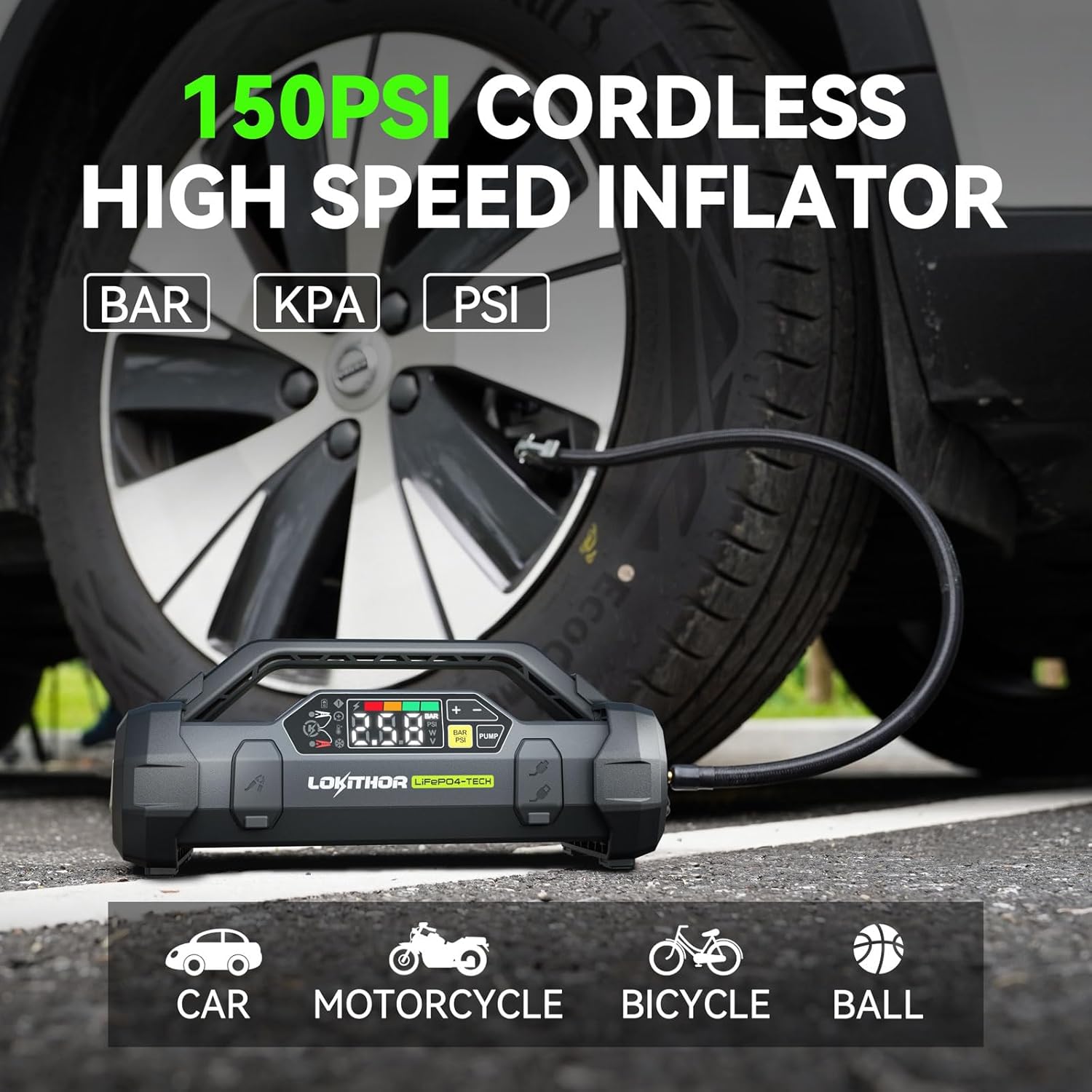
Image: The LOKITHOR JA3000 PRO in use, inflating a car tire with its 150 PSI cordless high-speed inflator function.
Using the Battery Tester (JT400 only):
The JT400's integrated battery tester provides detailed diagnostics of your vehicle's 12V battery.
- Connect to Battery: Connect the red positive (+) clamp to the positive (+) battery terminal and the black negative (-) clamp to the negative (-) battery terminal.
- Open App: Ensure the JT400 is powered on and open the "BattGuard" app on your paired smartphone.
- Perform Test: Select the desired test (e.g., Battery Test, Cranking Test, Charging Test) within the app. The app will display real-time data and diagnostic reports including State of Health (SOH), State of Charge (SOC), voltage, current, and internal resistance.

Image: A smartphone screen displaying the BattGuard app interface, showing detailed battery testing results such as load voltage, no-load voltage, and ripple, as provided by the LOKITHOR JT400.
Using as a Power Bank:
Both units can charge mobile devices via their USB ports.
- Connect your device's USB charging cable to the USB output port on the jump starter.
- The device will begin charging automatically.
Using the LED Flashlight:
Both units include an integrated LED flashlight.
- Press the flashlight button to cycle through modes: On, Strobe, SOS, Off.
- The JT400 features a 300 lumen LED.
Maintenance
Proper maintenance ensures the longevity and optimal performance of your LOKITHOR devices.
- Cleaning: Wipe the device with a dry, soft cloth. Do not use harsh chemicals or abrasive cleaners.
- Storage: Store the device in a cool, dry place away from direct sunlight and extreme temperatures.
- Charging: For optimal battery life, recharge the device every 3-6 months, even if not in use.
- Case Protection: The rugged EVA material case provides protection against accidental collisions, dents, scratches, and offers waterproof/shockproof/dustproof functionality.
Troubleshooting
If you encounter issues with your LOKITHOR jump starter, refer to the following common problems and solutions:
| Problem | Possible Cause | Solution |
|---|---|---|
| Device does not turn on. | Battery is depleted. | Charge the device fully. |
| Vehicle does not start after jump attempt. | Incorrect clamp connection; Vehicle battery too severely discharged; Vehicle issue not related to battery. | Ensure clamps are connected correctly (positive to positive, negative to negative/ground). Wait 30-60 seconds between attempts. Consult a mechanic if the issue persists. |
| Air compressor not inflating. | Hose not securely attached; Incorrect pressure setting; Device battery low. | Check hose connections. Verify pressure setting. Charge the JA3000 PRO. |
| Battery tester app not connecting (JT400). | Bluetooth off; App not updated; Device not powered on. | Ensure Bluetooth is enabled on your phone. Update the BattGuard app. Power on the JT400. |
Specifications
Key technical specifications for the LOKITHOR JT400 and JA3000 PRO.
| Feature | LOKITHOR JT400 | LOKITHOR JA3000 PRO |
|---|---|---|
| Peak Current | 2500A | 3000A |
| Engine Compatibility (Gas) | Up to 8.5L | Up to 9.0L |
| Engine Compatibility (Diesel) | Up to 6.5L | Up to 7.0L |
| Battery Type | Lithium-ion (implied) | LiFePO4 (Lithium Iron Phosphate) |
| Air Compressor | N/A | 150 PSI Cordless |
| Battery Tester | Integrated 12V Digital (Bluetooth 5.3) | N/A |
| Fast Charging | 60W Two-Way | Yes (implied) |
| LED Flashlight | 300 Lumen (Flash, Strobe, SOS) | Yes |
| Operating Temperature | -4°F to 140°F (-20°C to 60°C) | -4°F to 140°F (-20°C to 60°C) |
| Standby Time | Up to 36 months | Up to 36 months (implied) |

Image: A comparison chart highlighting the advantages of Lithium Iron Phosphate (LiFePO4) batteries, such as longer cycle life and enhanced safety, compared to standard Lithium batteries.
Warranty and Support
LOKITHOR products are designed for reliability and performance. For warranty information and technical support, please refer to the following:
- Warranty: Specific warranty terms and duration may vary by region. Please refer to the warranty card included with your product or visit the official LOKITHOR website for detailed information.
- Customer Support: LOKITHOR has a dedicated after-sales processing company overseas. For assistance, product inquiries, or troubleshooting not covered in this manual, please contact LOKITHOR customer service through their official website or the contact information provided on your product packaging.
- Online Resources: Visit the LOKITHOR Store on Amazon for additional product information and updates.
Related documentsJT400, JA3000 PRO


Ask a question about this manual
Ask about setup, troubleshooting, compatibility, parts, safety, or missing instructions. Manuals+ will review the question and use this page’s manual context to help answer it.