
Introduction
Thank you for choosing the Ohniyou GLX100 42-inch Low Profile Ceiling Fan with Light. This manual provides essential information for the safe installation, operation, and maintenance of your new ceiling fan. Please read it thoroughly before installation and keep it for future reference.
Safety Information
To reduce the risk of fire, electric shock, or personal injury, please follow these important safety instructions:
- Always disconnect power at the main fuse box or circuit breaker before installing or servicing the fan.
- All wiring must be in accordance with national and local electrical codes.
- The fan must be mounted to a ceiling joist or support structure capable of supporting a minimum of 35 lbs (15.9 kg).
- Do not use a full-range dimmer switch to control fan speed, as this may damage the fan motor.
- Ensure all connections are secure and properly insulated.
- Do not bend the blade holders during installation or cleaning.
- Keep children away from the fan while it is operating.
Package Contents
Carefully unpack your ceiling fan and ensure all components are present and undamaged. If any parts are missing or damaged, please contact customer support.
- Ceiling Fan with Light Kit
- Remote Control
- Mounting Hardware
- User Manual
- Fan Blades (5)
- Blade Holders (5)
- Canopy
- Motor (with safety rope)
- Lamp Panel
- Receiver Control
- Lampshade
- Self-tapping Screws
- Screws

Image: Overview of Ohniyou ceiling fan components including fan body, blades, light kit, remote, and mounting hardware.
Video: This video demonstrates how to identify and request replacement parts if any are missing from your package.
Product Features
- Smart Control: Operable via included remote control and smartphone application for convenience.
- Ultra-Quiet DC Motor: Features a reversible DC motor with noise levels as low as 20 dB, providing 6-speed settings and 4,400 CFM airflow.
- Year-Round Comfort: Reversible motor function allows for cooling breezes in summer and warm air circulation in winter.
- Dimmable LED Lighting: Integrated 18W LED light source (3000K warm/4500K natural/6000K cool white) with 5%-100% dimmability and flicker-free illumination.
- Modern Design: 42-inch flush mount design with double-sided blades (black and wood-grey) to complement various decor styles.
- Easy Installation: Designed for quick installation on flat ceilings, typically within 30 minutes, with all necessary hardware included.

Image: Visual representation of key product features including 2H Timer, Remote/APP Control, Double Finish Fan Blade, Sleep Mode, 6 Wind Speeds, Memory Function, and 3CCT Dimmable Light.

Image: Illustration showing the reversible wind function for summer cooling (downward airflow) and winter warm air circulation (upward airflow), along with dual blade colors.
Setup & Installation
The Ohniyou GLX100 ceiling fan is designed for easy installation. Please follow the detailed instructions provided in the included manual and refer to the video guide for visual assistance.
- Prepare for Installation: Ensure power is disconnected at the circuit breaker. Gather all necessary tools and components.
- Mount the Bracket: Secure the mounting bracket to the ceiling junction box.
- Assemble the Fan: Attach the fan blades to the motor assembly. Connect the wiring for the motor and light kit.
- Install the Fan: Lift the fan assembly and attach it to the mounting bracket. Secure all connections.
- Install the Light Kit: Connect and secure the LED light panel and lampshade.
- Restore Power: Once installation is complete, restore power and test the fan and light functions.

Image: Visual guide illustrating the components and steps for easy installation of the flush mount ceiling fan.
Video: Detailed instructional video for the installation process of the Ohniyou ceiling fan.
Operating Instructions
Remote Control
The included remote control allows for convenient operation of your ceiling fan. Ensure 2 AAA batteries (not included) are installed.

Image: Diagram of the multifunctional remote control with labels for Light ON/OFF, CCT Change, Pairing, Reversible Motor, 6 Speed Buttons, ALL OFF, Night Light, Brightness +/-, Timer Setting (2H), Natural Wind, and Fan OFF.
- Power On/Off: Use the 'ON/OFF' button for light and 'ALL OFF' for both fan and light.
- Fan Speed: Select from 6 speed settings using buttons 1-6.
- Light Control: Adjust light brightness (5%-100%) and color temperature (3000K/4500K/6000K) using the dedicated buttons.
- Reversible Motor: Press 'F/R' to change fan direction for summer (downward airflow) or winter (upward airflow) modes.
- Timer: Set the fan to turn off automatically after 2 hours using the '2H' button.
- Natural Wind: Activates a mode that simulates natural breezes by varying fan speed.
- Night Light: Activates a low-brightness light setting.
Smartphone App Control
Control your fan conveniently from your smartphone. Download the "FanLamp Pro" app from your app store or by scanning the QR code below. Download FanLamp Pro App

Image: Illustration showing a smartphone displaying the FanLamp Pro app interface for controlling the ceiling fan, including fan speed, light settings, and pairing instructions.
- Turn on Bluetooth: Ensure your phone's Bluetooth is enabled.
- Open the App: Navigate to the app interface.
- Reset the Fan (IMPORTANT): Turn on the wall switch in your room that controls the power of your fan, and then turn it off. Wait about 5 seconds, then turn it on again.
- Pair to the App: Hit the pair button on the app about 3 times until you hear a beep from the fan and the light flashes.
- Control: Once paired, you can adjust fan speed, light brightness, and color temperature directly from the app.
Video: This video provides a step-by-step guide on how to download and connect the FanLamp Pro app to your Ohniyou ceiling fan.
Maintenance
Regular maintenance ensures optimal performance and longevity of your ceiling fan.
- Cleaning: Use a soft, damp cloth to clean the fan blades and motor housing. Do not use abrasive cleaners or solvents.
- Blade Balance: Check for any wobbling. If wobbling occurs, ensure all blade screws are tight. A balancing kit may be used if necessary (not included).
- Light Source: The integrated LED light source is designed for long life and is not user-replaceable.
- Motor: The DC motor is maintenance-free and does not require lubrication.
Troubleshooting
If you experience issues with your fan, refer to the following common problems and solutions:
| Problem | Possible Cause | Solution |
|---|---|---|
| Fan does not start | No power to the fan; Loose wiring; Remote control battery low. | Check circuit breaker/fuse; Ensure all wiring connections are secure; Replace remote control batteries. |
| Fan wobbles | Loose blade screws; Unbalanced blades; Improper mounting. | Tighten all blade screws; Use a balancing kit; Re-check mounting bracket installation. |
| Light does not work | Loose wire connection; LED driver issue; Remote control battery low. | Check light kit wiring; Contact customer support if LED driver is suspected; Replace remote control batteries. |
| Remote not responding | Battery low; Not paired correctly; Obstruction. | Replace batteries; Re-pair remote with fan (refer to app pairing instructions); Ensure no obstructions between remote and fan. |
Specifications
| Feature | Detail |
|---|---|
| Brand | Ohniyou |
| Model Name | GLX100 |
| Product Dimensions | 42"D x 42"W x 10.63"H |
| Color | Black |
| Electric Fan Design | Ceiling Fan |
| Power Source | 110-240V AC input, DC motor |
| Style | Flush Mount |
| Room Type | Bedroom, Covered patios, Dining Room, Kitchen, Living Room |
| Special Feature | App Operable, Dimmable Light, Quiet DC Motor, Remote Controlled |
| Noise Level | 20 Decibels |
| Wattage | 32 watts |
| Number of Blades | 5 |
| Air Flow Capacity | 4400 Cubic Meters Per Minute |
| Speed | 260 RPM |
| Item Weight | 8 Pounds |
| Control Method | App, Remote |
| Installation Type | DIY |
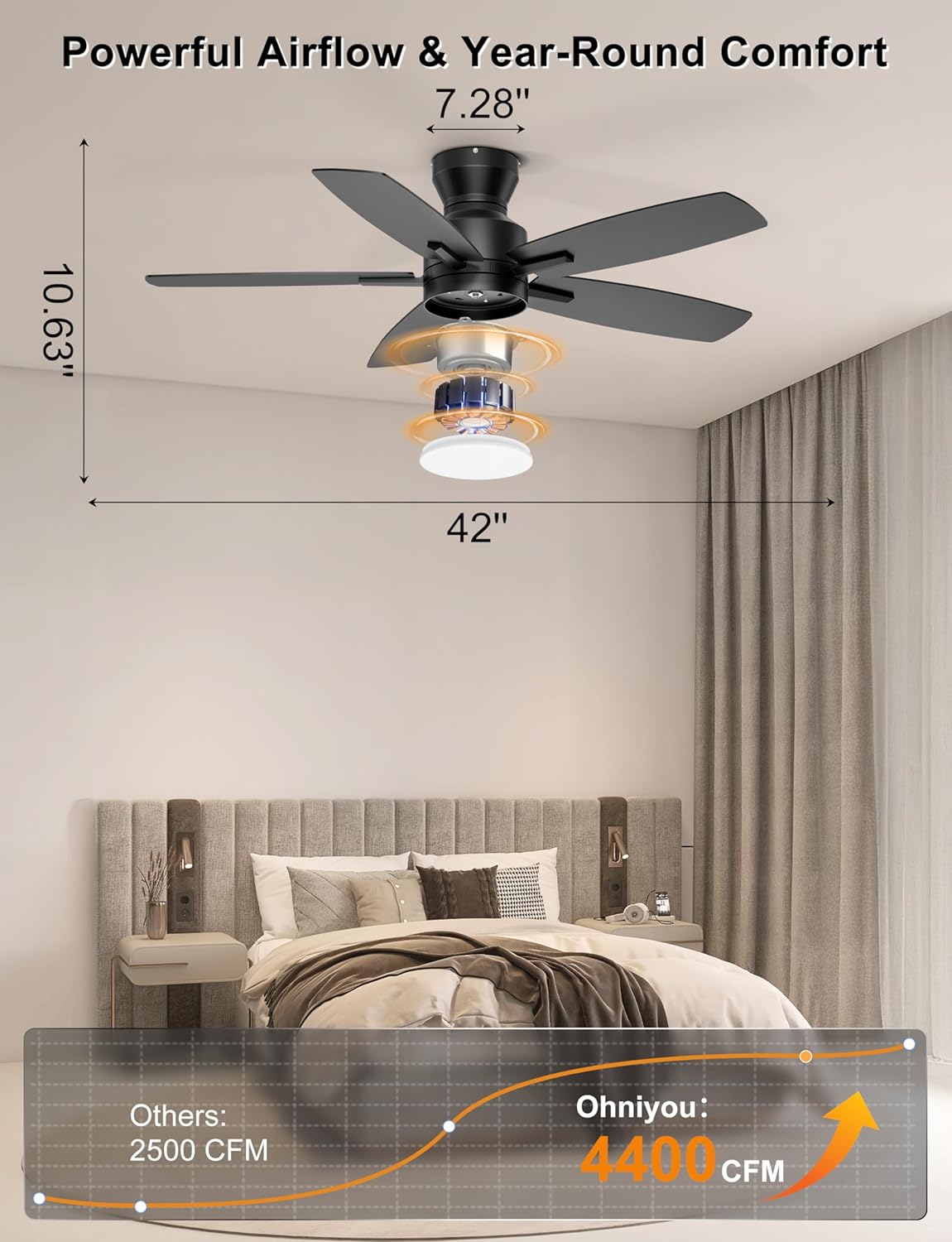
Image: Detailed dimensions of the 42-inch ceiling fan and its powerful 4400 CFM airflow capacity.

Image: Close-up view of the copper brushless DC motor, highlighting its 6 adjustable speeds, 260 RPM max speed, and 85% energy saving efficiency.

Image: Graphic illustrating the quiet operation of the Ohniyou fan at 20dB, compared to other noise levels, and its 2-hour time mode.
Warranty & Support
For any questions, missing parts, or technical support, please contact Ohniyou customer service.
Email: ohniyou@ledphy.com
We aim to reply within 12 hours.


