
HOMCOM 920-105V00WT
HOMCOM Computer Desk on Wheels, Model 920-105V00WT - User Manual
Comprehensive guide for assembly, operation, and maintenance.
1. Introduction
Thank you for choosing the HOMCOM Computer Desk on Wheels, Model 920-105V00WT. This compact and versatile desk is designed to provide an efficient workspace with integrated storage and mobility. This manual provides essential information for safe assembly, proper operation, and effective maintenance of your new desk.

Image 1.1: The HOMCOM Computer Desk on Wheels, showcasing its compact design and integrated storage for a computer setup.
2. Safety Information
Please read and understand all safety instructions before assembly and use. Failure to follow these instructions may result in injury or damage to the product.
- Always assemble according to the provided instructions.
- Keep the desk away from heat sources.
- Do not place heavy objects on the desk that could cause it to tip over. The maximum recommended total weight capacity is 30 kg.
- Always lock the casters when the desk is in use to prevent unintended movement.
3. Package Contents
Before beginning assembly, ensure all components are present and undamaged. If any parts are missing or damaged, please contact customer support.
- Desktop Panel
- Drawer Components
- Shelf Panels (2)
- Metal Frame/Legs
- Casters (4, with 2 lockable)
- Assembly Hardware (screws, bolts, etc.)
- Assembly Instructions
4. Setup and Assembly
Assembly is required for this product. It is recommended that two people assemble the desk to ensure stability and ease of construction. Please note that assembly tools are not included.
- Prepare the Workspace: Clear a spacious area for assembly. Lay out all components and hardware.
- Attach Legs: Securely attach the legs to the base frame using the provided screws. Tighten all screws using an appropriate tool (not included).
- Install Casters: Insert the four casters into the designated holes on the bottom of the leg frame. Ensure they are firmly seated.
- Connect Desktop to Frame: Carefully align the desktop panel with the top of the frame and secure it using the provided bolts.
- Assemble Drawer: Follow the specific instructions for assembling the drawer components. Insert the drawer slides into the side panels of the desk frame.
- Attach Shelves: Position and attach the two shelf panels to the frame using the appropriate hardware. Ensure they are level and secure.
- Final Checks: Verify that all screws and bolts are tightened. Gently test the desk for stability before placing items on it.

Image 4.1: Key components of the desk, including the desktop, drawer, storage shelf, and CPU stand.
5. Operating Instructions
This desk is designed for versatility and convenience in various settings.
- Mobility: The desk is equipped with four casters for easy movement. To move the desk, unlock the two lockable casters.
- Stability: Once the desk is in your desired position, engage the locks on the two lockable casters to prevent accidental movement during use.
- Drawer Use: The integrated drawer provides convenient storage for office supplies. Pull gently to open and push to close.
- Storage Shelves: Utilize the two shelves for organizing books, folders, or other items. The lower compartment is suitable for a CPU tower or storage boxes.
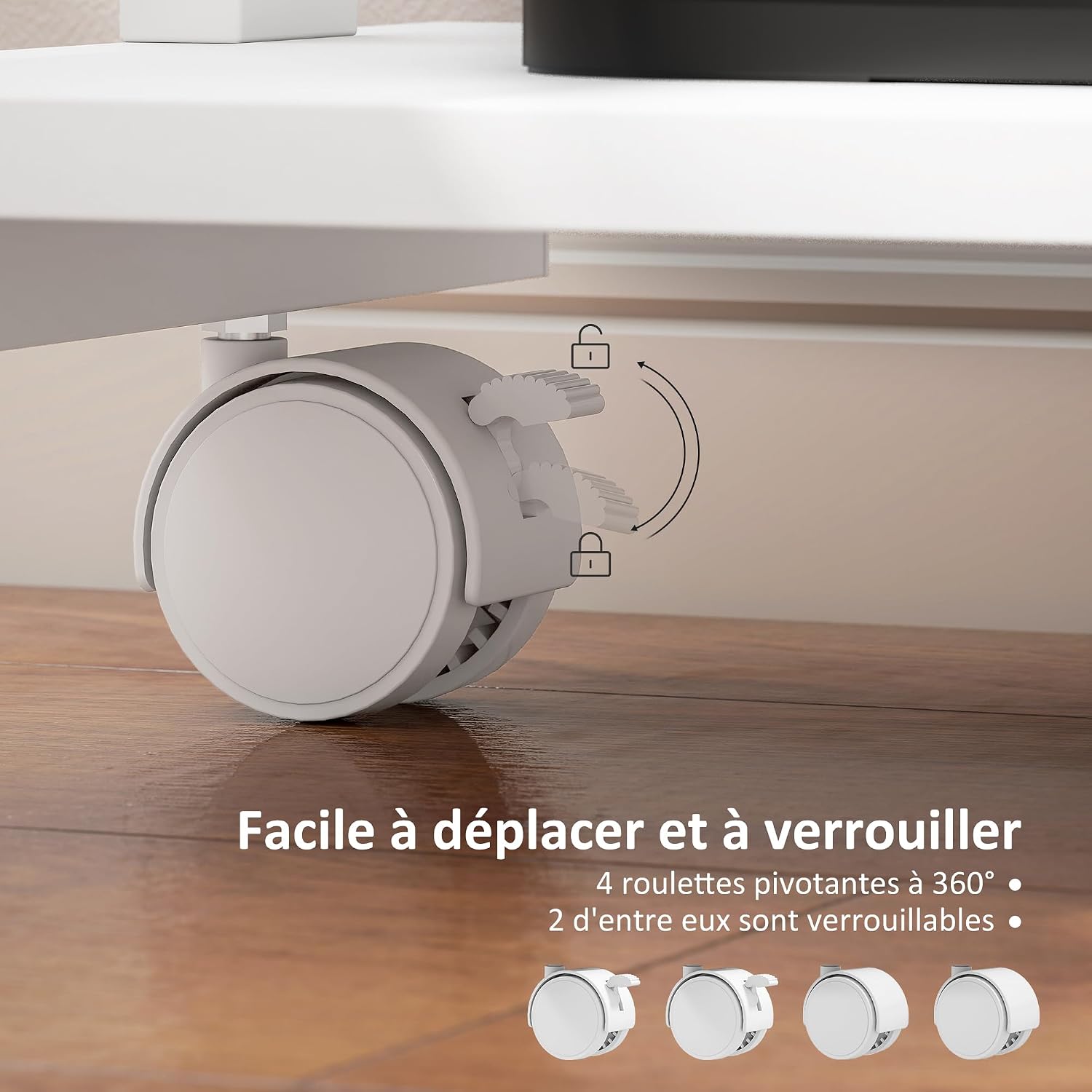
Image 5.1: Detail of the lockable caster, demonstrating how to secure the desk in place.
6. Maintenance
Proper care will extend the life and appearance of your HOMCOM Computer Desk.
- Cleaning: Wipe the desk surfaces clean with a damp cloth. Avoid abrasive cleaners or harsh chemicals that could damage the finish. The melamine-treated surface is scratch-resistant and easy to clean.
- Hardware Check: Periodically check all screws and bolts to ensure they remain tight. Retighten if necessary.
- Caster Care: Keep casters free of debris to ensure smooth movement.
7. Troubleshooting
If you encounter any issues with your desk, refer to the following common solutions:
- Desk is unstable or wobbly:
- Ensure all assembly screws and bolts are fully tightened.
- Verify that the casters are properly inserted and, if applicable, locked when the desk is stationary.
- Drawer does not slide smoothly:
- Check that the drawer slides are correctly installed and aligned.
- Ensure no debris is obstructing the drawer glides.
- Verify that the drawer components are assembled correctly and not warped.
- Difficulty with assembly:
- Re-read the assembly instructions carefully.
- Ensure you are using the correct hardware for each step.
- If a part seems misaligned (e.g., screw holes), double-check the orientation of the components. Do not force parts together.
8. Specifications
| Feature | Detail |
|---|---|
| Model Number | 920-105V00WT |
| Brand | HOMCOM |
| Overall Dimensions (L x W x H) | 56 cm x 51 cm x 79 cm (22.05"D x 20.08"W x 31.1"H) |
| Material | Particle Board, Metal Frame |
| Color | White |
| Weight Capacity (Total) | 30 kg (66 lbs) |
| Drawer Dimensions (Internal) | 28.5L x 44.5D x 5.5H cm |
| CPU Holder Dimensions | 49.5L x 29.5D x 43H cm |
| Storage Shelf Dimensions | 49.5L x 32.5D x 18H cm |
| Number of Drawers | 1 |
| Number of Shelves | 2 |
| Special Features | Compact, Practical drawer, Scratch Resistant, Two shelves, Wheels (2 lockable) |

Image 8.1: Dimensional diagram of the desk, illustrating key measurements.
9. Warranty and Support
This HOMCOM product comes with a Limited Warranty. For specific terms and conditions, please refer to the warranty information provided at the time of purchase or contact HOMCOM customer service.
For technical assistance, missing parts, or any other inquiries, please contact HOMCOM customer support through their official website or the retailer where the product was purchased. Please have your model number (920-105V00WT) and purchase details ready when contacting support.
Related documents920-105V00WT


Ask a question about this manual
Ask about setup, troubleshooting, compatibility, parts, safety, or missing instructions. Manuals+ will review the question and use this page’s manual context to help answer it.