
1. Introduction
Thank you for purchasing the wheelfun HUINA 580 1/14 Metal RC Excavator. This hobby-grade model is designed for enthusiasts seeking a realistic and functional remote-controlled construction vehicle. Featuring a durable metal construction, advanced control capabilities, and interchangeable attachments, this excavator provides an immersive operating experience.
Safety Warning: This product is not suitable for children under 14 years of age.
2. What's in the Box
Please ensure all components listed below are present in your package:
- 1 x HUINA 580 1/14 Metal RC Excavator
- 1 x 2.4G LED Display Radio Controller
- 1 x 7.4V Battery (included)
- 1 x USB Charging Cable
- 1 x English Manual Book
- 1 x Manual Quick-release Coupler
- 1 x Electric Ripper Attachment
- 1 x Electric Timber Grab Attachment
- 1 x Electric Ball Grabber Attachment
- 1 x Electric Shear Attachment
- 1 x Screwdriver

Figure 2.1: Complete package contents of the HUINA 580 RC Excavator.
3. Setup Guide
3.1. Battery Installation
The excavator and remote control require battery installation before first use. Ensure batteries are fully charged using the provided USB charging cable.
Excavator Battery Installation:
- Locate the battery compartment on the top rear of the excavator's body. It features a magnetic slot for easy access.
- Gently open the battery compartment cover.
- Connect the 7.4V battery to the excavator's power connector, ensuring correct polarity.
- Carefully place the battery inside the compartment and close the cover securely.
- Turn on the excavator using the power switch located at the bottom rear of the unit.
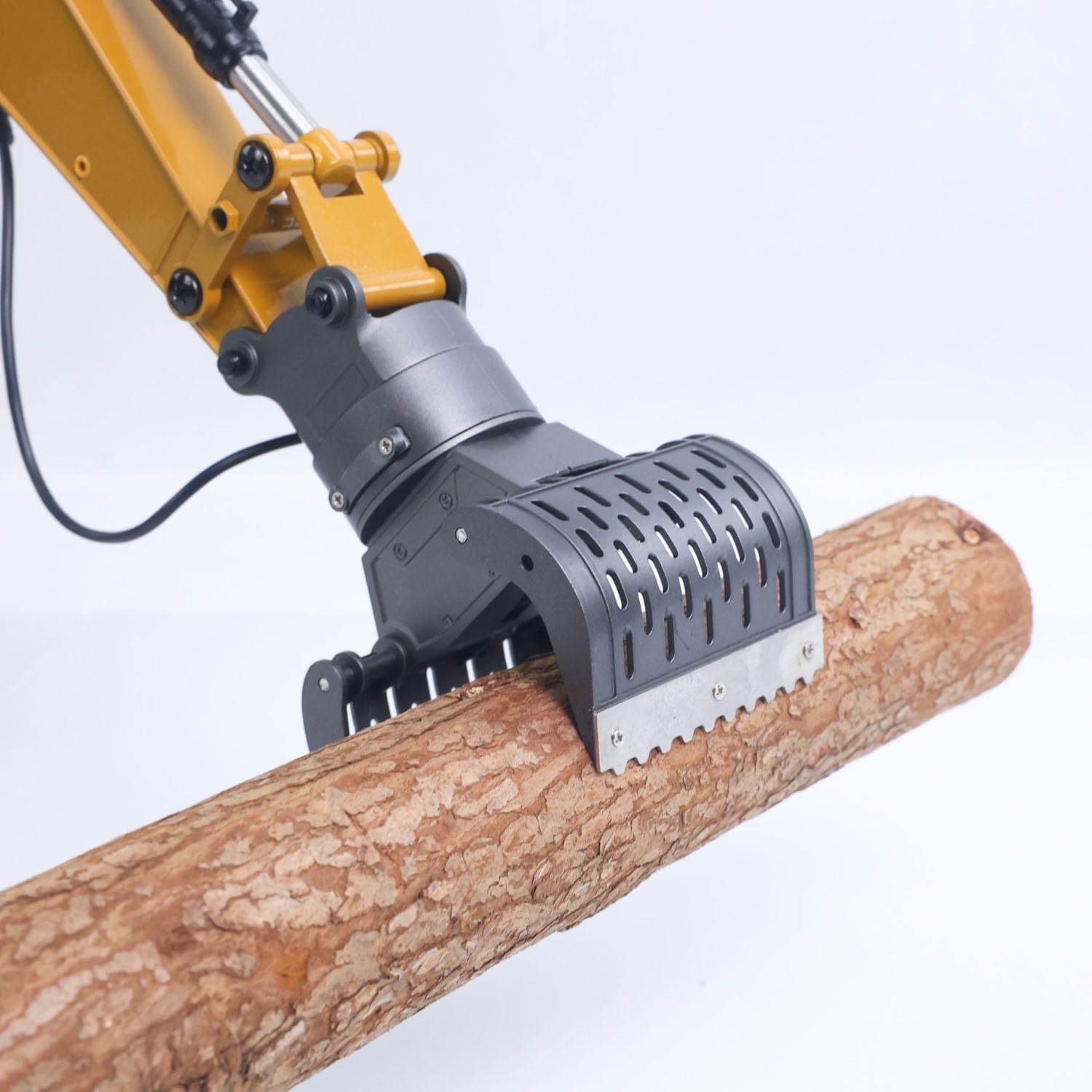
Figure 3.1: Excavator battery installation.
Remote Control Battery Installation:
- Using the provided screwdriver, open the battery cover on the back of the remote control.
- Insert the pre-charged batteries (as specified in the remote's manual, typically AA or AAA, though product data mentions 1 D battery included for the product, the remote usually uses smaller ones) into the battery slots, observing correct polarity.
- Close the battery cover and secure it with the screw.

Figure 3.2: Remote control battery installation.
3.2. Pairing the Remote Control
Once both the excavator and remote control have batteries installed and are powered on, they should automatically pair. The remote control's LED screen will stay on, and the excavator's lights will illuminate to indicate a successful connection.
Video 3.1: Demonstration of the HUINA RC Excavator's setup and basic functions, including battery installation and remote control pairing. (Source: Toucan RC Hobby)
4. Operating the Excavator
The HUINA 580 offers precise control over its movements and functions. Familiarize yourself with the remote control layout and practice movements in an open area.
4.1. Basic Controls
- Track Movement: Use the left and right joysticks to control forward, backward, and turning movements of the tracks.
- Cab Rotation: The cab can spin a full 360 degrees, allowing operation from any angle.
- Arm and Bucket Control: Separate controls allow for independent movement of the main arm, forearm, and bucket for realistic digging and lifting actions.
- Sound and Lights: The excavator features realistic sound effects and working lights for enhanced play. These can typically be toggled on/off via dedicated buttons on the remote.

Figure 4.1: HUINA 580 Excavator overview.
4.2. Swapping Attachments
The excavator comes with a manual quick-release coupler, allowing for fast and easy swapping of various electric tools:
- 360° Rotating Shear: For cutting and demolition tasks.
- 360° Rotating Timber Grab: Ideal for lifting and moving logs or similar objects.
- Ball Grabber: Designed for picking up and moving spherical objects.
- Hammer: For breaking down small structures or hard surfaces.
To swap attachments, ensure the excavator is powered off. Use the quick-release mechanism to detach the current tool and securely attach the desired one. Power on the excavator to resume operation.

Figure 4.2: Electric Timber Grab in action.
Video 4.1: Official product video showcasing the HUINA 580 1/14 Metal RC Excavator's features, including its various attachments and operational capabilities. (Source: Wheelfun RC Hobby)
5. Maintenance
5.1. Battery Care
- Always use the provided USB charging cable to charge the 7.4V battery.
- Do not overcharge or completely discharge the battery, as this can reduce its lifespan.
- Store batteries in a cool, dry place away from direct sunlight and extreme temperatures.
- If the excavator will not be used for an extended period, remove the battery from the unit.
5.2. Cleaning and Storage
- After use, especially in dusty or sandy environments, gently wipe down the excavator with a soft, dry cloth to remove dirt and debris.
- Avoid using water or harsh chemicals, as these can damage electronic components.
- Store the excavator in its original EPP foam case for serious protection, or in a clean, dry place away from direct sunlight and moisture.
5.3. Professional Maintenance Services
wheelfun offers professional after-sales and technical maintenance support. Technicians can provide guidance in English through video or text for repairs. For detailed assistance, please refer to the contact information provided in your product manual or on the official wheelfun website.
6. Troubleshooting
If you encounter any issues with your HUINA 580 excavator, please refer to the following common problems and solutions:
- Excavator not responding to remote:
- Ensure both the excavator and remote control are powered on.
- Check that batteries in both units are fully charged and correctly installed.
- Re-pair the remote control by turning both units off and then on again.
- Weak performance or short play time:
- Fully charge the excavator battery.
- Ensure the battery is securely connected.
- Avoid operating the excavator on excessively rough terrain or with heavy loads, which can drain the battery faster.
- Attachments not functioning correctly:
- Ensure the attachment is securely connected to the quick-release coupler.
- Check for any obstructions or debris in the attachment's moving parts.
- Item damaged out of box:
If the item is damaged upon arrival, please contact wheelfun customer support immediately. We use solid packaging for all items, and we can resend a free replacement part if damage occurs during shipping.
7. Specifications
| Feature | Detail |
|---|---|
| Brand Name | wheelfun |
| Model Name | TH25483-AMZUS2-S |
| Scale | 1/14 |
| Material Type | Metal |
| Power Source | Battery Powered |
| Battery Description | Lithium-Ion Polymer (7.4V) |
| Operation Mode | Remote Control, App Control |
| Item Dimensions (L x W x H) | 27.2 x 14.8 x 11.2 inches |
| Color | Yellow |
| Additional Features | Lightweight, Adjustable, Sound, Lights |
8. Warranty and Support
wheelfun is committed to providing high-quality products and excellent customer service. Our mission is to provide fun and exploration opportunities of hydraulic principles for hobby-level players, inspiring interest in science, engineering, and technology.
For any product-related inquiries, technical support, or warranty claims, please contact wheelfun customer service through the contact information provided in your product packaging or on the official wheelfun website. Our professional after-sales team and technical maintenance team are ready to assist you.
