
1. Introduction
This manual provides instructions for the installation, operation, and maintenance of the BAFANG B02N eBike Display. The B02N is an IPS color display designed for BAFANG mid-drive motors, offering various functions including speed display, pedal assist level control, battery indication, and Bluetooth connectivity.

Figure 1.1: BAFANG B02N eBike Display mounted on bicycle handlebars.
2. Compatibility
The BAFANG B02N display is compatible with BAFANG electric bike motors utilizing the UART 5.0~5.8 protocol. It is specifically designed for BAFANG BBS01, BBS02, and BBSHD series mid-drive motors. Ensure your motor uses a 5-pin female round connector for UART protocol compatibility.

Figure 2.1: Compatibility overview for the B02N display, highlighting supported motor types and connector protocols.
Important: This display is not compatible with CAN protocol motors or other brands of mid-drive or hub motors. Verify your motor's protocol and connector type before installation.
3. Features
The BAFANG B02N display offers a range of features to enhance your eBike experience:
- IPS Color Display: Provides clear visibility of riding data.
- Type-C Charging Port: Allows charging of mobile devices directly from the display.
- Bluetooth Connectivity: Enables connection to a mobile application for data synchronization and navigation.
- Multi-Language Support: Offers 8 language options for user interface.
- Adjustable Pedal Assist Levels: Supports 3, 5, or 9 pedal assist levels.
- Mileage Reset Function: Allows resetting of trip mileage.
- Password Protection: Includes start password and advanced setting password options.
- Automatic Backlight: Adjusts display brightness based on ambient light.
- IP67 Waterproof Rating: Designed to withstand water splashes and rain.
- Real-time Battery Indicator: Provides accurate feedback on battery power.
- Multiple Display Themes: Four different themes are available for user selection.

Figure 3.1: Visual representation of key display functions.
4. Setup and Installation
Installation of the BAFANG B02N display is designed to be straightforward. Follow these general steps:
- Mounting: Securely attach the display to your eBike handlebars using the provided clamp. Ensure it is positioned for optimal visibility and accessibility.
- Connection: Connect the display's cable to the corresponding UART connector on your BAFANG mid-drive motor system. Ensure the 5-pin female round connector is properly aligned and fully inserted.
- Cable Management: Route the cable neatly along your bike frame and secure it to prevent interference with moving parts or accidental damage.
For detailed installation instructions specific to your eBike model, refer to your motor's manual or consult a qualified eBike technician.
5. Operation
The B02N display features intuitive controls for easy operation:
- Power Button: Press and hold to power the display on or off. A short press may cycle through display modes or confirm selections.
- Up/Down Buttons (+/-): Used to adjust pedal assist levels, navigate menus, or change settings values.
- Information Display: The main screen shows current speed, battery level, pedal assist level, trip distance, odometer, and power output.
6. Settings and Functions
6.1. Type-C Charging Port
The integrated Type-C port allows you to charge compatible mobile phones or other small electronic devices directly from your eBike's battery via the display.

Figure 6.1: Using the Type-C port for charging a mobile device.

Figure 6.2: Location of the Type-C charging port on the display.
6.2. Bluetooth and Navigation
The B02N display supports Bluetooth connectivity, allowing it to pair with a mobile application (e.g., BIKE GO). Once connected, you can access relevant riding data on your smartphone and utilize navigation features directly through the app, which can be displayed on the screen.

Figure 6.3: Bluetooth connectivity and navigation integration with a mobile application.
6.3. Multi-Language Selection
The display offers 8 language options for the user interface. To change the language, navigate to the "Language" menu within the display settings.
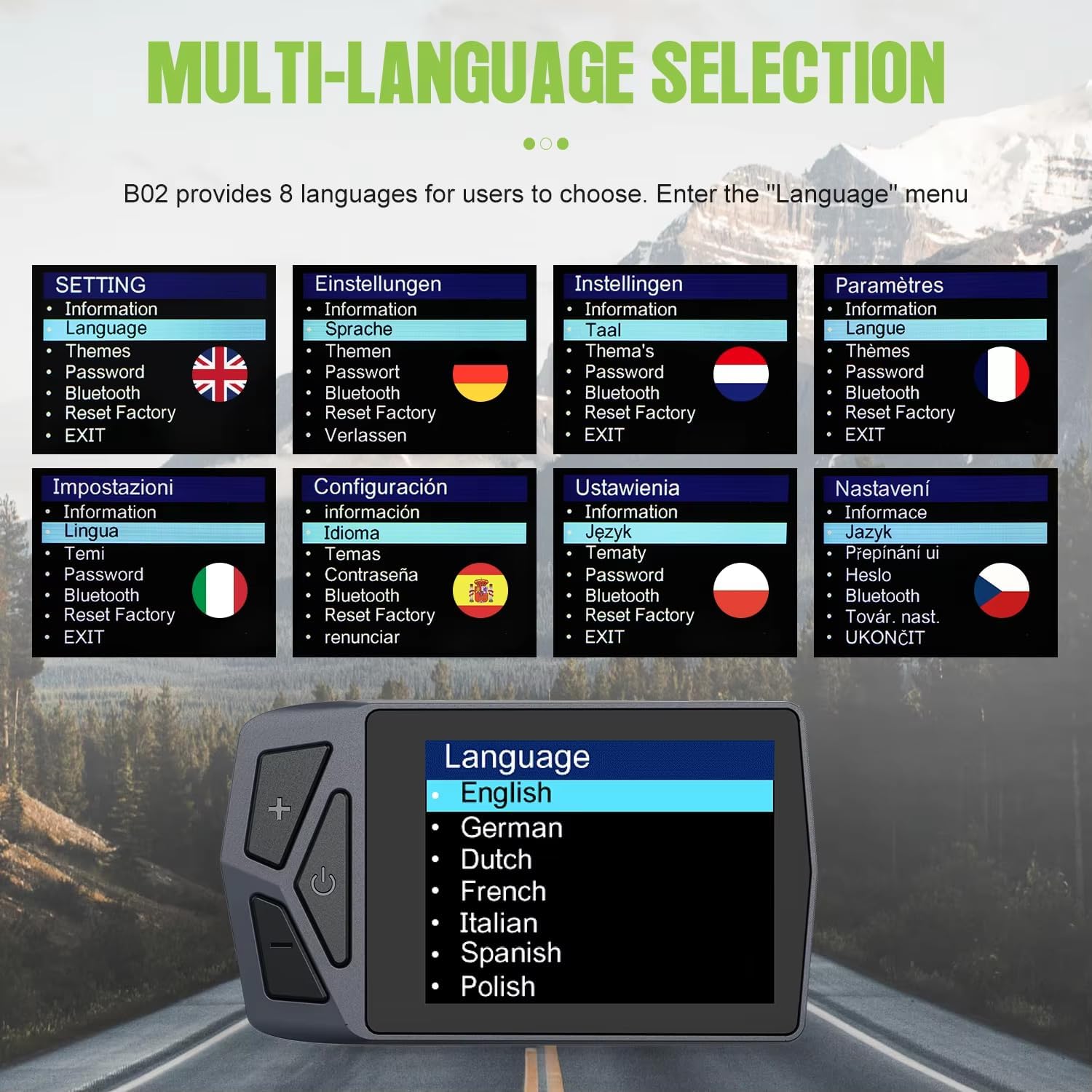
Figure 6.4: Language selection menu on the B02N display.
6.4. Pedal Assist System (PAS) Levels
The B02N display allows you to select between 3, 5, or 9 pedal assist levels, depending on your preference and riding conditions. This setting can typically be adjusted in the display's advanced settings menu.

Figure 6.5: Pedal Assist Level (Boost Gear) selection menu.
6.5. Other Settings
- Passwords: Set a start password for security and an advanced setting password to prevent unauthorized changes to critical parameters.
- Mileage Reset: The trip mileage can be reset to zero through the display settings.
- Themes: Choose from four different display themes to customize the visual interface.
- Unit Selection: Switch between Kilometers (km) and Miles (mi) for speed and distance readings.
7. Specifications
Detailed technical specifications for the BAFANG B02N eBike Display:

Figure 7.1: BAFANG B02N Display dimensions and technical specifications.
| Specification | Value |
|---|---|
| Model Name | BAFANG eBike Display B02N |
| Brand | mGYDY (Manufacturer) / BAFANG (Product) |
| Material | ABS |
| Color | Black |
| Connector | 5PIN Female Round |
| Protocol | UART (5.0~5.8) |
| Screen | 2.4" IPS Color Screen |
| Voltage Compatibility | 12V / 36V / 48V / 60V |
| PAS Levels | 0-3, 0-5, 0-9 Optional |
| Speed Limit | 0km/h ~ 99km/h |
| USB Port | Type-C (for charging) |
| Waterproof Rating | IP67 |
| Operating Temperature | -20℃ ~ 70℃ |
| Storage Temperature | -30℃ ~ 80℃ |
8. Maintenance
To ensure the longevity and optimal performance of your BAFANG B02N display, follow these maintenance guidelines:
- Cleaning: Wipe the display screen and body with a soft, damp cloth. Avoid using abrasive cleaners or solvents that could damage the surface.
- Water Exposure: While the display has an IP67 waterproof rating, avoid submerging it in water or exposing it to high-pressure water jets. Ensure the Type-C port cover is securely closed when not in use.
- Connection Check: Periodically inspect the cable connections for any signs of wear, corrosion, or looseness. Ensure all connections are secure.
- Storage: When not in use for extended periods, store the eBike and display in a dry, temperate environment.
9. Troubleshooting
If you encounter issues with your BAFANG B02N display, consider the following basic troubleshooting steps:
- Display Not Powering On:
- Check if the eBike battery is charged and properly connected.
- Ensure all cable connections between the display and the motor are secure.
- Incorrect Speed/Distance Readings:
- Verify that the wheel circumference setting in the display is correct.
- Check the speed sensor for proper alignment and cleanliness.
- Bluetooth Connection Issues:
- Ensure Bluetooth is enabled on both the display and your mobile device.
- Restart both the display and your mobile device.
- Ensure you are using the correct mobile application (e.g., BIKE GO).
- Error Codes: If an error code appears on the display, consult the BAFANG motor manual or contact customer support for specific interpretations and solutions.
If these steps do not resolve the issue, please contact the manufacturer or your eBike dealer for further assistance.
10. Warranty and Support
The BAFANG B02N eBike Display comes with a 1-Year Manufacturer Warranty. This warranty covers defects in materials and workmanship under normal use.
For warranty claims, technical support, or any questions not covered in this manual, please contact the manufacturer (mGYDY) or your authorized dealer. Provide your product model number (B02N) and proof of purchase when seeking support.
Manufacturer: mGYDY