
1. Important Safety Instructions
Please read all instructions carefully before using this appliance. Keep this manual for future reference.
- Ensure the voltage specified on the rating label matches your mains voltage.
- Do not immerse the fan, plug, or cord in water or other liquids.
- Unplug the fan from the outlet when not in use, before cleaning, or before moving.
- Do not operate the fan with a damaged cord or plug. Contact authorized service personnel for repair.
- Keep fingers and other objects away from the fan blades and openings.
- Do not use the fan near windows, in bathrooms, or in wet environments.
- This appliance is not intended for use by persons (including children) with reduced physical, sensory, or mental capabilities, or lack of experience and knowledge, unless they have been given supervision or instruction concerning use of the appliance by a person responsible for their safety.
- Children should be supervised to ensure that they do not play with the appliance.
2. Product Overview
The Mistral MFD4389DRW is a 43-inch DC Turbo Tower Fan designed for efficient air circulation. It features a DC brushless motor, 12 speed settings, and multiple operating modes. Control options include a full touch screen, remote control, and Wi-Fi with online voice control capabilities. The fan also offers a unique height conversion feature and 60-degree left-right oscillation.

Figure 2.1: Front view of the Mistral MFD4389DRW DC Turbo Tower Fan, showcasing its sleek design and touch control panel.

Figure 2.2: Side view of the Mistral MFD4389DRW DC Turbo Tower Fan, highlighting its slim profile.

Figure 2.3: Back view of the Mistral MFD4389DRW DC Turbo Tower Fan, showing the air intake grille.
3. Package Contents
Verify that all components are present in the packaging:
- Mistral MFD4389DRW DC Turbo Tower Fan Unit
- Remote Control
- User Manual (this document)
- Base components (if not pre-assembled)
- Height extension component (for convertible height models)
4. Assembly
The Mistral MFD4389DRW fan features simple assembly. Typically, this involves attaching the base to the main fan unit. For models with height conversion, an additional extension piece may need to be secured.
- Carefully remove all components from the packaging.
- Place the main fan unit upside down on a soft, flat surface to avoid scratching.
- Align the base with the bottom of the fan unit. Ensure the power cord passes through the designated opening in the base.
- Secure the base to the fan unit using the provided screws (if applicable).
- For height conversion, insert the extension component between the base and the main unit, ensuring it clicks securely into place or is fastened as per instructions.
- Place the fan upright on a stable, level surface.
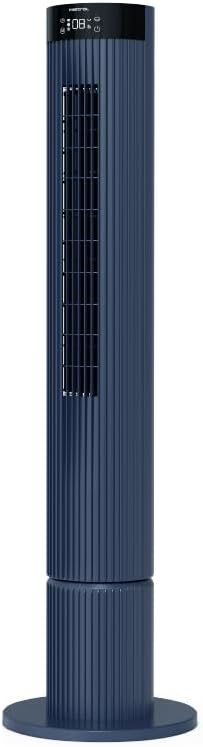
Figure 4.1: The fan demonstrating its convertible height feature, allowing adjustment between two different heights.
5. Setup and Initial Use
After assembly, position the fan in your desired location. Ensure it is on a stable, flat surface and away from curtains or objects that could obstruct airflow.
- Plug the power cord into a suitable electrical outlet (220-240V~, 50-60Hz).
- The fan will enter standby mode. The touch screen display may illuminate briefly.
- To power on, touch the power icon on the control panel or press the power button on the remote control.
6. Operating Instructions
The fan can be operated via the full touch screen control panel on the unit or the included remote control.
6.1 Control Panel Functions
The touch screen control panel provides access to all fan functions:
- Power Button: Turns the fan On or Off.
- Speed Adjustment: Cycles through 12 fan speeds.
- Mode Selection: Switches between Turbo, One-key Cycle, and Baby modes.
- Oscillation: Activates or deactivates 60-degree left-right oscillation.
- Timer: Sets the pre-set On/Off timer for up to 12 hours.
- Wi-Fi Indicator: Shows Wi-Fi connection status.
6.2 Remote Control
The remote control duplicates all functions available on the touch screen panel for convenient operation from a distance.
- Ensure the remote control has working batteries.
- Point the remote control towards the fan's control panel for optimal signal reception.
6.3 Operating Modes
- Turbo Mode: Provides maximum airflow for rapid cooling.
- One-key Cycle Mode: Automatically cycles through different fan speeds to simulate natural breeze.
- Baby Mode: Operates at a gentle, quiet speed suitable for nurseries or light sleeping.
7. Wi-Fi and Online Voice Control
The Mistral MFD4389DRW fan can be connected to your home Wi-Fi network for smart control via a mobile application and online voice commands.
7.1 Wi-Fi Connection
- Download the official Mistral smart home application from your device's app store.
- Register or log in to your account within the app.
- Ensure your mobile device is connected to a 2.4GHz Wi-Fi network.
- Follow the in-app instructions to add a new device. This typically involves putting the fan into pairing mode (refer to the app or fan display for specific instructions, often by holding a Wi-Fi button).
- Once connected, the Wi-Fi indicator on the fan's control panel will illuminate steadily.
7.2 Online Voice Control
After successful Wi-Fi connection, you can link your fan to compatible smart home voice assistants (e.g., Google Assistant, Amazon Alexa) through the Mistral app settings.
- Open the Mistral app and navigate to the 'Integrations' or 'Voice Control' section.
- Select your preferred voice assistant and follow the prompts to link your Mistral account.
- Once linked, you can use voice commands such as:
- "Turn on the fan."
- "Set fan speed to 5."
- "Turn off oscillation."
- "Change fan mode to Baby."
8. Maintenance
Regular cleaning helps maintain the fan's performance and extends its lifespan.
8.1 Cleaning
- Always unplug the fan from the power outlet before cleaning.
- Use a soft, damp cloth to wipe the exterior surfaces of the fan. Do not use abrasive cleaners or solvents.
- Use a vacuum cleaner with a brush attachment to remove dust from the air intake and outlet grilles.
- Ensure the fan is completely dry before plugging it back in and operating.
8.2 Storage
If storing the fan for an extended period, unplug it, clean it thoroughly, and store it in its original packaging or a dust-free environment.
9. Troubleshooting
If you encounter issues with your fan, refer to the following common problems and solutions:
| Problem | Possible Cause | Solution |
|---|---|---|
| Fan does not turn on. | No power supply. | Check if the power cord is securely plugged into a working outlet. |
| Weak airflow. | Air intake/outlet blocked; Fan speed too low. | Clean grilles to remove dust. Increase fan speed. |
| Fan makes unusual noise. | Obstruction; Loose parts. | Unplug and check for any foreign objects. Ensure base is securely attached. |
| Remote control not working. | Dead batteries; Obstruction. | Replace remote control batteries. Ensure no objects are blocking the signal path. |
| Wi-Fi connection fails. | Incorrect Wi-Fi password; Router issues; Fan too far from router. | Verify Wi-Fi password. Ensure fan is within range of a 2.4GHz Wi-Fi network. Restart router and fan. |
If the problem persists after attempting these solutions, please contact customer support.
10. Specifications
| Feature | Specification |
|---|---|
| Model | MFD4389DRW |
| Voltage | 220-240V~, 50-60Hz 1.3A |
| Wattage | 40W |
| Air Volume | 29.54 m³ / min |
| Max Air Flow | 4.26 m / s |
| Noise Level (Lowest Speed) | 33.2dB |
| Noise Level (Highest Speed) | 68.3dB |
| Product Dimensions (L*W*H) | 168 * 300 * 900 OR 1104 mm |
| Net Weight | 4.46 KGS |
| Safety Mark | 250467-11 |
| Special Features | Remote Controlled, Timer, Wi-Fi Enabled |
| Number of Speeds | 12 |
11. Warranty and Support
This Mistral MFD4389DRW DC Turbo Tower Fan comes with a comprehensive warranty:
- General Warranty: 1 Year from the date of purchase.
- Motor Warranty: An additional 3 Years for the motor only, totaling 4 years for the motor.
For warranty claims, technical support, or service inquiries, please contact your local Mistral authorized service center or refer to the contact information provided on the official Mistral website.
