1. Introduction
This manual provides comprehensive instructions for the installation, operation, maintenance, and troubleshooting of your APEC WATER ROCT-C1 Countertop Reverse Osmosis Water Filter. Please read this manual thoroughly before operating the unit to ensure proper function and longevity of your system. Keep this manual for future reference.
2. Important Safety Information
- Ensure the unit is placed on a stable, level surface.
- Do not immerse the unit in water or other liquids.
- Unplug the unit from the power outlet before cleaning or performing any maintenance.
- Keep the unit away from direct sunlight and heat sources to maintain optimal performance.
- Do not use the unit with water that is microbiologically unsafe or of unknown quality without adequate disinfection before or after the system.
- Never top off old water in the tap water tank; always empty it first, then refill.
3. Product Components
The APEC WATER ROCT-C1 system includes the following components:
- ROCT-C1 Main Unit
- Tap Water Tank with Lid
- Purified Water Jug with Lid
- Removable Drip Tray
- Pre-installed All-in-One RO Filter Cartridge
- Power Cord (pre-installed)

Figure 3.1: APEC WATER ROCT-C1 Countertop Reverse Osmosis Water Filter with its main components.
4. Setup Instructions
Follow these steps for the initial setup of your ROCT-C1 system:
- Unpacking and Placement: Unbox the unit and place it on a flat, sturdy surface near a power outlet. Ensure at least 8 inches of space behind and to the left for proper airflow. Keep it out of direct sunlight and away from heat sources.
- Remove Tanks: Remove both the tap water tank and the purified water jug from the main unit. Allow the system to cool for 15 minutes if recently used.
- Fill Tap Water Tank: Fill the tap water tank with tap water up to the MAX line. Reinstall the filled tank onto the machine, ensuring it aligns fully with the back panel.
- Install Purified Water Jug: Ensure the purified water jug is aligned correctly with its base. The purified water jug indicator on the display panel will light up solid when placed properly.
- Plug In: Plug the unit into a grounded power outlet.
- Initial Flush (6 Cycles): The system will automatically begin purifying water. Once the purified water jug fills, remove it and discard the water. Repeat this cycle five more times (total of 6 cycles) to complete the initial flush. This clears out any manufacturing residue and primes the filter.
- Cold Water Tank Flush (3 Cycles): After the initial flush, fill the tap water tank again. Use the touch panel to select the cold water button. Flush cold water three times by dispensing a full volume each time, discarding the water after each dispense. This flushes the cold water tank.
Video 4.1: APEC ROCT-C1 Countertop Reverse Osmosis System Installation Guide. This video demonstrates the unboxing, component identification, and initial setup process for the ROCT-C1 water filter.
5. Operating Instructions
Your ROCT-C1 system offers convenient access to purified water. Here's how to operate it:
- Filling the Tap Water Tank: Always ensure the tap water tank is filled with fresh tap water. Never top off old water; empty the tank first, then refill.
- Selecting Water Temperature: Use the intuitive touch panel to select your desired water temperature: Cold (chilled to approximately 40°F) or Ambient (room temperature). Note that chilled water takes about 45 minutes to cool to the optimal temperature (between 43°F and 50°F).
- Selecting Dispense Volume: Choose your desired dispense volume from the options on the touch panel: 8 oz, 12 oz, or 16 oz.
- Dispensing Water: Place a glass or container under the dispenser nozzle. Press the Dispense icon to start. You can stop dispensing at any time by pressing any button.
- Using the Removable Pitcher: The purified water jug can be removed from the unit and used to serve water directly or stored in the refrigerator.
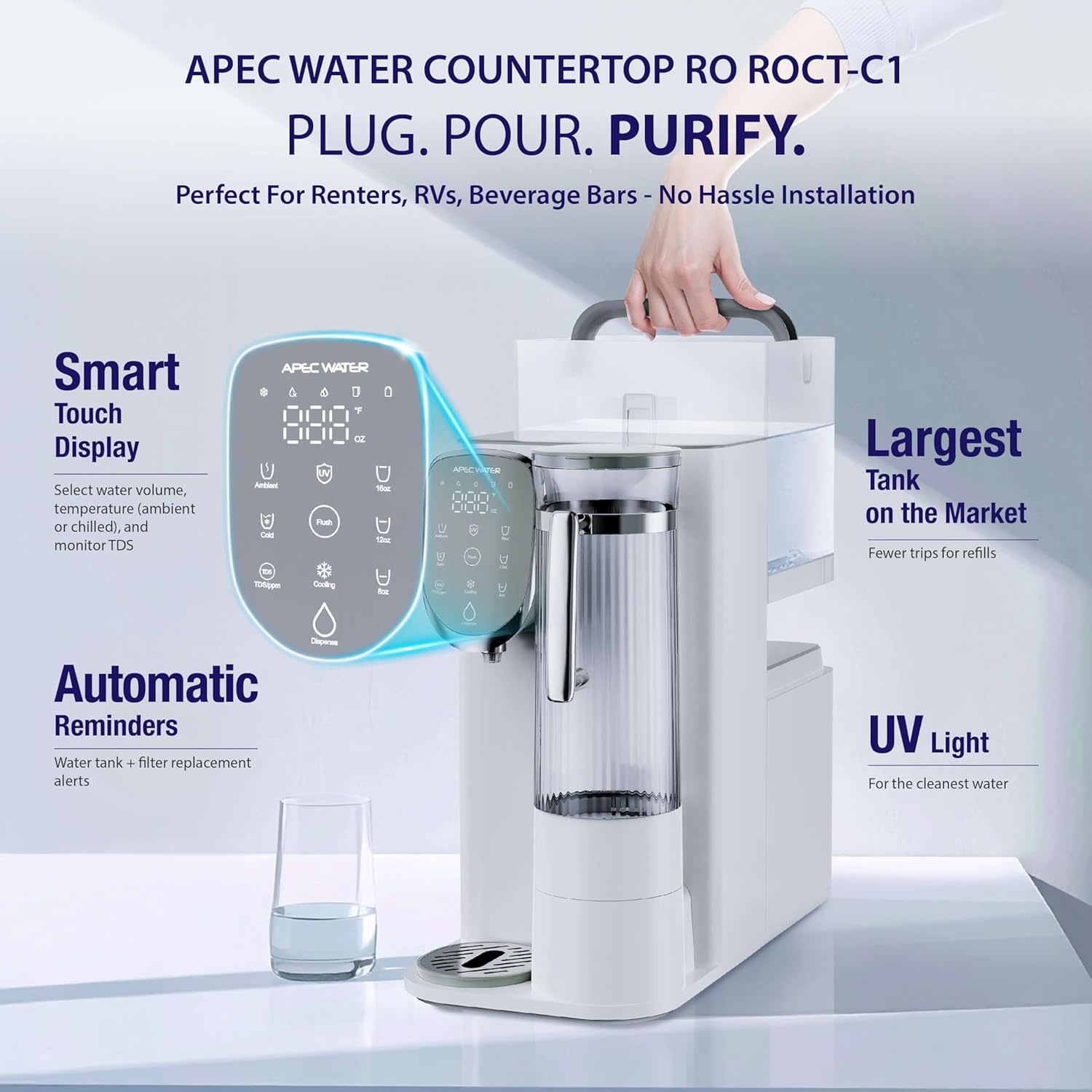
Figure 5.1: The touch panel allows selection of water temperature and dispense volume, while the removable jug offers convenience.
Video 5.1: APEC Countertop RO System Featured. This video highlights the key features and ease of use of the APEC ROCT-C1 system, including its touch panel controls and water dispensing capabilities.
6. Maintenance
Regular maintenance ensures the optimal performance and longevity of your ROCT-C1 system.
6.1 Filter Replacement
The ROCT-C1 uses a single All-in-One RO cartridge. Replace the filter every 12 months or when the filter life indicator on the display panel blinks or stays solid red, or if water output slows significantly, or taste/clarity changes.
- Power Off: Turn off the power and unplug the unit.
- Remove Tanks: Remove both the tap water tank and purified water jug. Allow the system to cool for 15 minutes if recently used.
- Remove Front Panel: Gently pull the front panel towards you to remove it.
- Remove Old Filter: Hold the old filter firmly, twist counterclockwise, and pull straight out. Note: Some residual water may drip; use a cloth to protect surfaces.
- Install New Filter: Unbox your new replacement filter. Align the connector tabs with the port inside the unit. Insert the cartridge and turn clockwise until it locks into place with a firm click. Ensure it is securely installed before closing the panel.
- Reset Filter Life: Press and hold the filter reset button (UV icon) on the display panel for 3 seconds. The filter light will turn off, confirming a successful reset.
- Reinstall Tanks and Flush: Reinstall the tanks, plug the unit back in, and fill up the tap water tank. Run 2-3 full cycles and discard the water to flush out the new filter.
Video 6.1: APEC ROCT-C1 Filter Replacement. This video provides a step-by-step guide on how to replace the All-in-One filter cartridge in your ROCT-C1 system.
6.2 Cleaning
- Clean the purified water jug and tap water tank weekly with mild soap and water. Rinse thoroughly.
- Wipe the exterior of the unit with a soft, damp cloth. Do not use abrasive cleaners.
6.3 Descaling
Descale the tap water tank every three months using a citric acid solution to prevent mineral buildup. Follow the instructions provided with your descaling solution.
7. Troubleshooting
| Problem | Possible Cause | Solution |
|---|---|---|
| No water dispensed | Unit unplugged; Tap water tank empty; Purified water jug not correctly installed; Filter expired. | Check power connection; Refill tap water tank; Realign purified water jug; Replace filter. |
| Slow water flow | Clogged filter; Air in system. | Replace filter; Perform a flush cycle. |
| Unpleasant taste/odor | Expired filter; Tanks need cleaning. | Replace filter; Clean water jug and tap water tank. |
| Filter indicator light blinking/solid red | Filter needs replacement. | Replace filter and reset filter life indicator. |
| Water not cold enough | Insufficient cooling time; Unit near heat source. | Allow 45 minutes for cooling; Relocate unit away from heat. |
8. Specifications
- Model Name: ROCT-C1
- Brand: APEC WATER
- Product Dimensions: 15.7"L x 8.3"W x 18.1"H
- Item Weight: 21.9 pounds (9.96 Kilograms)
- Installation Type: Countertop
- Power Source: Corded Electric
- Purification Method: Reverse Osmosis, Ultraviolet (UV)
- Special Feature: Portable, Reduces TDS, Chills Purified Water to 40°F
- Supported Water TDS Level Maximum: 300 PPM
- Material: Polypropylene
- Capacity: 1.3 Gallons
9. Warranty
The APEC WATER ROCT-C1 system includes a comprehensive 1-year satisfaction coverage. For detailed warranty terms and conditions, please refer to the official APEC WATER website or contact customer support.
10. Customer Support
For any questions, assistance, or to order replacement filters, please utilize the following resources:
- Online Resources: Access installation videos and troubleshooting guides on the APEC WATER website.
- Customer Assistance: Contact APEC WATER customer service for expert lifetime service.
- Website: www.apecwater.com

Figure 10.1: APEC Water Systems customer support is available to assist you.