
Introduction
Thank you for choosing the Diyeeni Digital Camera. This manual provides essential information for setting up, operating, and maintaining your camera. Please read it carefully to ensure proper use and to maximize your photography experience. This camera is designed to capture high-quality 5K video and 75MP photos, featuring an 18x digital zoom and a convenient 180° flip screen.
Package Contents
Verify that all items listed below are included in your package:
- 1 x Diyeeni Digital Camera
- 1 x Hand Strap
- 1 x Charging Cable
- 1 x Instruction Manual
- 1 x BL-5C Li-ion Battery (1150mAh)
- 1 x Cleaning Cloth
- 1 x Storage Bag
- 1 x Wide Angle Macro Filter
- 1 x 32GB Memory Card (Class 10)
- 1 x Memory Card Case

Image: The Diyeeni Digital Camera shown with its complete set of accessories, including the hand strap, charging cable, battery, cleaning cloth, storage bag, wide-angle macro filter, and memory card.
Product Overview
Familiarize yourself with the main components of your Diyeeni Digital Camera.
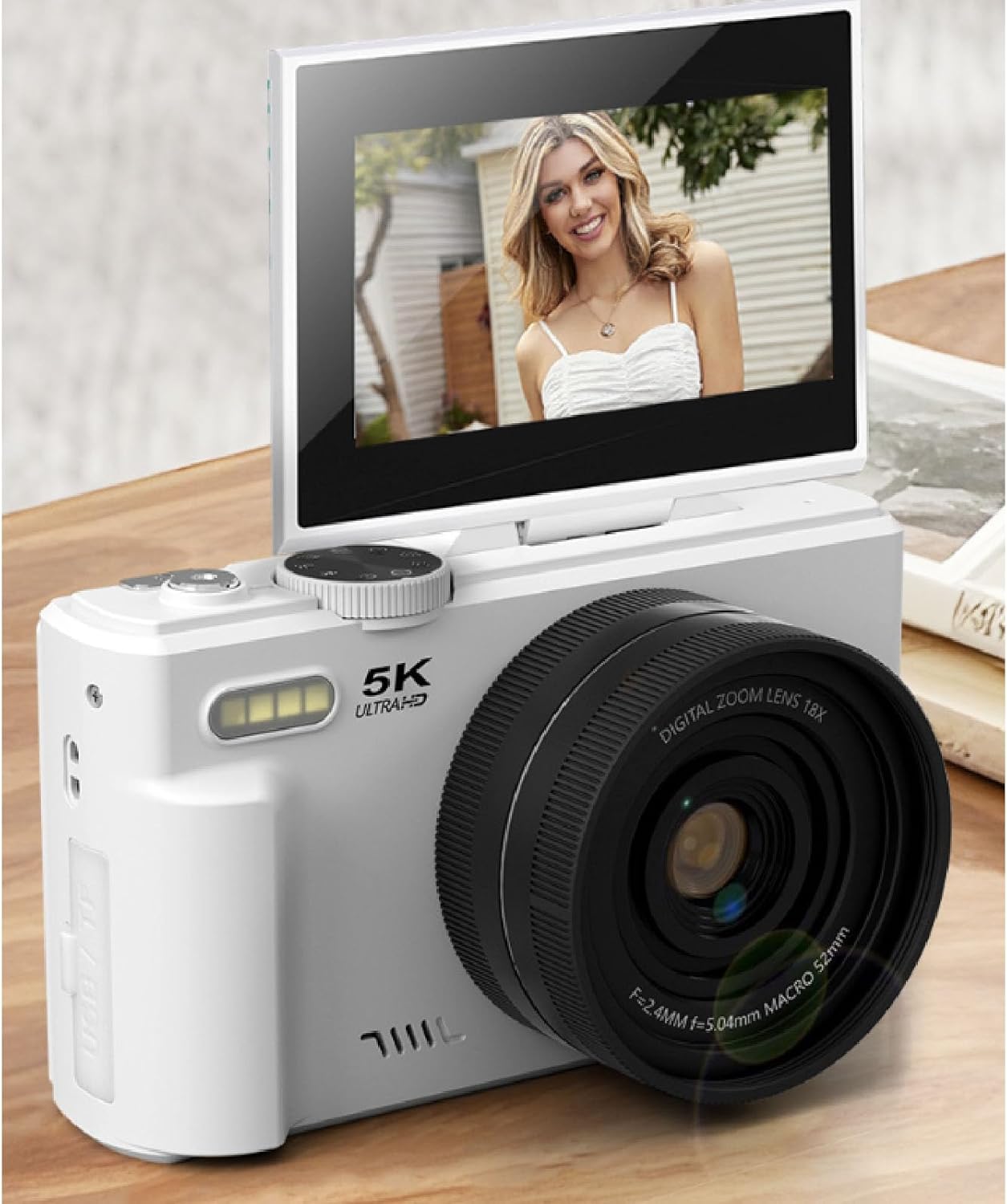
Image: A front-angle view of the Diyeeni Digital Camera, showcasing its lens, built-in flash, and the 180-degree flip screen in an open position, displaying a subject.
- Lens: Main optical component for capturing images and videos.
- 3.0-inch 180° Flip Screen: High-definition display that can rotate for vlogging and selfies.
- Built-in LED Fill Light: Provides additional illumination in low-light conditions.
- Control Buttons: Various buttons for power, shutter, zoom, menu navigation, and mode selection.
- Battery Compartment: Located on the bottom or side for inserting the BL-5C battery.
- Memory Card Slot: For inserting a Class 10 memory card (up to 128GB).
- USB Port: For charging and data transfer.
Setup
1. Battery Installation
- Locate the battery compartment cover on the camera.
- Open the cover and insert the provided BL-5C Li-ion battery, ensuring the correct orientation according to the markings inside the compartment.
- Close the battery compartment cover securely.
2. Memory Card Installation
- Locate the memory card slot on the camera.
- Insert the provided 32GB Class 10 memory card (or another compatible card up to 128GB) into the slot until it clicks into place. Ensure the card is inserted in the correct direction.
- To remove, gently press the card until it springs out.
3. Charging the Battery
- Connect the camera to a power source using the provided charging cable.
- The charging indicator light will illuminate. Once fully charged, the light may change color or turn off.
- A full charge is recommended before first use.
Operating Instructions
1. Power On/Off
Press and hold the power button for a few seconds to turn the camera on or off.
2. Basic Photo and Video Capture
- Photo Mode: Press the shutter button halfway to focus, then fully press to take a 75MP photo.
- Video Mode: Switch to video mode (if applicable via a mode button or menu), then press the shutter button to start/stop 5K video recording.

Image: An infographic highlighting key features of the camera, including 75MP photo resolution, 5K video recording, 180° flip screen, 18x digital zoom, AF autofocus, multiple beauty filters, WiFi transmission, compact design, timer selfie function, and an upgraded flash.
3. Using the 180° Flip Screen
The 3.0-inch LCD screen can be flipped 180 degrees, making it ideal for vlogging, selfies, and precise framing. Simply rotate the screen to your desired angle.

Image: The Diyeeni Digital Camera with its 3.0-inch screen fully flipped open, displaying a clear image of a woman, demonstrating its utility for self-portraits or vlogging.
4. Digital Zoom
Utilize the 18x digital zoom for capturing distant subjects. Use the zoom controls (typically 'W' for wide and 'T' for telephoto) to adjust the focal length.

Image: A visual comparison demonstrating the 18x digital zoom capability. One image shows a wide view of a lighthouse by the sea, while the other shows a significantly magnified, close-up view of the same lighthouse, illustrating the camera's zoom power.
5. Beauty Mode and Filters
Access the camera's menu to select from the intelligent beauty mode and 19 different filters to enhance your photos. The LED fill light can be activated for improved clarity in dim environments.
6. WiFi Transfer
The camera supports WiFi wireless connection. Download the dedicated app to your mobile phone to sync photos and videos, allowing for convenient sharing to social media platforms.
Maintenance
1. Cleaning
- Use the provided cleaning cloth to gently wipe the camera body and screen.
- For the lens, use a specialized lens cleaning solution and cloth to avoid scratches.
- Do not use harsh chemicals or abrasive materials.
2. Storage
- Store the camera in the provided storage bag when not in use to protect it from dust and scratches.
- Keep the camera in a cool, dry place, away from direct sunlight and extreme temperatures.
- Remove the battery if the camera will not be used for an extended period.
Troubleshooting
If you encounter issues with your camera, try the following basic troubleshooting steps:
- Camera does not power on: Ensure the battery is correctly inserted and fully charged.
- Cannot take photos/videos: Check if the memory card is inserted correctly and has sufficient free space. Ensure the camera is in the correct mode.
- Poor image quality: Clean the lens. Check lighting conditions and adjust settings like exposure compensation or white balance if necessary.
- WiFi connection issues: Ensure the camera's WiFi is enabled and your mobile device is within range. Restart both devices if necessary.
- Camera freezes: Remove and reinsert the battery to perform a hard reset.
Specifications
| Item Type | Digital Camera |
| Material | ABS |
| Video Resolution | 5K Ultra HD |
| Photo Resolution | 75MP |
| Digital Zoom | 18x |
| LCD Screen | 3.0 inches, 180° Flip |
| LED Fill Light | Supported |
| Exposure Compensation | -3.0EV - +3.0EV |
| White Balance | Auto, Sunny, Cloudy, Incandescent, Fluorescent |
| Memory Card Support | Maximum 128GB (Class 10) |
| Battery Type | Li-ion battery, BL-5C, 1150mAh |
| WiFi (APP) | Supported |
| Manufacturer | Diyeeni |
| Model Number | Diyeeni04aziotksc-12 |
Warranty and Support
Warranty Information
This Diyeeni Digital Camera comes with a manufacturer warranty for 90 days from the date of purchase. Please retain your proof of purchase for warranty claims.
Customer Support
For further assistance, technical support, or warranty inquiries, please visit the official Diyeeni store on Amazon or contact their customer service directly.
Official Diyeeni Store: Visit Diyeeni Store