
1. Introduction
Thank you for choosing the RYOBI FVSM02 USB Lithium Cordless Agitating Spray Mop Kit. This manual provides essential information for the safe operation, setup, maintenance, and troubleshooting of your new spray mop. Please read these instructions carefully before use and retain them for future reference.
2. Safety Information
WARNING: Read all safety warnings, instructions, illustrations, and specifications provided with this power tool. Failure to follow all instructions listed below may result in electric shock, fire, and/or serious injury.
- Always ensure the mop is turned off and the battery is removed before performing any adjustments, changing accessories, or storing the appliance.
- Do not immerse the mop in water or other liquids.
- Use only RYOBI USB Lithium batteries and chargers. Using other batteries may create a risk of injury and fire.
- Store the mop indoors in a dry, secure location, out of reach of children.
- Do not use the mop on unsealed or water-sensitive surfaces.
- Use only recommended cleaning solutions. Do not use flammable or abrasive cleaning agents.
- Keep hair, loose clothing, fingers, and all parts of the body away from openings and moving parts.
3. Package Contents
Verify that all items listed below are included in your package:
- RYOBI USB Lithium Cordless Agitating Spray Mop
- 2.0 Ah USB Lithium Battery
- USB Charging Cable
- (2) Microfiber Cloth Pads
- 7.6 oz Hard Surface Refreshed Formula
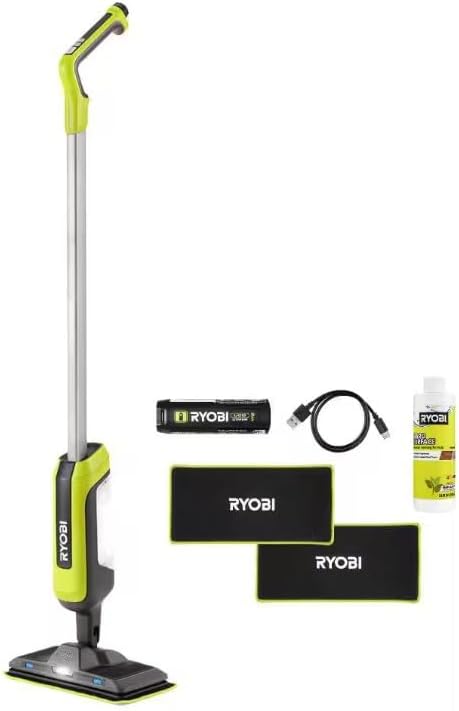
Image: The complete RYOBI USB Lithium Cordless Agitating Spray Mop Kit, including the mop, battery, charging cable, two microfiber pads, and cleaning formula.
4. Product Overview
Familiarize yourself with the components of your RYOBI FVSM02 Spray Mop:

Image: A diagram illustrating the key features of the RYOBI FVSM02 USB Lithium Power Spray Mop, including the Agitating Mop Mode button, Self-standing design, Refillable 8 oz. Tank Capacity, LED Light, Reusable & Machine Washable Mop Pad, and Dual Spray Nozzles.
- Agitating Mop Mode Button: Activates the agitating cleaning function.
- Self-Standing Design: Allows the mop to stand upright independently for convenient storage.
- Refillable 8 oz. Tank Capacity: Holds cleaning solution.
- LED Light: Illuminates the cleaning path.
- Reusable & Machine Washable Mop Pad: Attaches to the mop head for cleaning.
- Dual Spray Nozzles: Dispense cleaning solution onto the floor.
5. Setup
5.1 Charging the Battery
Before first use, fully charge the 2.0 Ah USB Lithium Battery. Connect the USB Charging Cable to the battery and a compatible USB power source (not included). The battery indicator lights will show charging status.
5.2 Installing the Battery
Once charged, insert the USB Lithium Battery into the designated slot in the mop handle until it clicks securely into place.

Image: A hand demonstrating the insertion of the RYOBI USB Lithium battery into the top section of the mop handle.
5.3 Filling the Solution Tank
Locate the refillable 8 oz. solution tank on the mop body. Open the tank cap, pour the provided 7.6 oz Hard Surface Refreshed Formula into the tank, and securely close the cap. Do not overfill.
5.4 Attaching Mop Pads
Align a clean microfiber cloth pad with the bottom of the mop head. The pad will attach securely via hook-and-loop fasteners. Ensure the pad covers the entire mop head surface.
6. Operating Instructions
6.1 Powering On/Off and Spray Function
To turn on the mop, press the power button on the handle. The LED light will illuminate. To spray cleaning solution, press and hold the spray button located on the handle. Release the button to stop spraying.
6.2 Using the Agitating Mop Mode
For enhanced cleaning, press the Agitating Mop Mode button on the handle. The mop head will begin to agitate, providing a deeper clean. Press the button again to deactivate the agitating mode.

Image: The RYOBI Agitating Spray Mop in use on a wooden floor, demonstrating its agitating action to clean spills.
6.3 Cleaning Tips
- The RYOBI FVSM02 is ideal for sealed hard floors such as hardwood, LVP/T (Luxury Vinyl Plank/Tile), and tile.
- For best results, sweep or vacuum the floor before mopping to remove loose debris.
- Move the mop in a steady, overlapping motion.
- The swivel head design allows for easy maneuverability around obstacles and into hard-to-reach areas.

Image: The RYOBI Agitating Spray Mop shown cleaning a tiled floor, with insets illustrating its suitability for hardwood, LVP/T, and tile surfaces.

Image: The RYOBI Agitating Spray Mop demonstrating its easy swivel head feature, allowing it to clean effectively along baseboards and in tight spaces.
7. Maintenance
Always remove the battery before cleaning or performing maintenance.
7.1 Cleaning Mop Pads
The microfiber cloth pads are reusable and machine washable. After each use, remove the pad from the mop head and wash it according to the care instructions on the pad's label. Air dry or tumble dry on low heat.
7.2 Cleaning the Mop Head
Wipe the mop head with a damp cloth to remove any dirt or residue. Ensure the spray nozzles are clear of obstructions. Do not use harsh chemicals or abrasive cleaners.
7.3 Emptying and Cleaning Solution Tank
After each use, or when changing cleaning solutions, empty any remaining solution from the tank. Rinse the tank with clean water and allow it to air dry before refilling or storing.
7.4 Storage
Store the mop in a cool, dry place. Ensure the solution tank is empty and clean, and the mop pad is removed and clean. The mop's self-standing design allows for convenient upright storage.
8. Troubleshooting
| Problem | Possible Cause | Solution |
|---|---|---|
| Mop does not turn on. | Battery not charged or not properly inserted. | Ensure battery is fully charged and securely inserted. |
| No spray from nozzles. | Solution tank empty; nozzles clogged; spray button not pressed. | Refill tank; clean nozzles; press spray button firmly. |
| Agitating mode not working. | Agitating mode button not pressed; battery low. | Press agitating mode button; charge battery. |
| Poor cleaning performance. | Mop pad dirty or worn; incorrect cleaning solution. | Replace or clean mop pad; use appropriate cleaning solution. |
9. Specifications
- Brand: RYOBI
- Model: FVSM02
- Power Source: USB Lithium 2.0 Ah Battery
- Tank Capacity: 8 oz.
- Runtime: Up to 3 hours (with 2.0 Ah battery)
- Included Components: Mop, Battery, USB Cable, 2 Microfiber Pads, Cleaning Formula
- Surface Recommendation: Sealed Hard Floors (Hardwood, LVP/T, Tile)
- UPC: 693070932595
10. Warranty and Support
For warranty information or technical support, please refer to the warranty card included with your product or visit the official RYOBI website. You may also contact RYOBI customer service directly for assistance.