
Introduction
This manual provides essential information for the proper setup, operation, and maintenance of your Cecotec Conga Z100 Robot Vacuum and Mop. Please read these instructions carefully before using the device to ensure optimal performance and longevity.
Setup
1. Unpacking and Initial Placement
Carefully remove all components from the packaging. Place the All-in-Home self-emptying base station against a wall in an open area, ensuring there are no obstacles within 1 meter to the front and 0.5 meters to the sides. Connect the power cable to the base station.

Image: The Conga Z100 robot vacuum docked with its self-emptying base station, ready for charging.
2. Initial Charging
Place the robot onto the charging base. Ensure the charging contacts align. The robot will begin charging automatically. For first use, allow the robot to charge completely, which may take up to 4 hours.
3. App Installation and Pairing
Download the 'Conga Z100' application from your mobile device's app store. Follow the in-app instructions to create an account and pair your robot. This typically involves connecting to the robot's Wi-Fi network temporarily and then connecting it to your home Wi-Fi.

Image: A smartphone displaying the Conga Z100 application, showing a mapped area and control options for the robot vacuum.
Operating Instructions
1. AI with LaserEye Navigation
The Conga Z100 uses AI and LaserEye technology for precise navigation. It identifies small objects, different floor types, and dirt levels to adapt its cleaning path. This intelligent system allows the robot to navigate efficiently even in cluttered environments.

Image: The Conga Z100 robot vacuum navigating a room, demonstrating its AI and LaserEye object detection capabilities.
2. AquaCycle Professional Mopping
The AquaCycle system ensures mopping with clean water from start to finish. It continuously wets the mop with clean water and wrings it into the dirty water tank. This guarantees optimal mopping in less time, as the robot does not need to return to the station as frequently for mop cleaning during a cycle.
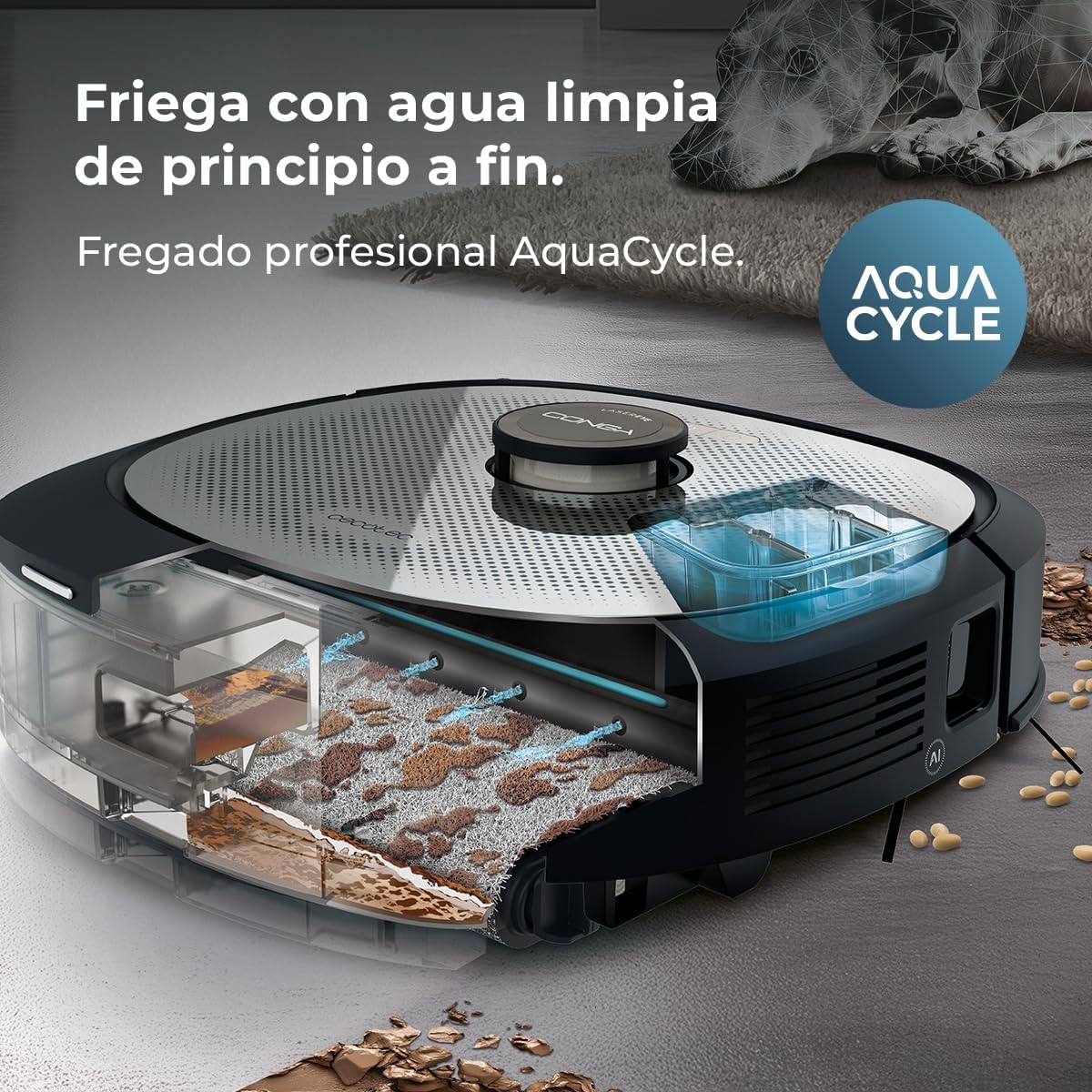
Image: An internal view of the Conga Z100 illustrating the AquaCycle system, which separates clean and dirty water for effective mopping.
3. Wet&Protect Technology and XXL Bimaterial Mop
The intelligent Wet&Protect mopping adapts its bimaterial mop according to the surface. It mops deeply with its super-absorbent side and, when detecting a carpet, activates CarpetCare mode, selecting the smooth side of the mop to protect carpets from excessive moisture.

Image: A detailed view of the Conga Z100's mop, highlighting its ability to adapt to different surfaces using Wet&Protect technology.
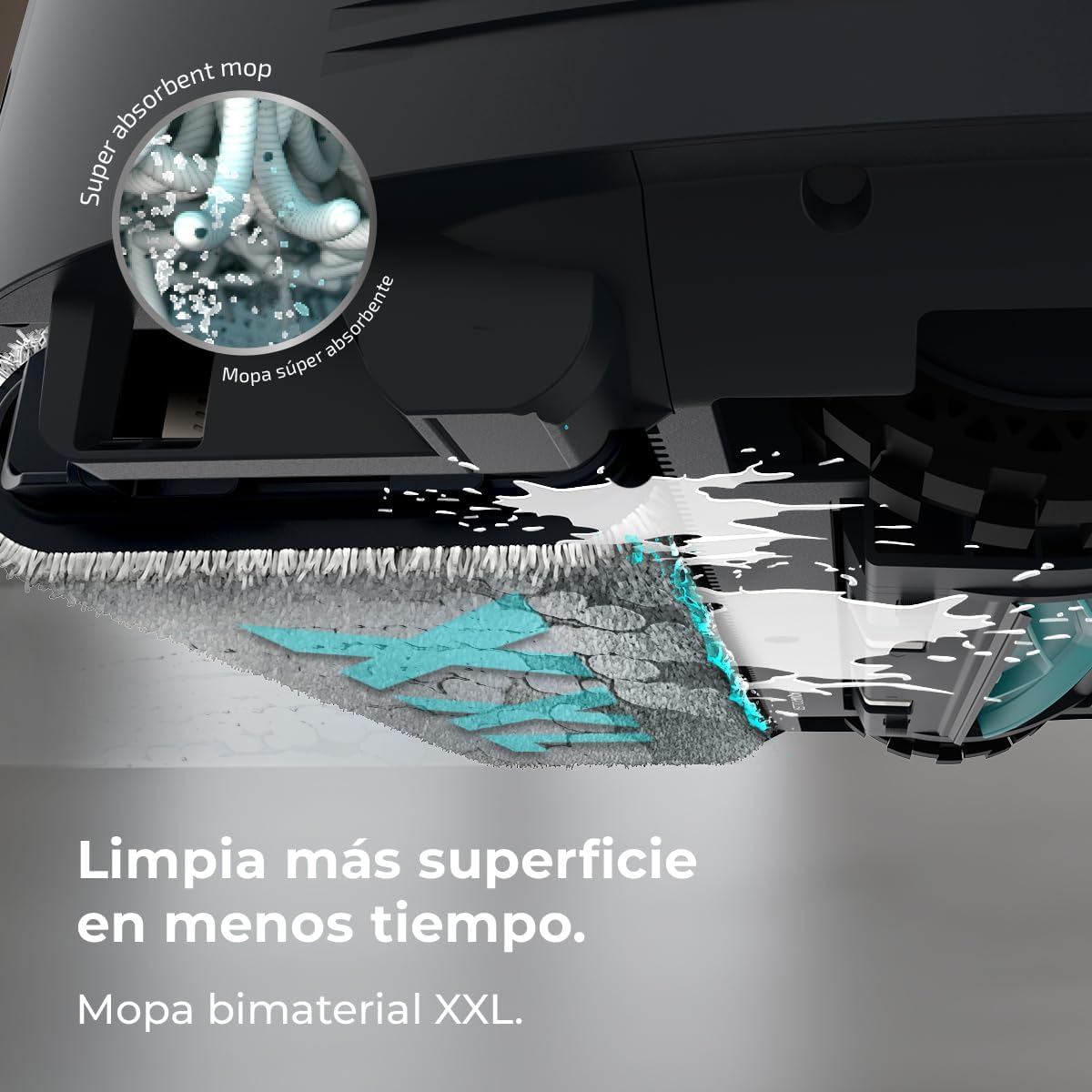
Image: A close-up of the robot's large, bimaterial mop, designed for efficient cleaning.
4. Ultra Power Suction (20000 Pa)
Equipped with an Ungravity motor, the robot delivers 20000 Pa of suction power. This strong suction effectively cleans even hidden dirt in high-pile carpets or deep tile grout.

Image: The Conga Z100's powerful suction is depicted, showing it effectively collecting debris from the floor.
5. Cleaning Coverage and Total Surface 4.0
The robot can clean up to 240 m² without interruptions. If the battery runs low during a cleaning cycle, the Total Surface 4.0 feature allows the robot to return to its base, recharge, and then resume cleaning exactly where it left off.

Image: A floor plan illustrating the extensive cleaning coverage of the Conga Z100 robot vacuum, up to 240 square meters.

Image: A visual representation of the Total Surface 4.0 feature, where the robot returns to its base for charging and then continues cleaning from its last position.
6. Video Demonstration of Carpet Cleaning
Video: This video demonstrates the Cecotec Conga Z100 robot vacuum cleaning a carpeted area, showcasing its movement and suction capabilities on soft surfaces.
Maintenance
1. All-in-Home Station Maintenance
The All-in-Home station provides complete maintenance. It wrings out dirty water, washes the mop, and dries it with hot air. Additionally, its self-emptying system automatically empties the hygienic dust bag, reducing the need for manual intervention for up to 12 weeks (actual time may vary based on environmental conditions and usage habits). The station includes a 3 L dust bag, a 3 L clean water tank, and a 3 L dirty water tank.

Image: The All-in-Home station is shown washing and drying the robot's mop, illustrating its comprehensive maintenance features.
2. Anti-Tangle Silicone Brush
The robot features an anti-tangle silicone brush, ideal for homes with pets or long hair. Regularly check and clean the brush to maintain optimal performance. Remove any tangled hair or debris to prevent blockages.

Image: A close-up of the robot's anti-tangle silicone brush, highlighting its effectiveness in managing pet hair and preventing tangles.
3. Filter and Dust Bag Replacement
The robot uses a fabric filter. Periodically check the filter and replace it as needed to maintain suction efficiency. Replace the dust bag in the self-emptying station when indicated by the app or when full.
Troubleshooting
- Robot not charging: Ensure the charging contacts on both the robot and the base station are clean and properly aligned. Check if the power cable is securely connected to the base station and the outlet.
- App connectivity issues: If the app frequently disconnects or fails to pair, try restarting your Wi-Fi router, the robot, and your mobile device. Ensure the robot is within range of your Wi-Fi network. Reinstalling the app or re-pairing the device might be necessary.
- Poor cleaning performance: Check if the dustbin is full or the dust bag needs replacement. Clean the main brush, side brushes, and filter. Ensure the mop is clean and properly attached.
- Robot getting stuck or lost: Clear obstacles from the cleaning path. Clean the robot's sensors (cliff sensors, bumper sensors, LaserEye). If the map is frequently resetting, try creating a new map in the app after ensuring the robot has a clear view of its surroundings during mapping.
- Unusual noises: Turn off the robot and check for any foreign objects caught in the brushes or wheels. Clean these areas carefully.
For persistent issues, refer to the detailed troubleshooting section in the full product manual available on the Cecotec website or contact customer support.
Specifications
| Feature | Specification |
|---|---|
| Brand | Cecotec |
| Model Name | Conga Z100 |
| Model Number | A01_EU01_114630 |
| Color | Black |
| Product Dimensions | 10.5 x 35.2 x 35.2 cm |
| Product Weight | 4.92 kg |
| Voltage | 220 Volts |
| Operating Time | 4 hours |
| Special Features | Intelligent Mapping, AI with LaserEye, AquaCycle Mopping, Wet&Protect Technology, Self-Emptying Base, Mop Drying |
| Surface Recommendation | All |
| Controller Type | App Control |
| Included Components | Robot vacuum, Docking station, Remote control |
| Filter Type | Fabric |
| Battery Cell Composition | Lithium Ion |
Warranty and Support
For warranty information, product registration, or technical support, please visit the official Cecotec website or contact their customer service department. Keep your purchase receipt as proof of purchase for any warranty claims.
Official Cecotec Website: Cecotec Store


