
Introduction
This manual provides detailed instructions for the assembly, operation, and maintenance of your Bellemave Queen Over Queen Bunk Bed. This bunk bed features integrated storage cabinets, plug outlets, and USB ports for enhanced functionality. Please read all instructions carefully before assembly and use to ensure safety and proper operation.
Important Safety Information
Failure to follow these safety guidelines may result in injury or damage to the product.
- Always assemble according to the provided instructions to prevent instability.
- Be cautious of sharp edges during assembly and use.
- Do not exceed the maximum weight recommendation of 600 pounds per level to ensure safety and stability.
- Ensure all connections are securely tightened before use and periodically check for tightness.
- The top bunk is not suitable for children under 6 years of age.
- Use only mattresses that comply with the recommended dimensions for each bunk.
- Do not attach or hang items on any part of the bunk bed that are not designed for use with the bed.
- Always use the provided guardrails on the top bunk.
Setup and Assembly
This bunk bed is designed for straightforward assembly. All necessary tools and a detailed installation manual are included in the packaging. Please follow the step-by-step instructions provided in the separate assembly guide.
Before You Begin:
- Verify all parts are present by comparing them with the parts list in the assembly manual.
- Clear a spacious area for assembly.
- Have a second person assist with assembly for safety and ease.
Assembly Steps Overview:
- Unpack all components and lay them out on a soft, clean surface to prevent scratches.
- Assemble the main bed frames (upper and lower) according to the numbered steps in the manual.
- Attach the guardrails to the upper bunk.
- Install the storage cabinets and integrate the plug outlets and USB ports.
- Secure all slats to both bed frames.
- Ensure all bolts and screws are tightened. Do not overtighten.

Image: The Bellemave Queen Over Queen Bunk Bed frame, showing the structure before mattresses are added. This image illustrates the general form of the bed during assembly.
Operating Instructions
Using the Storage Cabinets:
The bunk bed includes 6 integrated storage cabinets located on the side. These cabinets are designed to hold books, small toys, and other personal items, helping to keep the sleeping area tidy. Ensure items are placed securely within the cabinets to prevent them from falling.

Image: A detailed view of the integrated storage cabinets on the side of the bunk bed, designed for organizing personal belongings.
Using the Plug Outlets and USB Ports:
The top bunk features 2 standard plug outlets and 2 USB ports conveniently located on top of the storage cabinets. These ports allow for easy charging of electronic devices such as laptops, tablets, and smartphones. Connect your devices directly to the available ports. Ensure the bed is connected to a power source for these features to function.
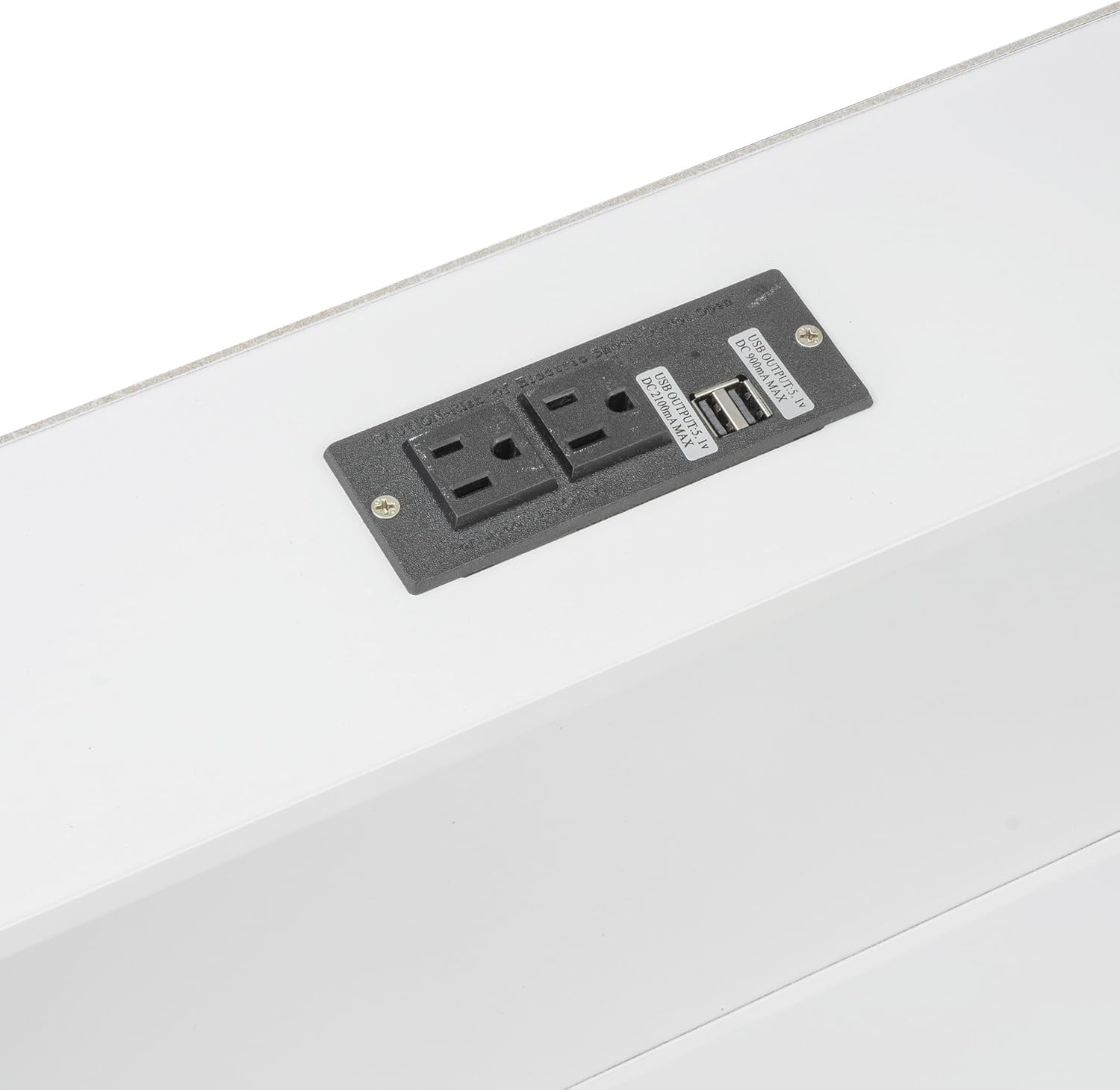
Image: A close-up view of the integrated plug outlets and USB ports, showing their placement for convenient device charging.
Maintenance
- Cleaning: Wipe surfaces with a soft, damp cloth. Avoid harsh chemicals or abrasive cleaners that may damage the finish.
- Hardware Check: Periodically check all bolts, screws, and connections to ensure they remain tight. Retighten as necessary to maintain stability and safety.
- Structural Integrity: Inspect the wooden frame and slats regularly for any signs of wear, damage, or cracks. Address any issues promptly.
- Electrical Components: Ensure the power cord for the outlets and USB ports is not pinched or damaged. If any electrical component malfunctions, discontinue use and contact customer support.
Troubleshooting
| Problem | Possible Cause | Solution |
|---|---|---|
| Bed feels wobbly or unstable. | Loose hardware. | Check and tighten all bolts and screws. Ensure all components are correctly assembled. |
| USB ports or power outlets are not working. | Not plugged into a wall outlet; power cord damage; internal wiring issue. | Ensure the bed's power cord is securely plugged into a functional wall outlet. Check the power cord for visible damage. If the issue persists, contact customer support. |
| Squeaking noises. | Loose connections; friction between wood parts. | Tighten all hardware. Apply a small amount of furniture wax or silicone spray to contact points between wooden components if necessary. |
Specifications
- Model: Queen Over Queen Bunk Bed
- Brand: Bellemave
- Color: Antique White
- Material: Pine Wood, Engineered Wood
- Product Dimensions (L x W x H): 85.4" x 65.7" x 64.2"
- Item Weight: 186.5 Pounds
- Compatible Mattress Size: Queen
- Maximum Weight Recommendation (per level): 600 Pounds
- Special Features: 6 Storage Cabinets, 2 Plug Outlets, 2 USB Ports, Guardrails
- Assembly Required: Yes (Tools and manual included)

Image: A diagram illustrating the detailed dimensions of the Bellemave Queen Over Queen Bunk Bed.
Warranty and Support
For information regarding product warranty, please refer to the warranty card included with your purchase or visit the official Bellemave website. For technical support, missing parts, or any other inquiries, please contact Bellemave customer service through their official channels. Keep your purchase receipt for warranty claims.
Bellemave Official Website: Bellemave Store on Amazon