1. Introduction
This manual provides detailed instructions for the VINABTY Universal Replacement Remote Control. It is designed to function as a direct replacement for various Polaroid TV models without requiring any complex programming or setup. Please read this manual carefully to ensure proper use and longevity of your remote control.
2. Product Overview
The VINABTY Universal Replacement Remote Control is engineered for ease of use and durability. It features an ergonomic design, soft rubber buttons, and robust ABS material construction, ensuring comfortable handling and a long lifespan. The remote utilizes infrared sensor technology for reliable communication with your television.
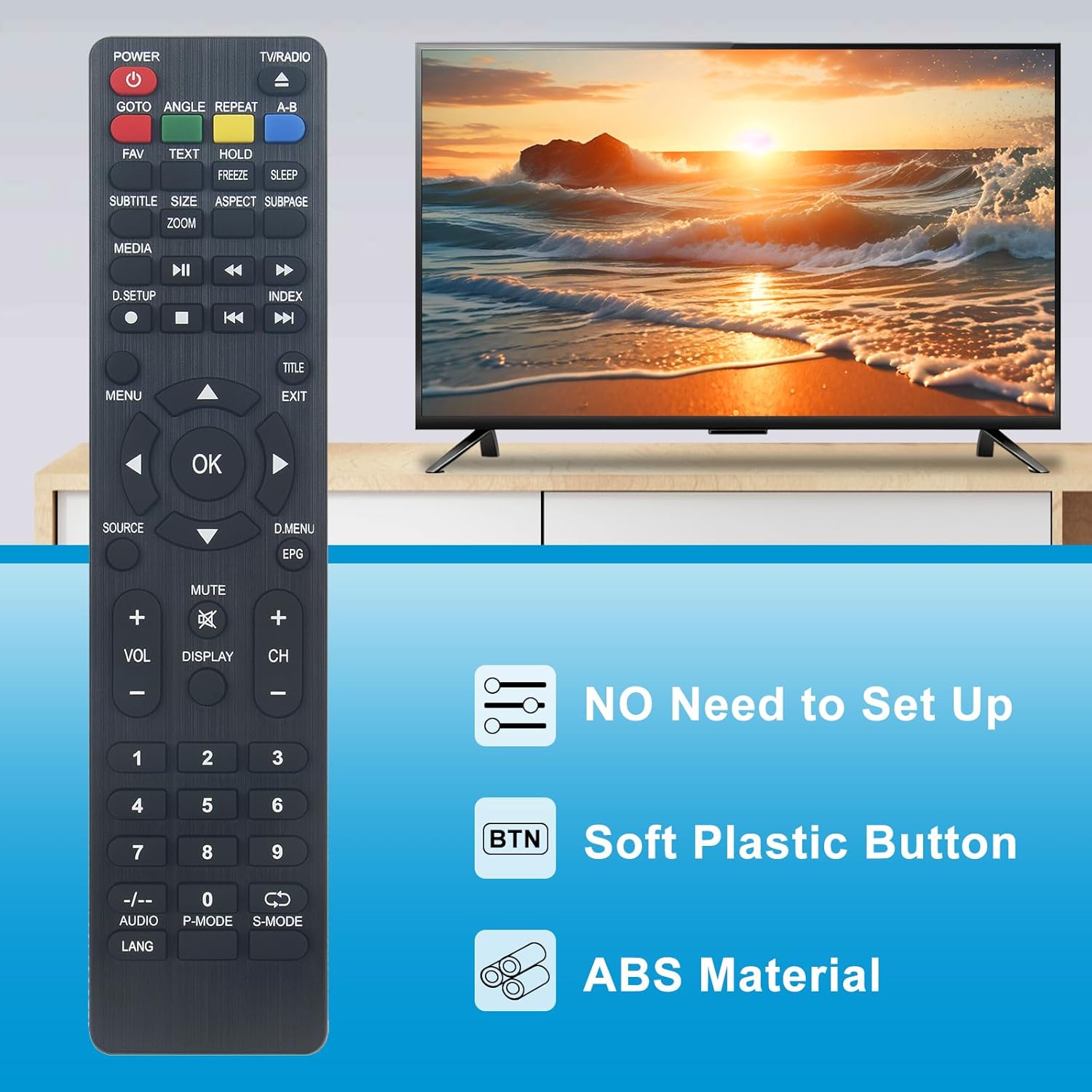
Image 2.1: The VINABTY remote control highlighting key features such as no setup requirement, soft plastic buttons, and durable ABS material construction.

Image 2.2: The remote control shown against a background suggesting advanced internal components, emphasizing its upgraded smart chip for stable performance.
Key Features:
- No Setup Required: Ready to use right out of the box; no programming or pairing needed.
- Ergonomic Design: Lightweight and comfortable to hold for extended periods.
- Durable Construction: Made from high-quality ABS material with resilient buttons.
- Long Transmission Distance: Operates effectively up to 10 meters (approximately 33 feet).
- Sensitive Operation: Quick and responsive button presses.
3. Setup
This VINABTY remote control is designed for immediate use with compatible Polaroid TV models. No complex programming or synchronization steps are required.
Battery Installation:
- Locate the battery compartment on the back of the remote control.
- Slide open the battery compartment cover.
- Insert two (2) AAA batteries (not included), ensuring the positive (+) and negative (-) terminals match the indicators inside the compartment.
- Close the battery compartment cover securely.
Once batteries are installed, the remote control is ready for operation.
4. Operating Instructions
To operate your television, point the remote control directly at the TV's infrared receiver. Ensure there are no obstructions between the remote and the TV.

Image 4.1: A clear front view of the VINABTY remote control, displaying all functional buttons.
Common Button Functions:
- POWER: Turns the TV on or off.
- TV/RADIO: Switches between TV and Radio modes.
- GOTO: Function for direct access (specific to TV model).
- ANGLE: Adjusts viewing angle (specific to TV model).
- REPEAT: Repeats playback (specific to TV model).
- A-B: Marks A and B points for repeat playback (specific to TV model).
- FAV: Accesses favorite channels.
- TEXT: Displays teletext.
- HOLD: Holds teletext page.
- FREEZE: Freezes the current screen.
- SLEEP: Sets the sleep timer.
- SUBTITLE: Toggles subtitles.
- SIZE/ZOOM: Adjusts screen size or zoom level.
- ASPECT: Changes aspect ratio.
- SUBPAGE: Accesses teletext subpages.
- MEDIA: Enters media playback mode.
- Playback Controls (Play, Pause, Stop, Rewind, Fast Forward, Skip): For media playback.
- D.SETUP: Digital setup menu.
- INDEX: Accesses index function.
- MENU: Opens the main menu.
- OK: Confirms selections.
- Arrow Buttons (Up, Down, Left, Right): Navigates menus and adjusts settings.
- TITLE: Displays title menu.
- EXIT: Exits current menu or function.
- SOURCE: Selects input source (HDMI, AV, etc.).
- D.MENU/EPG: Digital menu or Electronic Program Guide.
- VOL +/-: Adjusts volume up or down.
- MUTE: Mutes or unmutes sound.
- DISPLAY: Displays current channel information.
- CH +/-: Changes channels up or down.
- Number Buttons (0-9): Direct channel selection.
- -/--: For two-digit channel input.
- AUDIO: Selects audio track.
- P-MODE: Picture mode selection.
- S-MODE: Sound mode selection.
- LANG: Language selection.
Compatible TV Models:
This remote control is compatible with a wide range of Polaroid TV models, including but not limited to:
- TQL-22R4PR001
- TQL-40F4PR001
- TQL-32R4PR005
- TQL-32R4PR004
- TQL-32R4PR003
- TQL-32R4PR001
- FQL55UHPR001
- TFL55UHDPR001
- TQL-24F4PR001
- TQL-43F4PR0051
- TQL-19HDPR001
- TQL19R4PR002
- TQL19R4PR003
- TQL-24FPR003
- TQL24F4PR004
- TQL32R4PR0000
- TQL32R4PR012
- TQL48F4PR004
- TQL50F4PR001
- TQL55UHDPR001
- TQL60UHDPR001
- TQL65F4PR001
- TVC24HDP001112
- CELED754KB7
- CELED654KB7
- CELED55KP19B7
- OCEALED320516B7
- LED320516B7
5. Maintenance
Proper care and maintenance will extend the life of your remote control.

Image 5.1: The remote control emphasizing its premium ABS material and high resilience for durability.
Cleaning:
- Wipe the remote control with a soft, dry cloth.
- Do not use abrasive cleaners, solvents, or chemical agents, as these can damage the surface and internal components.
Battery Care:
- Replace batteries when the remote's performance diminishes or it becomes unresponsive.
- Remove batteries if the remote will not be used for an extended period to prevent leakage.
Storage:
- Store the remote control in a cool, dry place, away from direct sunlight and extreme temperatures.
- Avoid dropping the remote or exposing it to excessive force.
6. Troubleshooting
If you encounter issues with your VINABTY remote control, please refer to the following troubleshooting steps:
Remote Not Responding:
- Check Batteries: Ensure batteries are inserted correctly with the correct polarity (+/-) and are not depleted. Replace with fresh AAA batteries if necessary.
- Line of Sight: Make sure there is a clear path between the remote control and the TV's infrared sensor. Obstructions can block the signal.
- Distance: Confirm you are within the effective operating range of approximately 10 meters (33 feet).
- TV Power: Ensure your television is powered on and not in standby mode.
Specific Buttons Not Working:
- This may indicate low battery power. Try replacing the batteries.
- Ensure the button is not physically stuck or damaged.
If the issue persists after following these steps, please refer to the 'Warranty and Support' section for further assistance.
7. Specifications

Image 7.1: The remote control with its approximate dimensions of 4 cm width and 22 cm length.
| Feature | Detail |
|---|---|
| Brand | VINABTY |
| Model Name | TQL-22R4PR001 |
| Connectivity Technology | Infrared |
| Compatible Devices | Television |
| Special Feature | Ergonomic |
| Color | Black |
| Maximum Range | 10 Meters |
| Item Weight | 60 Grams |
| Product Dimensions (L x W x H) | 18L x 3W x 1.5H centimeters |
| Material | ABS |
8. Warranty and Support
For support regarding product functionality, compatibility, or any other inquiries, please contact your retailer or the manufacturer directly. It is recommended to verify compatibility with your specific TV model before purchase. If you receive a remote that does not function as expected, please reach out to customer service for assistance.
Please retain your proof of purchase for any warranty claims or support requests.
