
1. Introduction
This manual provides instructions for the safe and efficient operation of your WSTER WS-338 Mini Bluetooth Speaker. Please read this manual thoroughly before using the product and retain it for future reference.
The WS-338 is a portable Bluetooth speaker designed for versatile audio playback, featuring HD sound, a colorful LED ring light, and multiple connectivity options including Bluetooth, USB, and TF card support. It also includes a built-in microphone for hands-free calling.
2. Package Contents
Verify that all items are present in the package:
- WSTER WS-338 Mini Bluetooth Speaker
- Power Cable (USB to USB-C)
- Quick Start Guide
3. Product Overview
Familiarize yourself with the speaker's components and controls.

Figure 1: Front view of the WSTER WS-338 Mini Bluetooth Speaker.
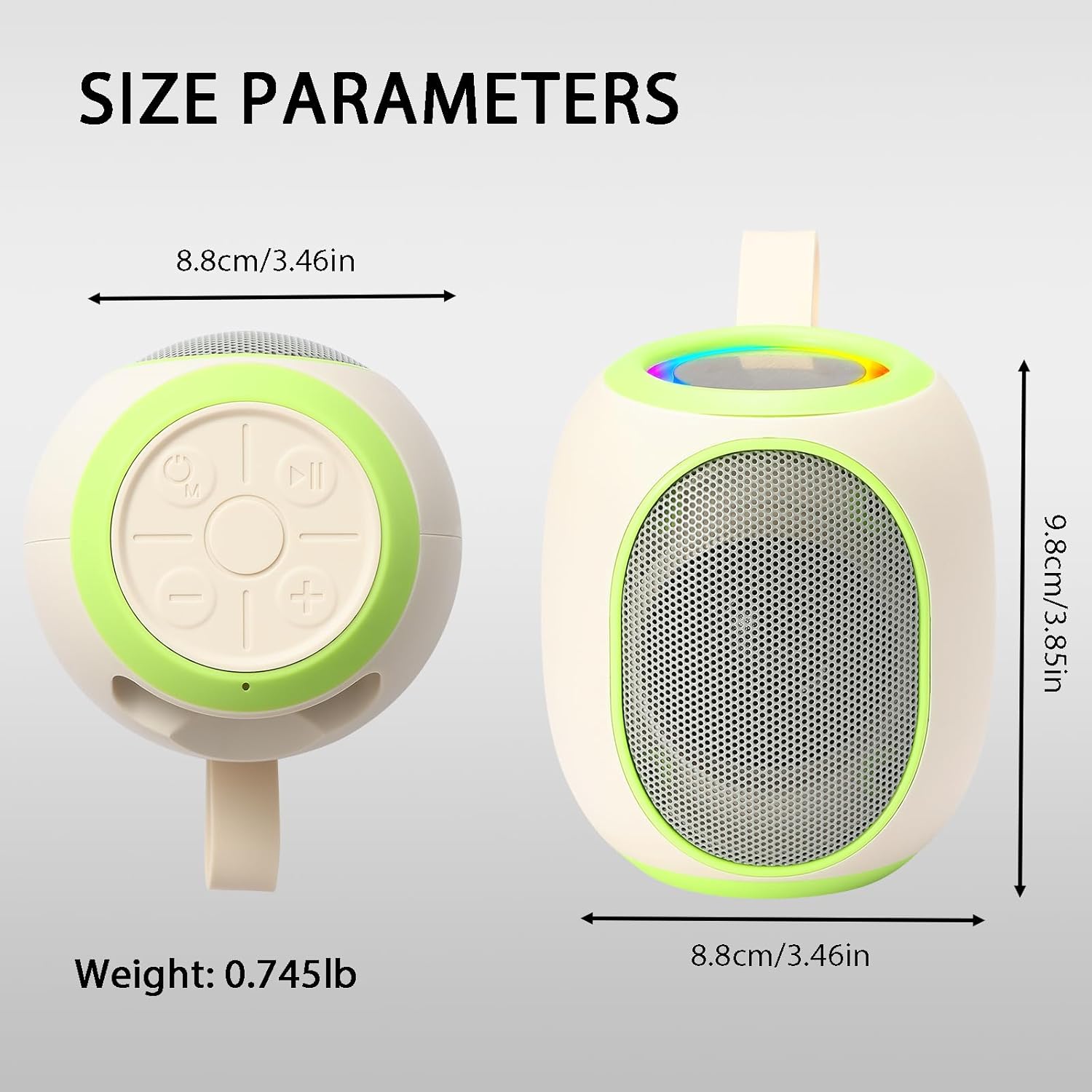
Figure 2: Rear view showing USB, TF card slot, and charging port.

Figure 3: Top view displaying the control buttons.
Control Buttons:
- Power/Mode (M) Button: Long press to power ON/OFF. Short press to switch modes (Bluetooth, USB, TF, FM).
- Play/Pause (►▮▮) Button: Short press to play/pause music. In call mode, short press to answer/end call. Long press to reject call.
- Previous Track/Volume Down (-) Button: Short press for previous track. Long press to decrease volume.
- Next Track/Volume Up (+) Button: Short press for next track. Long press to increase volume.
Ports:
- USB Port: For USB drive playback.
- TF Card Slot: For TF (MicroSD) card playback.
- DC 5V Charging Port (USB-C): For charging the speaker.
4. Setup
4.1 Charging the Speaker
- Connect the provided USB-C charging cable to the speaker's DC 5V port.
- Connect the other end of the cable to a USB power adapter (DC 5V, 1A output recommended) or a computer's USB port.
- The LED indicator will show charging status. It will typically turn off or change color when fully charged.
4.2 Powering On/Off
- To Power ON: Long press the Power/Mode (M) button until you hear a startup sound and the LED light activates.
- To Power OFF: Long press the Power/Mode (M) button again until you hear a shutdown sound and the LED light turns off.
5. Operation
5.1 Bluetooth Connection
- Ensure the speaker is powered on and in Bluetooth mode. If not, short press the Power/Mode (M) button to switch to Bluetooth mode. The speaker will indicate it is ready for pairing (e.g., a voice prompt or flashing LED).
- On your mobile device (smartphone, tablet, etc.), enable Bluetooth and search for available devices.
- Select "WS-338" from the list of found devices to pair.
- Once successfully paired, the speaker will provide an audible confirmation, and the LED light may change its pattern.
Video 1: Demonstrates the Bluetooth connection process for the WSTER speaker.
5.2 Music Playback
- Play/Pause: Short press the Play/Pause button.
- Next Track: Short press the Next Track/Volume Up (+) button.
- Previous Track: Short press the Previous Track/Volume Down (-) button.
- Volume Up: Long press the Next Track/Volume Up (+) button.
- Volume Down: Long press the Previous Track/Volume Down (-) button.
5.3 Mode Switching
Short press the Power/Mode (M) button to cycle through available modes: Bluetooth, USB, TF Card, and FM Radio.
5.4 Hands-Free Calling
When a call comes in while connected via Bluetooth:
- Answer Call: Short press the Play/Pause button.
- End Call: Short press the Play/Pause button.
- Reject Call: Long press the Play/Pause button.
- Switch between phone and speaker: During a call, long press the Play/Pause button to switch the audio output between your mobile phone and the speaker.
5.5 TWS (True Wireless Stereo) Function
To connect two WS-338 speakers for stereo sound:
- Turn on both WS-338 speakers simultaneously.
- Double-click the Power/Mode (M) button on one of the speakers. You will hear a beep sound.
- Wait for a prompt tone indicating that both speakers are connected.
- On your mobile device, search for the TWS pairing name (e.g., "WS-338 TWS") and connect.
- The TWS connection is complete, and music will now play in stereo through both speakers.
5.6 Selfie Function
The speaker can act as a remote shutter for your phone's camera:
- Press the Power/Mode (M) button to switch from wireless mode to selfie mode.
- Open your phone's camera application.
- Press the Previous Track/Volume Down (-) or Next Track/Volume Up (+) button on the speaker to take a picture.
6. Specifications
| Feature | Detail |
|---|---|
| Model Name | WS-338 |
| Brand | WSTER |
| Speaker Type | Portable Speaker |
| Connectivity Technology | Bluetooth |
| Bluetooth Version | 5.4 |
| Special Features | Bluetooth Connection, Built-in Microphone, FM Radio, LED Light, TWS |
| Output Power | 8W |
| Frequency Response | 20Hz - 18KHz |
| Battery Capacity | 1200mAh |
| Input Voltage | DC-5V |
| Product Dimensions | 3.46"D x 3.46"W x 3.85"H |
| Item Weight | 286.3 Grams (10.1 ounces) |
| Material | Acrylonitrile Butadiene Styrene (ABS) |
7. Troubleshooting
- Speaker does not power on: Ensure the battery is charged. Connect the speaker to a power source using the provided cable.
- Cannot pair via Bluetooth: Make sure the speaker is in Bluetooth pairing mode (indicated by a flashing LED or voice prompt). Ensure Bluetooth is enabled on your device and it is within range. Try restarting both the speaker and your device.
- No sound or low volume: Check the volume levels on both the speaker and your connected device. Ensure the speaker is not muted.
- Sound distortion: Reduce the volume on both the speaker and your device. Ensure the speaker is not too far from the connected device.
- FM Radio not working: Ensure the speaker is in FM mode. Extend the antenna (if applicable) or try moving to an area with better signal reception. Perform an automatic channel scan.
8. Safety Information
- Do not expose the speaker to extreme temperatures, direct sunlight, or high humidity.
- Avoid dropping or subjecting the speaker to strong impacts.
- Do not disassemble, repair, or modify the speaker yourself. This may void the warranty and cause damage.
- Keep the speaker away from water and other liquids.
- Use only the provided charging cable or a certified equivalent.
- Dispose of the speaker and its battery responsibly according to local regulations.
9. Warranty and Support
This product is covered by a standard manufacturer's warranty. For specific warranty terms and conditions, please refer to the documentation provided at the time of purchase or contact WSTER customer support.
For technical assistance or further inquiries, please visit the official WSTER website or contact their customer service department.