
Introduction
This manual provides detailed instructions for the OUKITEL C2 Android 14 smartphone. Please read this guide thoroughly to ensure proper usage and to maximize your device's capabilities. Keep this manual for future reference.
Package Contents
Verify that all items are present in your product package:
- OUKITEL C2 Smartphone
- 10W Fast Charger
- USB Type-C Data Cable
- SIM Card Ejector Tool (SIM pin)
- Screen Protector (pre-applied or included)
- Smartphone Case
- User Manual

Image: Contents of the OUKITEL C2 retail package.
Device Overview
The OUKITEL C2 features a lightweight and slim design, weighing approximately 198g and measuring 9.3mm in thickness. It is equipped with a 6.52-inch HD+ display and a triple camera system on the rear.
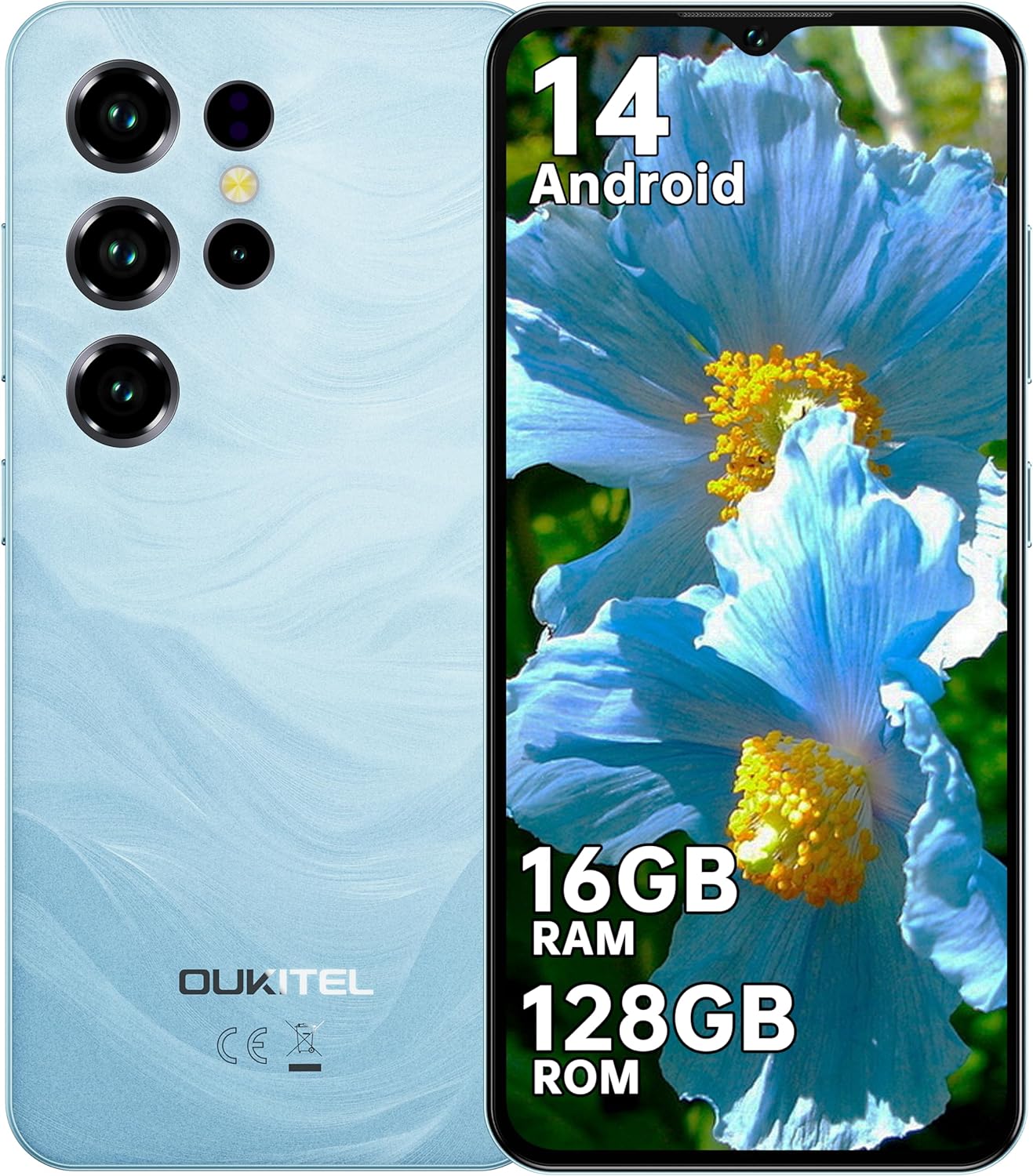
Image: Front and rear view of the OUKITEL C2 smartphone.
Physical Features:
- Display: 6.52-inch HD+ Waterdrop Notch Display (540x1200 resolution, 209 PPI, 450 nits brightness, 20:9 aspect ratio, 93% screen-to-body ratio).
- Rear Camera: 13MP Main Camera.
- Front Camera: 5MP Front Camera.
- Ports: USB Type-C for charging and data transfer, 3.5mm Headphone Jack.
- SIM Slot: Supports Dual Nano SIM or Nano SIM + TF card for expandable storage up to 1TB.
- Sensors: Face Unlock, GPS, GLONASS, Beidou, Galileo.

Image: Key features and ports of the OUKITEL C2 smartphone.
Setup
1. Inserting SIM Card and TF Card:
- Locate the SIM card tray on the side of the device.
- Insert the SIM ejector tool into the small hole next to the tray and press gently until the tray pops out.
- Place your Nano SIM card(s) and/or TF card into the designated slots on the tray. Ensure the gold contacts face downwards.
- Carefully push the tray back into the device until it is flush with the side.

Image: SIM and TF card installation guide.
2. Initial Power On and Setup:
- Press and hold the Power button until the OUKITEL logo appears.
- Follow the on-screen prompts to select your language, connect to a Wi-Fi network, and set up your Google account.
- Configure security settings such as Face Unlock or a PIN/pattern/password.

Image: Wi-Fi connectivity and Face Unlock features.
Operating Instructions
Basic Navigation:
- Power Button: Press to turn the screen on/off. Press and hold to power off or restart the device.
- Volume Buttons: Adjust media volume, call volume, and notification volume.
- Touchscreen Gestures: Tap to select, swipe to scroll, pinch to zoom.
Android 14 Features:
The OUKITEL C2 runs on Android 14, offering enhanced performance, intuitive operation, and robust privacy protection. Key features include:
- Improved system performance and application launch speeds.
- Customizable user interface, lock screen, and application icons.
- Advanced security features with real-time threat detection and encrypted data.
- Seamless device connectivity and file sharing.

Image: Android 14 operating system interface.
Camera Usage:
The OUKITEL C2 is equipped with a 13MP main camera and a 5MP front camera, suitable for daily photography and video calls. It supports various shooting modes:
- Panorama
- Portrait
- Beauty Mode
- HDR
- Professional Mode
To take a photo or record a video, open the Camera app and select your desired mode. Tap the shutter button to capture an image or start/stop video recording.

Image: Examples of photos taken with the OUKITEL C2's main and front cameras.
Battery Management
The OUKITEL C2 features a 5000mAh large-capacity battery, providing extended usage times. It supports 10W fast charging.
- Charging: Connect the USB Type-C cable to the phone and the 10W fast charger to a power outlet. The device can charge up to 80% in approximately 2.5 hours.
- OTG Reverse Charging: The OUKITEL C2 supports OTG (On-The-Go) reverse charging, allowing it to act as a temporary power bank for other electronic devices.
- Battery Life Estimates:
- Continuous Talk Time: Up to 35 hours
- Music Playback: Up to 35 hours
- Video Playback: Up to 10 hours
- Standby Time: Up to 18 days

Image: Battery capacity and charging features of the OUKITEL C2.

Image: OTG reverse charging capability.
Connectivity
- 4G Dual SIM: The device supports 4G dual SIM cards, allowing you to use two different network providers simultaneously.
- Wi-Fi: Supports Wi-Fi 5 (2.4GHz/5GHz) for high-speed internet access.
- GPS: Integrated satellite navigation system (GPS+GLONASS+Beidou+Galileo) for accurate positioning, ideal for outdoor activities and navigation.
- 3.5mm Audio Jack: Allows direct connection to FM radio and wired headphones.
Maintenance
- Cleaning: Use a soft, lint-free cloth to clean the screen and body of the phone. Avoid using harsh chemicals or abrasive materials.
- Software Updates: Regularly check for and install system updates to ensure optimal performance and security. Go to Settings > System > System update.
- Storage Management: Periodically clear unnecessary files and applications to maintain sufficient storage space. The device supports up to 1TB expandable storage via TF card.
- Battery Care: Avoid extreme temperatures. Do not fully discharge the battery frequently.
Troubleshooting
| Problem | Solution |
|---|---|
| Device does not power on. | Ensure the battery is charged. Connect the charger and wait a few minutes before attempting to power on again. If unresponsive, press and hold the power button for 10-15 seconds to force a restart. |
| Poor network signal or no service. | Check if the SIM card is correctly inserted. Ensure you are within network coverage. Try restarting the device. Verify network settings in Settings > Network & internet > SIMs. |
| Applications are slow or crashing. | Close background applications. Clear app cache (Settings > Apps > [App Name] > Storage & cache > Clear cache). Ensure sufficient free storage space. Restart the device. |
| Battery drains quickly. | Reduce screen brightness. Close unused apps running in the background. Disable Wi-Fi, Bluetooth, or GPS when not in use. Check battery usage in Settings > Battery to identify power-hungry apps. |
| Face Unlock not working. | Ensure your face is well-lit and clearly visible to the front camera. Re-register your face data in Settings > Security > Face unlock. |
Specifications
| Feature | Detail |
|---|---|
| Brand | OUKITEL |
| Model Name | OUKITEL C2 |
| Operating System | Android 14 |
| RAM | 16GB (4GB physical + 12GB virtual) |
| Internal Storage | 128GB |
| Expandable Storage | Up to 1TB via TF card |
| Display Size | 6.52 inches |
| Display Resolution | 540 x 1200 (HD+) |
| Main Camera | 13MP |
| Front Camera | 5MP |
| Battery Capacity | 5000mAh |
| Charging | 10W Fast Charging |
| Connectivity | 4G Dual SIM, Wi-Fi 5 (2.4GHz/5GHz), Bluetooth, GPS (GPS+GLONASS+Beidou+Galileo) |
| Ports | USB Type-C, 3.5mm Headphone Jack |
| Dimensions | 20.9 x 12.3 x 7 cm |
| Weight | 198g (device only), 430g (package) |
Warranty and Support
OUKITEL provides the following support for the C2 smartphone:
- Return Policy: 30-day unconditional return policy.
- Warranty: 2-year warranty.
- Technical Support: Long-term technical support.
- Customer Service: 24/7 online customer service.
For further assistance, please contact OUKITEL customer service through their official channels or the retailer where the product was purchased.