
1. Introduction
The CAMWAY 3.5mm RCA Audio Switcher is a versatile, passive, bi-directional audio selector designed for managing multiple audio sources and outputs. It allows for seamless switching between up to four input devices to one output device, or one input device to up to four output devices. Featuring both 3.5mm AUX and RCA L/R interfaces, along with a volume control knob and channel selection, this device simplifies your audio setup without requiring external power.
Its compact design and plug-and-play functionality make it suitable for various environments, including home theaters, audio studios, and multi-device office setups.
2. Package Contents
Please verify that all items are present in the package:
- 1x CAMWAY 4-Way Bi-Directional Audio Switcher
- 1x L/R Stereo RCA Cable
- 1x User Manual

Figure 2.1: Package Contents - Audio switcher, RCA cable, and user manual.
3. Product Features
- Bi-Directional Functionality: Supports both 4-in-1-out and 1-in-4-out audio configurations.
- Multiple Interfaces: Equipped with 3.5mm AUX and RCA L/R audio ports for broad compatibility.
- Synchronous Output: Allows simultaneous output to a 3.5mm wired headset and RCA speakers on the same selected channel.
- Lossless Audio: Passive design ensures no signal distortion or loss, delivering pristine sound quality.
- Easy Control: Features a channel selector knob (1/2/3/4/OFF) and a dedicated volume control knob.
- Durable Construction: Rugged all-metal housing provides longevity and shields against interference.
- Plug and Play: No external power supply required for operation.
4. Setup Instructions
The CAMWAY Audio Switcher offers flexible connection options. Ensure all audio devices are powered off before making connections.
4.1. Connecting Multiple Inputs to One Output (4-IN-1-OUT)
- Connect up to four audio source devices (e.g., PC, smartphone, turntable, CD player) to the IN/OUT 1, 2, 3, or 4 ports using either 3.5mm AUX or RCA L/R cables.
- Connect your single output device (e.g., amplifier, active speaker) to the OUT/IN port using either a 3.5mm AUX or RCA L/R cable.
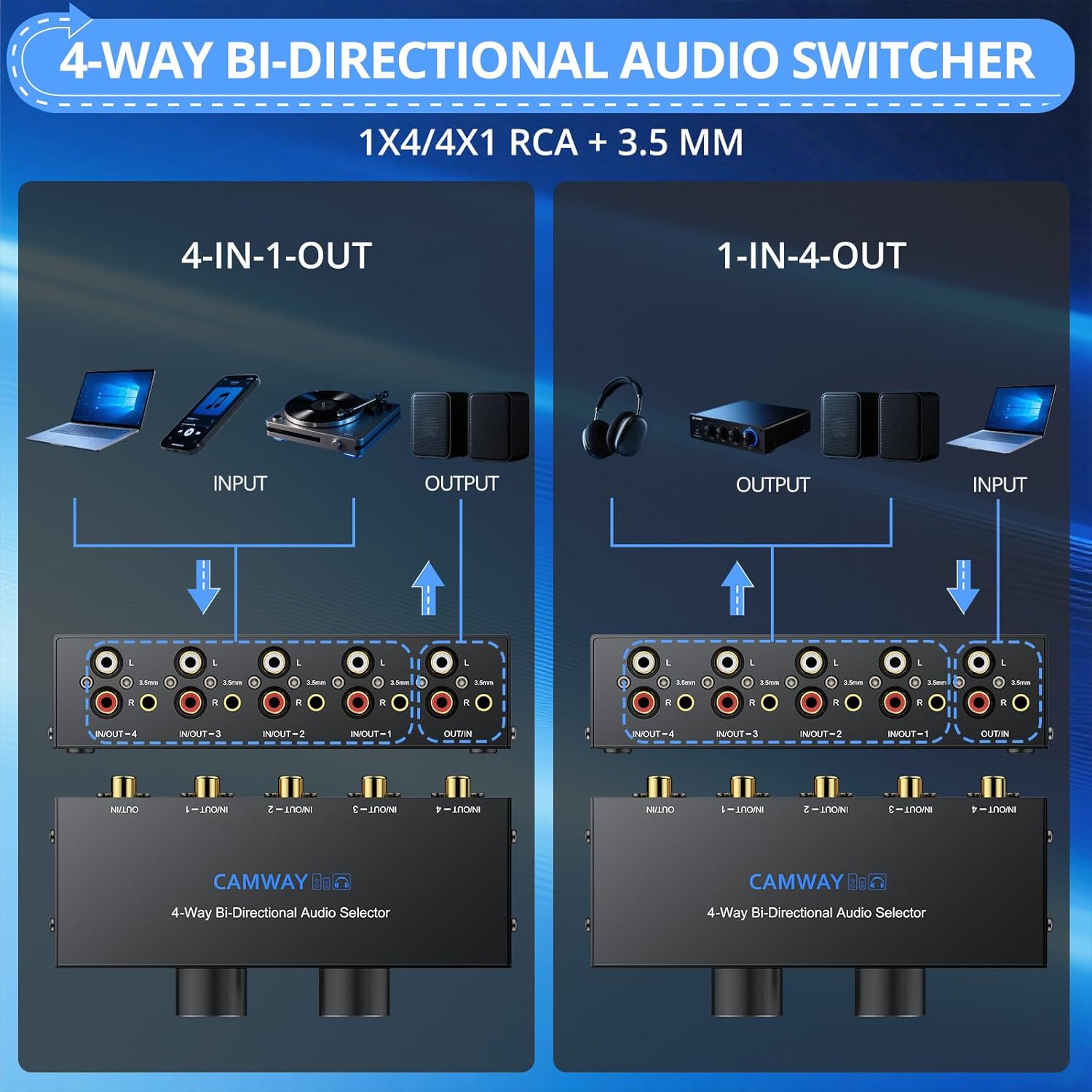
Figure 4.1: 4-IN-1-OUT Connection Diagram.
4.2. Connecting One Input to Multiple Outputs (1-IN-4-OUT)
- Connect your single audio source device (e.g., PC) to the OUT/IN port using either a 3.5mm AUX or RCA L/R cable.
- Connect up to four output devices (e.g., wired headphones, amplifier, active speakers) to the IN/OUT 1, 2, 3, or 4 ports using either 3.5mm AUX or RCA L/R cables.

Figure 4.2: 1-IN-4-OUT Connection Diagram.
4.3. Rear Panel Connections Overview

Figure 4.3: Rear Panel Connection Ports.
5. Operating Instructions
Once your devices are connected, operating the CAMWAY Audio Switcher is straightforward.
5.1. Channel Selection
Use the large knob on the left, labeled with numbers 1, 2, 3, 4, and OFF, to select your desired audio channel. Turn the knob to the corresponding number for the connected device you wish to use. Selecting 'OFF' will mute all audio output.

Figure 5.1: Channel Selection and Volume Control Knobs.
5.2. Volume Control
The knob on the right controls the master volume for the selected channel. Rotate it clockwise to increase volume and counter-clockwise to decrease volume.
5.3. Synchronous Output (3.5mm + RCA)
Each channel is equipped with both 3.5mm AUX and RCA L/R interfaces. This allows for simultaneous output to a 3.5mm wired headset and RCA speakers from the same selected channel. For example, you can listen through headphones while also playing audio through speakers.
Note: When both headphones and speakers are connected simultaneously to the same channel, the total perceived volume may decrease. This is normal behavior for passive audio splitting.

Figure 5.2: Synchronous 3.5mm and RCA Output.
5.4. Operational Demonstration Video
Video 5.1: This video demonstrates the basic operation of the CAMWAY 3.5mm RCA Audio Switcher, including connecting devices, switching between channels, and adjusting the volume. It shows the device in a typical setup with a laptop, speakers, and headphones.
6. Maintenance
The CAMWAY Audio Switcher is designed for durability and requires minimal maintenance.
- Keep the device in a dry environment, away from moisture and extreme temperatures.
- Clean the exterior with a soft, dry cloth. Avoid using liquid cleaners or solvents.
- Ensure cables are connected securely but do not apply excessive force to the ports.
- Avoid dropping or subjecting the device to strong impacts.
7. Troubleshooting
| Problem | Possible Cause | Solution |
|---|---|---|
| No audio output. | Incorrect channel selected. Cables are loose or incorrectly connected. Source device not playing audio. Output device volume is too low or muted. | Ensure the channel knob is set to the correct input (1-4) and not 'OFF'. Check all cable connections. Verify the source device is playing audio. Increase the volume on the output device and the switcher. |
| Low audio volume. | Volume knob on switcher is low. Volume on source/output device is low. Synchronous output is active. | Increase the volume using the switcher's volume knob. Adjust volume on your source and output devices. If using synchronous output (3.5mm and RCA simultaneously), a slight volume decrease is normal. |
| Distorted or poor audio quality. | Faulty cables. Loose connections. Interference from other electronic devices. | Try replacing audio cables. Ensure all connections are firm. Move the switcher away from potential sources of electromagnetic interference. |
| Only one channel (left or right) has sound. | RCA L/R cables are incorrectly connected (e.g., only one channel connected). Faulty cable. | Ensure both left (white) and right (red) RCA cables are properly connected. Test with a different RCA cable. |
8. Specifications
| Feature | Description |
|---|---|
| Model Number | CAM078 |
| Color | Black |
| Connector Type | 3.5mm AUX and L/R RCA |
| Number of Ports | 5 (4 IN/OUT, 1 OUT/IN) |
| Power Source | Passive (No external power required) |
| Audio Output Mode | Stereo |
| Dimensions (Approx.) | 6.3 x 2.4 x 1.6 inches (16 x 6 x 4 cm) |
| Compatible Devices | Speakers, Headphones, Amplifiers, CD Players, Turntables, Computers, and all 3.5mm Aux & RCA L/R devices. |

Figure 8.1: Product Dimensions.
9. Warranty Information
The CAMWAY 3.5mm RCA Audio Switcher (Model CAM078) comes with an 18-Month Warranty from the date of purchase. This warranty covers manufacturing defects and malfunctions under normal use. It does not cover damage caused by misuse, accidents, unauthorized modifications, or improper installation.
Please retain your proof of purchase for warranty claims.
10. Support
For technical support, warranty claims, or any questions regarding your CAMWAY Audio Switcher, please contact CAMWAY customer service through the following channels:
- Visit the official CAMWAY Store on Amazon: CAMWAY Store
- Refer to the contact information provided on your product packaging or purchase receipt.
Our support team is dedicated to assisting you with any issues you may encounter.