Introduction
Thank you for choosing the MOZOTER SP9i Wireless Earbuds. These earbuds are designed to provide a comfortable and stable audio experience with advanced Bluetooth 5.3 technology, deep bass sound, and extended playtime. This manual will guide you through the setup, operation, and maintenance of your new earbuds to ensure optimal performance.
What's in the Box
- MOZOTER SP9i Wireless Earbuds (Left and Right)
- Charging Case
- USB-C Charging Cable
- Eartips (S, M, L sizes)
- User Manual
Product Overview
The MOZOTER SP9i earbuds feature an over-ear hook design for secure fit and comfort. Each earbud is equipped with intuitive touch controls for easy management of audio and calls. The compact charging case provides additional battery life and convenient storage.

Image: The MOZOTER SP9i Wireless Earbuds resting in their open charging case, showcasing the over-ear hook design and the charging contacts.
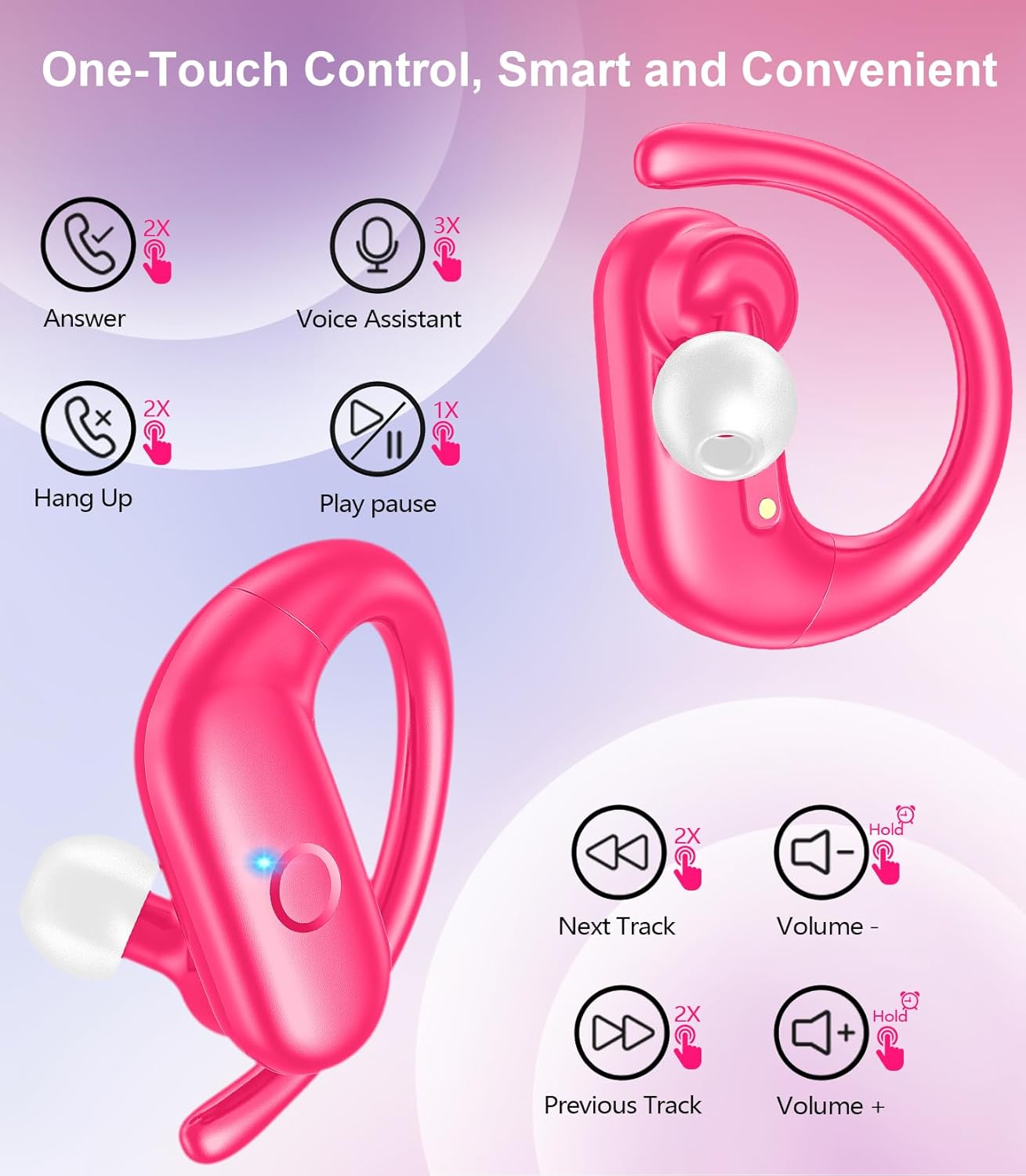
Image: A detailed view of an earbud highlighting the integrated Bluetooth 5.3 technology for stable and efficient wireless connectivity.
Setup
1. Charging the Earbuds and Case
Before first use, fully charge the earbuds and the charging case. Connect the provided USB-C cable to the charging port on the case and a power source. The indicator lights on the case will show the charging status.
- Charging Time: Approximately 1.5 hours for a full charge.
- Earbud Playtime: Up to 12 hours on a single charge.
- Total Playtime with Case: Up to 60 hours.

Image: The charging case with earbuds inside, illustrating the 60-hour total playtime, 12-hour single charge, and 48-hour case capacity, along with the USB-C charging port.
2. Pairing with Your Device
- Ensure the charging case has power and the earbuds are inside.
- Open the charging case. The earbuds will automatically power on and enter pairing mode.
- On your device (smartphone, tablet, laptop), enable Bluetooth.
- Search for available Bluetooth devices and select "SP9i" from the list.
- Once connected, you will hear a confirmation tone, and the earbuds' indicator lights will turn off or flash slowly.
The earbuds will automatically reconnect to the last paired device when removed from the case, if Bluetooth is enabled on the device.

Image: An illustration showing the MOZOTER SP9i earbuds in their open case, with a smartphone screen displaying a successful Bluetooth connection to "SP9i".
Wearing Instructions
For optimal sound quality and comfort, it is important to wear the earbuds correctly and choose the appropriate eartip size.
1. Selecting Eartips
The earbuds come with small (S), medium (M), and large (L) eartips. Experiment with different sizes to find the pair that provides the best seal and comfort for your ears. A good seal enhances bass response and passive noise cancellation.
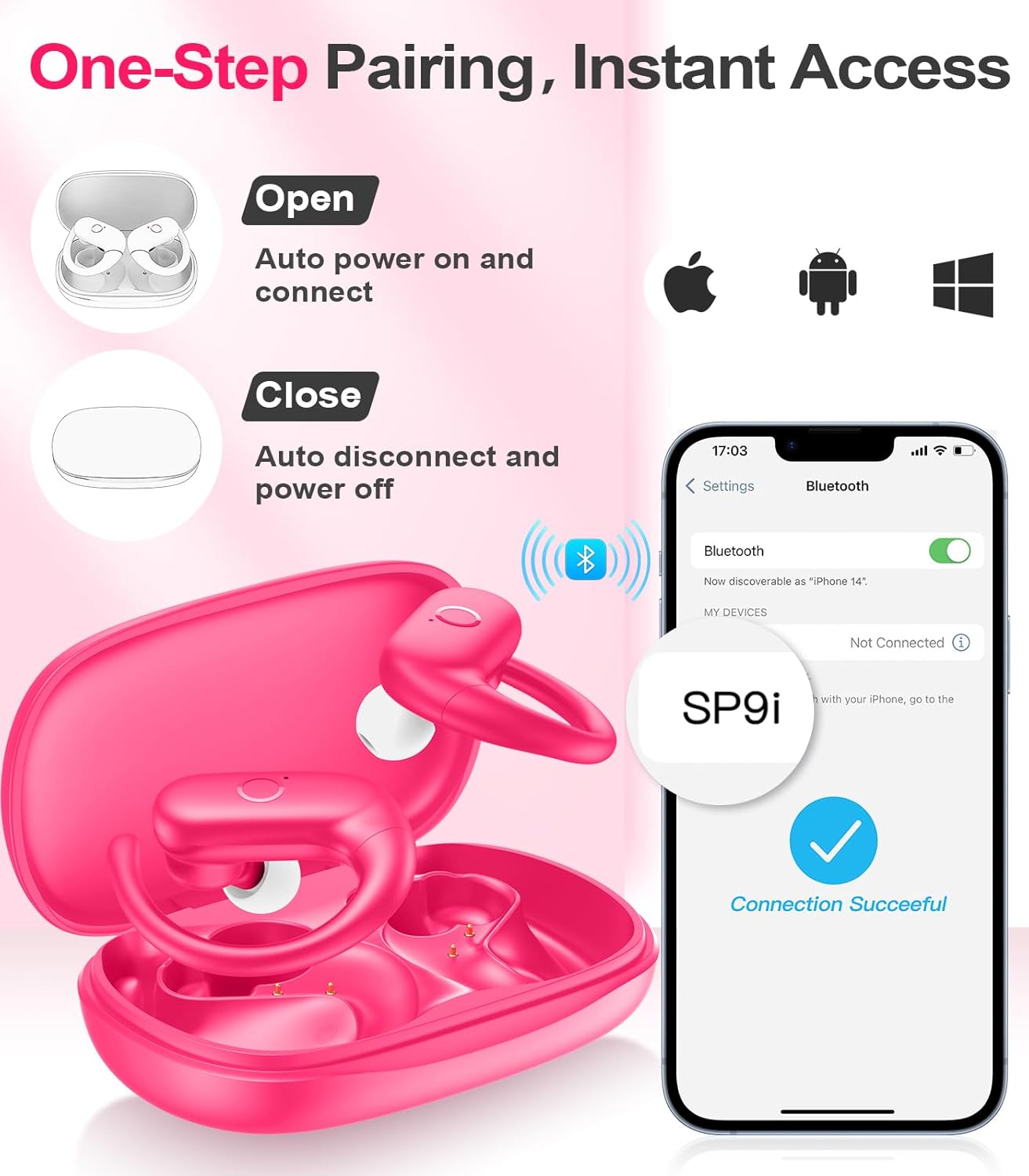
Image: A woman wearing an earbud, with an inset showing the three available eartip sizes (S, M, L) for a customized and comfortable fit.
2. Achieving a Secure Fit
- Step 1: Place the ear hook over your ear.
- Step 2: Gently insert the earbud into your ear canal.
- Step 3: Rotate the earbud slightly to find a comfortable and secure angle. The flexible ear hooks ensure a stable fit, ideal for sports and active use.

Image: A three-step diagram illustrating the correct method to wear the MOZOTER SP9i earbuds, ensuring a secure and comfortable fit with the ear hook.

Image: A woman wearing the MOZOTER SP9i earbuds, demonstrating the ergonomic design that rests comfortably and securely on the ear.
Operating Instructions
The MOZOTER SP9i earbuds feature intuitive touch controls on each earbud. The following table outlines the functions:
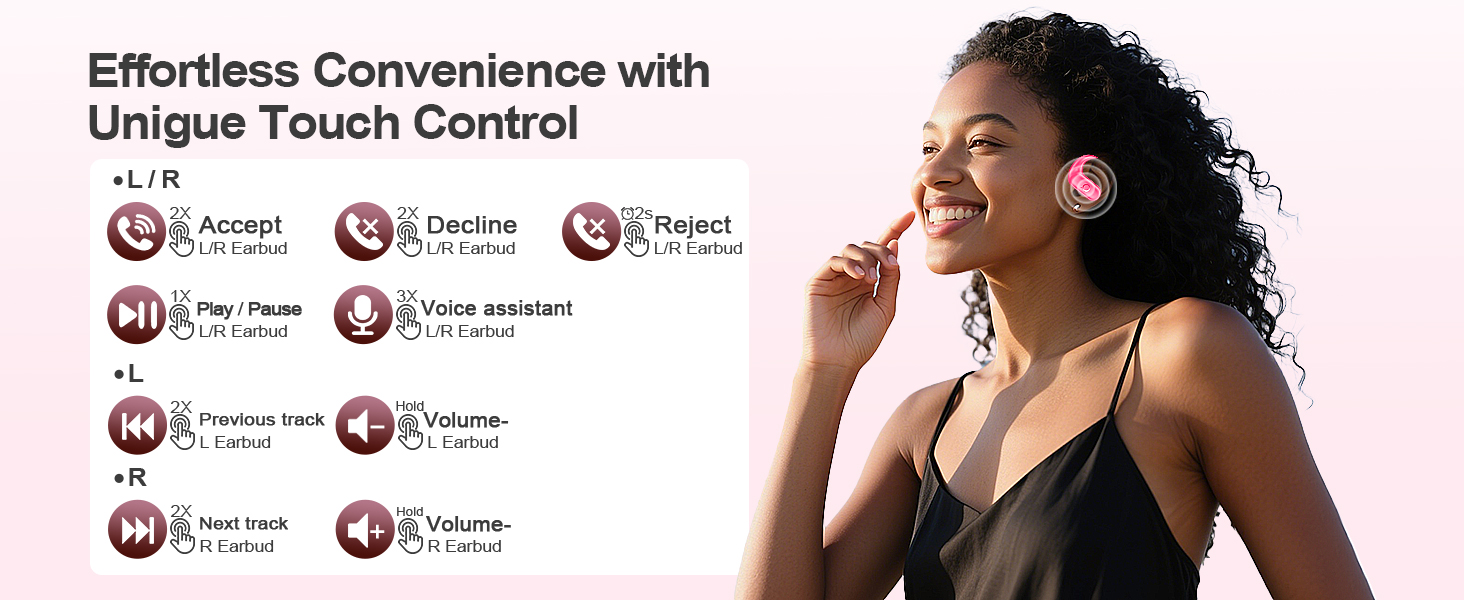
Image: A visual guide detailing the various touch control gestures for the MOZOTER SP9i earbuds, including call management, music playback, and volume adjustments.
| Action | Gesture (L/R Earbud) |
|---|---|
| Answer Call | Double-tap (2X) |
| Hang Up Call | Double-tap (2X) |
| Reject Call | Triple-tap (3X) |
| Play/Pause Music | Single-tap (1X) |
| Activate Voice Assistant | Triple-tap (3X) |
| Next Track | Double-tap (2X) on Right earbud |
| Previous Track | Double-tap (2X) on Left earbud |
| Volume Up | Hold on Right earbud |
| Volume Down | Hold on Left earbud |
Maintenance
Proper maintenance ensures the longevity and performance of your earbuds.
- Cleaning: Regularly clean the eartips and the charging contacts on both the earbuds and the case with a soft, dry, lint-free cloth. Avoid using harsh chemicals or abrasive materials.
- Storage: When not in use, store the earbuds in their charging case to protect them from dust and damage.
- Water Exposure: While designed for sports, avoid submerging the earbuds in water. Wipe off sweat or moisture immediately after use.
Troubleshooting
If you encounter any issues with your MOZOTER SP9i earbuds, please refer to the following common solutions:
- Earbuds not pairing: Ensure both earbuds are charged and removed from the case. Turn off and on your device's Bluetooth. If issues persist, try resetting the earbuds (refer to manufacturer's website for specific reset instructions if not in manual).
- Only one earbud working: Place both earbuds back into the charging case, close the lid, wait a few seconds, then open the lid and remove them. This often resynchronizes them.
- Poor sound quality: Ensure the eartips provide a good seal in your ear. Clean any debris from the earbud speakers. Check your device's volume and audio settings.
- Charging issues: Ensure the charging cable is securely connected to both the case and the power source. Clean the charging contacts on the earbuds and inside the case.
- Earbuds falling out: Experiment with different eartip sizes and adjust the ear hooks for a more secure fit as described in the Wearing Instructions section.
Specifications
| Feature | Detail |
|---|---|
| Model Name | SP9i |
| Connectivity Technology | Wireless (Bluetooth 5.3) |
| Noise Control | Passive Noise Cancellation |
| Impedance | 4 Ohm |
| Earbud Weight | Approximately 8g per earbud |
| Earbud Playtime | Up to 12 hours |
| Total Playtime (with case) | Up to 60 hours |
| Charging Port | USB-C |
| Included Components | Earbuds, Charging Case, Eartips, User Manual |
Warranty and Support
MOZOTER products are designed and manufactured to the highest quality standards. For warranty information and customer support, please refer to the documentation included with your purchase or visit the official MOZOTER website. If you require further assistance, please contact our customer service team.


