1. Introduction
This manual provides detailed instructions for the installation, operation, and maintenance of your La Crosse Technology 5-in-1 Wireless Sensor (Model WS6236-BLA). This sensor is designed to work exclusively with the La Crosse Technology WS6262 Weather Station, providing comprehensive environmental data including temperature, humidity, rainfall, wind speed, and wind direction.
Please read this manual thoroughly before using the product to ensure correct setup and optimal performance.
2. Safety Information
- Do not expose the sensor to excessive force, shock, dust, temperature, or humidity.
- Do not immerse the unit in water.
- Do not tamper with the internal components. This will void the warranty.
- Use only fresh batteries of the recommended type.
- Dispose of used batteries responsibly according to local regulations.
- Keep out of reach of children.
3. Package Contents
Ensure all items are present and in good condition upon unpacking:
- La Crosse Technology 5-in-1 Wireless Sensor (Model WS6236-BLA)
- Instruction Manual
- Mounting hardware (screws, pole mount, etc. - specifics may vary)
Note: 3 x AA LR6 batteries are not included and must be purchased separately.
4. Setup
4.1. Battery Installation
- Locate the battery compartment on the underside of the sensor unit.
- Open the battery compartment cover.
- Insert 3 new AA LR6 batteries, observing the correct polarity (+/-) as indicated inside the compartment.
- Close the battery compartment cover securely to ensure water resistance.
4.2. Sensor Placement and Mounting
Proper placement is crucial for accurate readings. Choose an open location with no obstructions above or around the sensor.
- Wind Measurement: Ensure the wind vane and anemometer are free from obstructions. The sensor should be mounted at least 1.5 meters (5 feet) above the ground for optimal wind readings.
- Rain Measurement: The rain collector should be level and clear of any overhead obstacles that could block rainfall.
- Temperature/Humidity: Avoid direct sunlight exposure on the temperature/humidity sensor to prevent inaccurate readings.
- Orientation: Orient the wind direction vane correctly, typically with the "N" (North) indicator pointing North.
Use the provided mounting hardware to securely attach the sensor to a pole or suitable structure. Ensure the sensor is stable and level.
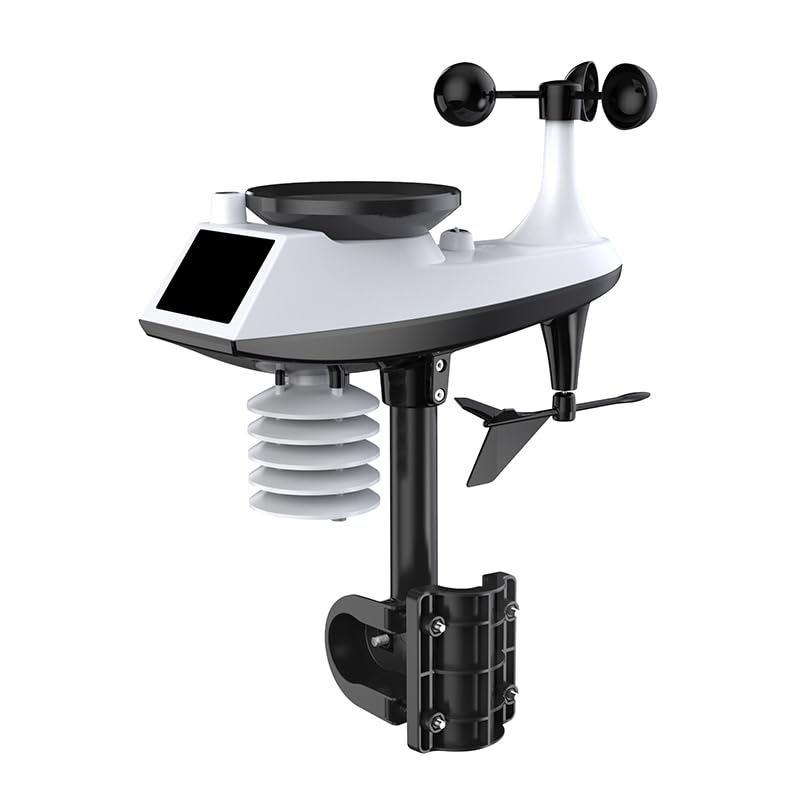
Image: La Crosse Technology 5-in-1 Wireless Sensor (Model WS6236-BLA) showing its various components and typical outdoor mounting. The sensor is black and white, featuring a wind vane, anemometer cups, a rain collector, and a main body.
4.3. Pairing with WS6262 Weather Station
After battery installation and mounting, the sensor will automatically attempt to transmit data to your WS6262 weather station. Refer to your WS6262 weather station's manual for specific instructions on how to initiate sensor search or pairing mode on the main display unit. The sensor operates on a 433 MHz frequency.
- Ensure the WS6262 weather station is within the effective transmission range of the 5-in-1 sensor.
- If pairing does not occur automatically, try resetting both the sensor (by removing and reinserting batteries) and the weather station (refer to its manual).
5. Operation
Once successfully paired, the 5-in-1 sensor will continuously collect and transmit environmental data to your WS6262 weather station. The weather station will then display these readings.
- Temperature: Measures ambient air temperature.
- Humidity: Measures relative humidity of the air.
- Rainfall: Accumulates rainfall data. The rain collector uses a tipping bucket mechanism.
- Wind Speed: Measures current wind speed using the anemometer cups.
- Wind Direction: Indicates the prevailing wind direction using the wind vane.
Data transmission occurs periodically. Consult your WS6262 weather station manual for details on data display, historical data, and alert settings.
6. Maintenance
6.1. Cleaning
- Periodically clean the exterior of the sensor with a soft, damp cloth. Do not use abrasive cleaners or solvents.
- Ensure the rain collector funnel is clear of debris (leaves, insects, etc.) to ensure accurate rainfall measurement.
- Check the wind vane and anemometer for any obstructions or debris that might impede their rotation.
6.2. Battery Replacement
When the batteries are low, the WS6262 weather station display will typically show a low battery indicator for the outdoor sensor. Replace all 3 AA LR6 batteries at the same time to ensure consistent power. Follow the battery installation steps in Section 4.1.
6.3. Winter Care
In areas with heavy snowfall or freezing rain, consider temporarily relocating the sensor to a sheltered area or clearing snow/ice from the rain collector and wind sensors to prevent damage and ensure continued operation.
7. Troubleshooting
| Problem | Possible Cause | Solution |
|---|---|---|
| No data displayed on WS6262 station. |
|
|
| Inaccurate temperature/humidity. |
|
|
| Inaccurate wind speed/direction. |
|
|
| Inaccurate rainfall. |
|
|
8. Specifications
- Model: WS6236-BLA
- Compatibility: Exclusively with La Crosse Technology WS6262 Weather Station
- Functions: Temperature, Humidity, Rainfall, Wind Speed, Wind Direction
- Frequency: 433 MHz
- Power: 3 x AA LR6 batteries (not included)
- Dimensions: Approximately 350 x 47 x 135 mm (13.78 x 1.85 x 5.31 inches)
- Measurement Accuracy: +/-1 (specific unit not provided, typically refers to temperature or humidity)
- Connectivity Technology: Wireless
- Sensor Technology: Ultrasonic
9. Warranty and Support
La Crosse Technology products are manufactured to high-quality standards. For specific warranty information, please refer to the warranty card included with your product or visit the official La Crosse Technology website. For technical support or inquiries, please contact La Crosse Technology customer service.
Online Resources: For additional support, FAQs, and product registration, please visit the official La Crosse Technology website.


