
1. Introduction
This manual provides detailed instructions for the setup, operation, and maintenance of your SMAJAYU SMA28H Laser RTK and SMA26 Pro Base GNSS Survey System. This system is designed for high-precision surveying applications, offering advanced features such as 2cm accuracy laser measurement, dual-camera AR real-scene stakeout, and robust multi-network GNSS connectivity.
2. Package Contents
Verify that all items listed below are included in your package. If any items are missing or damaged, please contact customer support.

Image: SMA28H and SMA26 Pro Base package contents.

Image: Detailed view of SMA28H and SMA26 Pro Base components.
2.1 SMA28H Rover List:
- 1x SMA28H Receiver
- 1x Handheld Controller
- 1x Handheld Bracket
- 1x Power Adapter
- 1x Charging Cable
- 1x Radio Antenna
- 1x User Manual
2.2 SMA26 Pro Base List:
- 1x GNSS Receiver
- 1x Power Adapter
- 1x Disc
- 1x Extension Rod
- 1x Tape Measure
- 1x Terminal Antenna
- 1x User Manual
2.3 Unboxing Videos:
Video: SMA26 Pro RTK Unboxing. This video demonstrates the unboxing process for the SMA26 Pro Base unit, showing all included components.
Video: SMA28H Unboxing. This video guides you through unboxing the SMA28H Rover, detailing each component.
3. Product Features
- 2cm Accuracy Laser Measurement: Non-contact point measurements up to 30m, with 3-4cm accuracy within 15m. Ideal for hard-to-reach points.
- Dual Cameras AR Real Scene Stakeout: Features dual high-definition cameras for augmented reality (AR) stakeout, displaying points directly on the live video feed for intuitive guidance.
- 120° Tilt Survey with High Accuracy: Integrated Inertial Measurement Unit (IMU) provides less than 2cm accuracy within a 60° tilt range, supporting angles up to 120°.
- Long-Distance Communication: Integrated UHF radio communication system with a working range of up to 15 kilometers in open environments.
- Multi-Network GNSS Connectivity: Supports PPP, PPK, RTK, and direct CORS network connections with a built-in 4G module for direct network access via SIM card.
- Durable Design: IP67 waterproof and 1.8m drop-tested.
- Extended Battery Life: 6600 mAh battery provides up to 20 hours of rover use.
- Connectivity: Integrated 4G LTE, UHF radio, Wi-Fi, Bluetooth, and WEBUI platform.

Image: Overview of SMA28H features including battery, channels, IP rating, 4G, NFC, and WEBUI.
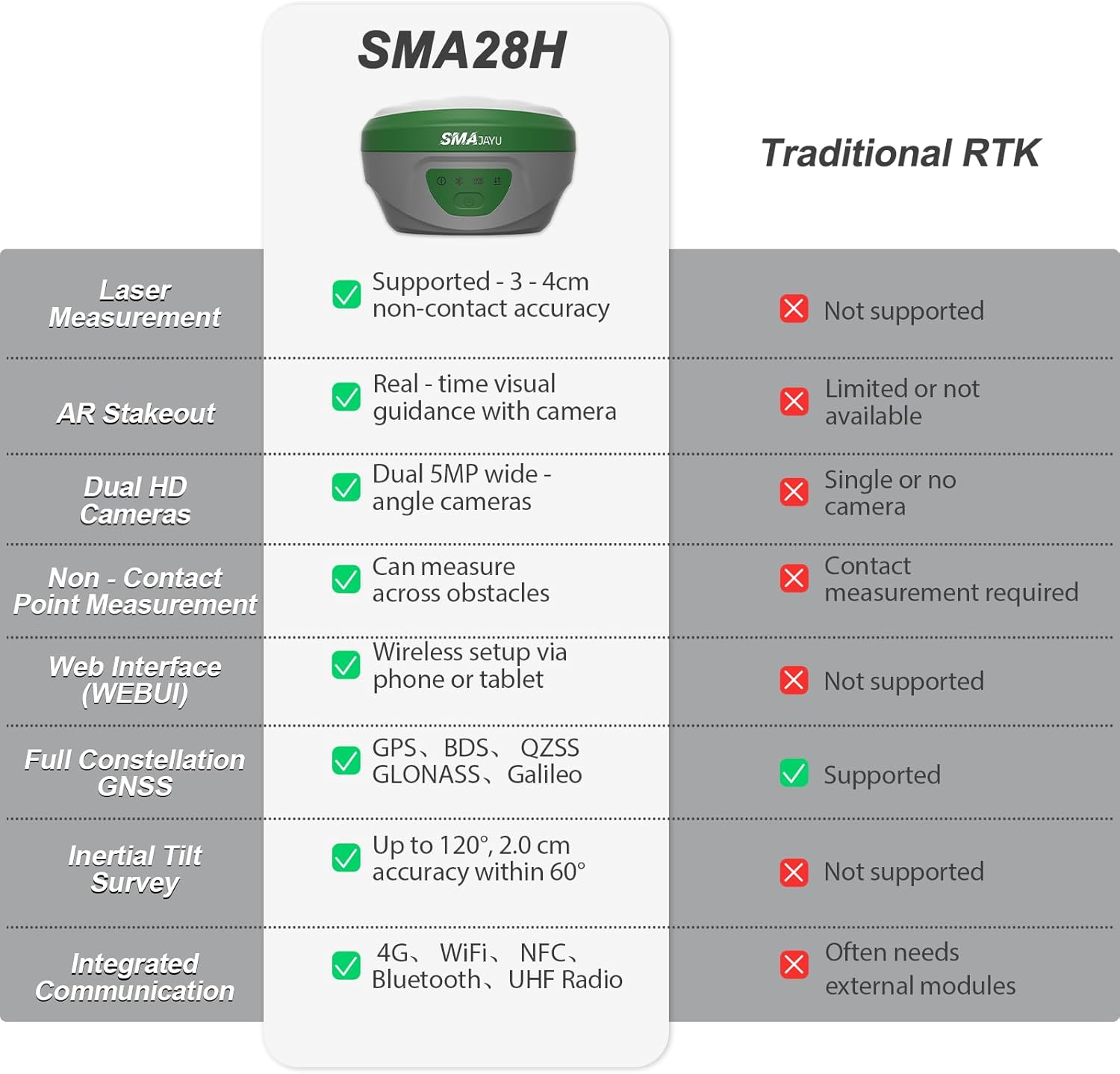
Image: Comparison table highlighting SMA28H advantages over traditional RTK systems.
4. Setup
4.1 Initial Assembly
- Attach the SMA28H Rover to the handheld bracket and secure it.
- Connect the radio antenna to the SMA28H Rover.
- For the SMA26 Pro Base, attach the terminal antenna and extension rod as needed.
- Ensure all components are securely fastened.
4.2 Powering On and Connectivity
- Power on both the SMA28H Rover and SMA26 Pro Base units.
- On the handheld controller, navigate to the communication settings.
- Select the appropriate RTK model (SMA28H) and connect via Bluetooth.
- Ensure a fixed solution state is achieved for accurate measurements.
5. Operating Instructions
5.1 Laser Measurement
The SMA28H features a visible green laser for non-contact measurements, ideal for points that are difficult to access directly.

Image: SMA28H GNSS Receiver demonstrating non-contact, high-precision laser measurement.
To perform laser measurements:
- Ensure the SMA28H is in rover mode and has a fixed solution.
- Navigate to the 'Survey' menu on the handheld controller and select 'Point Survey'.
- Click the laser mode icon, then the laser-assisted camera icon to activate the laser and camera view.
- Aim the laser at the desired point. The distance will be displayed on the screen.
- Click the measuring point icon to record the point.
Laser Measurement Videos:
Video: SMA28H RTK Laser Measurement. This video demonstrates how to use the laser measurement function of the SMA28H.
Video: SMA28H RTK GNSS Laser Focus at 15m & 30m. This video illustrates the stability and focus of the laser measurement at various distances.
5.2 AR Real Scene Stakeout
The AR stakeout feature provides real-time directional guidance by overlaying stakeout points onto a live video feed from the dual cameras.

Image: Demonstration of Dual Cameras AR Real Scene Stakeout.
To use AR Stakeout:
- From the 'Survey' menu, select 'Point Stakeout'.
- Choose the desired point from the 'Point Coordinates' list.
- Click the 'Stakeout' button.
- Select the 'Video Stakeout' option (AR icon).
- Follow the on-screen directional guidance to reach the stakeout point.
AR Stakeout Videos:
Video: SMA28H Laser RTK for AR Visual Stakeout. This video demonstrates the AR visual stakeout functionality.
Video: SMA28H Laser RTK Point Setting. This video shows how to set points using the laser RTK system.
5.3 120° Tilt Survey
The integrated IMU allows for accurate measurements even when the pole is tilted, providing flexibility in challenging environments.

Image: Demonstration of 120° Tilt Surveying capability.
The system automatically compensates for tilt up to 120°, maintaining accuracy of less than 2 cm within a 60° tilt range.
5.4 Long-Distance UHF Communication
The UHF radio communication system enables reliable data transmission over long distances.

Image: Diagram illustrating the 15KM communication distance of the built-in transceiver radio module.
In open environments, the system can maintain communication up to 15 kilometers, suitable for large-scale projects.
5.5 Multi-Network GNSS Connectivity
The system supports various GNSS constellations and correction methods for robust positioning.

Image: Diagram showing full constellation support including GPS, BDS, GLONASS, Galileo, and QZSS.
The SMA28H supports PPP, PPK, RTK, and direct CORS network connections. A built-in 4G module allows direct access to the 4G network and CORS login by inserting a SIM card, eliminating the need for external equipment.
5.6 Data Management (Export/Import)
The handheld controller facilitates easy export and import of survey data.
Data Export Video:
Video: Data Export Operation. This video demonstrates the steps to export survey data from the handheld controller.
Data Import Video:
Video: Data Import Operation. This video shows how to import survey data into the handheld controller.
5.7 Base Station Panning Operation
If the base station is restarted or moved, recalibration is necessary.
Base Station Panning Video:
Video: Base Station Panning Operation. This video explains how to recalibrate the base station if it has been moved or restarted.
6. Maintenance
- Keep the devices clean and free from dust and debris.
- Store the equipment in its protective case when not in use.
- Charge batteries regularly, even during periods of non-use, to maintain battery health.
- Avoid exposing the devices to extreme temperatures or direct sunlight for prolonged periods.
- Regularly check for firmware updates to ensure optimal performance and access to new features.
7. Troubleshooting
If you encounter any issues, refer to the following common troubleshooting tips:
- No Fixed Solution: Ensure clear sky view, check base station setup, verify internet/UHF connection for corrections.
- Connectivity Issues: Re-pair Bluetooth, check Wi-Fi/4G signal strength, ensure devices are within range.
- Inaccurate Measurements: Perform IMU calibration, check pole height settings, ensure base station is stable and correctly positioned.
- Battery Draining Quickly: Reduce screen brightness, close unused applications, ensure batteries are fully charged before use.
For more complex issues, please contact SMAJAYU customer support.
8. Specifications
| Feature | Specification |
|---|---|
| Item Weight | 14.96 pounds |
| Product Dimensions | 15.75 x 12.6 x 12.2 inches |
| Display Size | 5.5 Inches |
| Battery Life | 20 Hours |
| Voice Command | Buttons, Touchscreen |
| Special Feature | Non-Contact Laser Measurement, AR Real-Scene Stakeout, Long-Distance UHF Communication |
| Connectivity Technology | Wi-Fi, Bluetooth, USB, 4G LTE |
| Map Type | Topographical |
| Memory Storage Capacity | 32 GB |
| Laser Class | Class3R |
| Waterproof Rating | IP67 |
9. Warranty and Support
Your SMAJAYU SMA28H Laser RTK & SMA26 Pro Base GNSS Survey System comes with a standard manufacturer's warranty. Please refer to the warranty card included in your package for specific terms and conditions.
For technical support, troubleshooting assistance, or any inquiries regarding your product, please contact SMAJAYU customer service. Our team of expert engineers is available to provide online support.

Image: Example of one-on-one expert engineer online support.
You can also visit the official SMAJAYU website for FAQs, additional resources, and contact information.


