
BAOFENG UV-32
Contents
BAOFENG UV-32 Two-Way Radio Instruction Manual
Model: UV-32 | Brand: BAOFENG
1. Introduction
The BAOFENG UV-32 is a high-power, multi-band two-way radio designed for reliable communication. It features advanced functionalities such as Bluetooth programming, integrated GPS/APRS, 10 NOAA weather channels, and versatile Type-C USB charging. This manual provides essential information for setting up, operating, and maintaining your UV-32 radio.
2. Package Contents
Upon opening the package, ensure all items listed below are present:
- BAOFENG UV-32 Two-Way Radio Unit
- Rechargeable Battery (Nonstandard Battery)
- Antenna (Standard)
- Telescopic Antenna (Longer Whip Antenna)
- Battery Charger Base
- USB Type-C Charging Cable
- Power Adapter
- Belt Clip
- Lanyard
- Flathead Screwdriver (for battery attachment)
- Earpiece with Microphone
- User's Manual

Image: BAOFENG UV-32 radio with all standard accessories including battery, charger, antennas, belt clip, and earpiece.
Video: Unboxing and display of BAOFENG UV-32 accessories.
3. Product Overview & Key Features
The BAOFENG UV-32 is equipped with a range of features to enhance your communication experience:
- 10W High Power Output: Provides strong and clear long-range communication with H/M/L power switching.
- Bluetooth Programming: Customize frequencies and settings easily via a smartphone application.
- GPS / APRS: Global Positioning System for real-time positioning and automatic position reporting.
- Multi-Band Transceiver: Supports various frequency bands for versatile use.
- 10 NOAA Weather Stations: Receive critical weather hazard broadcasts for preparedness.
- Type-C USB Charging: Convenient charging via Type-C port, power bank, or car charger.
- 2.0-inch Display: Clear and intuitive display for easy navigation and information viewing.
- High Performance Audio System: Features a 40mm large-sized speaker with intelligent noise reduction for clear call quality.

Image: BAOFENG UV-32 showcasing Bluetooth APP programming and GPS capabilities.

Image: Illustration of the 10W Tri-power output settings (High, Mid, Low) on the UV-32.

Image: Diagram showing the high-quality speaker and clear call sound quality of the UV-32.
4. Initial Setup
Follow these steps to prepare your BAOFENG UV-32 for first use:
- Install Battery: Use the provided flathead screwdriver to secure the battery to the radio unit.
- Attach Antenna: Carefully screw the desired antenna (standard or telescopic) onto the antenna connector at the top of the radio. Ensure it is finger-tight.
- Attach Belt Clip: If desired, attach the belt clip to the back of the radio for convenient carrying.
Video: Demonstration of installing the battery and antenna on the BAOFENG UV-32.
Video: Overview of BAOFENG UV-32 operation, including initial setup and feature demonstration.
5. Operating the Radio
This section covers the basic operation of your UV-32 radio.
5.1 Power On/Off
- To power on, rotate the Power/Volume knob clockwise until the display illuminates.
- To power off, rotate the Power/Volume knob counter-clockwise until a click is heard and the display turns off.
5.2 Channel Mode & Frequency Adjustment
- Use the numeric keypad to directly input frequencies or navigate through channels.
- The Encoder/Channel selector switch can be used to change channels or adjust frequencies.
- The 2.0-inch color LCD screen displays current frequencies, channel information, and other operational data.
5.3 Side Key Customization
The UV-32 allows customization of its side keys (SK1, SK2, P1, P2) for quick access to frequently used functions like FM Radio, Alarm, or Monitor.
Video: Demonstration of various features including side key customization, text messaging, and GPS.
5.4 Copy Frequency
The radio supports a quick copy frequency function to easily duplicate frequencies from another radio or a specific band.
Video: Shows copy frequency operation and other features.
6. Advanced Functions
6.1 Bluetooth Programming (APP)
The UV-32 can be programmed wirelessly via a smartphone application. This allows for easy customization of frequencies and other settings.
- Turn on the walkie-talkie's Bluetooth function through the radio's menu.
- Download and open the programming application (e.g., "walkie-talkietool") on your smartphone.
- Connect to the UV-32 via Bluetooth within the app.
- Select the radio model and proceed to read/write frequencies and settings.

Image: BAOFENG UV-32 demonstrating wireless programming via a smartphone app for both iOS and Android.
Video: Detailed steps for programming the BAOFENG UV-32 using a smartphone application.
Video: Guide on viewing product features and downloading the companion application for the BAOFENG UV-32.
6.2 GPS / APRS Function
The integrated GPS allows for real-time positioning and Automatic Packet Reporting System (APRS) functionality, useful for tracking and location sharing.
- Access the GNSS settings in the radio menu to enable or disable GPS.
- Configure time zone and GPS mode as needed.
Video: Shows GPS function activation and other features.
6.3 NOAA Weather Reception
The radio can receive broadcasts from 10 NOAA weather stations, providing timely alerts for hazardous weather conditions.

Image: BAOFENG UV-32 displaying NOAA Weather Reception capability.
7. Charging
The BAOFENG UV-32 offers multiple convenient charging methods:
- Type-C USB Charging: Directly plug a Type-C USB cable into the radio for charging from a power bank, laptop, or car charger.
- Base Charger: Place the radio in the provided charging base, which connects to a power outlet via the power adapter.
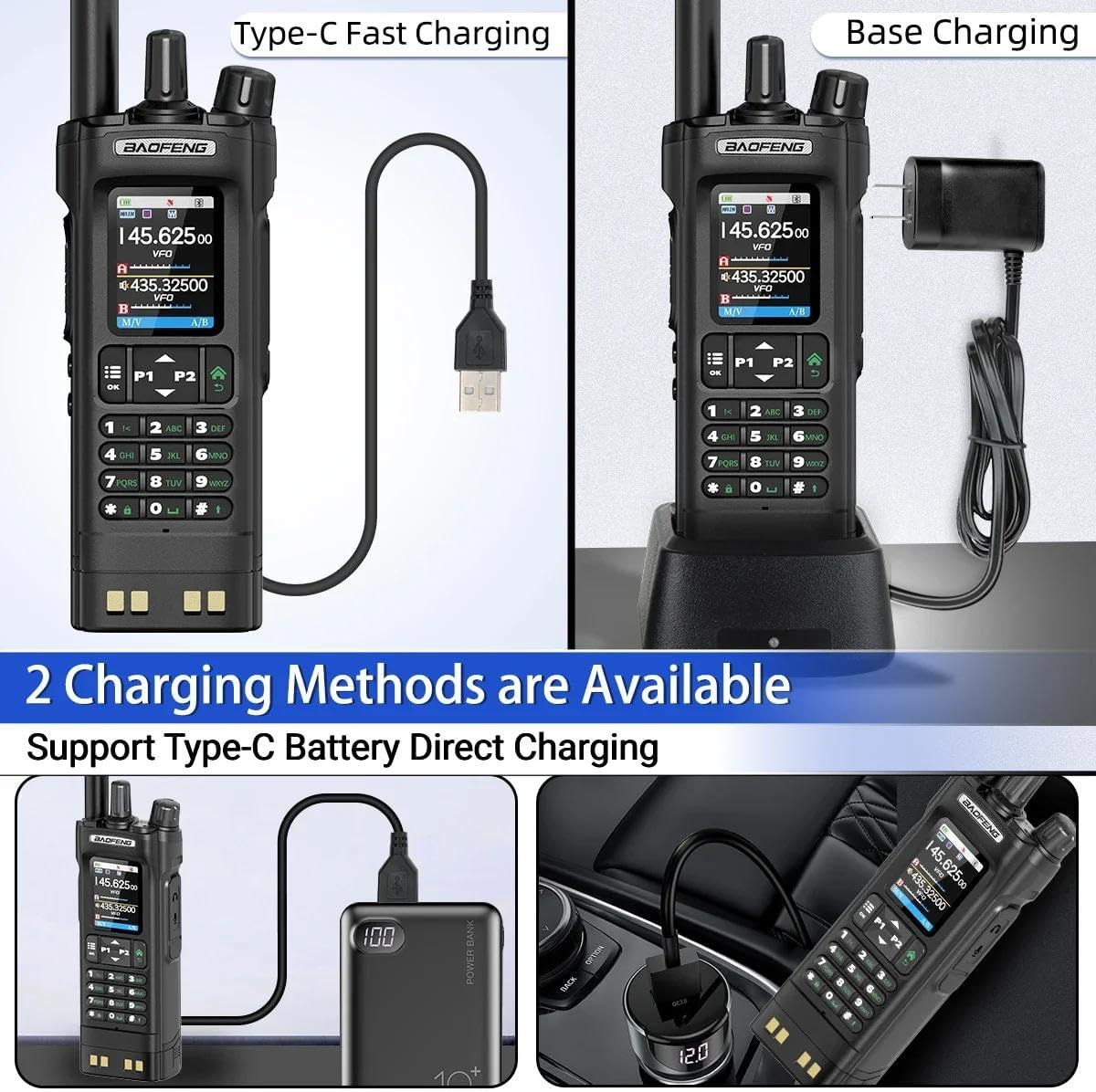
Image: Two available charging methods for the UV-32: Type-C direct charging and traditional base charging.
8. Programming via PC (CPS Software)
For advanced programming and management of channels and settings, you can use the CPS (Customer Programming Software) on a computer.
- Ensure the radio is turned on and connected to your computer via a programming cable (not explicitly listed in package contents, but implied by CPS).
- Download and install the appropriate CPS software from the official BAOFENG website.
- Open the CPS software and select the correct communication port (COM port) for your radio.
- Read data from the radio, make desired edits to channels and settings, and then write the updated data back to the radio.
Video: Step-by-step guide on how to program BAOFENG walkie-talkies using CPS software on a computer.
9. Specifications
| Feature | Detail |
|---|---|
| Item Weight | 1.7 pounds |
| Package Dimensions | 10.63 x 8.66 x 2.56 inches |
| Item Model Number | UV-32 |
| Batteries | 1 Nonstandard Battery required (included) |
| Number of Channels | 1000 |
| Special Feature | Dual Band, Long Range, Rechargeable |
| Talking Range Maximum | 8 Kilometer |
| Voltage | 7.4 Volts |
| Water Resistance Level | Not Water Resistant |
| Manufacturer | BAOFENG |
10. Warranty & Support
The product information indicates "No Warranty". For any support or service inquiries, please contact the seller or refer to the official BAOFENG website for available resources.
Official BAOFENG Website: www.baofengradio.com
Documents and downloads
Ask a question about this manual
Ask about setup, troubleshooting, compatibility, parts, safety, or missing instructions. Manuals+ will review the question and use this page’s manual context to help answer it.