
1. Introduction
Thank you for choosing the Newday 52-inch Black Ceiling Fan with Lights and Remote. This manual provides essential information for the safe installation, operation, and maintenance of your new ceiling fan. Please read these instructions thoroughly before beginning installation and retain them for future reference.
This ceiling fan is designed for both indoor and covered outdoor areas, offering a quiet DC motor, 6-speed settings, a dimmable LED light with 3 color temperatures, and a reversible function for year-round comfort.
2. Safety Information
To reduce the risk of electric shock, fire, or personal injury, always follow these basic safety precautions:
- Read all instructions and safety information before installing your fan and save these instructions.
- Before servicing or cleaning, switch power off at the service panel and lock the service disconnecting means to prevent power from being switched on accidentally.
- All wiring must be in accordance with national and local electrical codes. Consult a qualified electrician if you are unfamiliar with wiring.
- The mounting structure must be capable of supporting a minimum of 35 lbs (15.9 kg).
- Ensure the fan is installed at a height where the blades are at least 7 feet (2.1 meters) from the floor.
- Do not operate the fan with damaged blades or any other damaged components.
- Avoid placing objects in the path of the fan blades.
3. Package Contents
Carefully unpack your ceiling fan and inspect the contents. Ensure all items are present and undamaged. If any parts are missing or damaged, contact Newday customer service.
- Ceiling Fan Motor Housing
- Fan Blades (3)
- LED Light Kit
- Remote Control with Wall Mount
- Downrod(s)
- Mounting Bracket
- Hardware Pack (screws, wire nuts, washers)
- Instruction Manual
4. Installation Instructions
Most complex installation procedures for this Newday ceiling fan are pre-completed. Detailed instructions are provided to guide you through the remaining steps. Ensure power is OFF at the circuit breaker before starting installation.

Figure 4.1: Easy and Fast Installation. The fan supports both downrod and angled mounting options.
4.1 Mounting the Fan
- Secure the mounting bracket to the ceiling junction box. Ensure the junction box is securely fastened to the building structure and can support the fan's weight.
- Assemble the downrod to the motor housing.
- Carefully lift the fan assembly and hang it from the mounting bracket.
4.2 Wiring Connections
- Connect the fan's electrical wires to the household supply wires according to local electrical codes. Typically, this involves connecting the live, neutral, and ground wires.
- Ensure all wire connections are secure using the provided wire nuts.
4.3 Attaching Blades and Light Kit
- Attach the fan blades to the motor housing using the provided screws. Ensure all screws are tightened securely.
- Connect the LED light kit wires and secure the light kit to the fan housing.
5. Operating Instructions
Your Newday ceiling fan is controlled by a wireless remote, allowing for convenient adjustment of fan speed, light settings, and timing functions.
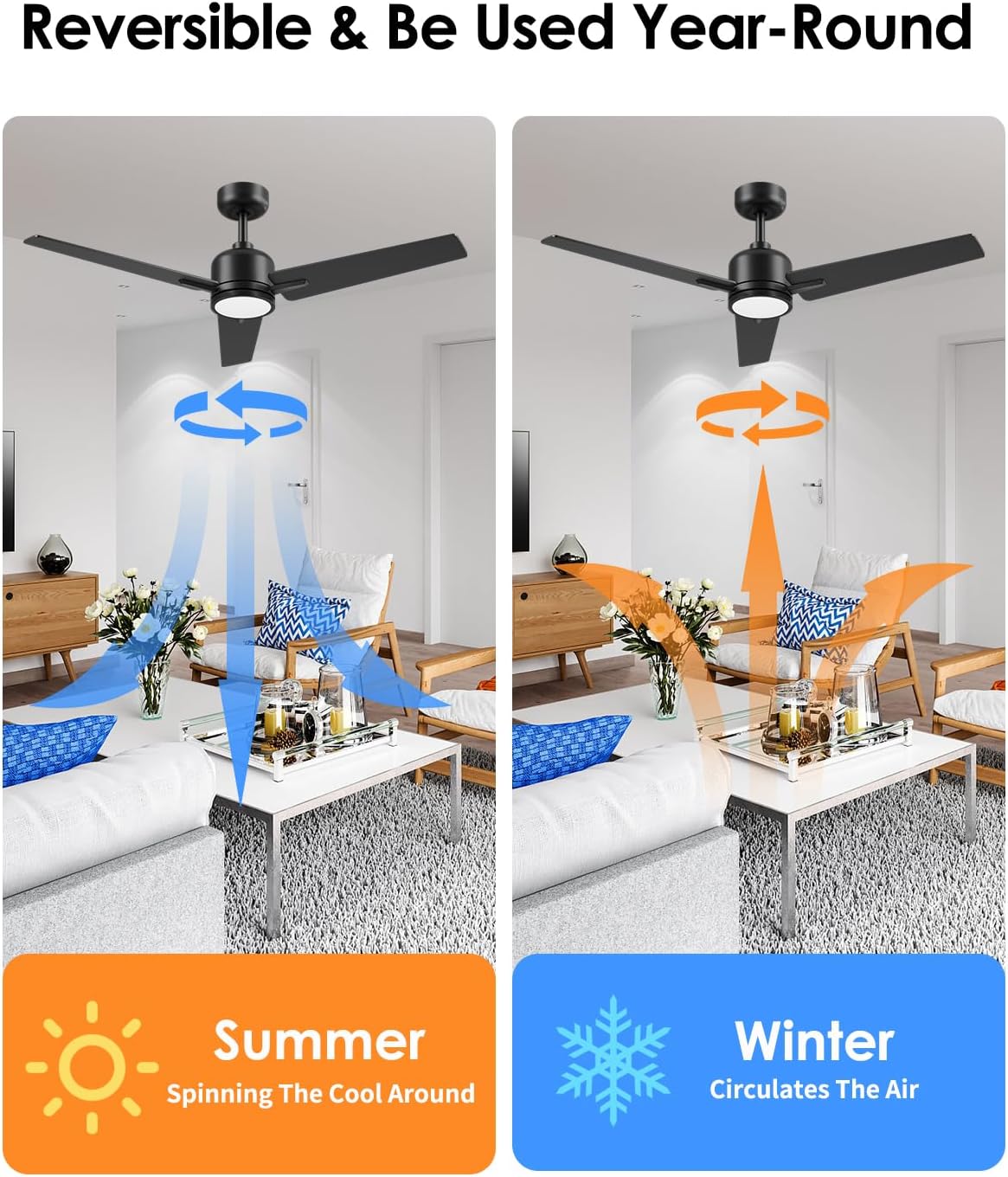
Figure 5.1: Remote Control Functions. The remote allows full control over fan and light settings.
5.1 Remote Control Functions
- Power On/Off: Press the power button to turn the fan and light on or off.
- Fan Speed: Select from 6 adjustable fan speeds to achieve your desired airflow.
- Light Control: Turn the light on/off separately from the fan.
- Color Temperature: Cycle through 3 color temperatures (3000K Warm, 4000K Neutral, 6000K White).
- Dimming: Adjust light brightness from 10% to 100%.
- Timer: Set the fan to automatically turn off after 1, 3, or 6 hours.
- Memory Function: The light will remember your last color temperature and brightness setting.
- Sleep Mode: Activates a simulated natural wind mode, cycling through speeds 1, 2, and 3 every 20 seconds for a gentle breeze.

Figure 5.2: 6 Wind Speeds Adjustable. Provides a range of airflow for various activities.

Figure 5.3: Dimmable Light with 3 Color Temperatures. Adjust the light to suit your preference.

Figure 5.4: Light Memory Function. The fan remembers your last light settings if turned off for more than 10 seconds.
5.2 Reversible DC Motor
The fan features a reversible DC motor, allowing for multi-seasonal use. A switch on the fan body or a button on the remote (refer to remote diagram) controls the direction of blade rotation.
- Summer Mode (Downward Airflow): Blades rotate counter-clockwise, creating a downward breeze that cools the room.
- Winter Mode (Upward Airflow): Blades rotate clockwise, circulating warm air near the ceiling throughout the room.

Figure 5.5: Reversible Motor for Year-Round Comfort. Adjust airflow direction for optimal cooling or heat distribution.
5.3 Quiet Operation and Energy Efficiency
The DC motor operates at a noise level below 30 decibels, ensuring a peaceful environment. This high-quality DC motor also offers significant energy savings compared to traditional AC motors.

Figure 5.6: Noiseless Quiet Enjoyment. The fan operates at a low noise level, comparable to a quiet library.
6. Maintenance
Regular maintenance helps ensure the longevity and optimal performance of your ceiling fan.
- Cleaning: Periodically clean the fan blades and motor housing with a soft, damp cloth. Do not use abrasive cleaners or solvents.
- Tighten Fasteners: Check all screws and fasteners on the fan and mounting hardware at least twice a year. Ensure they are securely tightened.
- Blade Balance: If the fan wobbles, ensure all blades are securely attached and consider using a blade balancing kit (not included) if necessary.
Always ensure power is disconnected at the circuit breaker before performing any maintenance.
7. Troubleshooting
If you experience issues with your ceiling fan, refer to the following common problems and solutions:
| Problem | Possible Cause | Solution |
|---|---|---|
| Fan does not start | No power to the fan; Remote control battery is dead; Incorrect wiring. | Check circuit breaker; Replace remote battery; Verify wiring connections. |
| Light does not work | Loose wire connection; Remote control battery is dead; LED light kit issue. | Check light kit wiring; Replace remote battery; Contact customer support if LED is faulty. |
| Fan wobbles | Loose blade screws; Unbalanced blades; Loose mounting bracket. | Tighten all blade screws; Use a blade balancing kit; Ensure mounting bracket is secure. |
| Remote control not working | Dead battery; Obstruction between remote and receiver; Remote not paired. | Replace battery; Ensure clear line of sight; Refer to remote pairing instructions (if applicable). |
If you encounter issues not listed here or if the problem persists after attempting the solutions, please contact Newday customer support.
8. Specifications
Key technical specifications for the Newday 52-inch Black Ceiling Fan (Model DY1235-3B/52):

Figure 8.1: Product Dimensions. Overall dimensions of the ceiling fan.
| Feature | Detail |
|---|---|
| Brand | Newday |
| Model Name | DY1235-3B/52 |
| Size | 52 INCH |
| Color | Black |
| Material | Metal, Plastic |
| Motor Type | High Quality DC Motor (30W) |
| Power Source | DC |
| Voltage/Frequency | 120V~/60Hz |
| Airflow | Up to 5600 CFM |
| Wind Speeds | 6 Speeds (with Natural Wind Mode) |
| Light Source Type | LED |
| Wattage (Light) | 19 watts |
| Color Temperature | 3000K, 4000K, 6000K (Adjustable) |
| Dimming Range | 10%-100% |
| Control Method | Remote Control |
| Mounting Type | Downrod Mount / Semi Flush Mount (Slope Mounted <15°) |
| Indoor/Outdoor Usage | Indoor, Outdoor (Covered Area) |
| Recommended Room Size | 10ft x 10ft - 18ft x 18ft |
| Item Weight | 12.85 pounds |
| Product Dimensions | 52 x 48 x 13 inches |
9. Warranty and Support
Newday is committed to customer satisfaction and provides comprehensive after-sales support for your ceiling fan.

Figure 9.1: Warranty Information. Details on product coverage.
- Product Warranty: A 2-year warranty covers the entire ceiling fan.
- Motor Warranty: The DC motor is covered by a lifetime replacement service.
- Accessory Replacement: Free replacement of damaged accessories within 2 years of purchase.
For any questions, installation assistance, or warranty claims, please contact Newday customer service. Our support team is available to assist you.
Contact Information: Please refer to the contact details provided on your purchase receipt or the official Newday website.