
Introduction
This manual provides essential instructions for the safe and efficient operation of your Retevis RT48H waterproof two-way radio. Please read this manual thoroughly before using the device to ensure proper function and to prevent damage.
Safety Information
- Do not operate the radio in explosive atmospheres (e.g., flammable gases, dust particles, metallic powders).
- Do not disassemble or modify the radio. Repairs should only be performed by authorized personnel.
- Use only Retevis-approved batteries and chargers.
- Avoid exposing the radio to direct sunlight for extended periods or to extreme temperatures.
- Maintain a safe distance from medical devices when transmitting.
Package Contents
Verify that all items are present in your package:
- 6x RT48H Walkie Talkies
- 6x 1500 mAh Battery
- 1x Charger (6-way multi-unit charger)
- 6x Earpiece
- 6x Belt Clip
- 1x User Manual

Figure 1: Package Contents for Retevis RT48H (6-pack)
Product Overview
Rugged and Durable Design
The Retevis RT48H is engineered for demanding environments, featuring an IP67 waterproof and dustproof rating. It is drop-proof up to 1.2 meters, making it suitable for construction sites, outdoor activities, and other harsh conditions. The robust ABS material ensures longevity and reliability.

Figure 2: Retevis RT48H Rugged Design Features
Hidden Display
The RT48H features a built-in hidden display that shows essential information such as battery life, current channel, power mode, and VOX status. This allows for quick status checks without complex button sequences.
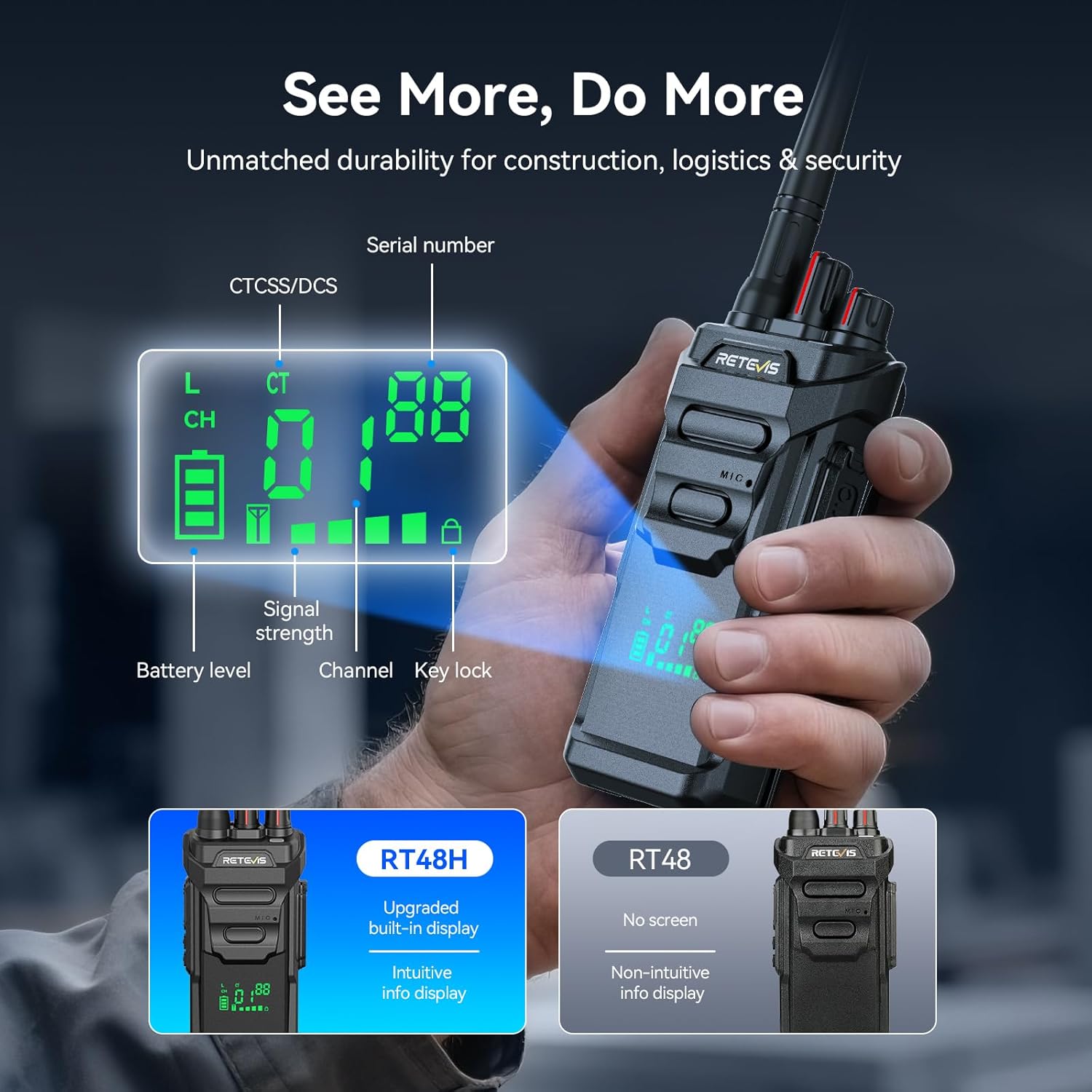
Figure 3: Retevis RT48H Hidden Display Details
Long Range Communication
Experience reliable long-range communication with the RT48H. It is designed to cover up to 300,000 sq ft and 25 floors indoors, making it suitable for large hotels, schools, hospitals, and construction sites.

Figure 4: Long-Range Communication Capability
Video 1: Demonstration of range for Retevis RT68 walkie talkies, which are compatible with the RT48H model.
Extended Battery Life and Fast Charging
Equipped with a 1500mAh battery, the RT48H provides over 16 hours of work time and 70 hours of standby time. The included 6-way charger supports fast charging, fully charging the radios in 1.5-2 hours via Type-C or the charging base.

Figure 5: Upgraded Battery Life of RT48H

Figure 6: Fast Charging Capabilities with 6-Way Charger
Easy to Use and Compatible
The RT48H is designed for straightforward operation, requiring minimal training. It offers 22 channels and is compatible with other Retevis models like RT48, RT22, RT21, RT68, and H777, allowing for seamless communication across mixed teams.

Figure 7: User-Friendly Operation Features
Setup
1. Battery Installation
- Ensure the radio is powered off.
- Align the battery pack with the grooves on the back of the radio.
- Slide the battery pack upwards until it clicks into place.
2. Charging the Radio
Use the provided 6-way multi-unit charger or a Type-C cable for charging.
- Using the 6-Way Charger: Place the radio into an available slot on the charging base. The indicator light will show charging status.
- Using Type-C: Connect a Type-C cable to the radio's charging port and a power source.
A full charge typically takes 1.5 to 2 hours.
3. Attaching the Belt Clip
Secure the belt clip to the back of the radio using the provided screws (if applicable) or by sliding it into the designated slot until it locks.
Operation
1. Power On/Off and Volume Adjustment
Rotate the Power/Volume knob (typically the top-left knob) clockwise to power on the radio and increase volume. Rotate counter-clockwise to decrease volume and power off.
2. Channel Selection
Rotate the Channel Selector knob (typically the top-right knob) to select your desired channel. The hidden display will show the current channel number.
3. Transmitting and Receiving (PTT)
- To transmit, press and hold the Push-to-Talk (PTT) button on the side of the radio. Speak clearly into the microphone.
- Release the PTT button to receive messages.
4. VOX (Voice Operated Exchange) Function
VOX allows hands-free transmission. When activated, the radio will transmit automatically when it detects your voice. Refer to the full user manual for specific steps to activate and adjust VOX sensitivity.
5. Emergency Alarm
The RT48H features a local alarm to alert nearby coworkers and a remote SOS function to notify supervisors or security teams via channel. Consult the full user manual for activation procedures.

Figure 8: Emergency Alarm Feature
6. Pairing and Duplicating Channels
The RT48H supports one-key pairing and duplication for easy setup with other radios. This feature simplifies configuring multiple units to the same channels.
Video 2: Instructions on how to pair Retevis RT48H walkie talkies.
Video 3: Guide on how to communicate between Retevis RT48H and RT48 models.
Maintenance
- Cleaning: Wipe the radio with a soft, damp cloth. Do not use harsh chemicals or solvents.
- Battery Care: To prolong battery life, avoid overcharging or completely draining the battery. Store the radio and batteries in a cool, dry place when not in use for extended periods.
- Antenna: Do not bend or modify the antenna. A damaged antenna can affect radio performance.
Troubleshooting
| Problem | Possible Cause | Solution |
|---|---|---|
| No power | Battery low or not installed correctly. | Charge the battery or re-install it properly. |
| Cannot transmit or receive | Incorrect channel, out of range, or low battery. | Verify channel, move closer to other radios, or charge battery. |
| Poor audio quality | Weak signal, interference, or volume too low/high. | Adjust volume, move to a clearer area, or check antenna connection. |
Specifications
| Feature | Detail |
|---|---|
| Brand | Retevis |
| Model Number | RT48H |
| Color | Black |
| Number of Channels | 22 |
| Special Feature | Fast Charging, Hidden Screen, IP67 Waterproof |
| Frequency Range | FRS |
| Talking Range Maximum | 300,000 sq ft / 25 floors indoors |
| Water Resistance Level | IP67 Water Resistant |
| Product Dimensions (D x W x H) | 9.4" x 2.5" x 1.4" |
| Battery Capacity | 1500 mAh (Nonstandard Battery) |
| Battery Average Life | 70 Hours (Standby) |
| Charging Time | 1.5-2 hours (via Type-C or base) |
| Item Weight | 5.4 Pounds (for 6-pack) |
Warranty and Support
Retevis provides a 2-year warranty for the radio body and a 1-year warranty for accessories. A 30-day no-reason return policy is also available. For service beyond the warranty period, maintenance services are offered, with buyers responsible for corresponding costs.
For any inquiries or support, please contact Retevis customer service on Amazon. Responses are typically provided within 12 hours.
For more information, visit the official Retevis Store on Amazon.


