
Important Safety Information
Please read all instructions carefully before assembly and use. Keep this manual for future reference.
- Always unplug the vanity from the power source before assembly, disassembly, cleaning, or maintenance.
- Exercise caution with sharp edges and heavy components during assembly and handling to prevent injury.
- Do not overload the integrated power station to avoid electrical hazards.
- Ensure all connections are secure and follow assembly instructions precisely.
- Keep children and pets away from the assembly area.
Setup and Assembly
The Yanosaku Vanity Desk requires assembly. All necessary instructions and accessories are included in the packaging. It is recommended to assemble the unit in the room where it will be used due to its weight and size.
Unpacking
The vanity desk is shipped in two separate boxes. These boxes may arrive at different times. Please ensure you have received both packages before beginning assembly.

Image: The product is delivered in two separate boxes, which may arrive at different times.
Assembly Process
Follow the detailed assembly instructions provided in the package. It is advisable to have a second person assist with the assembly, especially for larger components like the mirror and main desk sections.
- Identify all parts and hardware using the included list.
- Assemble the main desk frame according to the diagrams.
- Install the 15 drawers, ensuring smooth operation.
- Attach the lighted mirror securely to the desk.
- Place the tempered glass tabletop inserts into their designated slots.
- Connect the power cord for the lighting and charging station.

Image: Yanosaku Vanity Desk with all 15 drawers open, showcasing extensive storage capacity for cosmetics and accessories.

Image: Yanosaku Vanity Desk with all drawers closed, presenting a neat and compact appearance.
Operating Instructions
Lighted Mirror Operation
The vanity mirror features 13 LED Hollywood-style bulbs with three adjustable lighting modes and brightness control.
- Power On/Off: Press the touch sensor on the mirror to turn the lights on or off.
- Change Lighting Mode: Short press the touch sensor to cycle through the three color modes: Warm Light, Natural Light, and Cold Light.
- Adjust Brightness: Long press the touch sensor to increase or decrease the brightness level within the selected mode. Release when the desired brightness is reached.
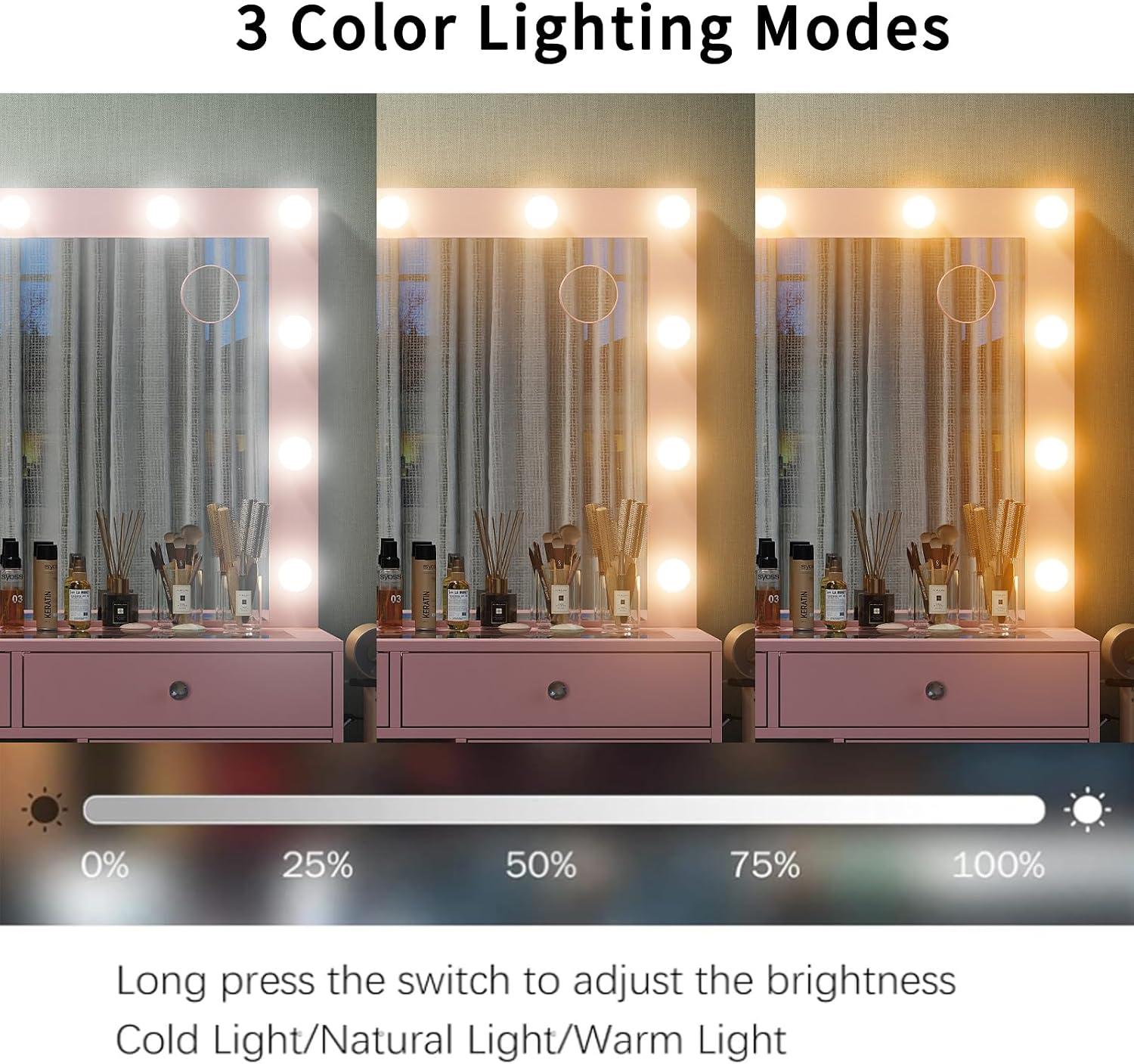
Image: Close-up of the lighted mirror, illustrating the three distinct color lighting modes and the touch control for brightness adjustment.
Charging Station Usage
The vanity desk includes a built-in power outlet with 2 standard AC plug sockets and 2 USB ports for convenient charging of electronic devices and powering beauty tools.
- Plug your hair dryer, curling iron, phone, tablet, or laptop into the available AC outlets (125V/12A) or USB ports (5V/2A).
- Ensure devices are compatible with the provided power specifications.
- Do not exceed the maximum load capacity of the power strip to prevent electrical issues.

Image: Detail of the built-in power strip, featuring two AC outlets and two USB ports, with a hairdryer holder mounted nearby.
Storage Features
The vanity desk is designed with 15 spacious drawers and an embedded tempered glass tabletop for organized storage.
- Utilize the multiple drawers for organizing makeup, skincare, haircare products, and other personal items.
- The tempered glass top allows for visible storage of frequently used items or decorative displays, protecting them from dust.

Image: Overhead view of the vanity's tempered glass tabletop, providing a clear view of the organized storage compartments below.
Vanity Stool
The included stool features a soft, padded seat for comfort and can be tucked under the desk to save space.

Image: Close-up of the vanity stool's thick, padded seat, designed for comfortable use.
Maintenance and Care
Proper care will ensure the longevity and appearance of your vanity desk.
- Cleaning: For the engineered wood surfaces, wipe with a soft, damp cloth. Avoid harsh chemicals or abrasive cleaners. For the glass top, use a standard glass cleaner.
- Dusting: Regularly dust all surfaces with a dry, soft cloth.
- Spills: Immediately wipe up any spills to prevent damage to the wood finish.
- Electrical Components: Ensure the vanity is unplugged before cleaning any electrical components. Use a dry cloth for the mirror and power strip area.
- Drawer Slides: Periodically check drawer slides for smooth operation. If needed, clean any debris and apply a silicone-based lubricant.
Troubleshooting
If you encounter any issues with your Yanosaku Vanity Desk, refer to the following common solutions:
| Problem | Possible Cause | Solution |
|---|---|---|
| Lights on mirror do not turn on. | Power cord unplugged; loose bulb; faulty power outlet. | Ensure the vanity is plugged into a working outlet. Check if all bulbs are securely screwed in. Test the outlet with another device. |
| Lights are dim or flickering. | Brightness setting too low; loose connection. | Long press the touch sensor to adjust brightness. Check power connections. |
| Charging station (AC/USB) not working. | Vanity unplugged; overloaded circuit; faulty device. | Verify the vanity is plugged in. Unplug other devices from the power strip to check for overload. Test with a different device. |
| Drawers do not align or slide smoothly. | Incorrect assembly; debris in slides; damaged part. | Review assembly instructions for correct drawer slide installation. Clear any debris from the slides. Contact support if parts appear damaged. |
| Missing parts or damaged components upon arrival. | Shipping error; manufacturing defect. | Immediately contact the seller or manufacturer with your order details and a description of the missing/damaged parts. |
Specifications
| Brand | Yanosaku |
| Model Number | VD017-PK |
| Color | Pink |
| Material | Engineered Wood |
| Product Dimensions (D x W x H) | 15.75" x 55" x 56" |
| Number of Drawers | 15 |
| Lighting Modes | 3 (Warm, Natural, Cold) with adjustable brightness |
| Charging Station | 2 AC Outlets (125V/12A), 2 USB Ports (5V/2A) |
| Included Components | Vanity Desk, Lighted Mirror, Stool, Instructions, Accessories |
| Assembly Required | Yes |

Image: Detailed dimensions of the Yanosaku Vanity Desk and the included stool.
Warranty and Support
For specific warranty details, please refer to the documentation included with your product or contact the seller directly. Yanosaku products are manufactured with quality in mind, and support is available for product-related inquiries.
Contact Support
If you require assistance with assembly, missing parts, or have questions regarding product functionality, please contact COZYNOME OFFICIAL, the seller, through your purchase platform.
Product Video
Official product video showcasing the features and storage capacity of the Yanosaku 15-drawer vanity desk.


