
1. Introduction
This manual provides essential information for the proper setup, operation, and maintenance of your TIQ mini M5 2025 Enhanced 4G Android 13 Smartphone. Please read this manual thoroughly before using your device to ensure optimal performance and longevity.
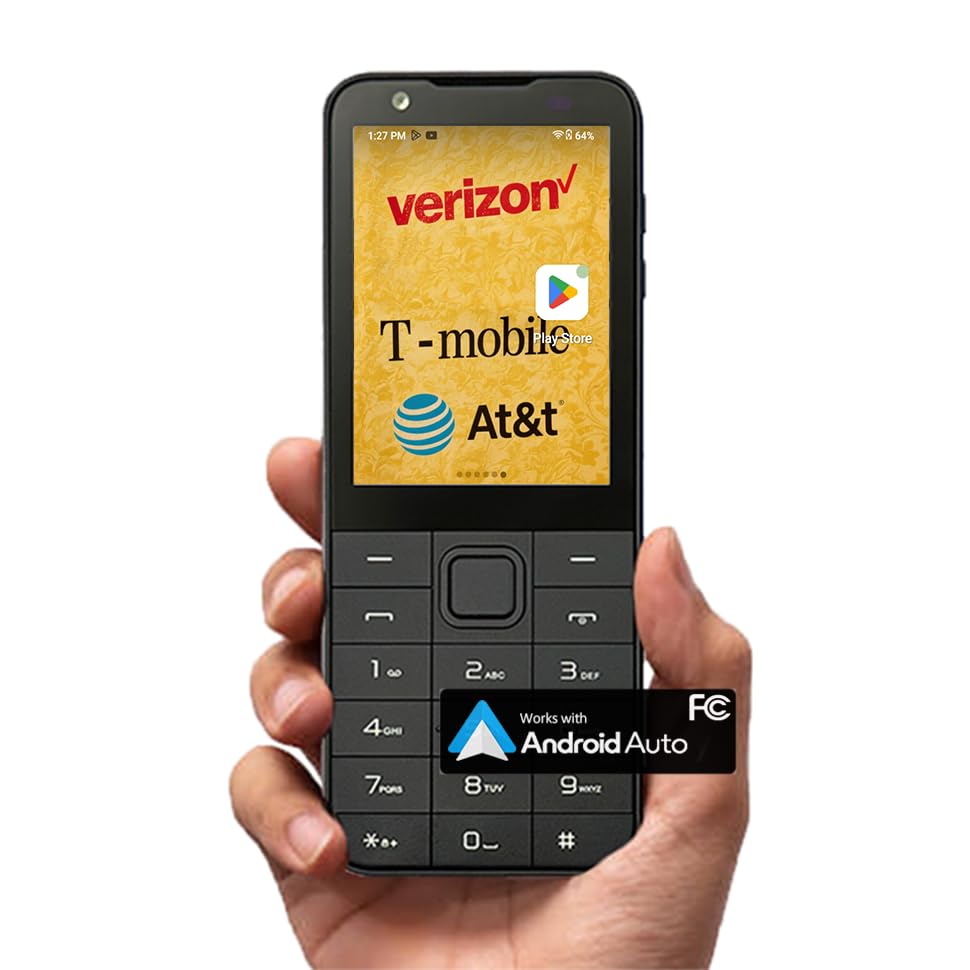
Image: The TIQ mini M5 2025 Enhanced Smartphone, showcasing its compact design.
2. What's in the Box
Upon opening your TIQ mini M5 package, you should find the following items:
- M5 phone
- Phone Case
- USB Cable
3. Setup
3.1. SIM Card Installation
The TIQ mini M5 supports dual 4G SIM cards. To install your SIM card(s):
- Power off the device.
- Locate the SIM card slot, typically on the side or under the battery cover.
- Insert your Nano-SIM card(s) into the designated slots as indicated by the diagram.
- Ensure the SIM cards are securely seated.
Note: This phone is compatible with most US carriers such as T-Mobile, Verizon, and AT&T. For Verizon users, if no service is detected, please contact Verizon to enable "CDMA-less" functionality on your SIM card.
3.2. Battery Installation and Charging
The device comes with a 2120mAh removable battery. To install and charge:
- If not already installed, place the battery into its compartment, ensuring the contacts align.
- Connect the provided USB cable to the phone's charging port and the other end to a compatible USB power adapter.
- Allow the device to charge fully before initial use. A full charge provides up to 5-7 hours of talk time.
3.3. Initial Power On
Press and hold the Power button until the screen illuminates. Follow the on-screen prompts to complete the initial setup, including language selection, Wi-Fi connection, and Google account setup.
4. Operating Instructions
4.1. Basic Navigation
The TIQ mini M5 features a 2.8-inch touchscreen and physical buttons for navigation. You can interact with the device using either method:
- Touchscreen: Tap, swipe, and pinch to navigate menus, open apps, and interact with content.
- Physical Buttons: Use the directional pad and function keys for traditional phone navigation.

Image: The TIQ mini M5 displaying its touchscreen and physical button interface.
4.2. Android 13 and Applications
Running on Android 13, the M5 provides a smooth and responsive user experience. The Google Play Store is pre-installed, allowing you to download a wide range of applications such as WhatsApp, YouTube, Facebook, and more.

Image: The TIQ mini M5 screen showing various popular applications.
The device also supports Android Auto, enabling seamless integration with compatible vehicle entertainment systems for navigation, music, and calls while driving.

Image: A user interacting with Android Auto in a car, connected to a TIQ mini M5.
4.3. Call Functions
To make a call, dial the number using the physical keypad or the on-screen dialer and press the green call button. To answer an incoming call, press the green call button. To end a call, press the red end call button.
4.4. Messaging
You can compose and send messages using either the touchscreen keyboard or the physical keypad, offering flexibility based on your preference.
4.5. Camera Usage
The TIQ mini M5 is equipped with a 2MP front camera and a 5MP rear camera, suitable for daily photography needs. Access the camera application from the home screen or app drawer to capture photos and videos.
4.6. Accessibility Features (Talkback)
For users with visual impairments or those who prefer audio guidance, the Talkback feature is available. This function provides voice prompts for phone operation and can be enabled or disabled in the device settings.

Image: A person using the TIQ mini M5 with the Talkback accessibility feature, which provides audio guidance.
5. Maintenance
5.1. Battery Care
To maximize battery life and performance:
- Avoid exposing the device to extreme temperatures.
- Use only the provided or certified charging accessories.
- For long-term storage, charge the battery to about 50% and store it in a cool, dry place.
5.2. Software Updates
The TIQ mini M5 receives continuous software upgrades and updates to optimize performance and introduce new features. Ensure your device is connected to Wi-Fi and has sufficient battery life before performing any updates. You can check for updates in the device settings.
5.3. Cleaning
Use a soft, lint-free cloth to clean the device. Avoid using harsh chemicals or abrasive materials that could damage the screen or casing.
6. Troubleshooting
If you encounter any issues with your TIQ mini M5, please refer to the following common solutions:
- Device not powering on: Ensure the battery is correctly installed and sufficiently charged. Try connecting the charger and attempting to power on again.
- No network service: Verify SIM card installation. Check network settings. For Verizon users, confirm "CDMA-less" is enabled by your carrier.
- Applications crashing or slow performance: Close background applications. Clear app caches. Restart the device. Ensure the device has the latest software updates.
- Screen unresponsive: Restart the device. If the issue persists, a factory reset might be necessary (see below).
For more complex issues or if you encounter problems after modifying the system, our professional team can provide free remote technical services. Please contact customer support for assistance.

Image: Visual guide for troubleshooting common issues such as black screen, boot errors, and accessing the factory reset menu.
7. Specifications
| Feature | Detail |
|---|---|
| Model Name | TIQ mini M5 |
| Operating System | Android 13.0 |
| Memory Storage Capacity | 32 GB |
| RAM Memory Installed Size | 3 GB |
| Battery Capacity | 2120 mAh |
| Phone Talk Time | 7 Hours |
| Connectivity Technology | 4G LTE |
| Wireless Carrier Compatibility | T-Mobile, Verizon, AT&T (US Version) |
| Display Features | Wireless |
| Scanner Resolution | 1920 x 1080 |
| Audio Jack | No headphone jack |
| Form Factor | Bar |
| Color | Black |
| Item Weight | 10.6 ounces |
| Package Dimensions | 7 x 4 x 4 inches |
| Manufacturer | TIQ mini |
| Date First Available | July 15, 2025 |
8. Product Overview Video
Video: An official TIQ mini video providing a function introduction to the M5 mobile phone.
9. Warranty and Support
For any product-related inquiries, technical assistance, or warranty claims, please contact TIQ mini customer support. Our professional team is available to provide remote assistance and help resolve most issues. Please refer to your purchase documentation for specific warranty terms and conditions.
Important: If you make modifications to the mobile phone system yourself and encounter problems, we can still provide free remote technical services.