
Introduction
The Solati D002 Hair Clipper and Trimmer is a versatile grooming tool designed for various hair cutting and trimming needs. It features a durable, self-sharpening precision stainless steel blade, an LED display for battery status, and a USB-C fast charging interface. This manual provides essential information for the safe and effective use, setup, operation, and maintenance of your device.
Safety Information
- Read all instructions before using this appliance.
- Keep the appliance away from water. Do not use it while bathing or showering.
- Do not immerse the appliance in water, except for the washable head as specified in the cleaning instructions.
- Always unplug the appliance immediately after charging.
- Do not use the appliance if it has a damaged cord or plug, or if it is not working properly.
- Keep the cord away from heated surfaces.
- This appliance is not intended for use by persons (including children) with reduced physical, sensory or mental capabilities, or lack of experience and knowledge, unless they have been given supervision or instruction concerning use of the appliance by a person responsible for their safety.
- Children should be supervised to ensure that they do not play with the appliance.
- Use this appliance only for its intended household use as described in this manual.
Package Contents
Verify that all items are present in your package:
- Solati D002 Main Unit
- T-Blade Edgers/Liners Head with Hair Guards (1mm, 3mm, 5mm, 6mm, 7mm)
- Beard Trimmer or Hair Clipper Head with Guide Combs (3mm, 6mm, 9mm, 12mm, 15mm)
- Design Trimmer Head
- Precision Trimmer Head (Adjustable 1-11mm)
- Micro Foil Shaver Head
- Nose/Ear Hair Trimmer Head
- Body Hair Trimmer Head with Adjustable Comb (3mm, 6mm, 9mm)
- USB-C Charging Cable
- Cleaning Brush
- Lubricating Oil
- Storage Base/Holder

Image: Overview of the Solati D002 main unit and its seven interchangeable heads, along with various guide combs for different hair lengths.
Product Overview
The Solati D002 features a robust design with an intuitive LED display and a powerful motor for efficient grooming. The main unit is equipped with a power button and a USB-C charging port.
- LED Display: Shows battery percentage and an oiling reminder.
- Power Button: Turns the device on and off.
- USB-C Charging Port: For convenient and fast charging.
- Interchangeable Heads: Easily swap between different grooming heads for various tasks.
- IPX7 Waterproof: The device is designed to be waterproof for easy cleaning under running water.
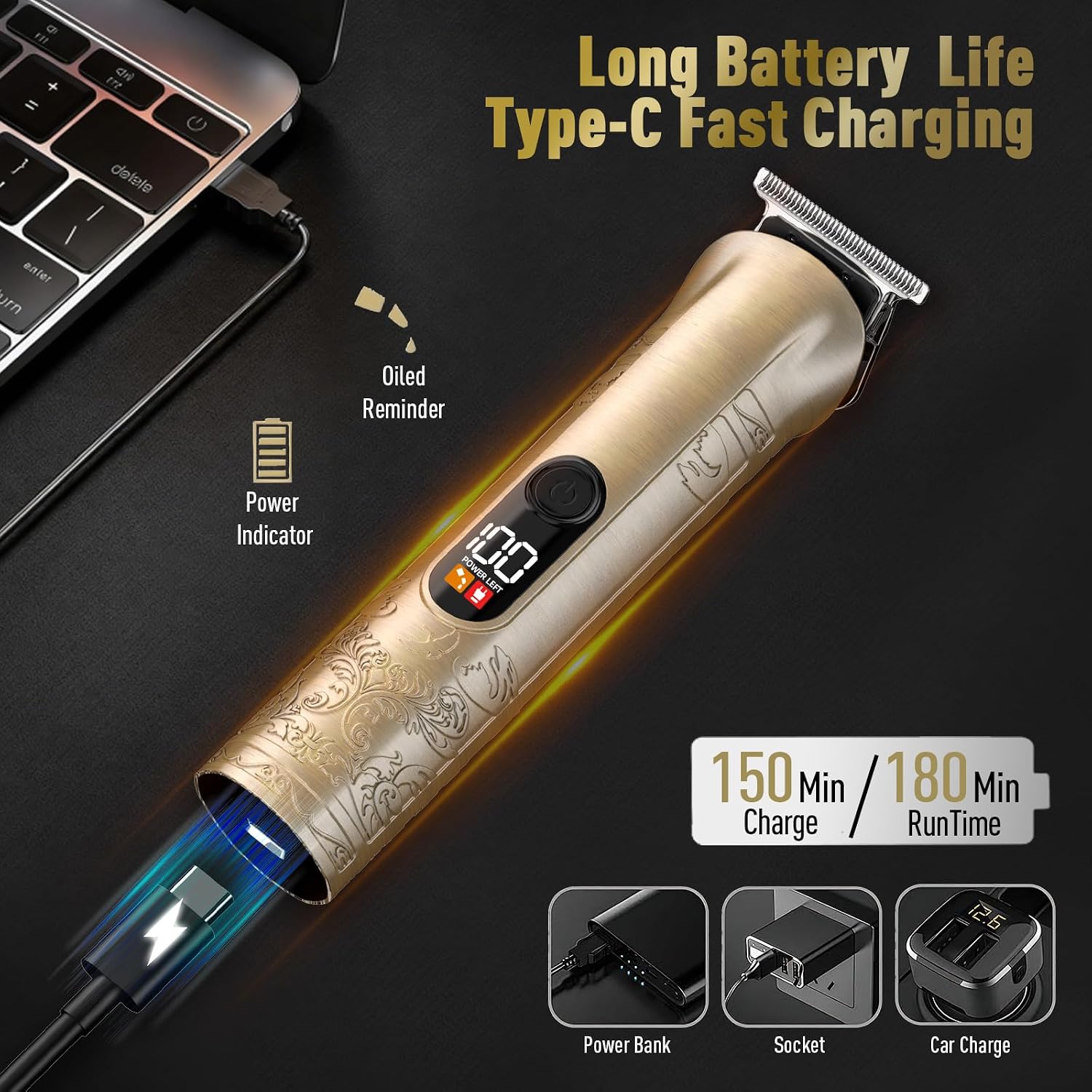
Image: The Solati D002 main unit highlighting the LED power indicator, USB-C charging port, and an oiling reminder icon.

Image: Internal view illustrating the 6500 RPM motor, emphasizing sharp, safe, and low-noise operation.
Setup
Charging the Device
- Ensure the device is turned off before charging.
- Connect the USB-C charging cable to the port at the bottom of the trimmer.
- Plug the other end of the USB cable into a compatible USB adapter, laptop, power bank, or car charger.
- The LED display will show the charging status. A full charge takes approximately 2.5 hours and provides up to 300 minutes of use.
Attaching and Detaching Heads
- To attach a head, align the head with the main unit and press firmly until it clicks into place.
- To detach a head, gently push the head upwards from the main unit. Refer to the diagram for proper removal technique.

Image: Visual guide demonstrating how to easily remove and install the various trimmer heads on the main unit.
Attaching Guide Combs
- Select the desired guide comb for your chosen trimming head (T-blade, Beard Trimmer, or Body Hair Trimmer).
- Align the comb with the teeth of the trimmer head and slide it on until it securely locks.
- Ensure the comb is firmly attached before use to prevent uneven cutting.
Operating Instructions
Always ensure your hair is clean and dry before trimming for best results. For longer hair, it is recommended to pre-cut with scissors before using the trimmer.
General Operation
- Press the power button to turn the device on.
- Hold the trimmer at a comfortable angle against the skin.
- Move the trimmer slowly against the direction of hair growth.
- Press the power button again to turn the device off after use.
Using Specific Heads
- T-Blade Edgers/Liners: Ideal for precise lines, sharp edges, necklines, and detailing. Use without a guard for closest trim or with 1mm, 3mm, 5mm, 6mm, 7mm hair guards for desired length.
- Beard Trimmer/Hair Clipper: Suitable for general hair cutting and beard trimming. Attach guide combs (3mm, 6mm, 9mm, 12mm, 15mm) for varying lengths.
- Precision Trimmer: Features an adjustable dial for lengths between 1mm and 11mm, offering fine control for specific styles.
- Design Trimmer: For creating intricate patterns and designs in hair.
- Micro Foil Shaver: For achieving a very close, smooth shave on smaller areas.
- Nose/Ear Hair Trimmer: Gently insert into nostrils or ears to trim unwanted hair.
- Body Hair Trimmer: For grooming body hair. Use with the adjustable comb (3mm, 6mm, 9mm) for different lengths.

Image: Demonstrations of the Solati D002 being used for hair clipping, beard trimming, nose/ear hair trimming, body trimming, foil shaving, and design trimming.

Image: Close-up view of the adjustable precision trimmer head (1-11mm) and the body hair trimmer head with its adjustable comb (3-9mm).
Maintenance
Cleaning
Regular cleaning ensures optimal performance and extends the life of your trimmer.
- Turn off the device and detach the trimming head.
- Use the provided cleaning brush to remove any loose hairs from the blades and inside the head.
- Since the device is IPX7 waterproof, the trimming heads can be rinsed under running water. Ensure the main unit's charging port is dry before charging.
- Allow the head to air dry completely before reattaching or storing.
Image: The Solati D002 trimmer head being rinsed under running water, demonstrating its IPX7 waterproof feature for easy cleaning.
Oiling the Blades
To maintain blade sharpness and smooth operation, regularly oil the blades.
- After cleaning and drying the blades, apply a small drop of the provided lubricating oil to the teeth of the blade.
- Turn on the trimmer for a few seconds to distribute the oil evenly.
- Wipe off any excess oil with a soft cloth.
- The LED display may show an oiling reminder when maintenance is due.
Troubleshooting
- Device not turning on: Ensure the device is fully charged. Check the LED display for battery level.
- Poor cutting performance or pulling hair: Clean the blades thoroughly to remove any trapped hair. Apply lubricating oil to the blades. Ensure the correct guide comb is securely attached. The blades may be dull and require replacement (contact support).
- Device not charging: Verify the USB-C cable is properly connected to both the device and the power source. Try a different USB-C cable or power adapter.
- Excessive noise or vibration: Ensure the trimming head is correctly attached and secured. Clean and oil the blades. If the issue persists, discontinue use and contact support.
Specifications
| Model Name | D002 |
| Brand | Solati |
| Battery Type | 1500 mAh Lithium-ion (1 C battery included) |
| Charging Time | Approx. 2.5 hours |
| Run Time | Up to 300 minutes |
| Charging Interface | USB Type-C |
| Motor Speed | 6500 RPM |
| Waterproof Rating | IPX7 |
| Item Weight | 0.72 Kilograms |
| Parcel Dimensions | 22 x 14.8 x 6.9 cm |
Warranty and Support
For warranty information, please refer to the documentation included with your product at the time of purchase. If you encounter any issues or require technical assistance, please contact Solati customer support through the retailer where the product was purchased or via the official Solati website.
