
DQLODCTB DC 24KEY BT
DQLODCTB 24 Key Infrared Remote Control Bluetooth Compatible LED RGB Light Strip Controller User Manual
Model: DC 24KEY BT
1. Product Overview
The DQLODCTB DC 24KEY BT is a versatile controller designed for 5050 and 2835 RGB LED light strips. It offers dual control methods: a traditional 24-key infrared remote control and a modern Bluetooth-compatible mobile application. This controller integrates music synchronization features, allowing your LED lights to react to audio, and provides comprehensive control over brightness, speed, and color modes.
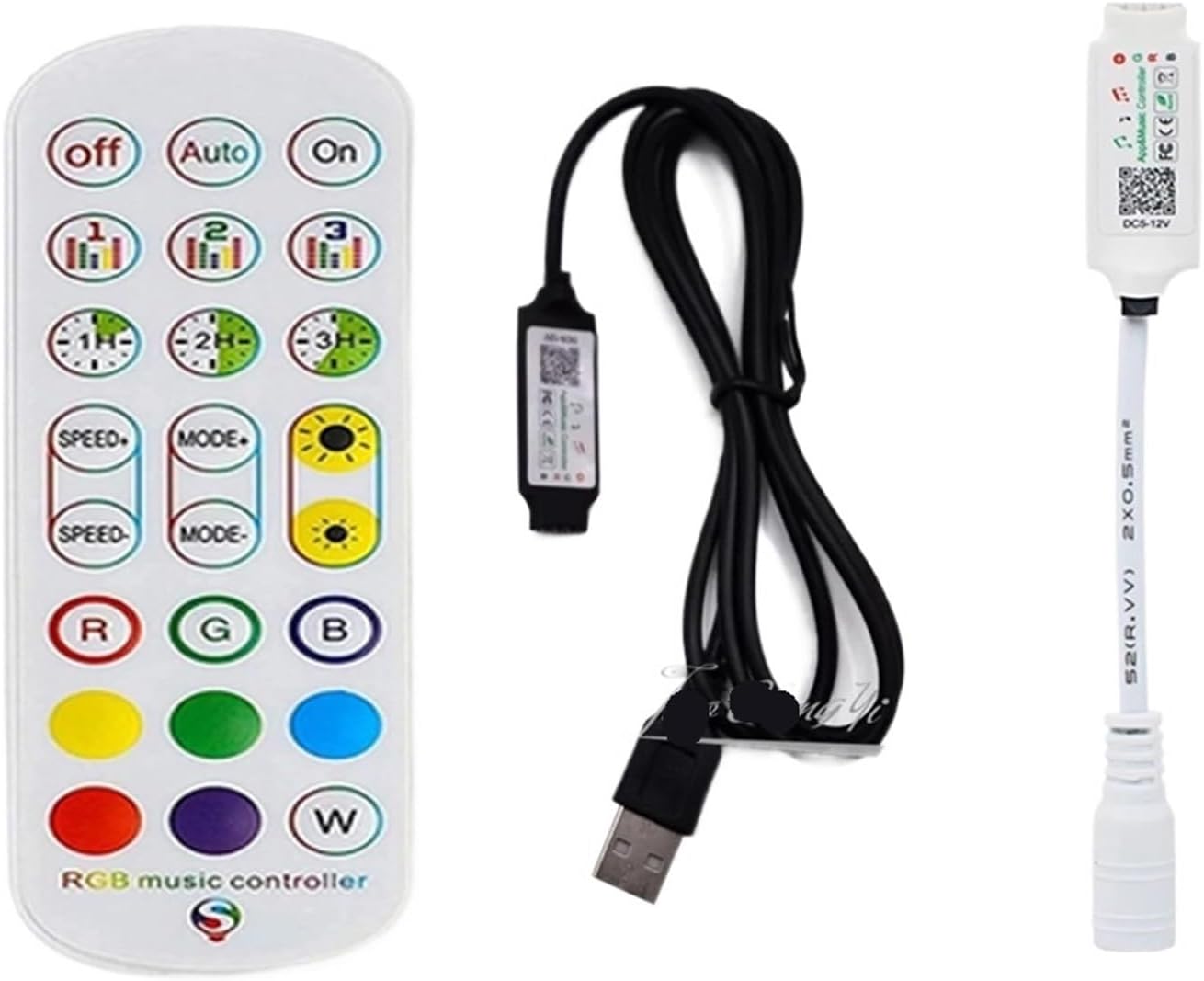
Image 1.1: The DQLODCTB 24 Key Infrared Remote Control and the Bluetooth Compatible LED RGB Light Strip Controller.
2. Features
- Dual Control: Operates via a 24-key infrared remote control and a Bluetooth 4.0 compatible mobile application.
- Music Synchronization: Lights can change rhythmically with music.
- Extended Range: Bluetooth control effective up to 20 meters without complex setup.
- Automatic Connection: Automatically connects to the controller within 5 seconds of opening the app.
- Group Control: Ability to control multiple compatible controllers simultaneously.
- Adjustable Settings: Brightness and speed addition/subtraction for dynamic modes.
- Wide Compatibility: Suitable for RGB LED light strips, supporting up to 10 meters of RGB(W) strip.
- Language Support: Mobile application automatically converts text based on phone's language settings (Chinese/English).

Image 2.1: Overview of remote control and mobile application control capabilities, including music sync.
3. Specifications
| Attribute | Value |
|---|---|
| Model | Bluetooth + 24-key remote control RGB DCLED controller |
| Input Voltage | DC 5-12V |
| Function | Bluetooth + Infrared Controller |
| Maximum Output Power | 100W |
| Connection Method | Common Anode (+) |
| Working Temperature | -20℃ to 55℃ (-4°F to 131°F) |
| Package Dimensions | 0.39 x 0.39 x 0.39 inches |
| Item Weight | 1.76 ounces (50 Grams) |
| Manufacturer | DQLODCTB |

Image 3.1: Physical dimensions of the LED controller and its remote control.
4. Package Contents
Please verify that all items are present in your package:
- 1 x DQLODCTB Bluetooth Compatible LED RGB Light Strip Controller (DC 24KEY BT)
- 1 x 24-Key Infrared Remote Control (Note: Batteries for the remote control are not included. A CR2025 or equivalent button cell battery is required.)
5. Setup
Follow these steps to set up your LED light strip controller:
- Insert Battery into Remote: Open the battery compartment on the back of the 24-key infrared remote control and insert a CR2025 button cell battery, ensuring correct polarity.
- Connect LED Strip: Connect your RGB LED light strip to the controller. Ensure the arrow on the LED strip connector aligns with the arrow on the controller's output port. This ensures correct polarity for RGB channels.
- Connect Power Adapter: Plug the DC power adapter (not included, must be compatible with DC 5-12V input) into the controller's input port.
- Power On: Plug the DC power adapter into a wall outlet. The LED strip should light up, indicating successful connection.

Image 5.1: Visual guide for connecting the LED strip to the controller (arrow to arrow) and the controller to the DC power adapter.
6. Operating Instructions
6.1 Remote Control Functions
The 24-key infrared remote control provides direct access to various lighting modes and settings:

Image 6.1: Detailed layout of the 24-key infrared remote control and its functions.
- OFF / ON: Turns the LED lights off or on.
- AUTO: Activates an automatic cycle through various dynamic modes.
- Musical Mode (1, 2, 3): Activates different music synchronization modes where lights react to sound.
- Timing Button (1H, 2H, 3H): Sets a timer for the lights to automatically turn off after 1, 2, or 3 hours.
- SPEED+ / SPEED-: Adjusts the speed of dynamic lighting effects.
- MODE+ / MODE-: Cycles through different dynamic lighting modes (e.g., flash, fade, jump).
- Brightness+ / Brightness-: Adjusts the overall brightness of the LED lights.
- R, G, B: Direct selection for Red, Green, and Blue static colors.
- Static Color Buttons: Selects various preset static colors (e.g., yellow, cyan, purple, white).
6.2 Bluetooth App Control
For advanced control and features, use the dedicated mobile application:
- Download App: Search for the
Related Documents - DC 24KEY BT

LotusLantern LED Light Strip and 24-Key Remote User Manual
User manual and setup guide for the ZX5050-60LED light strip and ZX001-24Key remote control. Includes instructions for the LotusLantern app, FCC compliance, and battery safety.
LED2022-24KEY Magic Lantern APP Operation Manual
This document provides a comprehensive operation manual for the LED2022-24KEY Magic Lantern APP, detailing its features, installation, and usage for controlling LED light strips via Bluetooth. It covers app download, color and brightness adjustments, music synchronization, scheduling, and FCC compliance information.
Lotus Lantern LED Controller and Furniture Assembly Guide
Comprehensive guide for assembling Lotus Lantern furniture and operating the Lotus Lantern LED strip controller app. Includes parts list, step-by-step assembly instructions, and detailed app usage instructions.
LED2022-24KEY LotusLantern APP Manual
Comprehensive guide to using the LotusLantern mobile application for controlling LED strips, including features, operation, and FCC compliance information.
YH-918 LED Controller User Manual with LotusLantern App Guide
User manual for the YH-918 LED controller, detailing installation, remote control functions, and advanced operation via the LotusLantern mobile app. Includes features like color control, music sync, and scheduling. Complies with FCC and IC regulations.
User Instruction: 24Key 2.4G TV LED Strip Lights
Comprehensive user instructions for 24Key 2.4G TV LED Strip Lights, covering installation, operation, app control, and troubleshooting. Includes safety warnings and FCC compliance information.Ask a question about this manual
Ask about setup, troubleshooting, compatibility, parts, safety, or missing instructions. Manuals+ will review the question and use this page’s manual context to help answer it.