
Miden X5
Miden X5 4K WiFi Dash Cam User Manual
Model: X5 (D001)
Brand: Miden
1. Product Overview
The Miden X5 is an advanced 3-channel dash camera system designed to provide comprehensive surveillance for your vehicle. It records in Ultra HD 4K for the front view, and Full HD 1080P for both the internal cabin and rear views, ensuring 360-degree coverage. Equipped with a 5GHz WiFi module, G-Sensor, Night Vision, and 24-hour parking monitoring, the X5 offers enhanced safety and convenience for drivers.
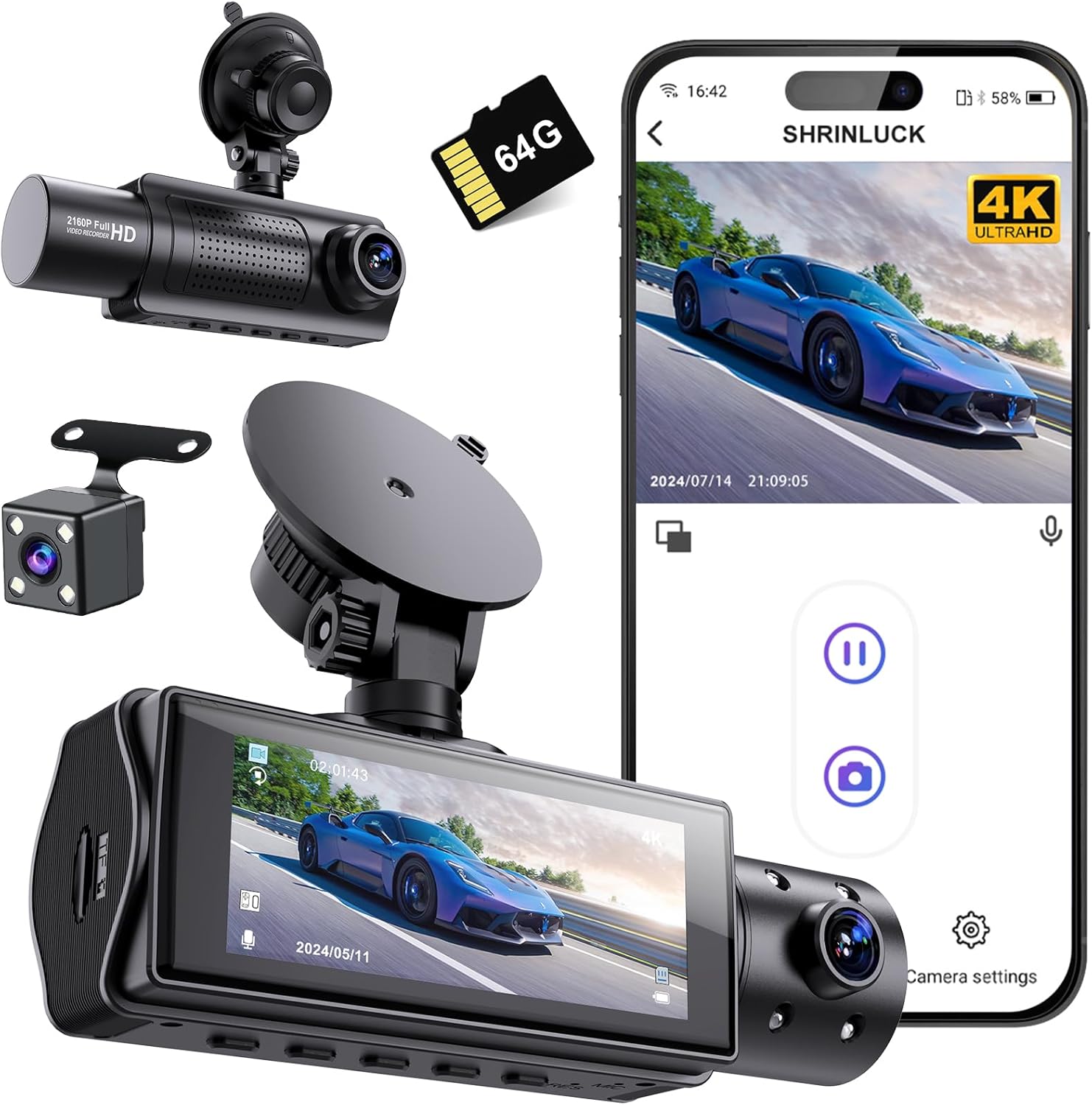
Image: Miden X5 Dash Cam system components and smartphone app interface.

Image: Overview of the Miden X5 Dash Cam highlighting its 4K 3-channel recording and WiFi capabilities.
Key Features:
- 4K 3-Channel Recording: Records Ultra HD 4K front video, 1080P internal video, and 1080P rear video for comprehensive coverage.
- Wide-Angle Lenses: Features a 176° wide-angle front camera and 160° wide-angle internal & rear cameras.
- 5GHz WiFi & APP Control: Faster wireless connectivity for smooth video preview, download, and sharing via a dedicated smartphone application.
- Enhanced Night Vision: Equipped with f1.5 aperture, 1/2.7-inch CMOS image sensor, 8-glass wide-angle lens, and Sony IMX662 Sensor for clear recordings in low-light conditions.
- 24H Parking Monitor: Automatically starts recording when vibration is detected, providing continuous protection for your vehicle.
- 3-Axis G-Sensor & Accident Lock: Detects collisions and automatically locks current video as evidence to prevent overwriting.
- Seamless Cyclic Recording: Automatically overwrites old files when storage is full, ensuring continuous recording without missing key frames.
- Reversing Image Assist: Automatically switches to the rear camera view with guidelines when reverse gear is engaged.
- Included 64GB SD Card: Comes with a high-speed 64GB SD card for immediate use.
2. What's in the Box
Please check the contents of your package to ensure all items are present:
- 1x Miden 4K WIFI Dashcam (Front Camera)
- 1x 1080P Internal Camera
- 1x 1080P Rear Camera
- 1x 64GB SD Card
- 1x Suction Cup Mount
- 1x Charging Cable (Type-C)
- 1x Car Charger
- 1x Wiring Crowbar
- 1x User Manual

Image: All components included in the Miden X5 Dash Cam package.
3. Setup
3.1 Installing the Dash Cam
- Prepare the SD Card: Insert the provided 64GB SD card into the dash cam's SD card slot. Ensure it is inserted correctly until it clicks into place.
- Mount the Front Camera: Attach the suction cup mount to the main dash cam unit. Clean a spot on your windshield, preferably near the rearview mirror, and firmly press the suction cup to secure the dash cam. Adjust the angle to ensure a clear view of the road ahead.
- Connect Power: Connect the charging cable to the dash cam's Type-C port and plug the car charger into your vehicle's cigarette lighter socket.
- Install Internal Camera: The internal camera is integrated into the main unit. Ensure its lens is clear and facing the cabin.
- Install Rear Camera: Connect the rear camera cable to the main dash cam unit. Mount the rear camera on your rear windshield, ensuring a clear view. Route the cable neatly using the provided wiring crowbar to hide it along the vehicle's interior trim.

Image: The dash cam's flexible mounting allows for optimal positioning on the windshield.
4. Operating Instructions
4.1 Power On/Off
The dash cam will automatically power on and begin recording when your vehicle's ignition is turned on. It will power off automatically when the ignition is turned off.
4.2 Video Recording
The Miden X5 records simultaneously from three channels: front, internal, and rear. The front camera records in 4K Ultra HD, while the internal and rear cameras record in 1080P Full HD.

Image: Visual representation of the 3-channel recording angles and coverage.
Seamless Cyclic Recording
The dash cam supports loop recording, meaning it will automatically overwrite the oldest video files when the SD card is full, ensuring continuous recording without interruption. Important locked videos (triggered by G-Sensor) will not be overwritten.

Image: Explanation of seamless cyclic recording and the included high-speed 64GB SD card.
4K Ultra HD Recording
The front camera captures video in stunning 4K resolution, allowing for clearer details such as license plates and road signs.

Image: Visual comparison demonstrating the superior clarity of 4K Ultra HD recording.
4.3 G-Sensor & Parking Monitor
The built-in 3-axis G-Sensor detects sudden movements or impacts. In the event of a collision, the dash cam will automatically save and lock the current video file, preventing it from being overwritten. This footage serves as crucial evidence.
The 24-hour parking monitor feature provides continuous surveillance even when your vehicle is parked. If any vibration or impact is detected, the dash cam will automatically start recording.

Image: Visual explanation of the 3-Axis Gravity Sensor for automatic locking and the 24-hour parking monitor.
4.4 Night Vision & WDR/HDR
The Miden X5 features advanced night vision capabilities, including an f1.5 aperture and Sony IMX662 CMOS sensor, to capture clear details even in low-light conditions. Wide Dynamic Range (WDR) and High Dynamic Range (HDR) functions automatically adjust brightness and enhance color richness for balanced and clear recordings in varying light environments.

Image: Features contributing to clearer night vision, including advanced processor and sensor technology.

Image: HDR function for automatic brightness correction and the reversing image assist feature.
4.5 WiFi & APP Control
Connect your Miden X5 dash cam to your smartphone via the upgraded 5GHz Wi-Fi module. The dedicated app allows you to:
- View live footage from all cameras.
- Replay recorded videos.
- Download videos directly to your phone.
- Share videos to social media.
- Adjust dash cam settings.

Image: Faster 5GHz WiFi connection and APP control features for the Miden X5 Dash Cam.
4.6 Reversing Image Assist
When your vehicle is put into reverse gear, the dash cam automatically displays the rear camera view on its screen, complete with parking guidelines, to assist with safe parking and maneuvering.
5. Maintenance
5.1 SD Card Management
- Formatting: It is recommended to format the SD card regularly (e.g., once a month) to ensure optimal performance and prevent data corruption. This can usually be done through the dash cam's settings menu.
- Card Lifespan: SD cards have a limited number of write cycles. If you experience frequent recording errors or corrupted files, consider replacing the SD card.
5.2 Cleaning
- Lenses: Gently wipe the camera lenses with a soft, lint-free cloth to remove dust or smudges. Do not use abrasive cleaners.
- Unit: Clean the dash cam body with a dry or slightly damp cloth. Avoid direct contact with water or harsh chemicals.
6. Troubleshooting
If you encounter any issues with your Miden X5 Dash Cam, please refer to the following common solutions:
| Problem | Possible Cause | Solution |
|---|---|---|
| Dash cam not turning on. | No power supply; loose connection. | Check car charger connection and vehicle's cigarette lighter socket. Ensure the vehicle's ignition is on. |
| Video recording stops or freezes. | SD card full or corrupted; low-speed SD card. | Format the SD card. Use a high-speed (Class 10 or U3) SD card. Replace the SD card if issues persist. |
| Poor video quality. | Dirty lens; protective film on lens; incorrect resolution settings. | Clean the camera lenses. Remove any protective film. Check video resolution settings in the menu. |
| WiFi connection issues. | Incorrect app settings; interference. | Ensure WiFi is enabled on the dash cam and your phone. Restart both devices. Check app permissions. |
| G-Sensor not working. | Sensitivity setting too low. | Adjust the G-Sensor sensitivity in the dash cam settings. |
If the problem persists after trying these solutions, please contact Miden customer support for further assistance.
7. Specifications
| Feature | Detail |
|---|---|
| Model Name | X5 |
| Product Dimensions | 3 x 1.5 x 1 inches |
| Item Weight | 14 ounces |
| Video Capture Resolution | Front: 2160p (4K UHD), Internal/Rear: 1080p (FHD) |
| Connectivity Technology | Type-C, 5GHz WiFi |
| Special Features | 3-Channel Recording, Faster 5GHz WiFi, Free 64G High-Speed SD Card, Reversing Image Assist, Dual Parking Mode, Super Infrared Night Vision, F1.5 Super Aperture, Sony IMX662 Sensor, 360° Super Wide Angle, Loop Recording, 3-Axis G-Sensor, WDR and HDR |
| Included Components | Dashcam unit, 64GB SD Card, Suction Cup Mount, Charging Cable, Car Charger, Wiring Crowbar, User Manual |
| Mounting Type | Windshield Mount |
| Batteries | 1 Lithium Ion battery (included) |
| Color | Space Black |
8. Warranty and Support
Miden offers a free 10-year warranty for the X5 Dash Cam, demonstrating our commitment to quality and customer satisfaction. Additionally, we provide lifelong professional technical support to assist you with any questions or issues you may encounter.
For technical assistance, warranty claims, or any other inquiries, please contact Miden customer support through the official channels provided at the time of purchase or on the Miden brand website.
Ask a question about this manual
Ask about setup, troubleshooting, compatibility, parts, safety, or missing instructions. Manuals+ will review the question and use this page’s manual context to help answer it.