
Introduction
The MOOER GE150 Max Li is a versatile guitar amp modelling and multi-effects processor designed to provide guitarists with extensive tonal options and flexible control. This manual provides essential information for setting up, operating, maintaining, and troubleshooting your device.
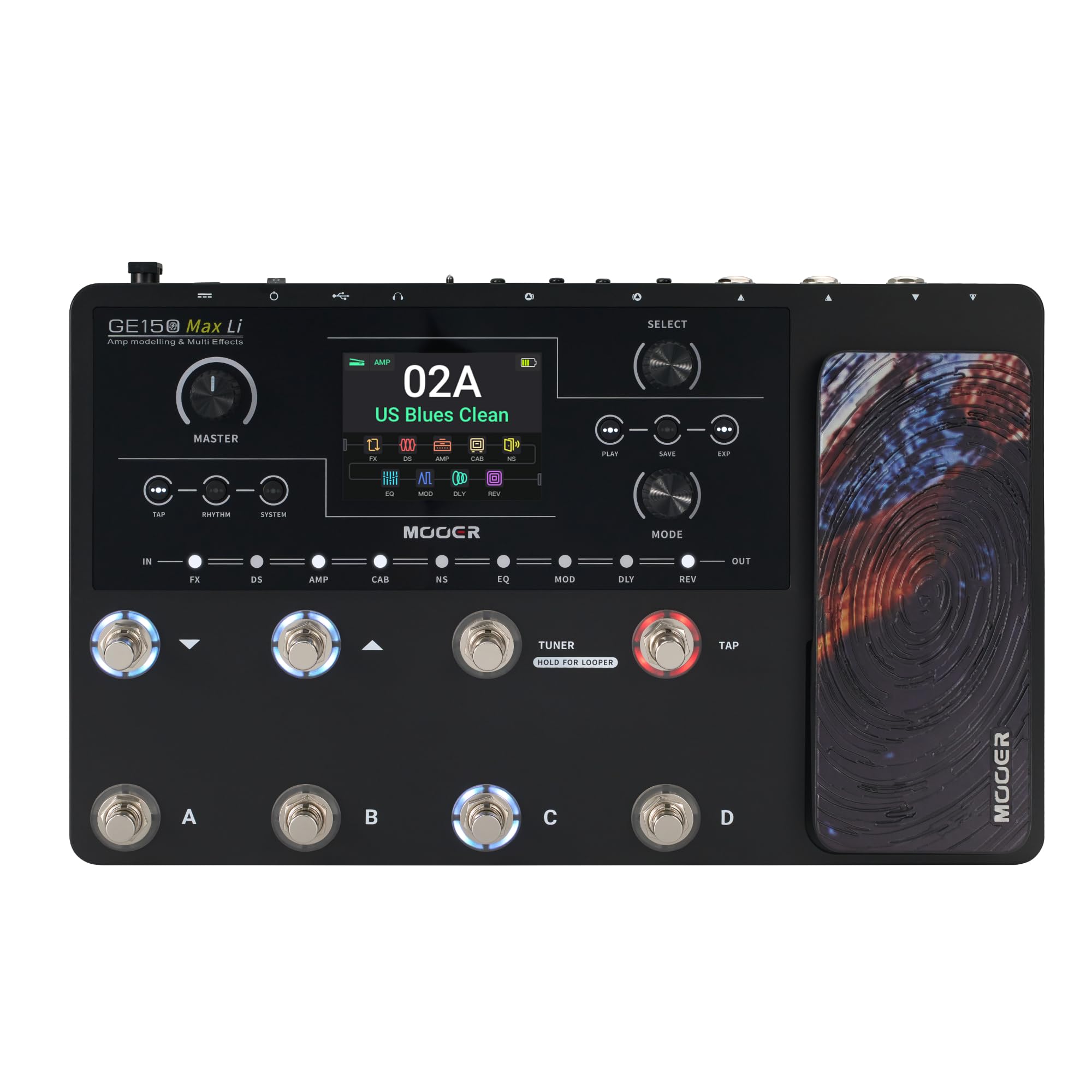
Image: The MOOER GE150 Max Li multi-effects processor, showcasing its compact design with an expression pedal and a clear display.
Setup
1. Powering On
- Connect the included power adapter to the 9V DC input on the rear panel.
- For the GE150 Max Li model, the integrated Lithium battery provides up to 9 hours of portable operation. Ensure the battery is charged for extended use without external power.
- Press the power switch to turn on the device.
2. Audio Connections
- Guitar Input: Connect your guitar to the 'INPUT' jack.
- Outputs:
- 1/4" Outputs (L/MONO, R): Connect to your amplifier, mixer, or audio interface. Use L/MONO for a mono signal.
- XLR Outputs (L, R): For balanced stereo output, ideal for direct connection to a PA system or studio mixer. Use the 'LIFT' switch to eliminate ground hum if present.
- Headphones: Connect headphones to the 'PHONES' jack for silent practice.
- AUX In: Connect an external audio source (e.g., MP3 player, phone) to the 'AUX IN' jack for playing along with backing tracks.
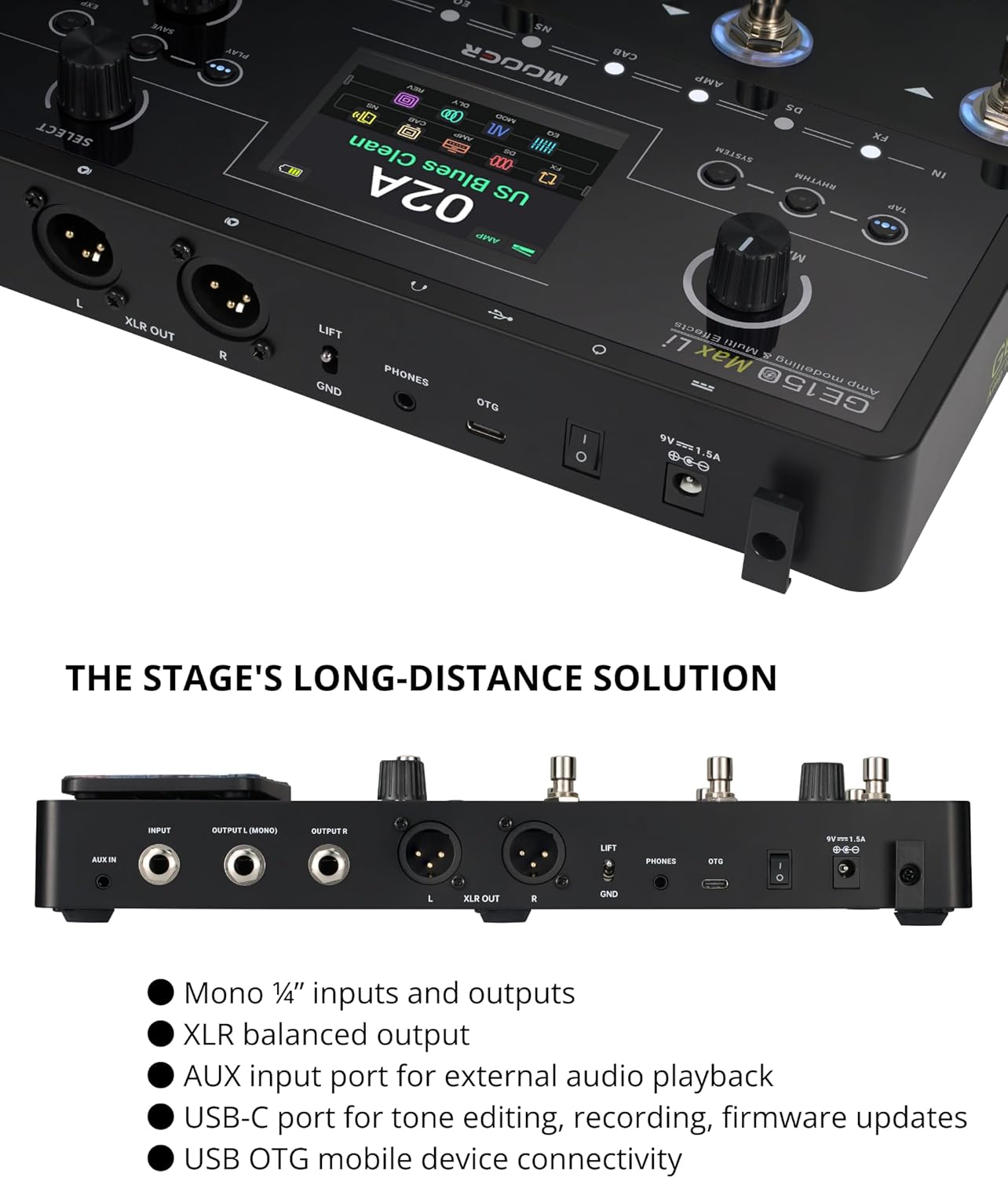
Image: Detailed view of the rear panel connections, including input, L/R outputs, XLR outputs, AUX in, headphones, and USB-C/OTG port.
3. USB Connectivity
- USB Type-C: Connect to a computer for firmware updates, tone editing via MOOER Studio software, and USB audio recording.
- OTG Port: Connect directly to a mobile phone or tablet for OTG audio recording, allowing you to capture your playing with studio-quality audio without additional gear.
Operating Instructions
1. User Interface Overview
The GE150 Max Li features a 3.5-inch LCD color display and intuitive controls for quick navigation and parameter adjustments.

Image: Close-up of the GE150 Max Li's display, master knob, and quick-press buttons for effects modules.
2. Presets and Tones
- The device comes with 200 factory presets across 50 banks (4 presets per bank).
- It utilizes MOOER's MNRS modelling technology, offering 55 classic amp preamps and 26 high-quality cabinet simulations.
- Access 177 different models of delay, reverb, and modulation effects.
- The AMP and CAB modules each have 20 slots for loading MOOER MNRS sample files and support 3rd party IRs.

Image: Visual representation of the GE150 Max Li's extensive features, including MNRS technology, 55 preamps, 26 cabinet simulations, and various effects.
3. Footswitch Control
The 8 multi-purpose footswitches provide convenient control for live performance and practice.
- Preset Switching: Easily navigate through your stored presets.
- Effect Toggling: Turn individual effects on or off within a preset.
- Tap Tempo: Set the tempo for time-based effects like delay and modulation.
- Tuner: Engage the built-in tuner for quick and accurate tuning.
4. Expression Pedal
The integrated expression pedal can be mapped to various parameters for dynamic real-time control.
- Volume Control: Adjust overall output volume.
- Wah Effects: Control wah parameters for expressive playing.
- Effect Parameters: Assign to any tone or effect parameter for granular control.
5. CTRL Mode
CTRL mode allows you to assign footswitches to toggle individual modules within each preset, enabling complex changes with a single press.
- Press and hold a footswitch of your active preset to enter CTRL mode.
- Assign the footswitch to toggle one or multiple effects/modules simultaneously.
- The LED rings indicate the A/B state (blue/purple) for visual feedback.
6. Creative Tools
- 80-Second Stereo Looper: Ideal for creative improvisations and loop-based compositions.
- 40-Style Drum Machine: Provides various drum patterns for practice and songwriting.
- 10 Metronomes: Keep your timing precise during practice sessions.
- All these features can be controlled via the footswitches.
7. Spill-Over Function
The new "SPILL-OVER" function ensures that delay and reverb effect tails fade out naturally when switching presets, providing smoother and more natural transitions during live performances.
8. Software Integration & Recording
- MOOER Studio Software: Connect via USB-C to your PC or Mac to edit presets, load MNRS samples, and import 3rd party IRs.
- OTG Audio Recording: Use the OTG port to connect directly to your phone or tablet for high-quality audio recording, perfect for capturing ideas or sharing performances.
Video: An official MOOER video demonstrating the features and capabilities of the GE150 Max and GE150 Max Li Guitar Multi-Effects Processors, including footswitch control, presets, and connectivity options.
Maintenance
- Cleaning: Use a soft, dry cloth to clean the unit. Avoid abrasive cleaners or solvents.
- Storage: Store the device in a cool, dry place away from direct sunlight, extreme temperatures, and high humidity.
- Firmware Updates: Regularly check the MOOER website for firmware updates to ensure optimal performance and access to new features. Updates can be installed via the MOOER Studio software.
- Battery Care (GE150 Max Li): To prolong battery life, avoid fully discharging the battery frequently. If storing for an extended period, charge the battery to approximately 50-70%.
Troubleshooting
- No Sound:
- Check all cable connections (guitar, output, power).
- Ensure the volume levels on the GE150 Max Li, your guitar, and amplifier are turned up.
- Verify that no effects are bypassed or muted.
- Unwanted Noise/Hum:
- Use the 'LIFT' switch on the XLR outputs to address ground loop hum.
- Check for faulty cables or power supply interference.
- Adjust the Noise Gate (NS) module settings.
- Expression Pedal Issues:
- Calibrate the expression pedal through the system settings if it's not responding correctly.
- Connectivity Problems (USB/OTG):
- Ensure you are using a compatible USB-C cable.
- For OTG recording, verify your mobile device supports OTG functionality.
- Restart the device and your connected computer/mobile device.
For further assistance, please refer to the official MOOER support resources.
Specifications
| Feature | Specification |
|---|---|
| Item Weight | 3.77 pounds |
| Product Dimensions | 12.83 x 2.48 x 2.83 inches |
| Item Model Number | GE150 Max Li |
| Batteries | 1 9V batteries required (included) |
| Power Source | Battery Powered |
| Battery Type | Lithium Ion |
| Connector Type | USB |
| Hardware Interface | 1/4-inch Audio, 3.5mm Audio, USB |
| Signal Format | Digital |
| Voltage | 9 Volts |
| Color | GE150 Max Li |
Warranty
The MOOER GE150 Max Li comes with a 2-year warranty. Please retain your proof of purchase for warranty claims. For detailed warranty terms and conditions, refer to the official MOOER website or contact customer support.
Support
For technical support, product registration, or additional resources, please visit the official MOOER website or contact their customer service department. You can often find FAQs, firmware downloads, and user forums on the manufacturer's website.
Official MOOER Website: Visit the MOOER Store on Amazon


