Important Safety Information
Before operating the GYMAX Walking Treadmill, please read and understand all safety instructions. Failure to follow these instructions may result in injury or damage to the product.
- Always attach the safety key clip to your clothing before starting the treadmill. The safety key is designed to stop the treadmill immediately in case of an emergency.
- Ensure the treadmill is placed on a flat, stable surface. Maintain a clear area of at least 6 feet behind and 2 feet on each side of the treadmill.
- The extended and enclosed handrails are designed for enhanced support and balance, especially for seniors or individuals undergoing rehabilitation. Always hold onto the handrails for stability when starting or stopping the treadmill, or if you feel unsteady.
- Do not allow children or pets near the treadmill while it is in operation.
- The maximum user weight capacity for this treadmill is 300 lbs. Do not exceed this limit.
- Wear appropriate athletic footwear during use. Do not operate the treadmill barefoot or in socks.
- If you experience pain, dizziness, or shortness of breath, stop exercising immediately and consult a physician.
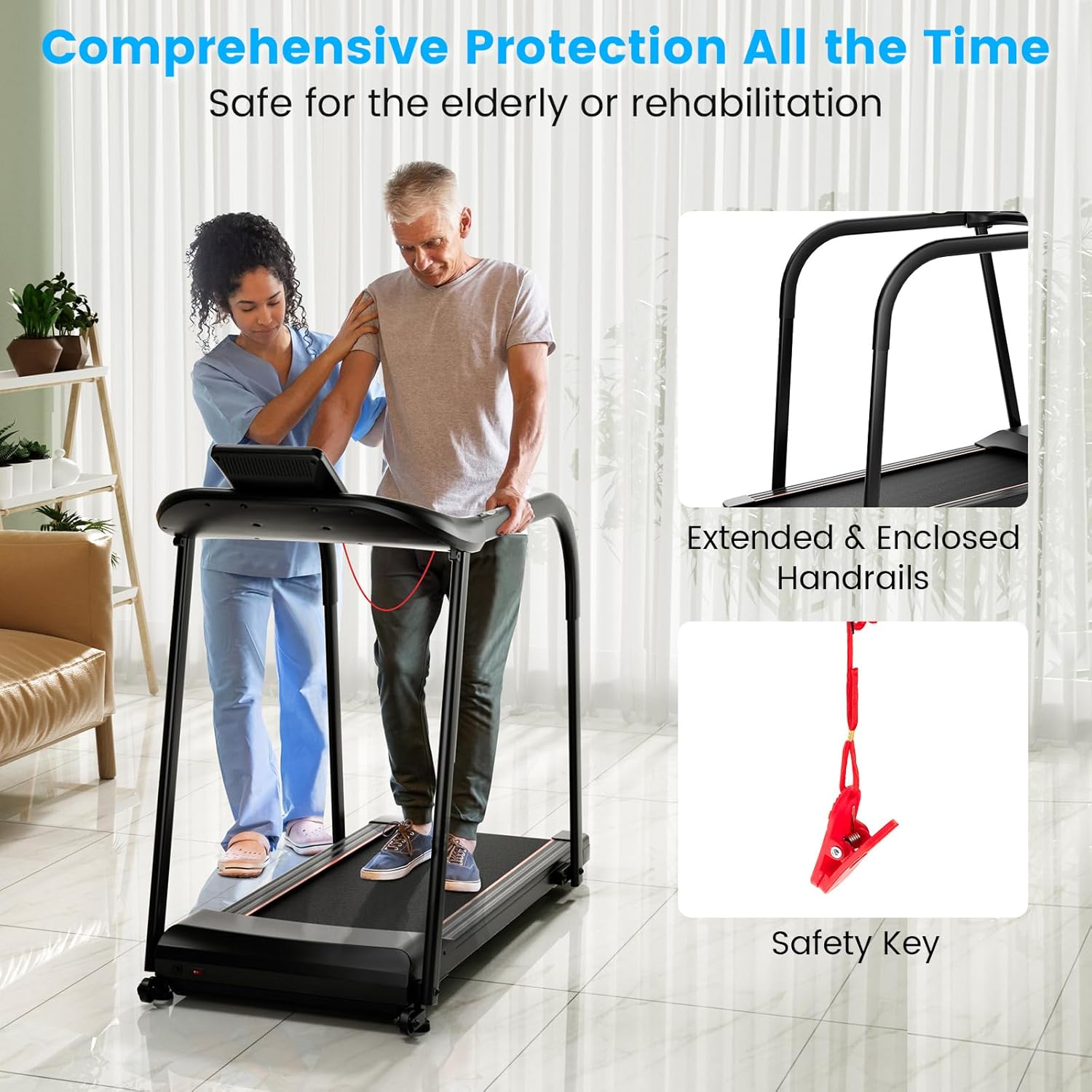
Figure 1: Comprehensive Protection Features. This image illustrates the extended and enclosed handrails for enhanced support and the safety key for emergency stops, highlighting the treadmill's design for user safety, particularly for seniors or those in rehabilitation.
Product Overview
The GYMAX Walking Treadmill is designed for home use, offering a safe and comfortable exercise experience. Key components include the running belt, control panel, handrails, and a robust frame.

Figure 2: GYMAX Walking Treadmill. This image displays the overall design of the treadmill, featuring its sturdy frame, wide running belt, and prominent handrails, with a user demonstrating its intended use.
Key Features:
- Extended Handrails: Provide enhanced stability and support.
- 7-Layer Anti-Slip Running Belt: Ensures secure footing during exercise.
- 6 Rubber Shock Absorbers: Minimize impact on joints for a comfortable workout.
- 2.5 HP Motor: Offers powerful yet quiet operation.
- LED Display: Tracks essential exercise data.
- 15 Preset Programs: For varied workout routines.
- Device and Cup Holders: Conveniently located for personal items.
- Pulse Sensors: Integrated into handrails for heart rate monitoring.
- Transportation Wheels: For easy relocation.
- Detachable Handrails: For compact storage.
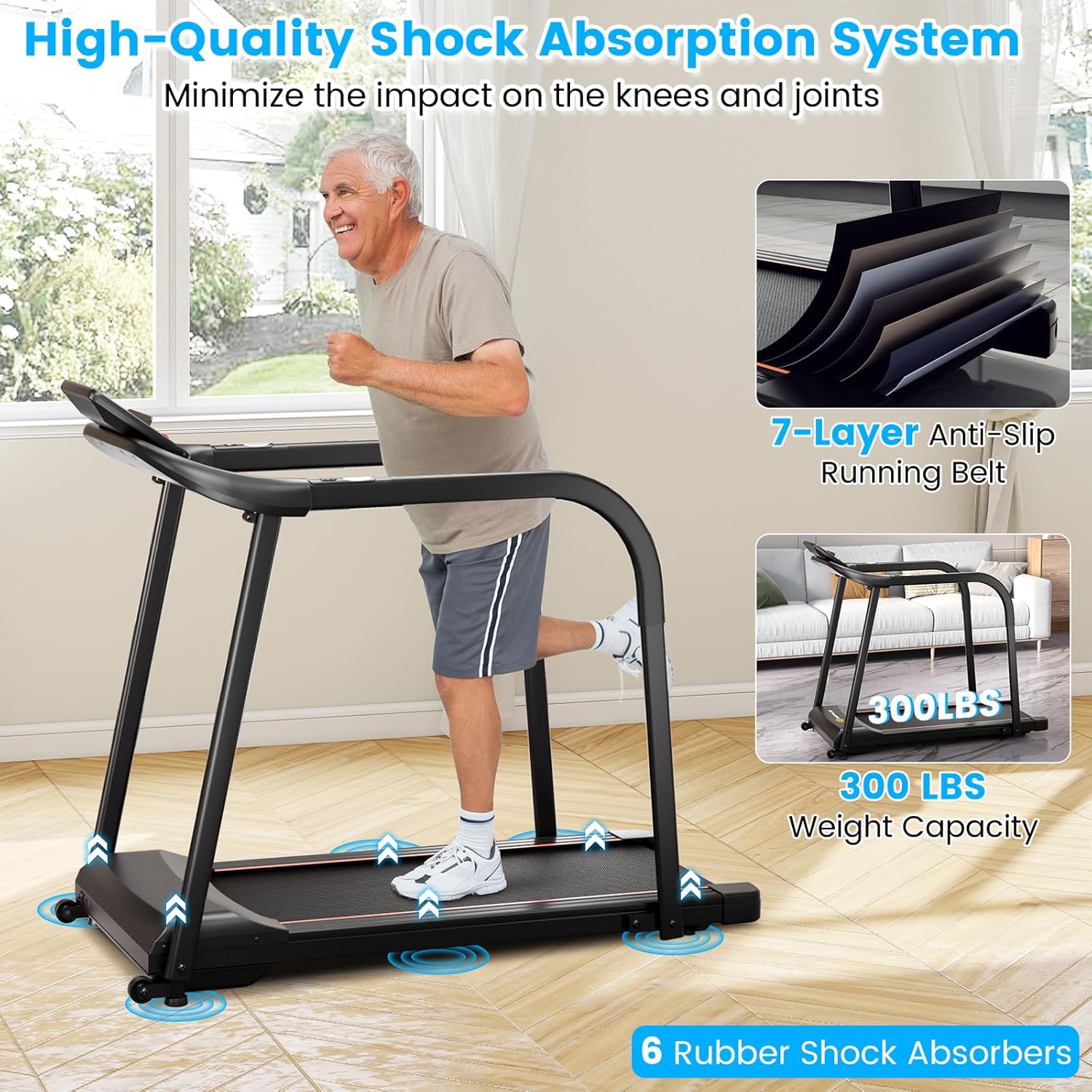
Figure 3: Shock Absorption System. This image highlights the treadmill's 7-layer anti-slip running belt and 6 rubber shock absorbers, designed to reduce impact on knees and joints during exercise.
Setup and Assembly
The GYMAX Walking Treadmill requires some assembly. Please follow these steps carefully.
Unpacking and Preparation:
- Carefully remove all components from the packaging.
- Verify that all parts listed in the package contents (refer to the included instruction manual) are present.
- Place the main treadmill frame on a clear, level surface where you intend to use it.
Assembly Steps:
- Attach the main uprights to the base frame using the provided hardware.
- Secure the control panel to the top of the uprights.
- Install the extended handrails. These are designed to be detachable for compact storage, but ensure they are securely fastened for operation.
- Connect any necessary electrical cables as indicated in the detailed assembly guide provided with the product.
- Ensure all bolts and nuts are tightened securely before plugging in the treadmill.
Power Connection:
- Plug the power cord into a grounded 110-120V, 60Hz electrical outlet.
- Ensure the power switch on the treadmill is in the "ON" position.
Operating Instructions
This section details how to operate your GYMAX Walking Treadmill.
Control Panel Overview:

Figure 4: Control Panel and Features. This image provides a top-down view of the treadmill's control panel, highlighting the LED display for tracking data, shortcut keys for operation, integrated device and bottle holders, and pulse sensors on the handrails.
- LED Display: Shows real-time data including Speed, Time, Distance, Calories, Steps, and Heart Rate.
- Start/Stop Buttons: Initiate or halt the treadmill belt.
- Speed Adjustment Buttons: Increase or decrease the belt speed. Shortcut keys on the handrails allow for quick adjustments.
- Program Selection: Access the 15 preset workout programs.
- Pulse Sensors: Grip the sensors on the handrails to measure your heart rate.
- Device Holder: Securely holds your smartphone or tablet.
- Bottle Holders: Conveniently store your water bottle.
Starting a Workout:
- Ensure the safety key is properly inserted into the control panel and the clip is attached to your clothing.
- Step onto the treadmill belt, placing your feet on the side rails.
- Press the "Start" button. The belt will begin moving at a low speed.
- Gradually increase the speed using the speed adjustment buttons to your desired pace. The treadmill supports a speed range of 0.5 to 7.5 MPH.
- For heart rate monitoring, grasp the pulse sensors on the handrails firmly. Your heart rate will display on the LED screen.
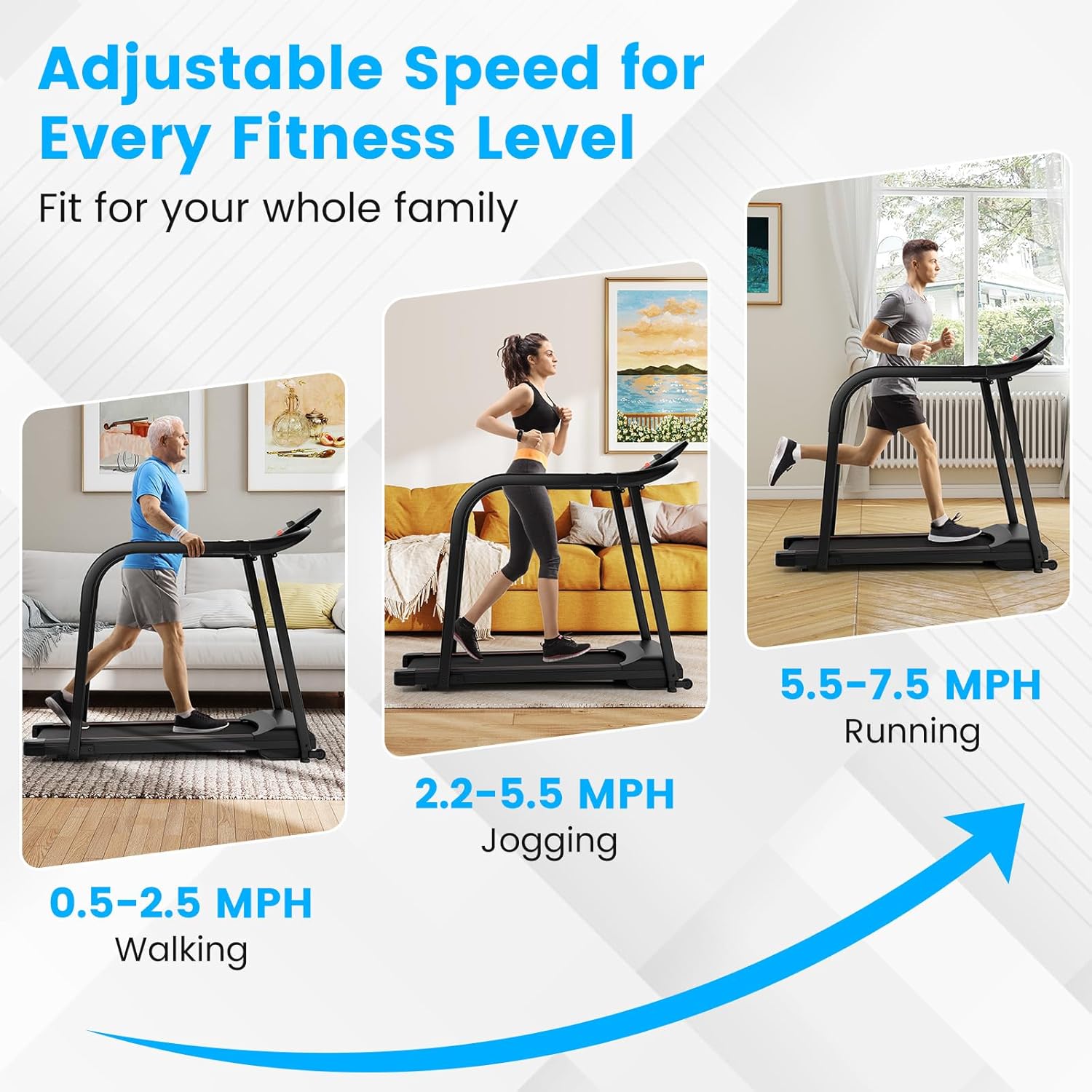
Figure 5: Adjustable Speed Levels. This image illustrates the treadmill's versatile speed settings, categorizing them into walking (0.5-2.5 MPH), jogging (2.2-5.5 MPH), and running (5.5-7.5 MPH) to accommodate various fitness levels.
Using Preset Programs:
The treadmill includes 15 preset programs designed to offer varied workout intensities. Consult the detailed instruction manual for specific program profiles.
- While the treadmill is stopped or in standby mode, press the "Program" button to cycle through the available programs (P1-P15).
- Once you select a program, press "Start" to begin the workout. The treadmill will automatically adjust speed according to the program's profile.
Ending a Workout:
- To stop the treadmill, press the "Stop" button. The belt will gradually slow down and come to a complete halt.
- In an emergency, pull the safety key from the control panel to immediately stop the treadmill.
Maintenance
Regular maintenance ensures the longevity and optimal performance of your GYMAX Walking Treadmill.
Cleaning:
- Unplug the treadmill before cleaning.
- Wipe down the control panel and exterior surfaces with a damp cloth. Avoid using abrasive cleaners or solvents.
- Periodically vacuum underneath the treadmill to remove dust and debris.
Running Belt Lubrication:
The running belt requires periodic lubrication to reduce friction and extend its lifespan. Use the provided silicone treadmill lubricant.
- Unplug the treadmill.
- Loosen the rear roller bolts slightly to lift the belt.
- Apply a thin line of silicone lubricant evenly under the center of the running belt.
- Tighten the rear roller bolts.
- Plug in the treadmill and run it at a low speed (e.g., 1 MPH) for 5 minutes to distribute the lubricant.
- Lubricate the belt every 3-6 months, depending on usage.
Belt Adjustment:
- If the running belt shifts to one side or slips, it may need adjustment. Refer to the detailed instruction manual for specific belt centering and tensioning procedures using the provided Allen wrench.
Troubleshooting
This section addresses common issues you might encounter with your treadmill.
| Problem | Possible Cause | Solution |
|---|---|---|
| Treadmill does not power on. | Power cord not plugged in; power switch off; circuit breaker tripped. | Ensure power cord is securely plugged in. Turn power switch to ON. Check household circuit breaker. |
| Belt does not move. | Safety key not inserted; "Stop" button pressed; motor issue. | Insert safety key fully. Press "Start". If issue persists, contact customer support. |
| Belt slips or hesitates. | Belt tension too loose; belt needs lubrication. | Adjust belt tension (refer to maintenance section). Lubricate the running belt. |
| Unusual noise from treadmill. | Loose parts; motor issue; belt rubbing. | Check for loose bolts and tighten. Ensure belt is centered. If noise persists, discontinue use and contact support. |
| Heart rate monitor not working. | Hands not firmly on sensors; dry hands. | Ensure both hands are firmly gripping the metal sensors. Slightly moisten hands if they are too dry. |
For issues not listed here or if solutions do not resolve the problem, please contact GYMAX customer support.
Specifications
Detailed technical specifications for the GYMAX Walking Treadmill, Model GM2231.
| Brand | GYMAX |
| Model Name | Walking Treadmill for Seniors (GM2231) |
| Color | Black |
| Overall Dimensions (L x W x H) | 53" x 25" x 44" (134.62 cm x 63.5 cm x 111.76 cm) |
| Running Belt Size (L x W) | 40.5" x 15" (102.87 cm x 38.1 cm) |
| Folded Thickness | 8.5" (21.59 cm) |
| Net Weight | 69 lbs (31.29 kg) |
| Weight Capacity | 300 lbs (136 kg) |
| Motor Power | 2.5 HP |
| Speed Range | 0.5 - 7.5 MPH |
| Voltage | 110-120V |
| Frequency | 60Hz |
| Display Type | LED |
| Number of Programs | 15 Preset Programs |
| Included Components | Treadmill, Silicone Treadmill Lubricant, Safety Key, Instruction Manual |
| Material | Metal, ABS |
Warranty and Support
Warranty Information:
The GYMAX Walking Treadmill (Model GM2231) comes with a 90-day warranty from the date of purchase. This warranty covers manufacturing defects and workmanship under normal use. It does not cover damage resulting from misuse, accident, unauthorized modification, or improper maintenance.
Please retain your proof of purchase for warranty claims.
Customer Support:
For technical assistance, parts replacement, or any questions regarding your GYMAX Walking Treadmill, please contact GYMAX customer support. Refer to the contact information provided in your product packaging or on the official GYMAX website.
When contacting support, please have your model number (GM2231) and purchase date available.
Additional Information
Storage:
The GYMAX Walking Treadmill is designed for easy storage. The handrails are detachable, allowing the treadmill to be folded to a compact thickness of 8.5 inches. Built-in transportation wheels facilitate effortless movement and storage in small spaces.

Figure 6: Compact Storage. This image demonstrates how the treadmill's detachable handrails and integrated transportation wheels allow for easy folding and movement, making it suitable for home use with limited space.
Motor Performance:
Equipped with a 2.5 HP motor, the treadmill operates efficiently with a low noise level of ≤45dB, ensuring a quiet workout environment that minimizes disturbance to others.

Figure 7: Powerful and Quiet Motor. This image highlights the treadmill's 2.5 HP motor, emphasizing its efficient performance and low noise operation (≤45dB), ideal for a quiet home workout environment.


