
realme N70T
Contents
realme Note 70T Smartphone User Manual
Model: N70T | Brand: realme
1. Introduction
This manual provides essential information for setting up, operating, maintaining, and troubleshooting your realme Note 70T smartphone. Please read it carefully to ensure optimal performance and longevity of your device.
The realme Note 70T is designed for extended usage with its 6000mAh battery, offering 15W fast charging and 6W reverse charging capabilities. It features a 90Hz Eye Comfort Display, an Octa-core chipset, and a durable ArmorShellTM Tough Build with IP54 water and dust resistance.

This image displays the realme Note 70T smartphone in gold, showcasing its sleek design and highlighting core features such as its large 6000mAh battery, ultra-slim 7.94mm profile, 15W fast charging, 6W reverse charging capability, 12GB Dynamic RAM, and a 90Hz Eye Comfort Display.
2. Initial Setup
2.1. Package Contents
Before you begin, ensure all items are present in the box:
- realme Note 70T Smartphone
- USB Type-C Cable
- Power Adapter
- SIM Ejector Tool
- Quick Start Guide
- Safety Information
2.2. Inserting SIM Card and microSD Card
- Locate the SIM card tray on the side of your device.
- Insert the SIM ejector tool into the small hole next to the tray and press gently until the tray pops out.
- Place your Nano-SIM card(s) and/or microSD card into the designated slots on the tray. Ensure the gold contacts face downwards.
- Carefully push the tray back into the phone until it clicks into place.
2.3. Charging the Device
Before first use, it is recommended to fully charge your realme Note 70T.
- Connect the USB Type-C cable to the charging port at the bottom of the phone.
- Connect the other end of the cable to the power adapter.
- Plug the power adapter into a wall outlet.
- The charging indicator will appear on the screen. The device supports 15W fast charging.

This image provides a side view of the realme Note 70T, highlighting the placement of its 3.5mm headphone jack, USB-C charging port, and speaker grille.
2.4. Powering On and Initial Configuration
- Press and hold the Power button (located on the right side) until the realme logo appears.
- Follow the on-screen instructions to select your language, connect to Wi-Fi, set up your Google account, and configure security features (PIN, pattern, fingerprint, face unlock).
3. Operating Your realme Note 70T
3.1. Basic Navigation
- Power Button: Press and hold to power on/off or restart. Press once to lock/unlock the screen.
- Volume Buttons: Adjust media volume, call volume, or notification volume.
- Touchscreen Gestures: Swipe, tap, pinch-to-zoom for navigation and interaction.
3.2. Battery and Charging
Your realme Note 70T is equipped with a 6000mAh massive battery, providing extended usage times.
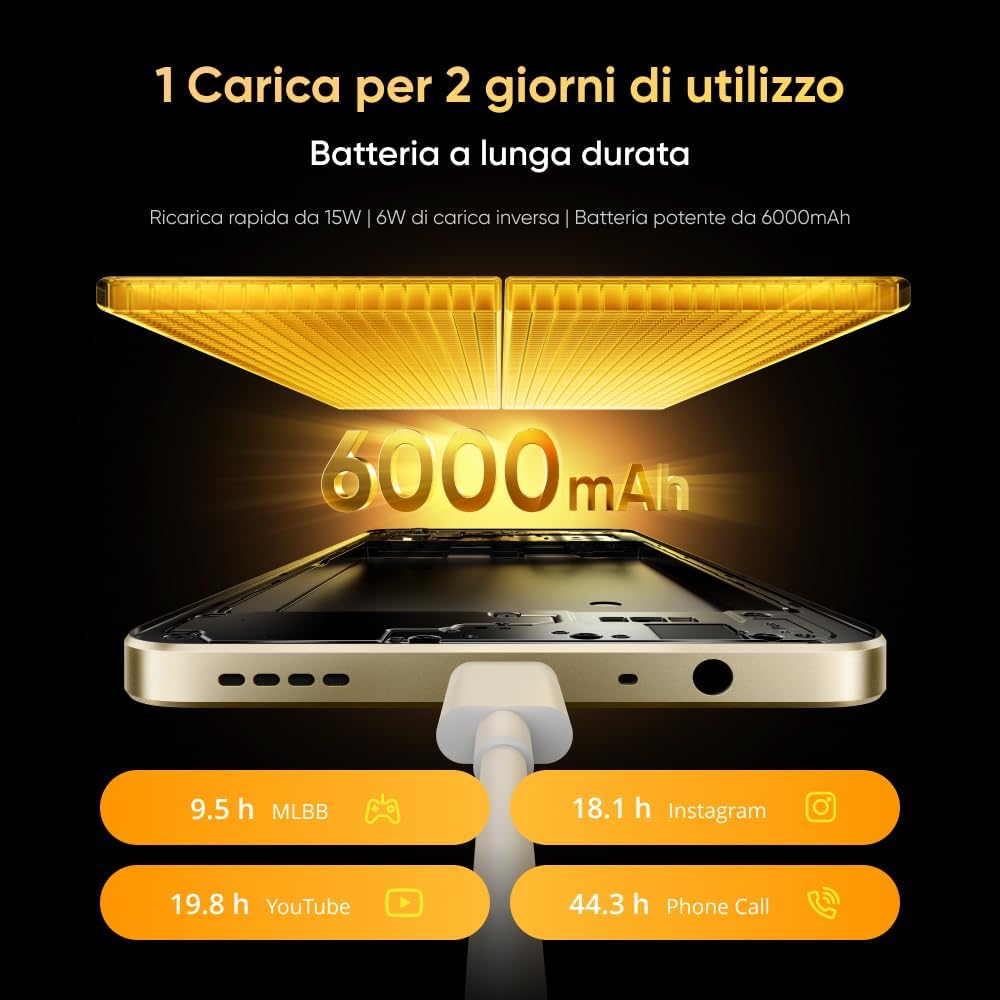
This graphic demonstrates the extended battery life of the realme Note 70T, indicating approximately 19.8 hours of YouTube playback, 18.1 hours of Instagram usage, 9.5 hours of Mobile Legends: Bang Bang (MLBB) gaming, and 44.3 hours of phone calls on a single charge.
3.2.1. Fast Charging
The device supports 15W fast charging via the USB Type-C port. Use the provided charger and cable for optimal charging speed.
3.2.2. Reverse Charging
The realme Note 70T can act as a power bank with its 6W reverse charging feature. To use this:
- Ensure your phone has sufficient battery charge.
- Connect an OTG (On-The-Go) cable to your realme Note 70T's USB-C port.
- Connect the other end of the OTG cable to the device you wish to charge.
- Enable reverse charging in your phone's settings if it doesn't start automatically.
3.3. Display Features
Experience smooth visuals on the 90Hz Eye Comfort Display. This display offers a higher refresh rate for fluid scrolling and animations, while also being optimized for reduced eye strain.

This image focuses on the realme Note 70T's 90Hz Eye Comfort Display, detailing its 90Hz refresh rate, 563 nits peak brightness, 6.74-inch screen size, and a responsive touch sampling rate of up to 180Hz for a smooth visual experience.
3.4. Camera Usage
Capture moments with the versatile camera system:
- Main Camera: 50MP for high-resolution photos.
- Ultra-wide Camera: 13MP for broader landscape shots.
- Front Camera: 5MP for selfies and video calls.

This diagram details the realme Note 70T's camera system, featuring a 50MP main camera for high-resolution photos, a 13MP ultra-wide camera for broader perspectives, and a 5MP front camera for selfies and video calls.
3.4.1. AI Camera Features
Leverage AI enhancements for improved photography and communication:
- AI Clear Face: Enhances clarity in portrait photos.
- AI Image Matting: Allows for precise background removal in images.
- AI Noise Reduction (Call 2.0): Improves call quality by intelligently filtering background noise.
- AI Optimization: Optimizes frequently used apps for smoother performance.

This image showcases the realme Note 70T's advanced AI capabilities, including AI Noise Reduction for clear calls, AI Optimization for efficient app performance, AI Clear Face for enhanced portrait clarity, and AI Image Matting for precise background removal.
3.5. Audio and Volume
The device features 300% Ultra Volume, providing a significantly louder audio experience for calls, music, and videos.
3.6. Performance and Storage
The realme Note 70T is powered by an Octa-core chipset for efficient performance. It includes 4GB of physical RAM, 128GB of internal storage, and supports up to 24GB of Dynamic RAM (virtual RAM expansion) for enhanced multitasking.

This image illustrates the powerful Octa-core Chipset of the realme Note 70T, featuring a 12nm advanced processor and A8 core architecture. It achieves an AnTuTu score of 280,000 and supports stable 60 frames per second gaming in MLBB for up to 2 hours.
3.7. Pulse Notifications
The device features 'Pulse' interactions, which are visual cues (likely LED lights or screen animations) that provide quick notifications at a glance. Refer to your phone's settings for customization options.
4. Maintenance and Care
4.1. Cleaning Your Device
To clean your realme Note 70T:
- Power off the device before cleaning.
- Use a soft, lint-free cloth to wipe the screen and body.
- For stubborn smudges, slightly dampen the cloth with water or a screen cleaner. Avoid harsh chemicals.
- Do not spray cleaners directly onto the phone.
4.2. Software Updates
Regularly check for and install software updates to ensure your device has the latest features, security patches, and performance improvements. Go to Settings > About phone > Software update.
4.3. Battery Care
- Avoid exposing the phone to extreme temperatures.
- Do not let the battery completely drain frequently.
- Use only realme-approved chargers and cables.
4.4. Storage Management
Periodically clear unnecessary files, apps, and cache to maintain optimal performance. You can manage storage in Settings > Storage.
4.5. Durability Features
The realme Note 70T features an ArmorShellTM Tough Build, providing Military-Grade Shock Resistance. It also has an IP54 rating, offering protection against dust and splashes.

This composite image highlights the realme Note 70T's robust build with Military Grade shock resistance and IP54 rating for water and dust protection. It also features the elegant design with a 'Pulse' light notification system and responsive 'Smart Touch' functionality.
5. Troubleshooting
Here are solutions to common issues you might encounter:
5.1. Phone Not Turning On
- Ensure the battery is charged. Connect the charger and wait a few minutes before attempting to power on.
- Press and hold the Power button for at least 10-15 seconds to force a restart.
5.2. Charging Issues
- Check if the charging cable and adapter are securely connected.
- Try using a different realme-approved charger and cable.
- Inspect the charging port for any debris or damage.
5.3. Network Connectivity Problems
- Ensure your SIM card is correctly inserted and active.
- Check if Airplane Mode is disabled.
- Restart your phone.
- Reset network settings: Settings > System > Reset options > Reset Wi-Fi, mobile & Bluetooth.
5.4. Apps Crashing or Freezing
- Force close the app and reopen it.
- Clear the app's cache and data: Settings > Apps > [App Name] > Storage > Clear cache/Clear data.
- Update the app from the Google Play Store.
- If the issue persists, uninstall and reinstall the app.
5.5. Factory Reset
If you experience persistent software issues, a factory reset may be necessary. Warning: This will erase all data on your phone. Back up important data before proceeding.
- Go to Settings > System > Reset options.
- Select Erase all data (factory reset).
- Confirm your decision and enter your PIN/pattern if prompted.
6. Specifications
| Feature | Specification |
|---|---|
| Model Name | realme Note 70T (N70T) |
| Operating System | Android |
| Processor | Octa-core Mobile CPU, 1.8 GHz |
| RAM | 4 GB (Physical) + up to 24 GB (Dynamic RAM) |
| Internal Storage | 128 GB |
| Display | 6.74-inch 90Hz Eye Comfort Display, 563 nits max brightness, up to 180Hz touch sampling rate |
| Rear Camera | 50MP Main Camera, 13MP Ultra-wide Camera |
| Front Camera | 5MP |
| Battery | 6000mAh Lithium-polymer |
| Charging | 15W Fast Charging, 6W Reverse Charging (Type-C) |
| Connectivity | 4G Cellular Technology, Wi-Fi, Bluetooth |
| Durability | Military-Grade Shock Resistance, IP54 Water and Dust Resistance |
| Dimensions | 7.94mm Ultra Slim (specific length/width not provided) |
| Weight | 201 grams |
7. Warranty and Support
7.1. Product Warranty
Your realme Note 70T smartphone is covered by a limited warranty. The terms and conditions of the warranty are typically provided in a separate warranty card included with your purchase. Please refer to this document for details regarding coverage period, what is covered, and exclusions.
7.2. Customer Support
For technical assistance, service, or further inquiries, please contact realme customer support through their official website or the contact information provided in your warranty documentation. When contacting support, please have your device model (N70T) and proof of purchase readily available.
Ask a question about this manual
Ask about setup, troubleshooting, compatibility, parts, safety, or missing instructions. Manuals+ will review the question and use this page’s manual context to help answer it.