
Introduction
Thank you for choosing the PQRQP TY616 Ring Light. This device is designed to provide soft, even illumination for various applications, including video calls, live streaming, content creation, and general desk lighting. Its features include adjustable brightness, multiple color temperatures, a stable base, and a flexible phone holder.
This manual provides detailed instructions for the proper setup, operation, and maintenance of your ring light to ensure optimal performance and longevity.

Image: Comparison of lighting before and after using the PQRQP Ring Light, demonstrating enhanced illumination.
Package Contents
Please verify that all components are present in the package:
- 1x Fill Light + Connector
- 1x Stand Rod
- 1x Metal Disc Base
- 1x Cellphone Holder
- 1x Remote Control
- 1x User Manual

Image: All components included in the PQRQP Ring Light package.
Setup Instructions
- Assemble the Base and Stand: Screw the stand rod into the metal disc base until secure.
- Attach the Fill Light: Unscrew the nut on the connector of the fill light. Place the fill light onto the top of the stand rod and tighten the nut to secure it.
- Install the Phone Holder: Attach the cellphone holder to the stand rod at your desired height and angle. Ensure it is securely fastened.
- Connect Power: Plug the USB cable from the ring light into a 5V/2A USB power source (e.g., laptop, power bank, USB wall adapter).

Image: Detailed view of the Desktop Fill Light components and assembly points.

Image: Visual guide for connecting the telescopic rod, attaching the light, and adjusting the phone holder.
Operating Instructions
Power On/Off and Mode Switching
The ring light can be controlled using the inline controller on the USB cable or the included remote control.
- Power Button: Press the power button on the inline controller or remote to turn the light on or off.
- Mode Switching: Use the mode switch button on the inline controller or the designated buttons on the remote to cycle through different lighting modes (White Light, Yellow Light, Warm Light).
Adjusting Brightness and Color Temperature
The PQRQP TY616 Ring Light offers 10 brightness levels and 3 color temperatures (3000K-6500K) for customizable lighting.
- Brightness Adjustment: Use the '+' and '-' buttons on the inline controller or remote to increase or decrease the brightness.
- Color Temperature Adjustment: Use the color temperature buttons on the remote control to switch between warm (3000K), natural (4500K), and cool (6500K) light.

Image: Three distinct lighting modes and remote control functions for brightness and color temperature.

Image: Inline and wireless remote control functions.
Physical Adjustments
- Height Adjustment: The stand rod is telescopic and can be adjusted from 20.5 inches (52cm) to 28.5 inches (72cm). Twist the adjustment ring to extend or retract the column, then tighten to secure.
- Angle Adjustment: The light head rotates 360 degrees and can be tilted 180 degrees for precise positioning. The phone holder also supports full rotation.
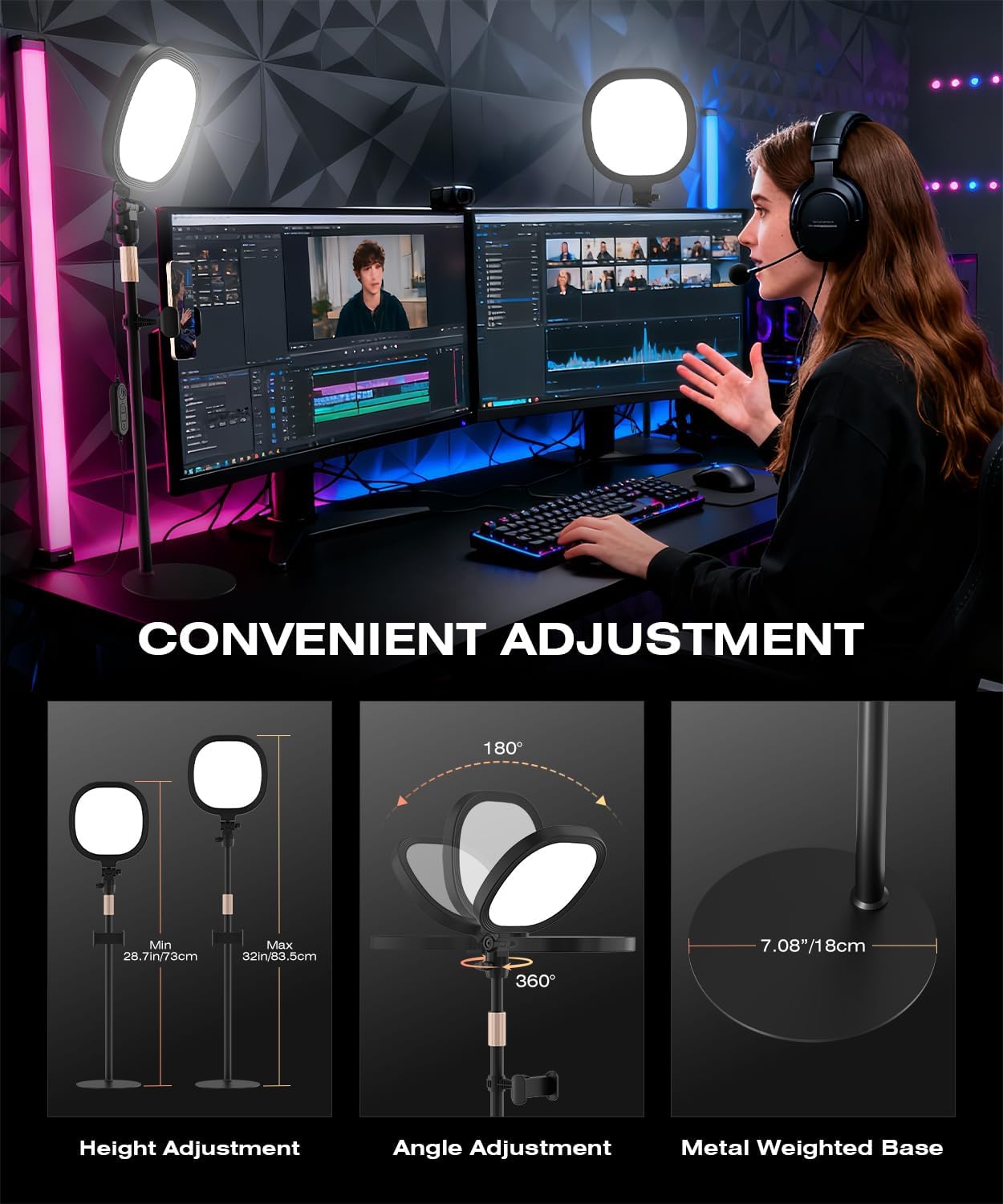
Image: Height and angle adjustment capabilities, and the stable metal base.

Image: Mechanisms for convenient adjustment of height, stability, and phone positioning.
Maintenance
- Cleaning: Use a soft, dry cloth to wipe the surface of the ring light and stand. Do not use abrasive cleaners or solvents.
- Storage: When not in use, store the ring light in a cool, dry place away from direct sunlight and excessive heat.
- Cable Care: Avoid bending or crimping the USB power cable excessively to prevent damage.
Troubleshooting
| Problem | Possible Cause | Solution |
|---|---|---|
| Light does not turn on. | No power, loose connection, faulty USB adapter. | Ensure USB cable is securely connected to a 5V/2A power source. Try a different USB port or adapter. |
| Remote control not working. | Battery depleted, obstruction, out of range. | Replace the remote control battery. Ensure no obstructions between remote and light. Operate within effective range. |
| Light flickers or is unstable. | Insufficient power, damaged cable. | Ensure power source provides 5V/2A. Check USB cable for damage. Try a different cable or power source. |
| Phone holder is loose. | Not tightened properly. | Tighten the fastening screw on the phone holder until secure. |
Specifications
- Brand: PQRQP
- Model: TY616
- Connectivity Technology: USB
- Product Dimensions: 7"L x 7"W x 32"H (fully extended)
- Adjustable Height: 20.5" to 28.5"
- Power Input: 5V/2A USB
- Color Temperature: 3000K-6500K (Warm, Natural, Cool)
- Brightness Levels: 10 levels
- Color Rendering Index (CRI): 97+
- Item Weight: 2 ounces
Warranty Information
PQRQP products are designed and manufactured to the highest quality standards. This product comes with a standard manufacturer's warranty. For specific warranty details, including duration and coverage, please refer to the warranty card included in your product packaging or contact PQRQP customer support.
Customer Support
If you have any questions, concerns, or require assistance with your PQRQP TY616 Ring Light, please contact our customer support team. You can find contact information on the official PQRQP website or through your purchase platform.
Please have your model number (TY616) and purchase details ready when contacting support.