
Introduction
This manual provides detailed instructions for the Moman TT07 Auto Face Tracking Phone Tripod and Extendable Selfie Stick. The TT07 is designed to enhance your mobile photography and videography experience with features such as automatic face tracking, a 360° rotating head, and an extendable design. Please read this manual thoroughly before use to ensure proper operation and to maximize the product's capabilities.
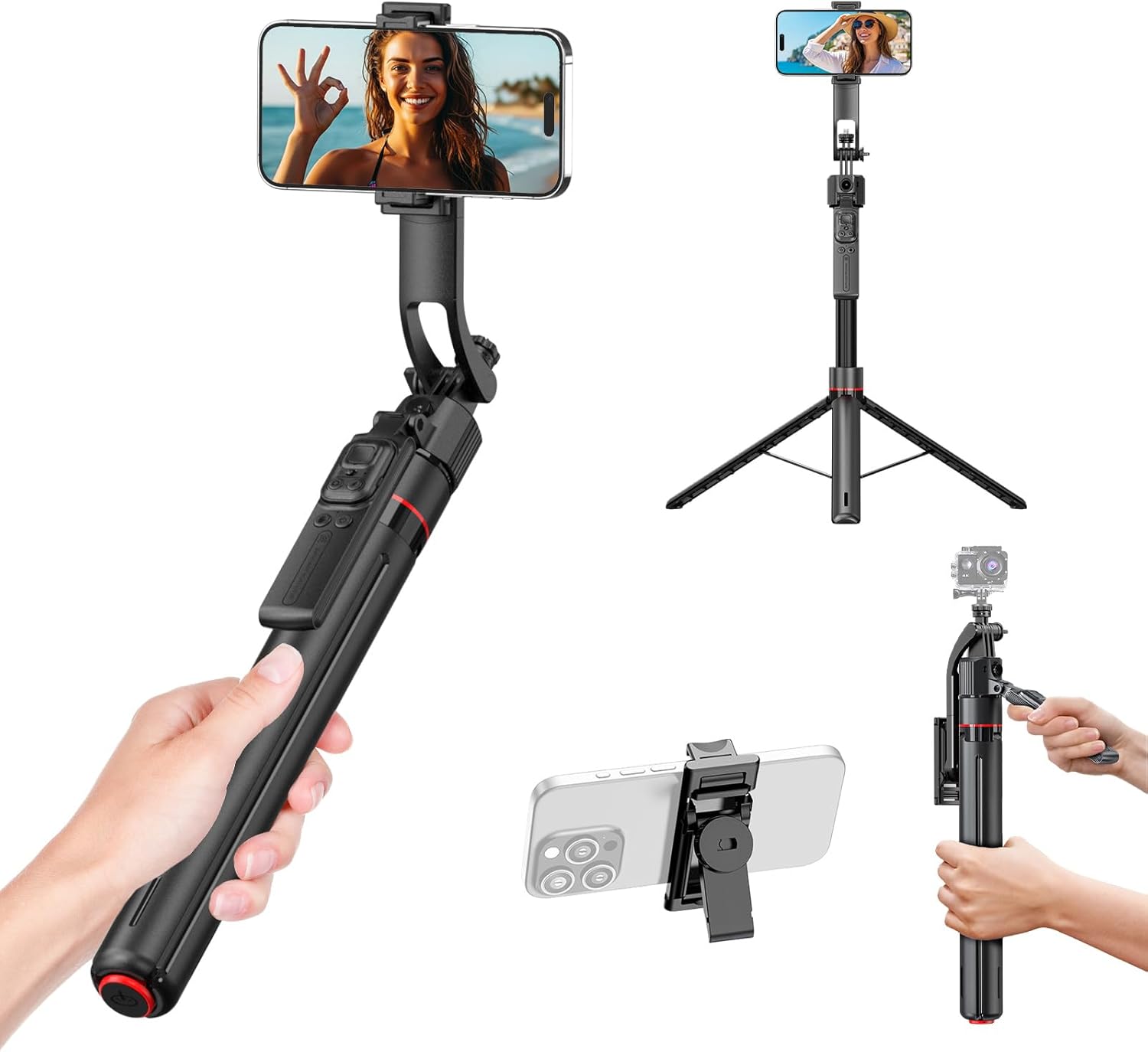
Figure 1: Moman TT07 in selfie stick and tripod modes, showcasing its versatility.
What's in the Box
Upon unboxing your Moman TT07, please ensure all the following items are present:
- Moman TT07 Selfie Stick Tripod
- USB-A to USB-C Charging Cable
- User Manual
Video 1: Unboxing the Moman TT07 Auto Face Tracking Selfie Stick, showing included components.
Product Overview
The Moman TT07 combines the functionality of a selfie stick and a tripod with advanced auto-tracking capabilities. Key features include:
- Auto Face Tracking: Automatically follows your face to keep you centered in the frame.
- Auto-Open Base: Tripod legs automatically deploy when dropped from a short height.
- Extendable Design: Extends from 18 inches to 69 inches for various shooting angles.
- 360° Rotation: Smooth rotation for dynamic videos and wide-angle shots.
- Wireless Remote Control: Detachable remote for convenient photo and video capture.
- Universal Compatibility: Supports phones from 2.3 to 3.7 inches and features a 1/4" standard screw for other devices.
- Portable & Lightweight: Weighs only 1.2 lbs and folds compactly for easy transport.

Figure 2: Illustration of the 10cm drop auto-open base feature for quick tripod setup.

Figure 3: The smart AI tracking system captures movement, including face, body, and back tracking.
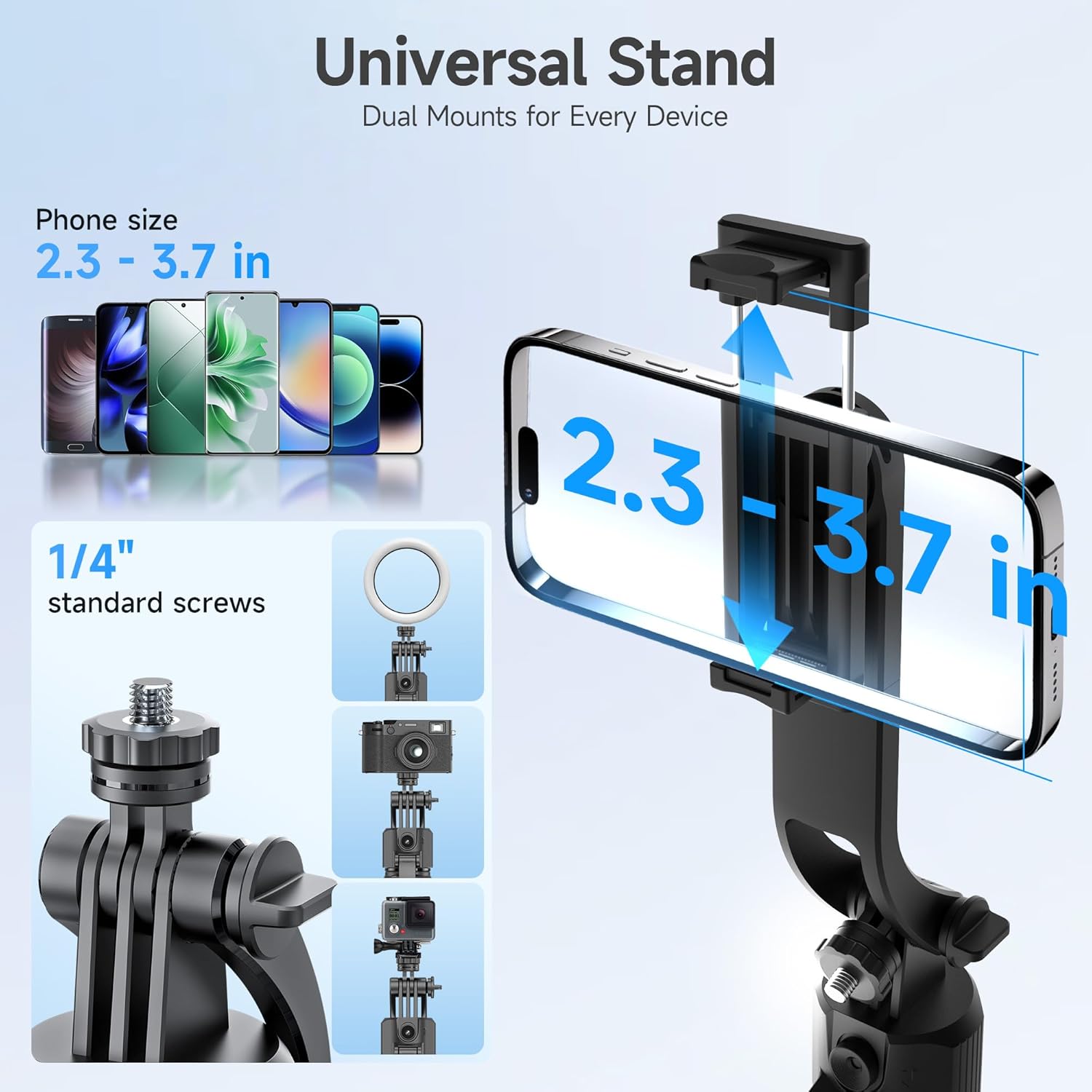
Figure 4: The universal stand supports phones 2.3-3.7 inches wide and has a 1/4" standard screw for other accessories like action cameras or lights.
Setup
- Charge the Device: Connect the Moman TT07 to a power source using the provided USB-A to USB-C charging cable. A red indicator light will show it's charging.
- Unfold the Tripod: Hold the device vertically and gently drop the base from approximately 10cm (4 inches) above a flat surface. The tripod legs will automatically spread out.
- Extend the Selfie Stick: Pull the telescopic rod upwards to extend the selfie stick to your desired height (up to 69 inches).
- Mount Your Phone: Open the phone holder and securely place your smartphone. The holder accommodates phones between 2.3 and 3.7 inches wide. Ensure your phone is balanced.
- Pair the Remote Control:
- Remove the detachable wireless remote control from the handle.
- Turn on the remote control. A blue light will flash, indicating it's in pairing mode.
- On your smartphone, go to Bluetooth settings and search for "Selfie TK".
- Select "Selfie TK" to pair. The blue light on the remote will become solid once paired.
- Enable Assistive Touch (for iOS/Android): For optimal remote control functionality, ensure 'Assistive Touch' is enabled in your phone's accessibility settings. This allows the remote to control camera functions.
Operating Instructions
1. Auto Face Tracking
The Moman TT07 features intelligent AI face tracking. Once powered on and in tracking mode (indicated by a green light), the device will automatically detect and follow your face, keeping you centered in the frame during videos or live streams.
Video 2: Demonstration of the Moman TT07's auto-tracking feature in action, following a person's movement.
2. Gesture Control
The TT07 supports intuitive hand gestures for control:
- "OK" Gesture: Make an "OK" sign with your hand to start or switch tracking.
- "Palm" Gesture: Show an open palm to pause tracking.
- "Double L" Gesture: Form two 'L' shapes with your hands to recenter and adjust the frame.
3. Remote Control Functions
The detachable wireless remote provides convenient control:
- Power Switch: Slide left to turn on, right to turn off.
- Camera Button: Click to take photos or start/stop video recording.
- Arrow Buttons: Control mouse direction (requires Assistive Touch).
- Like Button: Click to pause, double-click to 'like' (for live streaming platforms).
4. Adjustable Angles & Modes
- 360° Panoramic Panning: The head rotates fully for wide shots.
- 270° Flexible Tilting: Adjust the phone holder's tilt for various vertical angles.
- 90° Adjustable Stabilizing Handle: Provides additional stability when used handheld.
- Vertical & Horizontal Shooting: Easily switch between portrait and landscape orientations.
- Sitting & Standing Angles: The adjustable lens allows for optimal framing whether you are sitting or standing.

Figure 5: The TT07 offers flexible tilting, 360° rotation, and an adjustable lens for various shooting scenarios.

Figure 6: The versatile design supports handheld, standing tripod, and desk tripod shooting modes.
Maintenance
To ensure the longevity and optimal performance of your Moman TT07, follow these maintenance guidelines:
- Cleaning: Use a soft, dry cloth to clean the device. Avoid using harsh chemicals or abrasive materials.
- Storage: Store the device in a cool, dry place away from direct sunlight and extreme temperatures. Ensure it is folded compactly when not in use.
- Battery Care: Charge the device regularly, even if not in frequent use, to maintain battery health. Avoid fully discharging the battery for extended periods.
- Avoid Impact: While durable, avoid dropping or subjecting the device to strong impacts, especially the tracking lens and phone holder.
Troubleshooting
If you encounter any issues with your Moman TT07, please refer to the following common solutions:
- Device Not Turning On: Ensure the device is fully charged. Connect it to the charging cable and wait for the red indicator light.
- Remote Control Not Pairing:
- Ensure the remote is turned on and the blue light is flashing.
- Check your phone's Bluetooth settings to ensure it's discoverable.
- Forget previously paired "Selfie TK" devices on your phone and try pairing again.
- Face Tracking Not Working:
- Ensure the device is powered on and the green light is solid (indicating tracking mode).
- Verify that the tracking lens is clean and unobstructed.
- Ensure you are within the optimal tracking range and lighting conditions.
- Phone Holder Not Secure: Ensure your phone is correctly seated within the holder and the clamps are firmly gripping the device. The holder is designed for phones 2.3-3.7 inches wide.
If the issue persists, please contact Moman customer support for further assistance.
Specifications
- Model: TT07
- Brand: Moman
- Item Weight: 1.2 lbs (0.54 kg)
- Package Dimensions: 16.26 x 3.66 x 1.97 inches
- Extendable Length: 18 inches to 69 inches
- Phone Holder Width: 2.3 - 3.7 inches
- Rotation: 360° (head), 270° (tilting)
- Connectivity: Bluetooth (for remote control)
- Tracking: AI Auto Face Tracking (Face, Body, Back)
- Base: Auto-Open Tripod Base
- Material: Aluminum Alloy Pole, Silicone Anti-Slip Feet
Warranty and Support
Moman products are designed for reliability and performance. For information regarding product warranty, returns, or technical support, please refer to the warranty card included in your product packaging or visit the official Moman website. Keep your purchase receipt as proof of purchase for any warranty claims.
For additional assistance, you may contact Moman customer service through their official channels. Please provide your product model (TT07) and purchase details when seeking support.