
1. Introduction
The Carpuride W125S is an advanced 11.26-inch HD touchscreen display designed to enhance your driving experience. It features wireless Apple CarPlay and Android Auto connectivity, allowing seamless integration with your smartphone for navigation, communication, and entertainment. This unit also includes a comprehensive 3-channel dash camera system, providing 4K front recording, 1080P rear recording, and a 1080P infrared cabin camera for all-around vehicle surveillance and safety.

Image: Overview of the Carpuride W125S display unit, showcasing its 11.26-inch screen, integrated cameras, and key functionalities like CarPlay, Android Auto, 3-channel dash cam, and voice control.
2. Package Contents
Please verify that all items listed below are included in your package:
- 1 x Carpuride W125S Main Unit (Autoradio)
- 1 x Rear Camera
- 1 x 64GB TF Card
- 2 x Adjustable Mounts (for dashboard or windshield)
- 1 x Car Charger (Type-C 12V 1A)
- 1 x 3.5mm Audio Cable (AUX)
- 1 x Reversing Camera Cable
- 1 x User Manual

Image: Detailed view of all components included in the Carpuride W125S package, such as the main unit, various cables, mounting options, and the user manual.
3. Setup and Installation
The Carpuride W125S is designed for easy, plug-and-play installation without requiring disassembly of your car's console.
3.1 Mounting the Display Unit
The unit comes with two adjustable mounts for flexible placement on your dashboard or windshield. These mounts offer 360° rotation and pivot functionality to achieve your preferred viewing angle.
- Attach the display unit securely to one of the provided adjustable mounts.
- Fix the mount to your desired location on the dashboard or windshield. Ensure the surface is clean and dry for optimal adhesion.
- Adjust the angle of the display for optimal visibility without obstructing your view of the road.

Image: Visual guide demonstrating the rotation capabilities and installation methods for the Carpuride W125S display unit using the adjustable mounts.
3.2 Power Connection
Connect the Carpuride W125S using the original Carpuride car charger via the Type-C 12V 1A cigarette lighter connector. Using a non-original charger or one with insufficient current (less than 12V 1A) may cause damage or improper operation.
The system is compatible with a 12V to 24V voltage range, suitable for most cars, RVs, SUVs, pickups, and trucks.
3.3 Rear Camera Installation (Optional)
Install the rear camera at the back of your vehicle. Connect it to the designated port on the main unit using the provided cable. For Volkswagen owners, an additional relay may be required for the reversing camera to function correctly.
4. Operating Instructions
4.1 Wireless CarPlay and Android Auto
The W125S supports wireless Apple CarPlay and Android Auto, allowing you to access your smartphone's features safely while driving.
- For Apple CarPlay:
- On your iPhone, activate Wi-Fi and Bluetooth.
- On the Carpuride screen, select the CarPlay icon.
- Search for "Carpuride_BT-xxxx" in your iPhone's Bluetooth settings and connect.
- Confirm pairing on both devices.
- For Android Auto:
- On your Android phone, activate Wi-Fi and Bluetooth.
- On the Carpuride screen, select the Android Auto icon.
- Search for "Carpuride_BT-xxxx" in your phone's Bluetooth settings and connect.
- Confirm pairing on both devices.

Image: Step-by-step guide for connecting an iPhone to Apple CarPlay wirelessly on the Carpuride W125S display.

Image: Step-by-step guide for connecting an Android phone to Android Auto wirelessly on the Carpuride W125S display.
4.2 Voice Control
Utilize Siri or Google Assistant for hands-free control of navigation, calls, messages, music, and more. This feature helps you stay focused on the road.

Image: Illustration of voice control functionality, showing how to use Siri or Google Assistant for tasks like making calls or getting directions.
4.3 3-Channel Dash Cam Operation
The integrated dash cam system records simultaneously from three perspectives: 4K front, 1080P rear, and 1080P infrared cabin.
- Loop Recording: The system supports continuous loop recording, automatically overwriting older files when the TF card is full. A 64GB TF card is included, and the system supports up to 256GB.
- G-Sensor: The built-in accelerometer detects impacts and automatically locks critical video files to prevent them from being overwritten.
- Infrared Cabin Camera: Provides clear night vision inside the car, automatically switching to black and white mode in low light. It is ideal for monitoring the vehicle interior.
- Reversing Camera: Activate the reversing camera with a single press. The display will show auxiliary lines to assist with parking.

Image: Overview of the 3-channel dash cam system, detailing the 4K front, 1080P rear, and 1080P infrared cabin cameras.
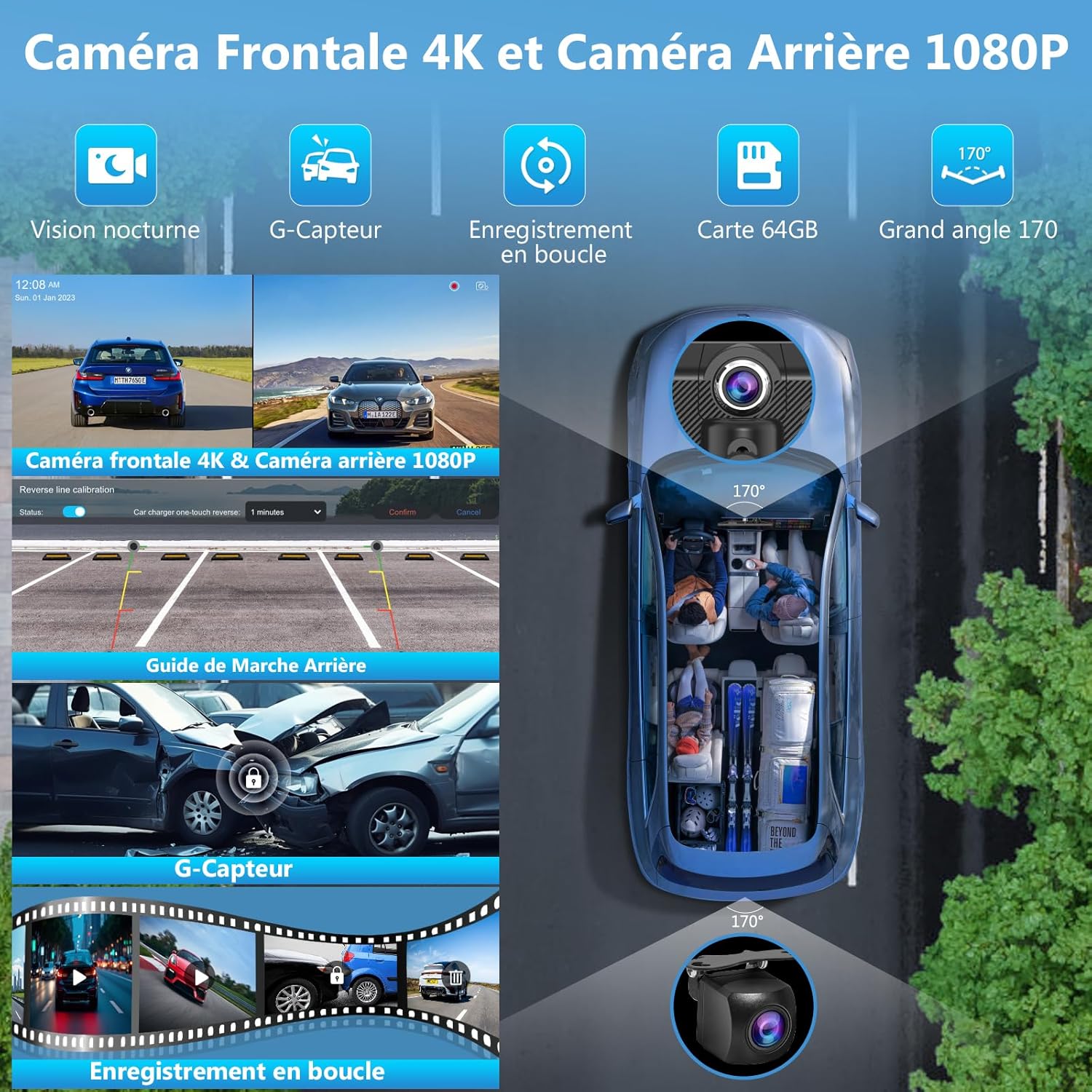
Image: Illustration of the loop recording function and G-sensor, showing how the system continuously records and protects critical video files in case of impact.
4.4 Screen Mirroring (SuperLink)
The SuperLink technology allows you to mirror your smartphone screen onto the W125S display, enabling you to watch online videos or view content directly from your phone.
- For iOS devices:
- Scan the QR code on the screen or visit https://camtree.cc/dl?zone=en&id=evelink&type=ios to download the EveLink app.
- Select "Wi-Fi Direct" connection mode and search for "EVELINK-xxxx".
- Once connected, select "Screen Mirroring" from your iPhone's Control Center ("Smartscreen").
- To watch online videos, select "Parameters" and click "Lab" in the EveLink app.
- For Android devices:
- Scan the QR code on the screen or visit https://camtree.cc/dl?zone=en&id=evelink to download the EveLink app.
- Select "Wi-Fi Direct" connection mode and search for "EVELINK-xxxx".
- Once connected, you can view videos from your phone on the display.

Image: Instructions for using SuperLink with iOS devices, detailing app download, connection, and screen mirroring steps.

Image: Instructions for using SuperLink with Android devices, detailing app download, connection, and video viewing steps.
4.5 Audio Output Options
The W125S offers multiple ways to output audio:
- Bluetooth Audio: Connect wirelessly to your car's Bluetooth system for calls and music.
- Built-in Speaker: The unit has an integrated 8Ω 2W speaker for direct audio output.
- AUX Connection: Use the provided 3.5mm audio cable to connect to your car's AUX input.
- FM Transmission: Transmit audio to your car's FM radio. For best sound quality, select an FM frequency between 90 MHz and 100 MHz that is not in use.

Image: Diagram illustrating the four available audio output modes: Bluetooth, built-in speaker, AUX connection, and FM transmission.
4.6 Display Features
- Light Sensor: The display automatically adjusts brightness based on ambient light conditions to reduce eye strain and ensure optimal visibility.
- Split Screen: The W125S supports various split-screen modes, allowing you to view multiple applications or camera feeds simultaneously.
- Custom Boot Logo: You can customize the boot logo to match your car model or display personal images.

Image: Illustration of the light sensor feature for automatic brightness adjustment and the clarity of the HD IPS touch screen.
5. Maintenance
To ensure the longevity and optimal performance of your Carpuride W125S, follow these maintenance guidelines:
- Cleaning: Use a soft, dry cloth to clean the screen and exterior. Avoid abrasive cleaners or solvents that could damage the surface.
- Temperature: Avoid exposing the device to extreme temperatures, both hot and cold, for extended periods.
- Cable Management: Ensure all cables are securely connected and not pinched or strained.
- Software Updates: Check the manufacturer's website periodically for any available firmware updates to improve performance and add new features.
6. Troubleshooting
If you encounter issues with your Carpuride W125S, refer to the following common solutions:
- Device Not Powering On:
- Ensure the original Carpuride car charger is used and properly connected to the cigarette lighter socket.
- Verify that the car's cigarette lighter socket is functioning.
- Check if the power supply is 12V 1A. Insufficient current can prevent the device from turning on or cause it to shut down automatically.
- Flickering Cabin Camera Image:
- The infrared cabin camera is optimized for in-car use. If used outside the car, the image may flicker due to sensitivity to light reflection on smooth surfaces. This is normal operation and not a defect.
- CarPlay/Android Auto Connection Issues:
- Ensure Wi-Fi and Bluetooth are enabled on your smartphone and the Carpuride unit.
- Verify that your smartphone meets the minimum OS requirements for wireless CarPlay (iOS 13+) or Android Auto (Android 11+ with 5 GHz Wi-Fi).
- Disable any VPN on your Android phone if experiencing connection issues.
- Check for incompatible phone models listed in the compatibility section.
- Rear Camera Not Displaying (Volkswagen):
- Volkswagen owners may need to install an additional relay for the reversing camera to function correctly.
- TF Card Storage Full:
- The system features loop recording, automatically overwriting older files. If you need more storage, consider purchasing a TF card with a larger capacity (up to 256GB).
7. Specifications
| Feature | Detail |
|---|---|
| Brand | CARPURIDE |
| Model Number | W125S |
| Screen Size | 11.26 inches |
| Display Resolution | 1920 x 720p (supports 1080P video playback) |
| Connectivity Technology | Bluetooth 5.0, Wi-Fi (for CarPlay/Android Auto), AUX |
| Special Features | 3-Channel Dash Cam (4K Front, 1080P Rear, 1080P IR Cabin), Wireless Apple CarPlay, Wireless Android Auto, Loop Recording, G-Sensor, Night Vision, Light Sensor, Custom Boot Logo, Split Screen Display |
| Compatible Devices | Smartphone (iOS 13+ for CarPlay, Android 11+ for Android Auto) |
| Video Recording Resolution | 4K (Front), 1080p (Rear), 1080p (Cabin) |
| TF Card Support | Up to 256GB (64GB included) |
| Power Input | Type-C 12V 1A (cigarette lighter connector), 12-24V compatible |
| Control Method | Touch, Voice, Application |
| Vehicle Service Type | Car, Truck, RV, SUV, Pickup |
7.1 Compatibility Notes
While compatible with most models, please note the following:
- Wireless CarPlay: Requires iPhone iOS 13 or higher, with Siri activated.
- Wireless Android Auto: Requires Android phone with Android 11 or higher, 5 GHz Wi-Fi, and Google Assistant. VPN must be disabled.
- Incompatible Android Phone Models: Some Samsung (S20, S23, Note 20), Huawei (P30, P40, Mate 20 Pro), Xiaomi (12 Pro, 11 Lite, 14T Pro), Oppo (Reno 2), and Galaxy A20 models may not support wireless Android Auto.

Image: Detailed requirements for wireless CarPlay and Android Auto, including a list of potentially incompatible Android phone models.
8. Warranty and Support
The Carpuride W125S comes with a manufacturer's warranty of 1 year.
For technical support or warranty claims, please contact CARPURIDE customer service through their official channels or the retailer where the product was purchased.


