
1. Introduction
The DUSONLAP E6 Open Ear Earbuds are designed to provide a comfortable and secure audio experience while allowing awareness of your surroundings. Featuring Bluetooth 5.4 connectivity, IPX7 waterproofing, and an ergonomic ear hook design, these earbuds are suitable for various activities including workouts, running, and daily use. This manual provides detailed instructions for setup, operation, and maintenance of your E6 earbuds.
2. What's in the Box
Please verify that all items are present in your package:
- Open-ear headphones x2 (Left & Right)
- Quick charging case x1
- USB-C fast charging cable x1
- User Manual x1

3. Product Overview
3.1 Components
The DUSONLAP E6 earbuds feature a lightweight design with ear hooks for secure placement. The charging case includes a digital display for battery percentage.
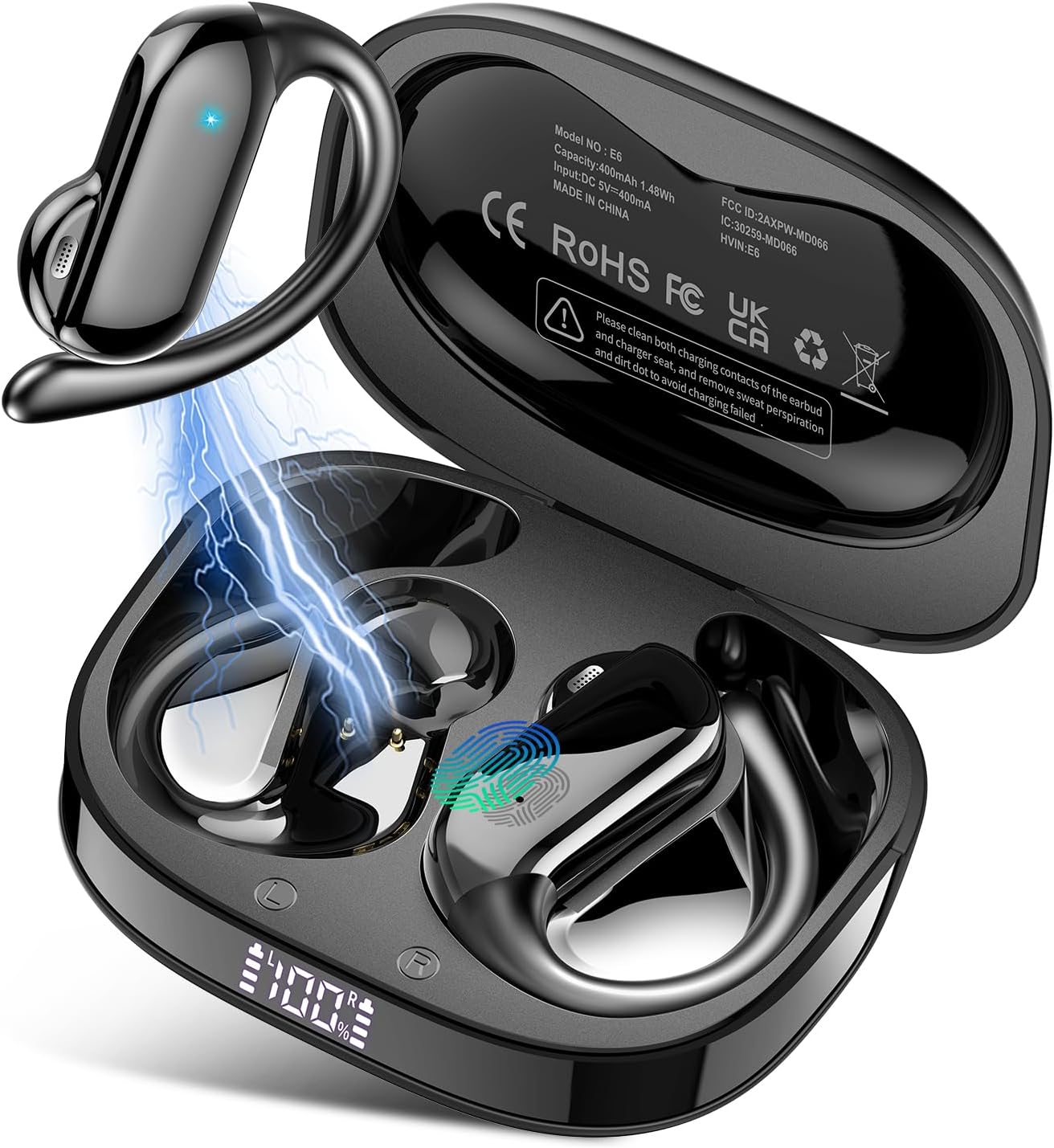

3.2 Controls
The earbuds feature touch controls for various functions:

- Play/Pause: Single tap (x1)
- Volume +: Single tap (x1) on right earbud
- Volume -: Single tap (x1) on left earbud
- Next Track: Tap and hold for 2 seconds (2S) on right earbud
- Previous Track: Tap and hold for 2 seconds (2S) on left earbud
- Answer Call: Double tap (x2)
- Hang Up/Reject Call: Tap and hold for 2 seconds (2S)
- Voice Assistant: Triple tap (x3)
4. Setup
4.1 Charging the Earbuds and Case
Before first use, fully charge the earbuds and charging case. The charging case features a digital display to indicate the battery level.
- Place the earbuds into the charging case. Ensure the charging contacts are clean.
- Connect the USB-C charging cable to the charging case and a power source.
- A full charge provides up to 8 hours of playtime for the earbuds, and the charging case extends total playtime to 32 hours.
- Charging time for the case is approximately 1.5 hours.

4.2 Pairing with a Device
The DUSONLAP E6 earbuds utilize Bluetooth 5.4 for quick and stable connections.
- Open the charging case. The earbuds will automatically power on and enter pairing mode.
- On your device (smartphone, tablet, laptop), enable Bluetooth.
- Search for available Bluetooth devices and select "E6" from the list.
- Once connected, the earbuds will automatically pair with your device in the future when removed from the case.


5. Operating Instructions
5.1 Wearing the Earbuds
The E6 earbuds feature an ergonomic ear hook design for a secure and comfortable fit.
- Simply remove the headphones from the charging case.
- Hang the headphones on your ear bone for a perfect fit.
- Turn the earphones and slide it behind the ear.
- Adjust the ear hook, wear and pull down the ear hook for a secure fit.


5.2 Call Management
The earbuds feature ENC (Environmental Noise Cancellation) microphone technology for clear calls.
- Answer Call: Double tap (x2) on either earbud.
- Hang Up/Reject Call: Tap and hold for 2 seconds (2S) on either earbud.
6. Maintenance
To ensure the longevity and optimal performance of your DUSONLAP E6 earbuds, follow these maintenance guidelines:
- Cleaning: Regularly wipe the earbuds and charging case with a soft, dry cloth. Ensure the charging contacts on both the earbuds and the case are free from dust, sweat, or debris to prevent charging issues.
- Water Resistance: The earbuds are IPX7 waterproof, meaning they can withstand sweat, rain, and splashes. However, they are not designed for swimming or prolonged submersion in water. Always dry the earbuds completely before placing them back in the charging case.
- Storage: Store the earbuds in their charging case when not in use to protect them from damage and keep them charged. Avoid exposing them to extreme temperatures or direct sunlight.
- Charging: Use the provided USB-C cable for charging. Avoid using damaged cables or chargers.


7. Troubleshooting
If you encounter issues with your DUSONLAP E6 earbuds, refer to the following common solutions:
| Problem | Possible Cause | Solution |
|---|---|---|
| Earbuds not pairing | Bluetooth off on device, earbuds not in pairing mode, interference. | Ensure Bluetooth is enabled on your device. Place earbuds in case, close, then open to re-enter pairing mode. Move closer to your device. |
| No sound from one earbud | Low battery, earbud not connected, balance settings. | Charge both earbuds fully. Re-pair the earbuds. Check audio balance settings on your device. |
| Charging issues | Dirty charging contacts, faulty cable/charger. | Clean charging contacts on earbuds and case. Try a different USB-C cable and power adapter. |
| Low volume | Device volume low, earbud placement. | Increase volume on both your device and the earbuds. Adjust earbud placement for optimal sound. |
| Intermittent connection | Distance from device, interference. | Reduce distance between earbuds and device. Avoid environments with strong Wi-Fi or other Bluetooth signals. |
8. Specifications
| Feature | Detail |
|---|---|
| Model Name | E6 |
| Connectivity Technology | Wireless |
| Wireless Communication Technology | Bluetooth |
| Bluetooth Version | 5.4 |
| Ear Placement | Over Ear (Open Ear Design) |
| Control Type | Touch Control |
| Water Resistance Level | IPX7 |
| Battery Life (Earbuds) | Up to 8 hours (single charge) |
| Total Playtime (with Charging Case) | Up to 32 hours |
| Charging Time | Approx. 1.5 hours for case |
| Driver Unit | 14mm |
| Noise Control | Passive Noise Cancellation (ENC for calls) |
| Item Weight | 4.2 ounces |
| Manufacturer | DUSONLAP |
9. Warranty and Support
DUSONLAP provides a two-year warranty for the E6 Open Ear Earbuds, covering manufacturing defects from the date of purchase. For any product-related inquiries, technical assistance, or warranty claims, please contact DUSONLAP customer service. We aim to provide 24-hour customer service to address your needs promptly.
Please retain your proof of purchase for warranty validation.