1. Introduction
The Infinix GTBuds 3 (XE30s) are advanced wireless earbuds designed for high-quality audio and clear communication. Featuring AI ENC HD Voice and Sound with 2 microphones, these earbuds offer up to 24 hours of playtime, Bluetooth V5.3 connectivity, and IPX4 water resistance. This manual provides essential instructions for setup, operation, and maintenance to ensure optimal performance.

Image: Infinix GTBuds 3 (XE30s) earbuds and charging case. The case is open, revealing the earbuds nestled within their compartments. One earbud is shown with a glowing blue light, indicating its active status or charging. The overall design is sleek and black.
2. Package Contents
Please check the package for the following items:
- Infinix GTBuds 3 (XE30s) Wireless Earbuds
- Charging Case
- Type-C Charging Cable
- User Manual (this document)
- Warranty Card
3. Setup
3.1 Initial Charging
Before first use, fully charge the earbuds and the charging case. Connect the provided Type-C charging cable to the charging port on the case and a power source. The LED indicators on the case will show the charging status.

Image: The Infinix GTBuds 3 (XE30s) charging case is shown with a Type-C charging cable plugged into its port. The earbuds are placed next to the case, indicating the charging process for both components.
3.2 Pairing with a Device
- Ensure the earbuds are charged.
- Open the charging case. The earbuds will automatically enter pairing mode, and their indicator lights will flash.
- On your device (smartphone, tablet, laptop), enable Bluetooth.
- Search for available Bluetooth devices and select "Infinix GTBuds 3" from the list.
- Once connected, a voice prompt will confirm successful pairing, and the earbud indicator lights will turn off or show a steady light.
4. Operating Instructions
4.1 Power On/Off
- Power On: Open the charging case, and the earbuds will automatically power on. Alternatively, press and hold the touch area on both earbuds for 3 seconds.
- Power Off: Place the earbuds back into the charging case and close the lid. They will automatically power off and begin charging. Alternatively, disconnect them from Bluetooth and they will power off after a few minutes, or press and hold the touch area on both earbuds for 5 seconds.
4.2 Wearing the Earbuds
Gently insert the earbuds into your ears, ensuring a comfortable and secure fit. Adjust them until the sound is clear and the fit is snug to optimize audio quality and noise cancellation.

Image: A side view of the Infinix GTBuds 3 (XE30s) earbuds and their charging case. The earbuds are shown outside the case, highlighting their ergonomic design for in-ear placement.
4.3 Touch Controls
The Infinix GTBuds 3 feature intuitive touch controls on each earbud:
| Action | Left Earbud | Right Earbud |
|---|---|---|
| Play/Pause | Single tap | Single tap |
| Next Track | Double tap | Double tap |
| Previous Track | Triple tap | Triple tap |
| Answer/End Call | Single tap | Single tap |
| Reject Call | Press and hold for 2s | Press and hold for 2s |
| Activate Voice Assistant | Press and hold for 3s | Press and hold for 3s |
5. Charging
The GTBuds 3 provide up to 24 hours of total playtime with the charging case. Each earbud has a 33 mAh battery, and the charging case has a 300 mAh battery.
- Charging Earbuds: Place the earbuds into the charging case. They will automatically charge.
- Charging Case: Connect the Type-C cable to the charging port on the case and a USB power adapter. The LED indicators on the case will show the battery level.
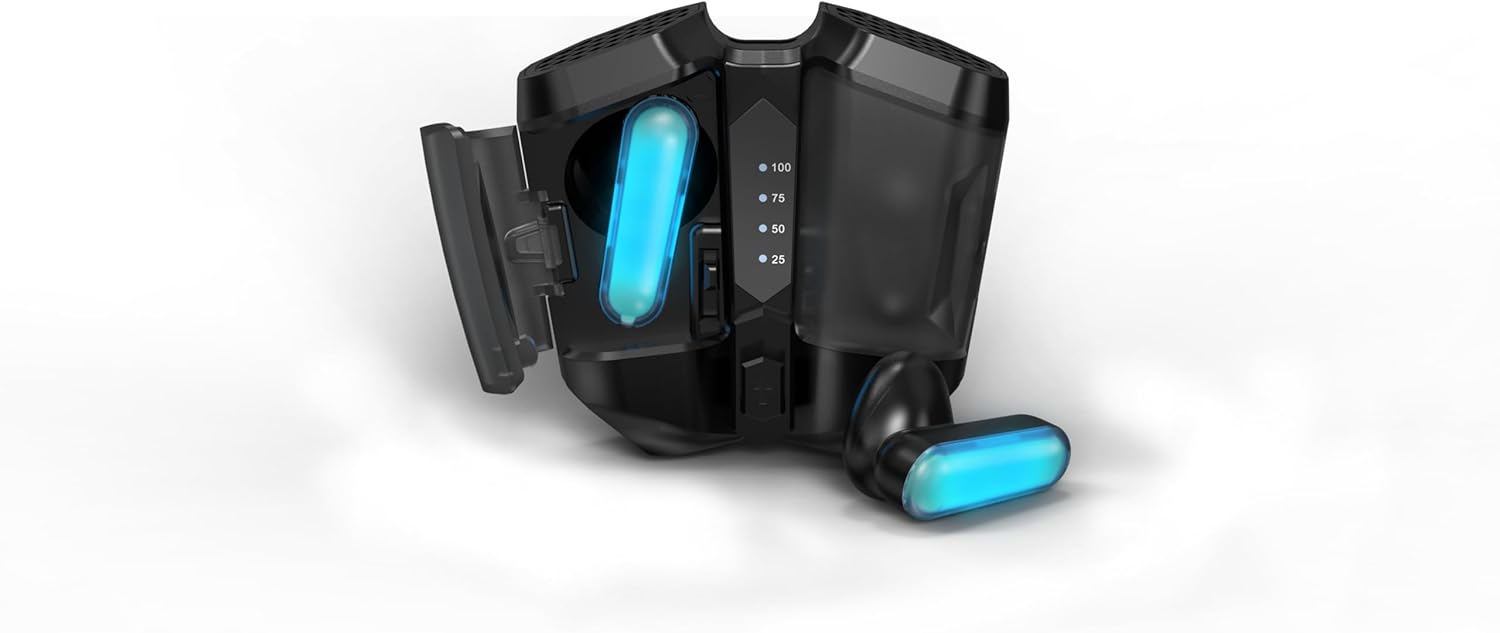
Image: The Infinix GTBuds 3 (XE30s) charging case is open, with both earbuds securely placed inside. Visible LED indicators on the case display the current battery charge level, ranging from 25% to 100%.
6. Maintenance
6.1 Cleaning
Regularly clean your earbuds and charging case to maintain optimal performance and hygiene.
- Use a soft, dry, lint-free cloth to wipe the earbuds and charging case.
- Do not use abrasive cleaners, solvents, or aerosol sprays.
- Gently remove any earwax or debris from the earbud mesh using a small, clean brush or cotton swab.
6.2 Water Resistance
The Infinix GTBuds 3 are IPX4 water resistant, meaning they are protected against splashing water from any direction. This makes them suitable for workouts and light rain. However, they are not designed for swimming or submersion in water. Do not expose them to high-pressure water or steam.
6.3 Storage
When not in use, store the earbuds in their charging case to protect them from dust, damage, and to keep them charged.
7. Troubleshooting
If you encounter any issues with your GTBuds 3, refer to the following common solutions:
- Earbuds not pairing: Ensure both earbuds are charged. Place them back in the case, close the lid, then open it again to re-enter pairing mode. Forget the device from your phone's Bluetooth settings and try pairing again.
- No sound from one earbud: Check if both earbuds are charged. Try placing them back in the case and taking them out again. Ensure they are properly connected to your device.
- Charging issues: Verify the Type-C cable is securely connected to both the case and the power source. Try a different charging cable or power adapter. Ensure the charging contacts on the earbuds and inside the case are clean.
- Low volume: Adjust the volume on your connected device. Ensure the earbuds are properly seated in your ears.
- Connection drops: Ensure your device is within the 10m/33ft Bluetooth range. Avoid obstacles between the earbuds and your device.
8. Specifications
| Feature | Detail |
|---|---|
| Model Name | GTBuds 3 (XE30s) |
| Bluetooth Version | V5.3 |
| Wireless Range | 10m / 33ft |
| Earbud Battery Capacity | 33 mAh (each) |
| Charging Case Battery Capacity | 300 mAh |
| Total Playtime | Up to 24 hours (with charging case) |
| Charging Port | Type-C |
| Microphones | 2 Mics (with AI ENC HD Voice) |
| Water Resistance | IPX4 |
| Control Method | Touch |
| Material | Plastic Or Silicone |
| Item Weight | 0.16 Kilograms |
9. Warranty and Support
9.1 Warranty Information
The Infinix GTBuds 3 (XE30s) come with a 12-month warranty from the date of purchase. This warranty covers manufacturing defects and workmanship under normal use. Please retain your proof of purchase for warranty claims.
The warranty does not cover damage caused by misuse, accidents, unauthorized modifications, or normal wear and tear.
9.2 Customer Support
For technical assistance, warranty claims, or any other inquiries, please contact Infinix customer support through their official website or the contact information provided with your product packaging.


