1. Important Safety Information
Please read all instructions carefully before using the MEGAWISE CL2020 Immersion Hand Blender. Retain this manual for future reference.
- Electrical Safety: Ensure the voltage indicated on the appliance corresponds to your local mains voltage before connecting. Do not immerse the motor unit in water or other liquids.
- Blade Safety: Blades are sharp. Handle with extreme care. Always disconnect the appliance from the power supply before assembling, disassembling, or cleaning.
- Children: This appliance is not intended for use by children. Keep the appliance and its cord out of reach of children.
- Continuous Operation: To prevent overheating, do not operate the motor unit continuously for more than 1 minute. Allow a short break between cycles.
- Damage: Do not use the appliance if the cord, plug, or any other part is damaged. Contact customer support for assistance.
2. Product Overview and Components
The MEGAWISE CL2020 is a versatile 3-in-1 immersion hand blender designed for various kitchen tasks. It includes a powerful motor unit and multiple attachments.

Image 2.1: The MEGAWISE CL2020 Immersion Hand Blender with its main components: motor unit, blending shaft, whisk attachment, and milk frother attachment.
Included Components:
- Motor Unit: The main body containing the 400W motor, speed control dial, Power button, and Turbo button.
- Blending Shaft: Stainless steel shaft with titanium-reinforced blades for blending.
- Whisk Attachment: For whipping cream, beating eggs, and mixing batters.
- Milk Frother Attachment: For frothing milk for coffee and other beverages.
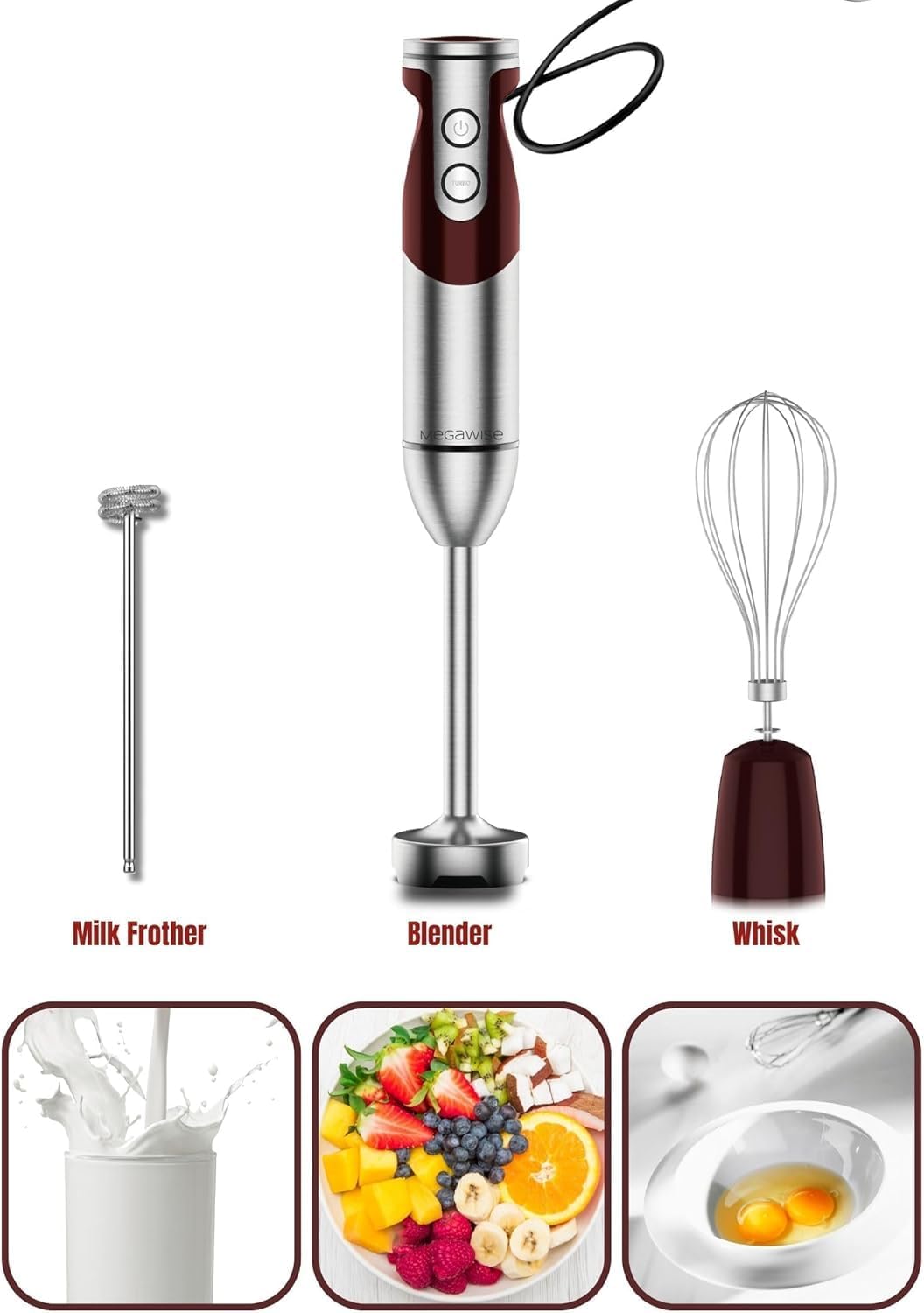
Image 2.2: Detailed view of the milk frother, blending shaft, and whisk attachments.
3. Setup and Assembly
Follow these steps to assemble your MEGAWISE Immersion Hand Blender:
- Attach Blending Shaft: Align the blending shaft with the motor unit and twist clockwise until it locks securely into place.
- Attach Whisk: Insert the whisk into its coupling gear, then align the coupling gear with the motor unit and twist clockwise until it locks.
- Attach Milk Frother: Insert the milk frother directly into the motor unit until it clicks into place.
- Power Connection: Plug the power cord into a suitable electrical outlet.
Note: Always ensure the appliance is unplugged before attaching or detaching any accessories.
4. Operating Instructions
The MEGAWISE CL2020 features 12-speed settings and a Turbo boost function for precise control.

Image 4.1: The motor unit displaying the Power button, Turbo button, and the 12-speed control dial.
General Operation:
- Power Button: Press and hold to activate the blender at the selected speed. Release to stop.
- Turbo Button: Press and hold for maximum power, regardless of the speed dial setting. Release to return to the selected speed or stop if the Power button is also released.
- Speed Control Dial: Rotate the dial on top of the motor unit to select one of 12 variable speeds. Adjust speed according to the ingredients and desired consistency.
Using the Immersion Blender Attachment:
Ideal for smoothies, soups, sauces, and baby food.
- Ensure the blending shaft is securely attached to the motor unit.
- Place the ingredients in a deep container.
- Immerse the blending shaft into the ingredients before pressing the Power button to prevent splashing.
- Press and hold the Power button, adjusting the speed as needed. For tough ingredients, use the Turbo button.
- Move the blender gently up and down and in circular motions to ensure even blending.
- Release the Power button to stop blending.

Image 4.2: The immersion blender attachment in use for preparing a smoothie.
Using the Whisk Attachment:
Perfect for whipping cream, beating eggs, and mixing light batters.
- Attach the whisk to the motor unit.
- Place ingredients in a bowl.
- Immerse the whisk into the ingredients.
- Press and hold the Power button, starting at a low speed and gradually increasing as desired.
- Move the whisk in a circular motion until the desired consistency is achieved.
- Release the Power button to stop.

Image 4.3: The whisk attachment being used to beat eggs.
Using the Milk Frother Attachment:
Create foamy milk for lattes, cappuccinos, and hot chocolates.
- Attach the milk frother to the motor unit.
- Pour cold or warm milk into a tall glass or mug.
- Immerse the frother head just below the surface of the milk.
- Press and hold the Power button. Move the frother slowly up and down to create foam.
- Continue until desired frothiness is achieved.
- Release the Power button to stop.

Image 4.4: The milk frother attachment in action, producing foam for a beverage.
5. Maintenance and Cleaning
Proper cleaning and maintenance will extend the life of your appliance.
- Always Unplug: Before cleaning, always unplug the motor unit from the power outlet.
- Motor Unit: Wipe the motor unit with a damp cloth. Do not immerse it in water or any other liquid.
- Attachments: The blending shaft, whisk, and milk frother attachments are detachable and dishwasher safe. For best results, rinse immediately after use.
- Stubborn Residue: For stubborn food residue on the blending shaft, fill a container with warm soapy water and briefly operate the blender in it. Then rinse under running water.
- Storage: Store the appliance and its attachments in a dry, safe place, out of reach of children.
6. Troubleshooting
If you encounter issues with your MEGAWISE CL2020, refer to the following table:
| Problem | Possible Cause | Solution |
|---|---|---|
| Appliance does not turn on. | Not plugged in; power outlet not working; motor unit not properly assembled. | Check power cord connection; test outlet with another appliance; ensure attachments are securely locked. |
| Poor blending performance. | Too much food; ingredients too large; incorrect speed setting. | Reduce quantity of ingredients; cut food into smaller pieces; increase speed or use Turbo mode. |
| Motor stops during operation. | Overheating due to prolonged use; motor overload. | Unplug and let cool for 10-15 minutes; reduce load and operate in shorter bursts (max 1 minute). |
| Attachments are difficult to remove. | Food residue buildup; improper twisting motion. | Clean thoroughly after each use; ensure you are twisting counter-clockwise to unlock. |
If the problem persists after trying these solutions, please contact MEGAWISE customer support.
7. Specifications
| Feature | Specification |
|---|---|
| Model Number | CL2020 |
| Brand | MEGAWISE |
| Motor Power | 400W (Pure Copper DC Motor) |
| Speed Settings | 12 Variable Speeds + Turbo Boost |
| Blade Material | Titanium Reinforced Stainless Steel |
| Product Dimensions | 5"D x 5"W x 10"H (approximate) |
| Item Weight | 2.07 pounds |
| Power Source | Corded Electric |
| Included Attachments | Blending Shaft, Whisk, Milk Frother |
8. Warranty and Support
MEGAWISE is committed to providing quality products and customer satisfaction. Your MEGAWISE CL2020 Immersion Hand Blender is covered by a standard manufacturer's warranty.
- For warranty claims, technical support, or any product-related inquiries, please refer to the contact information provided with your purchase or visit the official MEGAWISE website.
- Please have your model number (CL2020) and proof of purchase ready when contacting support.