1. Introduction
This manual provides essential information for the safe and efficient operation of your PGMTDEFXJO AC/DC 24V 360W Switching Power Supply, Model S-360-24. Please read these instructions thoroughly before installation and use to ensure proper functionality and to prevent damage or injury.
2. Safety Instructions
- Electrical Hazard: This device operates with high voltage. Installation and maintenance should only be performed by qualified personnel.
- Proper Grounding: Ensure the power supply is properly grounded to prevent electric shock.
- Ventilation: Do not block ventilation openings. Adequate airflow is crucial for heat dissipation.
- Environment: Install in a dry, well-ventilated area, away from flammable materials, moisture, and extreme temperatures.
- Voltage Selection: Verify the AC input voltage switch setting (110V/220V) matches your local power supply before connecting. Incorrect setting can cause damage.
- Output Overload: Do not exceed the rated output power (360W) or current (15A) to avoid damage to the power supply and connected devices.
3. Product Overview
The PGMTDEFXJO S-360-24 is a 24V DC, 15A, 360W switching power supply designed to convert AC input voltage to a stable DC output. It features an aluminum shell for durability and efficient heat dissipation, along with a built-in cooling fan.

Figure 3.1: Front, side, and bottom views of the PGMTDEFXJO S-360-24 Switching Power Supply. Note the AC voltage switch on the side, which must be set correctly before use.

Figure 3.2: Detailed view highlighting the built-in cooling fan, cooling hole design for heat dissipation, and the robust terminal block. The terminals are designed for resistance to aging, impact, and high temperatures, with a protective box cover to prevent accidental contact and enhance safety.
Key Features:
- Built-in Fan: Ensures efficient cooling and heat dissipation.
- Aluminum Case: Provides durability and aids in thermal management.
- Robust Terminals: Designed for high-temperature resistance and secure connections, protected by a cover.
- Selectable Input Voltage: Manual switch for 110V or 220V AC input.
4. Setup
4.1. AC Voltage Switch Adjustment
IMPORTANT: Before connecting the power supply to an AC source, ensure the voltage selector switch is set to match your local AC input voltage (110V or 220V). The switch is typically located on the side of the unit (refer to Figure 3.1). Incorrect setting can cause severe damage to the unit.
4.2. Wiring Instructions
Refer to the terminal block on the power supply for input and output connections. Ensure all connections are secure and correctly polarized.
- AC Input (L, N, #): Connect your AC power source to the 'L' (Live), 'N' (Neutral), and '#' (Ground) terminals. Use appropriate gauge wiring for the current rating.
- DC Output (+V, -V): Connect your DC load to the '+V' (Positive) and '-V' (Negative) terminals. Ensure correct polarity to prevent damage to your connected devices.
Always ensure the power supply is disconnected from the AC source during wiring to prevent electric shock.
5. Operating Instructions
After completing the setup and wiring, follow these steps to operate the power supply:
- Double-check all wiring connections for security and correct polarity.
- Confirm the AC voltage selector switch is set to the correct input voltage (110V or 220V).
- Connect the power supply to the AC mains. The unit should power on, and the built-in fan may start operating.
- Verify the output voltage using a multimeter if necessary, before connecting sensitive loads.
- Connect your DC load to the output terminals.
To turn off the power supply, disconnect it from the AC mains.
6. Maintenance
Regular maintenance helps ensure the longevity and reliable operation of your power supply.
- Cleaning: Periodically clean the exterior of the power supply and ensure ventilation openings are free from dust and debris. Use a soft, dry cloth. Do not use liquid cleaners.
- Fan Inspection: Check the cooling fan periodically for proper operation and ensure it is not obstructed. A malfunctioning fan can lead to overheating.
- Connection Checks: Occasionally inspect all wiring connections for tightness and signs of wear or corrosion.
Always disconnect the power supply from the AC mains before performing any maintenance.
7. Troubleshooting
If you encounter issues with your power supply, refer to the following common troubleshooting steps:
- No Output Power:
- Check if the AC input cable is securely connected and the AC source is active.
- Verify the AC voltage selector switch is set correctly (110V/220V).
- Inspect for any blown fuses (if accessible and user-replaceable, consult a professional).
- Incorrect Output Voltage:
- Ensure the load is not exceeding the rated output power or current.
- Check for loose or incorrect wiring connections.
- Overheating:
- Ensure adequate ventilation around the unit and that the fan is operating.
- Reduce the load if it is consistently operating near its maximum capacity.
If problems persist after performing these checks, discontinue use and contact a qualified technician or the manufacturer for assistance.
8. Specifications
The following table details the technical specifications for the PGMTDEFXJO AC/DC 24V 360W Switching Power Supply, Model S-360-24.
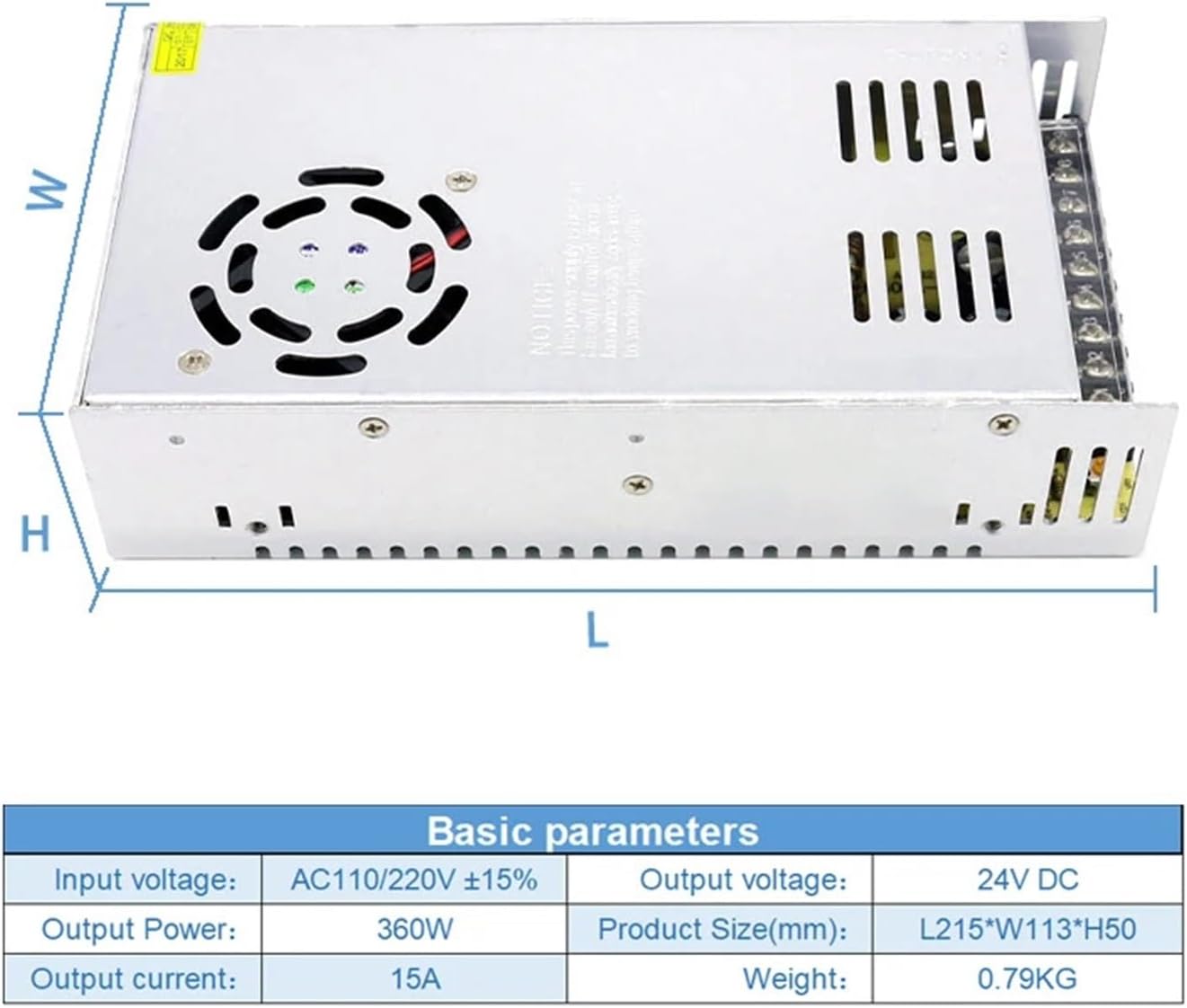
Figure 8.1: Basic parameters and dimensions of the power supply.
| Parameter | Value |
|---|---|
| Input Voltage | AC110/220V ±15% (Switchable) |
| Output Voltage | 24V DC |
| Output Power | 360W |
| Output Current | 15A |
| Output Frequency | 50/60HZ |
| Dimensions (L*W*H) | 215mm * 113mm * 50mm |
| Weight | 0.79 KG |
| Model Number | S-360-24 |
9. Warranty and Support
Specific warranty information for this product is not provided in the available documentation. For details regarding warranty coverage, technical support, or service, please contact the manufacturer, PGMTDEFXJO, or your point of purchase directly.


