1. Introduction
Welcome to the Basike BA-FON240 Bluetooth Sport Earbuds user manual. This guide provides essential information for setting up, operating, and maintaining your new earbuds. The BA-FON240 earbuds feature Bluetooth 6.0 connectivity, Hi-Fi stereo sound, IPX5 water resistance, and an ergonomic design for comfortable wear during various activities.
2. Package Contents
Please check the package for the following items:
- 1x Basike BA-FON240 Bluetooth Sport Earbuds (OWS type)
- 1x Charging Case with LED Display
- 1x USB-C Charging Cable
- 1x User Manual
- 1x Packaging Box
- Multiple sizes of ear tips (Small, Medium, Large)

Image: Illustration of the Basike BA-FON240 earbuds, charging case, USB-C cable, and various ear tip sizes, along with product dimensions.
3. Product Overview
The Basike BA-FON240 earbuds are designed for active lifestyles, offering a secure fit and high-quality audio.
Components:
- Earbuds: Each earbud features an ergonomic design with an ear hook for a secure fit. They include integrated touch controls and a microphone for calls.
- Charging Case: The compact charging case protects the earbuds and recharges them. It features a digital LED display to show the battery level of the case and individual earbuds.
- Charging Port: A USB Type-C port is located on the charging case for power input.

Image: A top-down view of the Basike BA-FON240 earbuds and their charging case, showcasing the beige color and LED display on the case.
4. Setup
4.1 Charging the Earbuds and Case
Before initial use, fully charge both the earbuds and the charging case to ensure optimal performance.
- Connect the provided USB-C charging cable to the charging port on the case and to a compatible power source (e.g., USB wall adapter, computer USB port).
- The LED display on the charging case will indicate the current battery level during charging.
- Once fully charged, disconnect the charging cable.
Charging Times:
- Earbud Recharge Time: Approximately 1.5 hours
- Case Recharge Time: Approximately 2 hours
- The fully charged case can provide up to 5 full recharges for the earbuds.

Image: Visual representation of the Basike BA-FON240 charging case with LED display, highlighting 500mAh case capacity, 8 hours of earbud use, and up to 48 hours total use with the case.
4.2 Pairing with a Device
The earbuds utilize Bluetooth 6.0 for a stable and efficient connection.
- Open the charging case. The earbuds will automatically power on and enter pairing mode.
- On your smartphone, tablet, or other Bluetooth-enabled device, navigate to the Bluetooth settings.
- Enable Bluetooth and search for available devices.
- Select "BA-FON240" from the list to connect.
- Once successfully paired, the earbuds will automatically connect to your device when removed from the case in the future.

Image: A close-up diagram showing the internal components of a Basike BA-FON240 earbud, highlighting the Bluetooth 6.0 chip for stable and low-latency connection.
5. Operating Instructions
5.1 Wearing the Earbuds
For optimal sound quality and comfort, ensure the earbuds are worn correctly.
- Select the ear tips (Small, Medium, Large) that provide the most comfortable and secure fit for your ears.
- Place the earbuds in your ears, adjusting the ear hooks over your ears until they feel stable and comfortable. The ergonomic design ensures stability during physical activity.

Image: A woman wearing the Basike BA-FON240 earbuds during exercise, demonstrating the ergonomic design with flexible ear hooks and different ear tip sizes (Small, Medium, Large).
5.2 Touch Controls
The earbuds feature sensitive touch controls for easy management of audio playback and calls.
- Play/Pause: Single tap on either earbud.
- Next Track: Double tap on the right earbud.
- Previous Track: Double tap on the left earbud.
- Volume Up: Triple tap on the right earbud.
- Volume Down: Triple tap on the left earbud.
- Answer/End Call: Single tap on either earbud during an incoming call.
- Reject Call: Press and hold either earbud for 2 seconds during an incoming call.
- Activate Voice Assistant: Press and hold either earbud for 3 seconds.
5.3 Sound Quality
The Basike BA-FON240 earbuds are engineered to deliver a high-fidelity audio experience.
- Equipped with 10mm drivers and a dual diaphragm design, they produce deep bass, clear mids, and crisp highs.
- The stereo sound profile provides an immersive listening experience for music and other audio content.
- Integrated microphones with ENC (Environmental Noise Cancellation) technology ensure clear call quality, even in noisy environments.
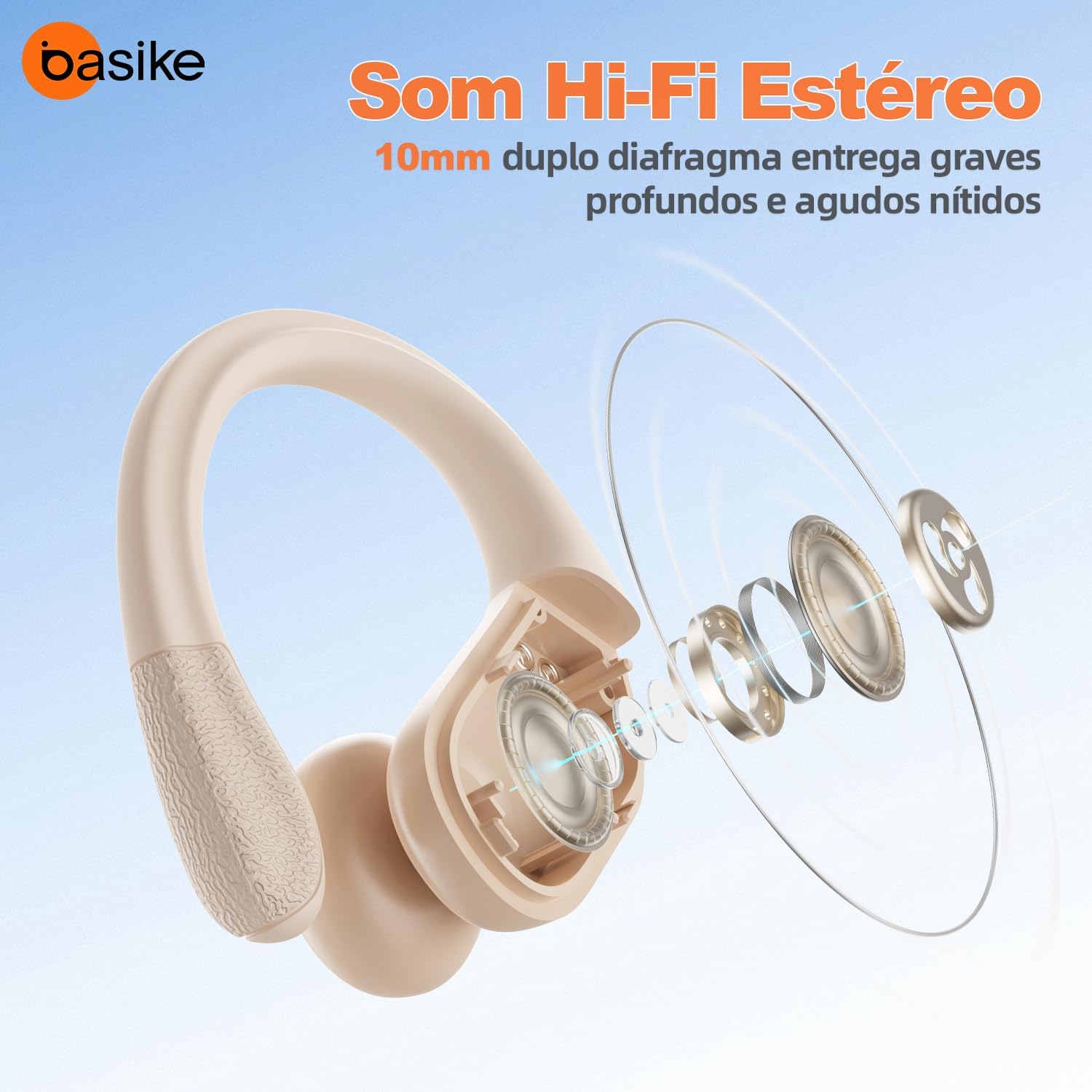
Image: A cutaway diagram of a Basike BA-FON240 earbud, illustrating the 10mm dual diaphragm driver responsible for Hi-Fi stereo sound with deep bass and clear treble.
5.4 Water Resistance (IPX5)
The earbuds are designed to withstand exposure to moisture.
- The BA-FON240 earbuds have an IPX5 rating, indicating resistance to sweat, splashes, and light rain.
- This makes them suitable for workouts, outdoor activities, and use in light precipitation.
- Note: The earbuds are not designed for submersion in water or exposure to heavy rain.

Image: The Basike BA-FON240 earbuds shown with water droplets, illustrating their IPX5 water resistance against sweat and light rain.
6. Maintenance
Proper maintenance helps extend the lifespan and performance of your earbuds.
- Cleaning: Regularly clean the earbuds and charging case with a soft, dry, lint-free cloth. Avoid using abrasive cleaners, solvents, or harsh chemicals.
- Charging Contacts: Ensure the charging contacts on both the earbuds and inside the case are clean and dry to prevent charging issues.
- Storage: When not in use, store the earbuds in their charging case to protect them from dust, damage, and to maintain battery charge.
- Temperature: Avoid exposing the earbuds to extreme temperatures (hot or cold) or high humidity, as this can affect battery life and internal components.
7. Troubleshooting
If you encounter any issues with your Basike BA-FON240 earbuds, please refer to the following common solutions:
- Earbuds not pairing:
- Ensure both earbuds are sufficiently charged.
- Place the earbuds back into the charging case, close the lid, then reopen it to re-initiate pairing mode.
- Disable and re-enable Bluetooth on your device.
- On your device, "forget" or "unpair" the "BA-FON240" from your Bluetooth device list, then attempt to pair again.
- Only one earbud working:
- Ensure both earbuds are charged.
- Try placing both earbuds back in the case, closing it for a few seconds, and then taking them out again. This can sometimes re-sync them.
- If the issue persists, try resetting the earbuds by unpairing them from your device and then pairing them again.
- No sound:
- Check the volume level on both your connected device and the earbuds.
- Ensure the earbuds are properly connected to your device via Bluetooth.
- Charging issues:
- Verify that the USB-C charging cable and power adapter are functioning correctly.
- Ensure the charging contacts on the earbuds and inside the case are clean and free of debris.
If these steps do not resolve the issue, please contact customer support for further assistance.
8. Specifications
| Feature | Specification |
|---|---|
| Model | BA-FON240 |
| Connectivity | Bluetooth 6.0 |
| Compatibility | Android, iOS, Windows, and other Bluetooth-enabled devices |
| Connection Range | Up to 20 meters (65 feet) |
| Control Type | Integrated sensitive touch operation |
| Audio Codecs | AAC, SBC |
| Speaker Driver | 10 mm |
| Frequency Response | 20Hz – 20kHz |
| Impedance | 32 ohms |
| Playback Duration (per charge) | Up to 8 hours |
| Call Duration (per charge) | Up to 7 hours |
| Standby Mode | Up to 80 hours |
| Earbud Recharge Time | Approx. 1.5 hours |
| Case Recharge Time | Approx. 2 hours |
| Case Recharge Cycles (for earbuds) | Up to 5 times |
| Earbud Battery Capacity | 2 x 55mAh |
| Charging Case Battery Capacity | 500mAh |
| Battery Lifespan | Over 300 charge cycles |
| Charging Port | USB Type-C |
| Water Resistance Rating | IPX5 (sweat and splash resistant) |
| Weight per Earbud | 7g (0.25 oz) |
| Case Weight | 50g (1.76 oz) |
| Case Dimensions | 95 × 27.5 × 56 mm |
| Material | Acrylonitrile Butadiene Styrene (ABS) |
| Noise Control | Sound Isolation |
9. Warranty and Support
Warranty: The Basike BA-FON240 Bluetooth Sport Earbuds come with a 1-year warranty against manufacturing defects. Please retain your proof of purchase for warranty claims.
Customer Support: 24/7 customer support is available for any questions or issues you may have. For assistance, please refer to the contact information provided with your purchase or visit the official Basike website.