
1. Introduction
Thank you for purchasing the AIRMSEN TDQR09A-JP Countertop Dishwasher. This manual provides essential information for the safe and efficient operation of your new appliance. Please read it thoroughly before use and retain it for future reference.
2. Safety Information
To reduce the risk of fire, electric shock, or injury, always follow basic safety precautions when using this appliance.
- Ensure the power supply voltage matches the rating label on the dishwasher.
- Do not immerse the appliance, power cord, or plug in water or other liquids.
- Keep children away from the dishwasher during operation and when the door is open.
- Use only detergents specifically designed for automatic dishwashers.
- Do not open the door during a wash cycle, as hot water may spray out.
- Always unplug the dishwasher before cleaning or performing maintenance.
- Sharp items should be loaded with handles up to prevent injury.
3. Product Overview
The AIRMSEN TDQR09A-JP is a compact countertop dishwasher designed for convenience and efficiency. It features a 360° upper and lower double nozzle spray system for thorough cleaning.
3.1 Components
- Dishwasher Unit
- Inlet Hose
- Drain Hose
- Cutlery Basket
- Power Cord
- User Manual (this document)
3.2 Key Features
- Installation Type: Countertop design, offering flexibility for placement.
- Capacity: 5 L water capacity, suitable for 3-4 person dish loads.
- Washing System: 360° upper and lower double nozzle spray for comprehensive cleaning.
- Control: Intuitive touch panel for easy program selection.
- Visibility: LED interior lighting for clear viewing of the wash process.
- Maintenance: Self-cleaning filter system.
- Safety: Child-proof lock function.
- Efficiency: Time-saving function for quicker cycles.
3.3 Product Diagram
Below is a general diagram of the dishwasher and its main parts. Refer to this for component identification.
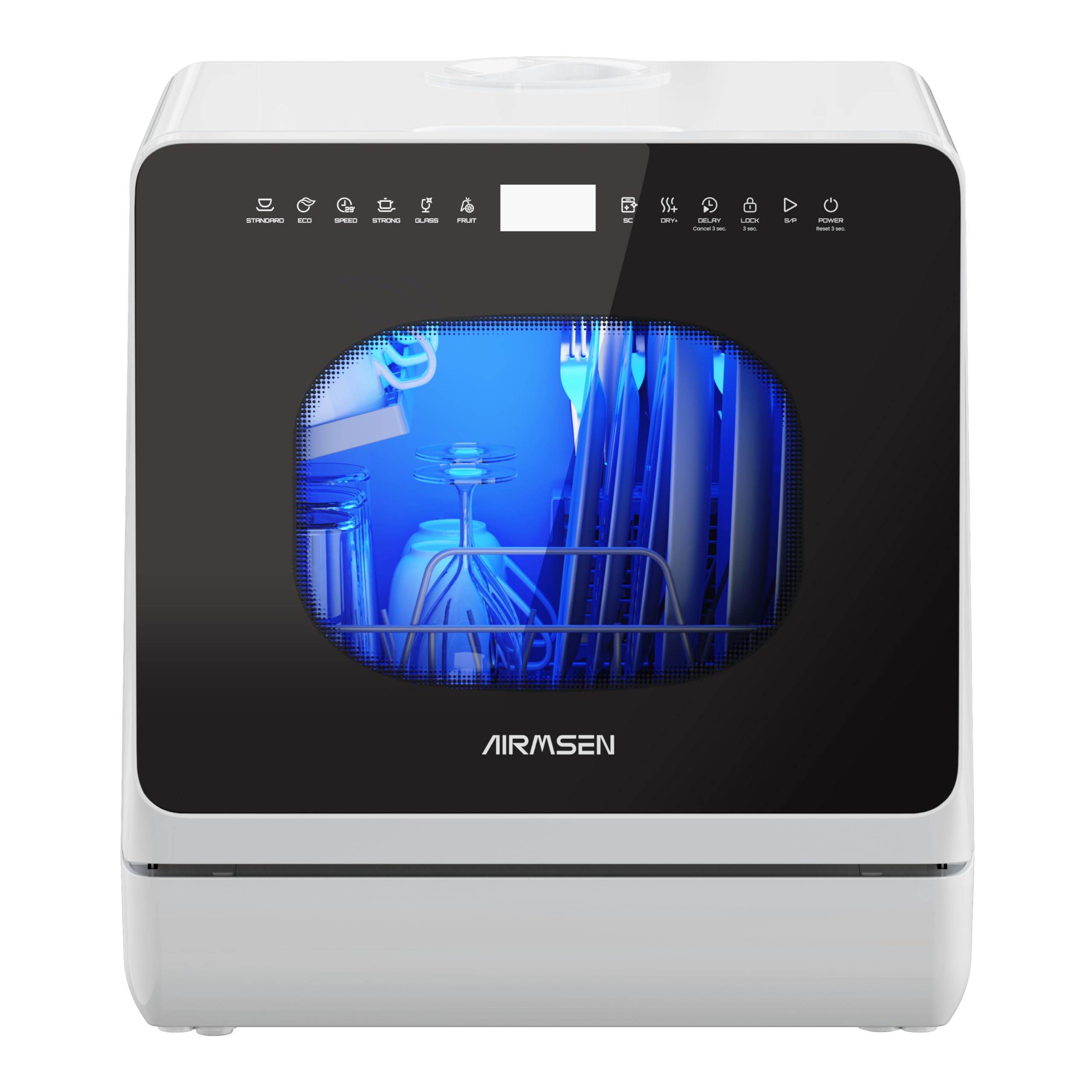
Image 1: Front view of the AIRMSEN TDQR09A-JP Countertop Dishwasher. This image shows the compact design, the touch control panel, and the overall aesthetic of the appliance in a white and black finish.
4. Setup
Proper setup ensures optimal performance and safety of your dishwasher.
4.1 Placement
- Place the dishwasher on a stable, level countertop near a water source and drain.
- Ensure there is adequate space around the unit for ventilation and door opening.
- Avoid placing the unit near heat sources or in direct sunlight.
4.2 Water Connection
The TDQR09A-JP offers two water supply options:
- Manual Fill (No Installation Required):
- Open the water inlet cap on the top of the unit.
- Carefully pour water into the inlet using a jug until the water level indicator signals full, or the unit beeps. The capacity is approximately 5 liters.
- Ensure the drain hose is properly positioned in a sink or drain.
- Direct Water Supply (Plumbed-in):
- Connect the provided inlet hose to a cold water tap.
- Connect the other end of the inlet hose to the dishwasher's water inlet port.
- Connect the drain hose to the dishwasher's drain outlet and secure the other end in a sink or a dedicated drain connection.
- Ensure all connections are tight to prevent leaks.
4.3 Power Connection
- Plug the power cord into a grounded electrical outlet.
- Do not use extension cords or adapters.
5. Operating Instructions
Follow these steps for effective dishwashing.
5.1 Loading Dishes
- Scrape off large food particles from dishes before loading.
- Place dishes securely in the racks, ensuring they do not block the spray arms.
- Load cutlery into the cutlery basket with handles facing down for most items, but sharp knives and forks should be placed handles up for safety.
- Avoid overcrowding to allow water to reach all surfaces.
5.2 Adding Detergent
- Open the detergent dispenser.
- Add the recommended amount of dishwasher detergent. Refer to the detergent manufacturer's instructions.
- Close the dispenser lid securely.
5.3 Selecting a Wash Cycle
The dishwasher offers various wash cycles. Use the touch panel to select the desired program:
- Standard: For daily loads with normal soil.
- Eco: Energy-saving cycle for lightly soiled dishes.
- Intensive: For heavily soiled pots and pans.
- Rapid: A quick wash for lightly soiled items that do not require drying.
- Fruit Wash: A dedicated cycle for washing fruits and vegetables.
5.4 Starting the Cycle
- Close the dishwasher door firmly.
- Press the 'Power' button to turn on the unit.
- Select your desired wash cycle using the 'Program' button.
- Press the 'Start/Pause' button to begin the cycle.
- To activate the child-proof lock, press and hold the designated button (refer to the control panel diagram on the unit) for a few seconds until the lock indicator appears.
6. Maintenance
Regular maintenance ensures the longevity and efficiency of your dishwasher.
6.1 Cleaning the Filter System
The dishwasher is equipped with a self-cleaning filter. However, periodic manual inspection and cleaning are recommended.
- Turn off and unplug the dishwasher.
- Remove the filter assembly located at the bottom of the wash tub.
- Rinse the filter under running water to remove any trapped food particles. Use a soft brush if necessary.
- Reinstall the filter assembly, ensuring it is securely locked in place.
6.2 Cleaning the Spray Arms
- Periodically check the spray arm nozzles for blockages.
- If blocked, remove the spray arms and clear the nozzles with a thin wire or toothpick.
6.3 Cleaning the Interior and Exterior
- Wipe the exterior with a soft, damp cloth. Do not use abrasive cleaners.
- Clean the interior with a damp cloth and a mild detergent.
- To prevent odors, leave the door slightly ajar after a cycle to allow air circulation.
7. Troubleshooting
Before contacting customer service, refer to the following table for common issues and solutions.
| Problem | Possible Cause | Solution |
|---|---|---|
| Dishwasher does not start | Power cord not plugged in; Door not closed properly; Fuse blown or circuit breaker tripped. | Ensure power cord is securely plugged in; Close door firmly; Check household fuse/circuit breaker. |
| Dishes not clean | Improper loading; Insufficient detergent; Blocked spray arms; Clogged filter. | Reload dishes correctly; Add appropriate amount of detergent; Clean spray arm nozzles; Clean filter. |
| Water not draining | Drain hose kinked or blocked; Clogged filter. | Check and clear drain hose; Clean filter. |
| Leakage from unit | Improper hose connection; Door seal damaged; Overfilling (manual fill). | Check all hose connections for tightness; Inspect door seal for damage; Ensure not to overfill when using manual water input. |
| "Needs Water" indicator remains on (manual fill) | Insufficient water added; Sensor issue. | Add more water until the indicator turns off; If issue persists after adding sufficient water, contact support. |
8. Specifications
Technical specifications for the AIRMSEN TDQR09A-JP Countertop Dishwasher.
| Specification | Detail |
|---|---|
| Brand | AIRMSEN |
| Model Number | TDQR09A-JP |
| Installation Type | Countertop |
| Product Dimensions (D x W x H) | 42.8 cm x 42.5 cm x 45.8 cm |
| Capacity | 5 Liters |
| Color | White and Black |
| Operation Type | Touch Panel |
| Noise Level | 50 Decibels |
| Voltage | 100 Volts (AC) |
| Power Consumption | 950 Watts |
| Standard Water Consumption | Approximately 1.13 Gallons per cycle |
| Product Weight | 14.48 kg |
9. Warranty and Support
9.1 Warranty Information
This AIRMSEN TDQR09A-JP dishwasher comes with a 2-year manufacturer's warranty from the date of purchase. This warranty covers defects in materials and workmanship under normal use. It does not cover damage caused by misuse, accident, unauthorized modification, or failure to follow the instructions in this manual.
9.2 Customer Support
If you encounter any issues not covered in the troubleshooting section or require further assistance, please contact AIRMSEN customer support. Have your model number (TDQR09A-JP) and proof of purchase ready when contacting support.
For the most up-to-date contact information, please visit the official AIRMSEN website or refer to your purchase documentation.


