
WYBOT OS7010C
WYBOT C1 Robotic Pool Vacuum User Manual
Model: OS7010C
1. Introduction
Thank you for choosing the WYBOT C1 Robotic Pool Vacuum. This advanced cordless pool cleaner is designed to provide efficient and thorough cleaning for both inground and above-ground pools, covering up to 1,614 sq. ft. With smart navigation, powerful suction, and app support, the WYBOT C1 simplifies pool maintenance, allowing you to enjoy a consistently clean pool with minimal effort. This manual provides essential information for the safe and effective operation, maintenance, and troubleshooting of your device.

Figure 1.1: WYBOT C1 Robotic Pool Vacuum and App Interface
The WYBOT C1 Robotic Pool Vacuum is shown alongside a smartphone displaying its intuitive app interface, highlighting its smart control capabilities.
2. Safety Information
Please read all safety instructions carefully before operating the WYBOT C1. Failure to follow these instructions may result in electric shock, fire, or serious injury.
- Always ensure the power adapter is disconnected from the power outlet before performing any maintenance or cleaning on the unit.
- Do not operate the cleaner if the power cable or plug is damaged.
- Do not allow children to play with or operate the cleaner. Adult supervision is required.
- Only use the original power adapter provided with the cleaner.
- Do not use the cleaner if the pool water temperature is outside the recommended range (typically 50°F - 95°F / 10°C - 35°C).
- Ensure the pool pump is running during operation to facilitate proper water circulation and cleaning.
- Keep the cleaner away from heat sources and direct sunlight when not in use.
3. Package Contents
Verify that all items are present in the package:
- WYBOT C1 Robotic Pool Vacuum (Device) x1
- Quick Start Guide x1
- User Manual x1
- Floating Parts x1 (for buoyancy adjustment)
- Charger x1
- Retrieval Hook x1

Figure 3.1: WYBOT C1 Package Contents
This image displays all components included in the WYBOT C1 Robotic Pool Vacuum package, such as the cleaner unit, charger, retrieval hook, and documentation.
4. Setup
Follow these steps for initial setup of your WYBOT C1:
- Unpack the Pool Vacuum: Carefully remove all components from the packaging.
- Charge the Battery: Connect the charger to the robotic cleaner and plug it into a power outlet. The battery takes approximately 4 hours to fully charge. The LED indicator on the cleaner will show charging status (Flashing Green for 81-99%, Solid Green for 100%).
- Download the App: Download the WYBOT mobile app from your device's app store.
- Connect to App: Before placing the cleaner in water, open the WYBOT app and connect to the device via Bluetooth. This allows you to set cleaning modes and schedules.
- Prepare the Pool: Ensure the pool pump is running to facilitate proper water circulation. Remove any large debris manually if necessary.
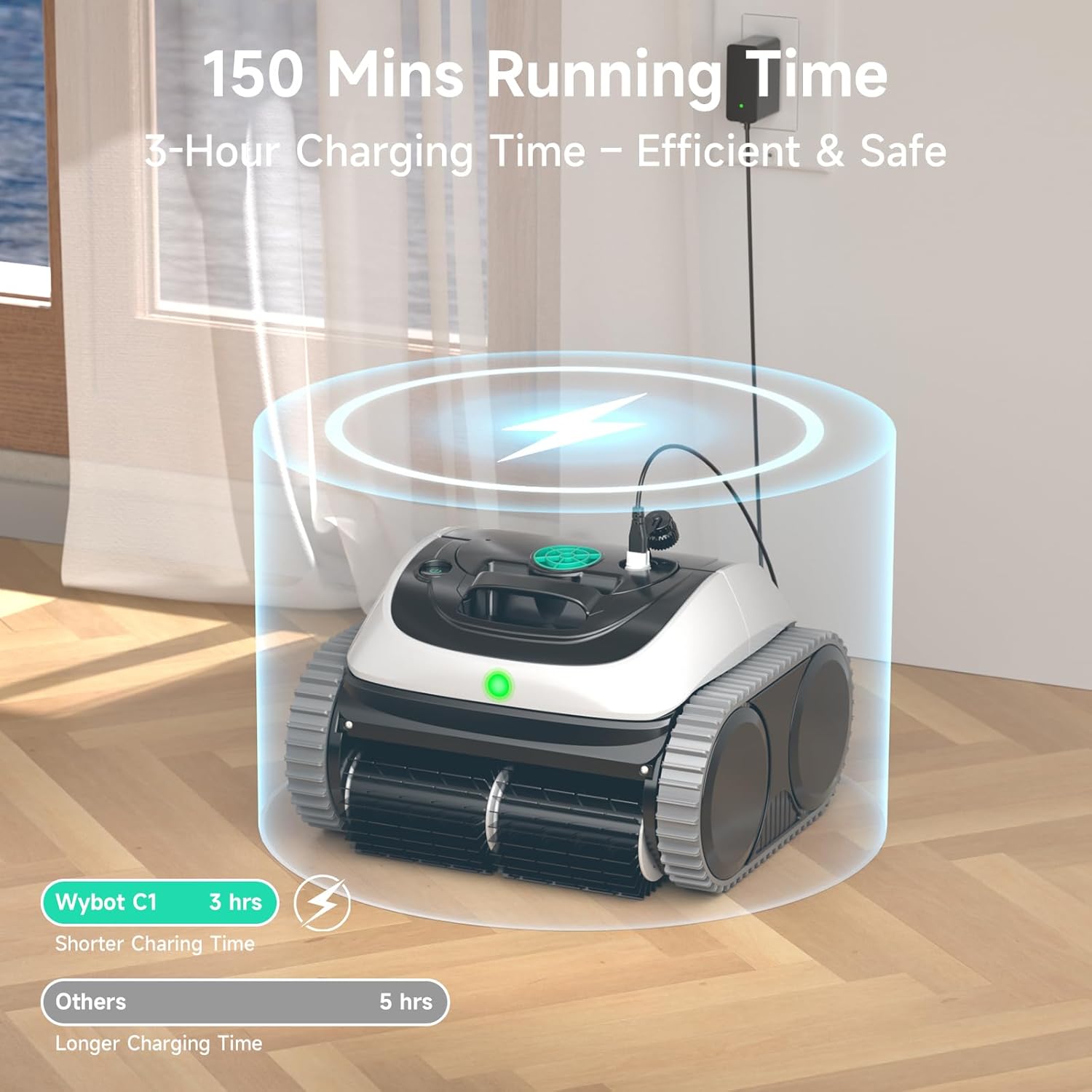
Figure 4.1: Charging the WYBOT C1
The image shows the WYBOT C1 Robotic Pool Vacuum connected to its charger, illustrating the charging process and indicating the typical 3-hour charging time.

Figure 4.2: Four-Color Battery Indicator
This diagram explains the different LED light colors on the WYBOT C1, indicating its charging status and normal operation.
5. Operating Instructions
The WYBOT C1 offers versatile cleaning modes and smart navigation for optimal performance.
5.1 Placing the Cleaner in the Pool
Gently lower the cleaner into the pool. It will sink to the bottom. Ensure there are no air bubbles trapped inside the unit.
5.2 Cleaning Modes and Smart Navigation
The WYBOT C1 features multiple cleaning modes and smart navigation paths:
- Full Coverage: Cleans the pool floor, walls, and waterline.
- Floor Only: Focuses solely on the pool floor.
- Wall Only: Cleans only the pool walls.
- Wall then Floor: Starts with wall cleaning and then transitions to the floor.
The smart gyroscope-based navigation system uses an N-path along walls and an S-path on the pool floor for optimized route planning.

Figure 5.1: Smart Navigation Mapping
This image illustrates the WYBOT C1's intelligent navigation, showing both 'N' path cleaning for walls and 'Cross' path cleaning for the pool floor to ensure complete coverage.

Figure 5.2: Versatile Cleaning Modes
The image displays the WYBOT C1 in a pool setting, highlighting the four available cleaning modes: Floor only, Wall only, Wall then floor, and Full pool cleaning.
5.3 App Control and Customization
The WYBOT mobile app provides comprehensive control and customization options:
- Schedule Cleaning: Set periodic cleaning cycles (e.g., every 2, 3, or 7 days).
- Monitor Status: Check battery level and cleaning progress.
- Customize Sessions: Select specific cleaning modes and paths.
- OTA Updates: Receive over-the-air software updates for continuous feature enhancements.

Figure 5.3: Convenient WYBOT App
This image shows a smartphone screen with the WYBOT app, demonstrating how users can set appropriate cleaning routes and choose cleaning modes before the cleaner enters the water.

Figure 5.4: Cleaning Cycle Via WYBOT App
The WYBOT app interface is displayed, illustrating the four different cleaning cycle options and how runtime is distributed wisely for optimal cleaning efficiency.
5.4 Retrieving the Cleaner
Once the cleaning cycle is complete or the battery is low, the cleaner will typically park itself near a wall. Use the provided retrieval hook attached to a standard pool pole to lift the cleaner out of the water.
6. Maintenance
Regular maintenance ensures the longevity and optimal performance of your WYBOT C1.
6.1 Cleaning the Filter Basket
After each use, the filter basket should be cleaned:
- Remove the cleaner from the pool.
- Open the filter compartment.
- Remove the filter basket.
- Rinse the filter basket thoroughly with a garden hose to remove all debris.
- Reinsert the clean filter basket into the cleaner and close the compartment securely.

Figure 6.1: Upgrade Your Clean - Filter Basket
This image highlights the large top-load filter basket and 180µm filtration system of the WYBOT C1, designed for exceptional dirt capture.
6.2 Cleaning the Brushes and Wheels
Inspect the dual PVC brushes and 4WD traction wheels for any tangled debris (hair, leaves, etc.) and remove them. Ensure the brushes can rotate freely.
6.3 Storage
When not in use, store the cleaner in a cool, dry place, away from direct sunlight and extreme temperatures. Ensure the battery is fully charged before long-term storage.
7. Troubleshooting
Refer to this section for common issues and their solutions.
| Problem | Possible Cause | Solution |
|---|---|---|
| Cleaner not moving or operating. | Low battery; Power button not pressed; Obstruction in brushes/wheels. | Charge the battery; Press the power button; Check and clear any obstructions. |
| Poor cleaning performance. | Clogged filter basket; Worn brushes; Incorrect cleaning mode selected. | Clean the filter basket; Inspect and replace brushes if worn; Select appropriate cleaning mode via app. |
| Cleaner not climbing walls. | Low battery; Air trapped inside; Water chemistry imbalance (algae); Worn brushes. | Ensure full charge; Tilt cleaner to release air; Balance pool chemistry; Check brushes. |
| App connection issues. | Bluetooth/Wi-Fi off; Cleaner out of range; App needs update. | Ensure Bluetooth/Wi-Fi is on; Bring device closer; Update app to latest version. |
If the problem persists after attempting these solutions, please contact WYBOT customer support.
8. Specifications
Key technical specifications for the WYBOT C1 Robotic Pool Vacuum:
- Model Name: OS7010C-C1-060
- Power Source: Battery Powered (Lithium-Ion)
- Battery Voltage: 25.2 Volts (DC)
- Battery Energy Content: 99.36 Watt Hours
- Charging Time: Approximately 4 Hours
- Running Time: Up to 150 minutes
- Max Pool Area: Up to 1,614 sq. ft.
- Max Water Depth: Up to 9.8 ft.
- Suction Power: Up to 3,038 GPH (Gallons Per Hour)
- Filtration: 180µm Ultra Fine Filter
- Control Method: App, Push Button
- Navigation: Smart Gyroscope-based (N-path, S-path)
- Dimensions: 17"L x 13"W x 18"H
- Item Weight: 22.9 pounds
- Material: Plastic

Figure 8.1: Coverage and Runtime
This image visually represents the WYBOT C1's impressive runtime of up to 150 minutes and its ability to clean pools up to 1,614 square feet.

Figure 8.2: Ideal for All Pool Surfaces
A collage of different pool surfaces (tile, concrete, fiberglass, mosaic, vinyl) demonstrates the WYBOT C1's adaptability and effectiveness across various materials.
9. Warranty and Support
9.1 Warranty Information
The WYBOT C1 Robotic Pool Vacuum comes with a 2-year limited warranty. This warranty covers defects in materials and workmanship under normal use. Please retain your proof of purchase for warranty claims.
9.2 Customer Support
For technical assistance, troubleshooting, or warranty inquiries, please contact WYBOT customer support through the official website or the contact information provided in your Quick Start Guide.
You can also visit the official WYBOT store on Amazon for more information and product updates: WYBOT Store
Related Documents - OS7010C
 |
WYBOT C1 Robotic Pool Cleaner User Manual - Efficient Pool Cleaning Guide Comprehensive user manual for the WYBOT C1 Robotic Pool Cleaner. Learn about setup, operation, maintenance, troubleshooting, and specifications for efficient and automatic pool cleaning. |
 |
WYBOT C1 Robotic Pool Cleaner User Manual User manual for the WYBOT C1 Robotic Pool Cleaner (OS7010C), providing setup, operation, maintenance, and troubleshooting instructions. |
 |
Uživatelský manuál k robotickému bazénovému vysavači WYBOT C1 Kompletní uživatelský manuál pro robotický bazénový vysavač WYBOT C1, pokrývající nastavení, provoz, údržbu a řešení problémů. |
 |
WYBOT SC1 Robotic Pool Cleaner User Manual Comprehensive user manual for the WYBOT SC1 Robotic Pool Cleaner, detailing setup, operation, maintenance, troubleshooting, and specifications. Learn how to effectively clean your pool with this advanced robotic cleaner. |
 |
WYBOT C1 Pro/Max Robotic Pool Cleaner User Manual User manual for the WYBOT C1 Pro/Max Robotic Pool Cleaner, covering setup, operation, maintenance, troubleshooting, and specifications. |
 |
WYBOT C1 Pro/Max Robotic Pool Cleaner User Manual User manual for the WYBOT C1 Pro/Max Robotic Pool Cleaner, covering setup, operation, maintenance, troubleshooting, and specifications. |
Ask a question about this manual
Ask about setup, troubleshooting, compatibility, parts, safety, or missing instructions. Manuals+ will review the question and use this page’s manual context to help answer it.