
Product Overview
This manual provides detailed instructions for the VASTEND VS-7CC Solar Backup Camera. This camera is designed as an accessory and must be used in conjunction with a compatible VASTEND VS-7C monitor system. It cannot function as a standalone device.
The VS-7CC camera features a 150° wide-angle view, IP69 waterproof rating, and is equipped with infrared light and a photoelectric sensor for enhanced visibility in various conditions.
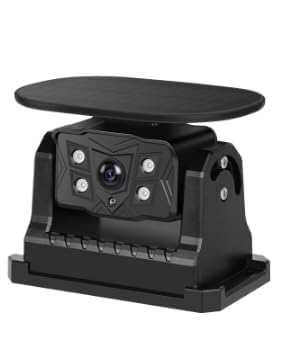
Image: The VASTEND VS-7CC Solar Backup Camera, a compact unit with an integrated solar panel on top and a camera lens on the front, designed for vehicle rear-view assistance.
Setup Instructions
1. Compatibility Check
Ensure you have a VASTEND VS-7C monitor system. The VS-7CC camera is exclusively compatible with this monitor model.
2. Initial Charging (Optional but Recommended)
While the camera features a solar panel for continuous charging, it is recommended to fully charge the internal battery via a USB cable before first use, especially if the camera has been stored for an extended period or if solar exposure is limited.
3. Mounting the Camera
The VS-7CC camera is equipped with a strong magnetic base for easy and secure attachment. Choose a flat, metallic surface on the rear of your vehicle that provides an unobstructed view. Ensure the solar panel faces upwards to receive maximum sunlight.
- Placement: Position the camera centrally for the best rear view.
- Security: Press firmly to ensure the magnetic base is fully engaged with the vehicle surface.
- Solar Exposure: Verify the solar panel is not obstructed by vehicle components or dirt.

Image: A close-up view of the VASTEND VS-7CC camera, highlighting its solar panel on top and the robust casing, indicating its design for outdoor vehicle use.
4. Pairing with VS-7C Monitor
Refer to your VASTEND VS-7C monitor's instruction manual for specific pairing procedures. Generally, you will need to power on both the camera and the monitor, then initiate the pairing process on the monitor. The camera will automatically connect when in range and paired.
Operating Instructions
1. Powering On/Off
The camera typically powers on automatically when the vehicle's ignition is on (if connected to a switched power source) or when the monitor is activated. It will enter a low-power mode or power off when not in use to conserve battery.
2. Video Transmission
Once paired and powered, the camera wirelessly transmits a live video feed to your VS-7C monitor. The 150° wide-angle lens provides a comprehensive view, assisting with backing up and maneuvering.

Image: A detailed view of the VASTEND VS-7CC camera, focusing on its wide-angle lens and infrared sensors, indicating its capability for broad and clear vision.
3. Night Vision and Low-Light Performance
The integrated infrared lights and photoelectric sensor automatically activate in low-light conditions, providing clear black-and-white video for improved visibility during nighttime or in dark environments.
4. Weather Resistance
With an IP69 waterproof rating, the camera is designed to withstand harsh weather conditions, including heavy rain, snow, and dust. It operates reliably in temperatures ranging from -20°C to 80°C.
Maintenance
1. Cleaning the Camera
Regularly clean the camera lens and the solar panel. Use a soft, damp cloth to gently wipe away dirt, dust, or water spots. Avoid abrasive cleaners or materials that could scratch the lens or panel surface.
2. Inspecting the Mount
Periodically check the magnetic mount to ensure it remains securely attached to your vehicle. If the camera is frequently removed or repositioned, inspect the mounting surface for any debris that could affect adhesion.
3. Battery Care
For optimal battery life, ensure the solar panel receives adequate sunlight exposure. If the camera is stored for long periods, a full charge via USB is recommended before reuse.
Troubleshooting
| Problem | Possible Cause | Solution |
|---|---|---|
| No signal on monitor | Camera not powered on, out of range, or not paired. | Ensure camera is powered. Move camera closer to monitor. Re-pair camera with monitor (refer to VS-7C manual). Check for signal interference. |
| Poor image quality | Dirty lens, low light, or camera vibration. | Clean the camera lens. Ensure adequate lighting or allow night vision to activate. Securely mount the camera to prevent vibration. |
| Battery not charging | Solar panel obstructed or insufficient sunlight. | Clean solar panel. Reposition camera for better sun exposure. If necessary, charge via USB. |
| Camera not turning on | Depleted battery. | Charge the camera via USB. Ensure solar panel is exposed to sunlight. |
If you continue to experience issues after attempting these solutions, please contact VASTEND customer support for further assistance.
Specifications
- Brand: VASTEND
- Model: VS-7CC
- Product Dimensions: 16.8L x 12.5W x 9.8H Centimetres
- Item Weight: 0.5 Kilograms
- View Angle: 150°
- Waterproof Rating: IP69
- Operating Temperature: -20°C to 80°C
- Optical Sensor Technology: CMOS
- Video Capture Resolution: 1080p (when paired with compatible monitor)
- Lens Type: Wide Angle
- Connector Type: Wireless Transmitter
- Installation Type: Surface Mount (Magnetic)
- Compatible Devices: VASTEND VS-7C Monitor
Warranty Information
This VASTEND product is covered by a 2-year parts replacement service from the date of purchase. This warranty covers manufacturing defects and material failures under normal use. Please retain your proof of purchase for warranty claims.
Customer Support
If you encounter any problems while using your VASTEND VS-7CC Solar Backup Camera or require technical assistance, please do not hesitate to contact VASTEND customer service. We provide lifetime technical support for our products.
For contact information, please refer to the VASTEND official website or your product packaging.
