
GODOX IT20
Contents
GODOX IT20 F TTL MINI iFlash Camera Flash Light Instruction Manual
Model: IT20 | For Fuji Cameras
1. Introduction
This manual provides detailed instructions for the safe and effective use of your GODOX IT20 F TTL MINI iFlash Camera Flash Light. Please read this manual thoroughly before operating the device to ensure optimal performance and to prevent damage.
2. Safety Information
- Do not disassemble or modify the flash unit.
- Keep the device away from water and high humidity.
- Avoid direct eye exposure to the flash light.
- Use only the specified charging cable and power source.
- Store the flash in a cool, dry place when not in use.
3. Product Overview
3.1 Package Contents
Verify that all items are present in your package:
- Flash Body x1
- USB-C Charging Cable x1
- Storage bag x1
- Magnetic Spreader x1
- 1/1 CTO Magnetic Color Filter x1
- 1/2 CTO Magnetic Color Filter x1

Image: The GODOX IT20 F TTL MINI iFlash Camera Flash Light with its various included accessories, including the flash unit, USB-C cable, storage bag, magnetic spreader, and CTO color filters.
3.2 Key Features
- Compact Design: Weighs approximately 45g, making it highly portable.
- TTL Functionality: Supports Through-The-Lens automatic flash exposure for compatible Fuji cameras.
- Magnetic Accessories: Allows for quick attachment of diffusers and color filters.
- Efficient Power: Provides over 700 flashes per charge with a 1.5-second recycling time at full power.
- Precise Power Control: Adjustable flash intensity across 6 stops (1/32 to 1/1 power) in 1/3-step increments.
- Integrated Battery: Built-in lithium battery with USB-C charging.
4. Setup
4.1 Charging the Battery
- Locate the USB-C port on the side of the flash unit.
- Connect the provided USB-C charging cable to the flash unit and a compatible USB power adapter (not included).
- The charging indicator on the flash will show charging status. A full charge takes approximately 1 hour and 10 minutes.

Image: Two GODOX iFlash units (IT20 and IT22) connected to USB-C cables for charging, illustrating the charging process and the built-in lithium battery feature.
4.2 Attaching to Camera
- Ensure your camera is powered off.
- Slide the flash unit onto your camera's hot shoe mount.
- Secure the flash by pressing the lock button or engaging the locking mechanism on the flash unit.

Image: A GODOX IT20 flash unit securely mounted on the hot shoe of a mirrorless camera, demonstrating its compact size and integration.
4.3 Attaching Magnetic Accessories
The GODOX IT20 features a magnetic front panel for quick attachment of accessories.
- Align the desired magnetic accessory (e.g., diffuser, color filter) with the front of the flash head.
- The magnets will automatically secure the accessory in place.

Image: A split image showing the effect of using a magnetic CTO color filter on the GODOX IT20, demonstrating how it changes the color temperature of the flash output.
5. Operating Instructions
5.1 Power On/Off
- To power on, press and hold the power button (usually marked with a circle or power symbol) until the display illuminates.
- To power off, press and hold the power button again until the display turns off.
5.2 Mode Switching (TTL/Manual)
The GODOX IT20 allows for quick switching between TTL (Through-The-Lens) and Manual flash modes.
- Press the dedicated M/TTL mode button to toggle between the two modes.
- The high-definition display will clearly indicate the currently selected mode.
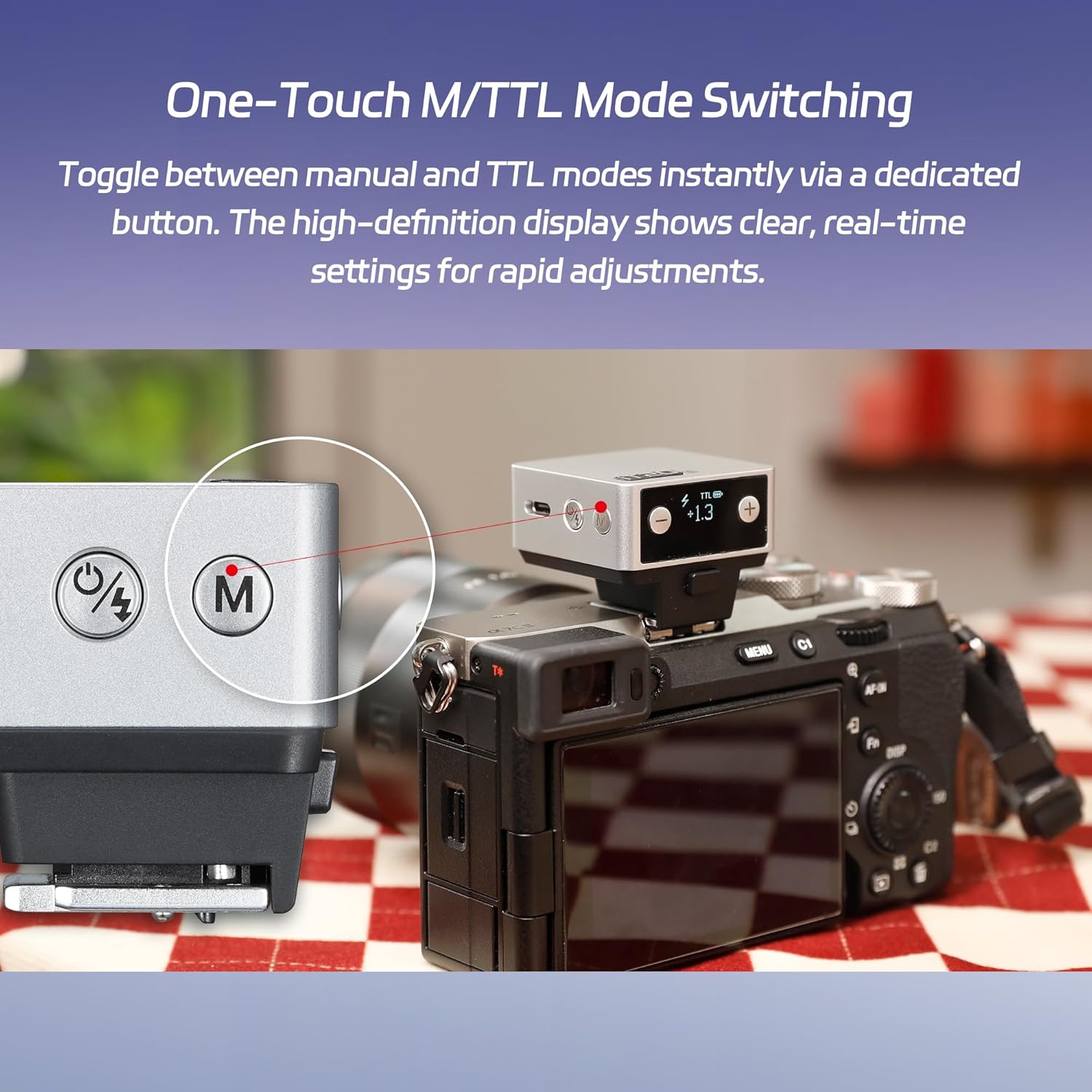
Image: A close-up of the GODOX IT20 flash unit, highlighting the dedicated button for switching between Manual (M) and TTL modes, and the display showing the current mode and power settings.
5.3 Flash Power Control
In Manual mode, you can precisely adjust the flash output.
- Use the '+' and '-' buttons to adjust the flash intensity.
- The power can be set from 1/32 to 1/1 (full power) in precise ±1/3-step increments.

Image: Three photographs demonstrating the effect of different flash power settings (1/4, 1/2, 1/1) on a subject, illustrating the precise control over lighting.
5.4 Recycling Time and Flash Endurance
The IT20 is designed for efficient and continuous shooting.
- At full power, the flash has a recycling time of approximately 1.5 seconds.
- A fully charged battery provides approximately 700 flashes at full power.

Image: A GODOX IT20 flash mounted on an Olympus PEN camera, with graphical indicators highlighting its capacity for over 700 full power flashes and a rapid 1.5-second recycling time.
6. Maintenance
- Cleaning: Use a soft, dry cloth to clean the flash unit. Do not use solvents or abrasive cleaners.
- Battery Care: For long-term storage, charge the battery to approximately 50% every three months to maintain battery health.
- Storage: Store the flash in its provided storage bag in a cool, dry, and dust-free environment.
7. Troubleshooting
| Problem | Possible Cause | Solution |
|---|---|---|
| Flash does not fire. | Low battery; incorrect camera settings; flash not securely mounted. | Charge the battery; check camera flash settings; ensure flash is properly seated on the hot shoe. |
| Flash output is too weak/strong. | Incorrect power setting in Manual mode; exposure compensation in TTL mode. | Adjust flash power using '+' and '-' buttons; check camera's flash exposure compensation settings. |
| Long recycling time. | Low battery; high power setting. | Recharge the battery; use a lower power setting if possible. |
| Shadows appear in images. | Flash head position; large lens obstructing flash path. | Ensure no part of the lens or camera body is blocking the flash output. Consider using a hot shoe riser if available for larger lenses. |
8. Specifications
| Model | IT20 (Fuji version) |
| Built-in Lithium Battery | 7.4V, 300mAh |
| Input | 5V=0.6A |
| Charging Time | Approx. 1h10min |
| Flash Times (1/1 Power) | Approx. 700 |
| Recycling Time (1/1 Power) | ≈1.5s |
| Flash Power Levels | 1/32 - 1/1, adjustable in 1/3 increments |
| Operating Environment Temperature | -10℃ to +50℃ |
| Synchronization Trigger | Hot Shoe |
| Dimensions | 41.5mm x 41mm x 32mm |
| Net Weight | ≈45g |

Image: A table detailing the technical specifications of the GODOX IT20 flash, including battery, charging, flash performance, and physical dimensions.
9. Warranty and Support
GODOX products are covered by a limited warranty. For specific warranty terms and conditions, please refer to the warranty card included with your product or visit the official GODOX website.
For technical support, troubleshooting assistance, or service inquiries, please contact GODOX customer service through their official channels. Contact information can typically be found on the GODOX website or on the product packaging.
Ask a question about this manual
Ask about setup, troubleshooting, compatibility, parts, safety, or missing instructions. Manuals+ will review the question and use this page’s manual context to help answer it.